
تعارف
Thank you for choosing the Sinocare Smart Scale. This digital bathroom scale is designed to provide accurate weight measurements and comprehensive body composition analysis when paired with the SinoHealth smartphone application. This manual will guide you through the setup, operation, and maintenance of your new smart scale, ensuring you get the most out of its features.
حفاظت جي ڄاڻ
- جيڪڏهن توهان وٽ پيس ميڪر يا ٻيو اندروني طبي اوزار آهي ته هن ڊوائيس کي استعمال نه ڪريو.
- هي ڊوائيس استعمال نه ڪريو جيڪڏهن توهان حامل آهيو.
- Keep the scale dry. Do not immerse it in water or use it in extremely humid environments.
- جڏهن گلي هوندي ته پيمانو جي مٿاڇري تي لڙڪي سگهي ٿي. احتياط سان قدم رکو ۽ لاٿو.
- پيماني تي نه ٽپو.
- This scale is intended for household use only and should not be used for medical diagnosis or treatment.
- ٻارن جي پهچ کان پري رکو.
پيڪيج مواد
مھرباني ڪري پيڪيج جي مواد کي چيڪ ڪريو ته جيئن پڪ ڪري سگھجي ته سڀئي شيون موجود آھن:
- Sinocare Smart Scale
- 3 x AAA بيٽريون
- استعمال ڪندڙ جو دستياب (ھي دستاويز)
پيداوار ختمview

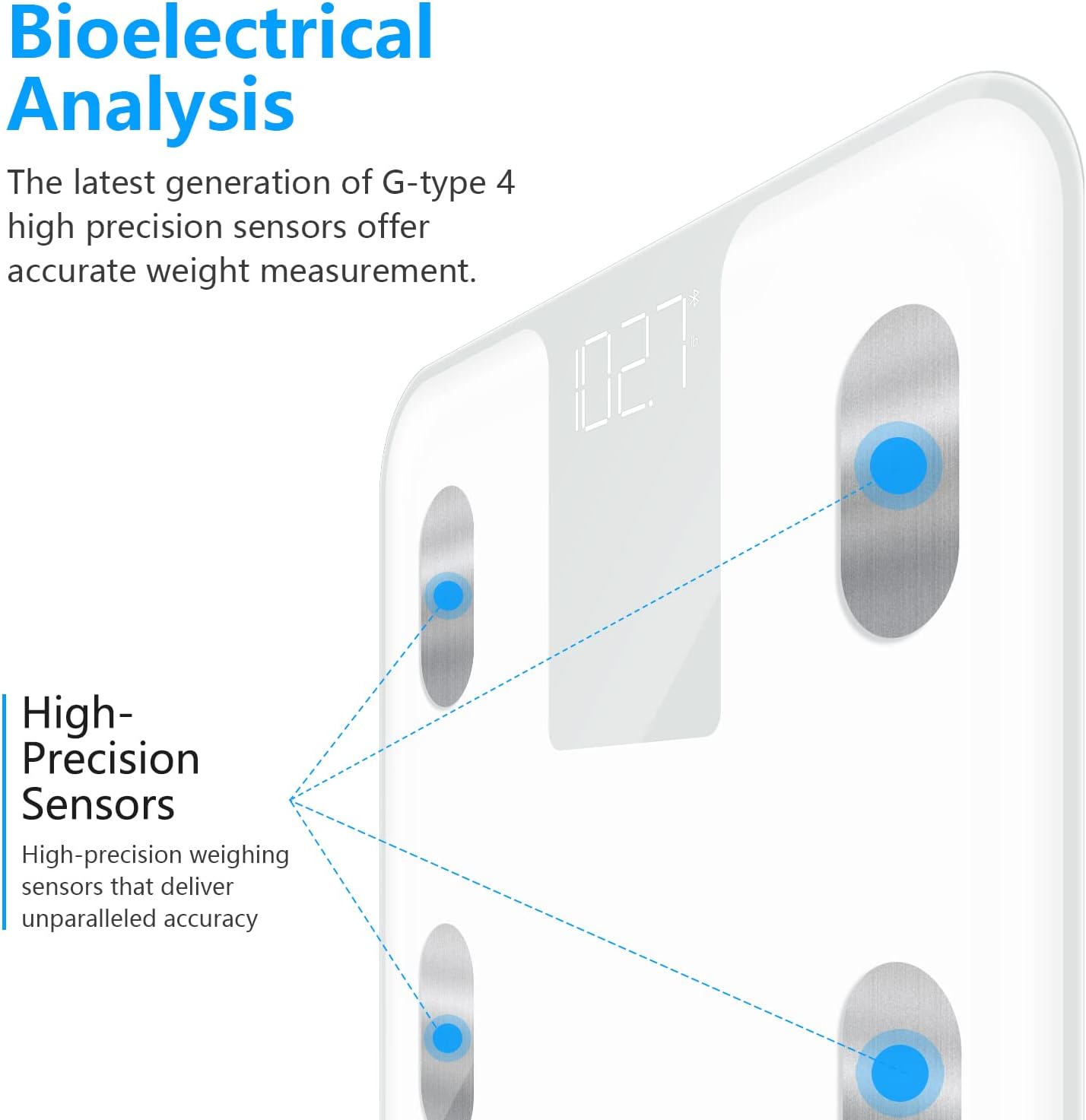

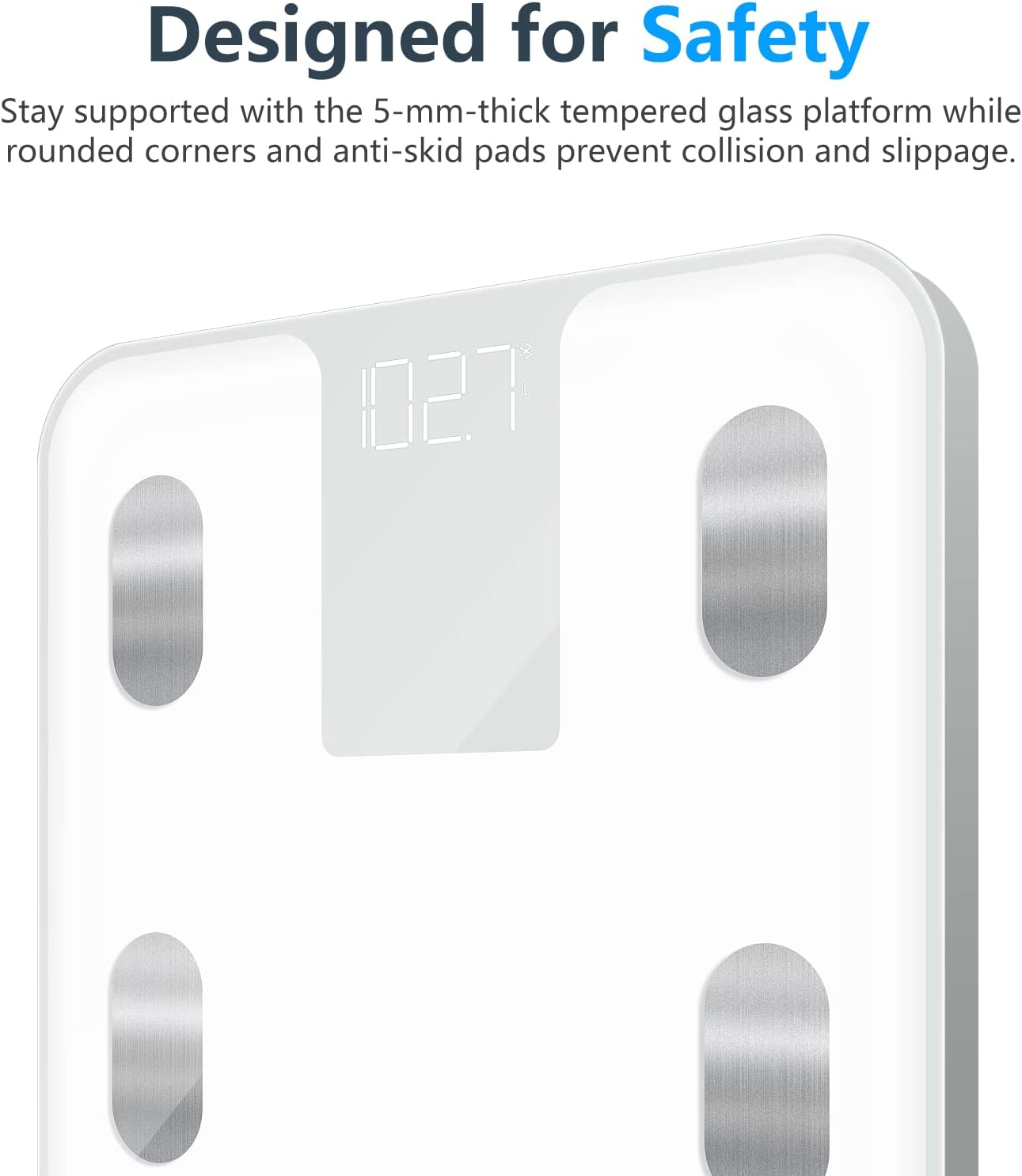

سيٽ اپ ڪريو
- بيٽرين کي انسٽال ڪريو. Open the battery compartment on the back of the scale. Insert the 3 AAA batteries, ensuring correct polarity (+/-). Close the compartment.
- لڳائڻ: اسڪيل کي سخت، هموار مٿاڇري تي رکو. قالين يا اڻ برابر فرش کان پاسو ڪريو، ڇاڪاڻ ته اهو درستگي کي متاثر ڪري سگهي ٿو.
- شروعاتي ڪيليبريشن: Gently tap the scale with your foot to turn it on. Wait for the display to show "0.0" or "CAL" before stepping on it. This calibrates the scale.
- يونٽ جي چونڊ: On the back of the scale, locate the "UNIT" button. Press it to cycle through the available units: pounds (lb), kilograms (kg), and stones (st). Select your preferred unit.
- Download SinoHealth App: For full body composition analysis, download the "SinoHealth" app from the Apple App Store or Google Play Store.


- ايپ سان جوڙيو:
- پنهنجي اسمارٽ فون تي بلوٽوت کي فعال ڪريو.
- Open the SinoHealth app and create your user profile (or log in).
- Step onto the scale barefoot. The scale will activate and attempt to connect to the app via Bluetooth.
- Follow the in-app instructions to complete the pairing process. Ensure your feet are in full contact with the electrode pads for accurate body composition readings.
آپريٽنگ هدايتون
Basic Weighing (Without App)
To measure only your weight:
- اسڪيل کي سخت، لوڻ واري مٿاڇري تي رکو.
- Gently tap the scale to turn it on. Wait for "0.0" to appear.
- Step onto the scale with both feet centered on the platform. Stand still until your weight is displayed and stabilizes.
- The scale will automatically turn off after approximately 10 seconds of inactivity to conserve battery.
Body Composition Analysis (With App)
For a full body composition analysis, ensure the scale is paired with the SinoHealth app and Bluetooth is enabled on your device.
- Open the SinoHealth app on your smartphone.
- Step onto the scale barefoot, ensuring your feet are in full contact with all four electrode pads.
- Stand still. The scale will display your weight, and then the app will begin to receive and process your body composition data.
- The app will display various metrics, including:
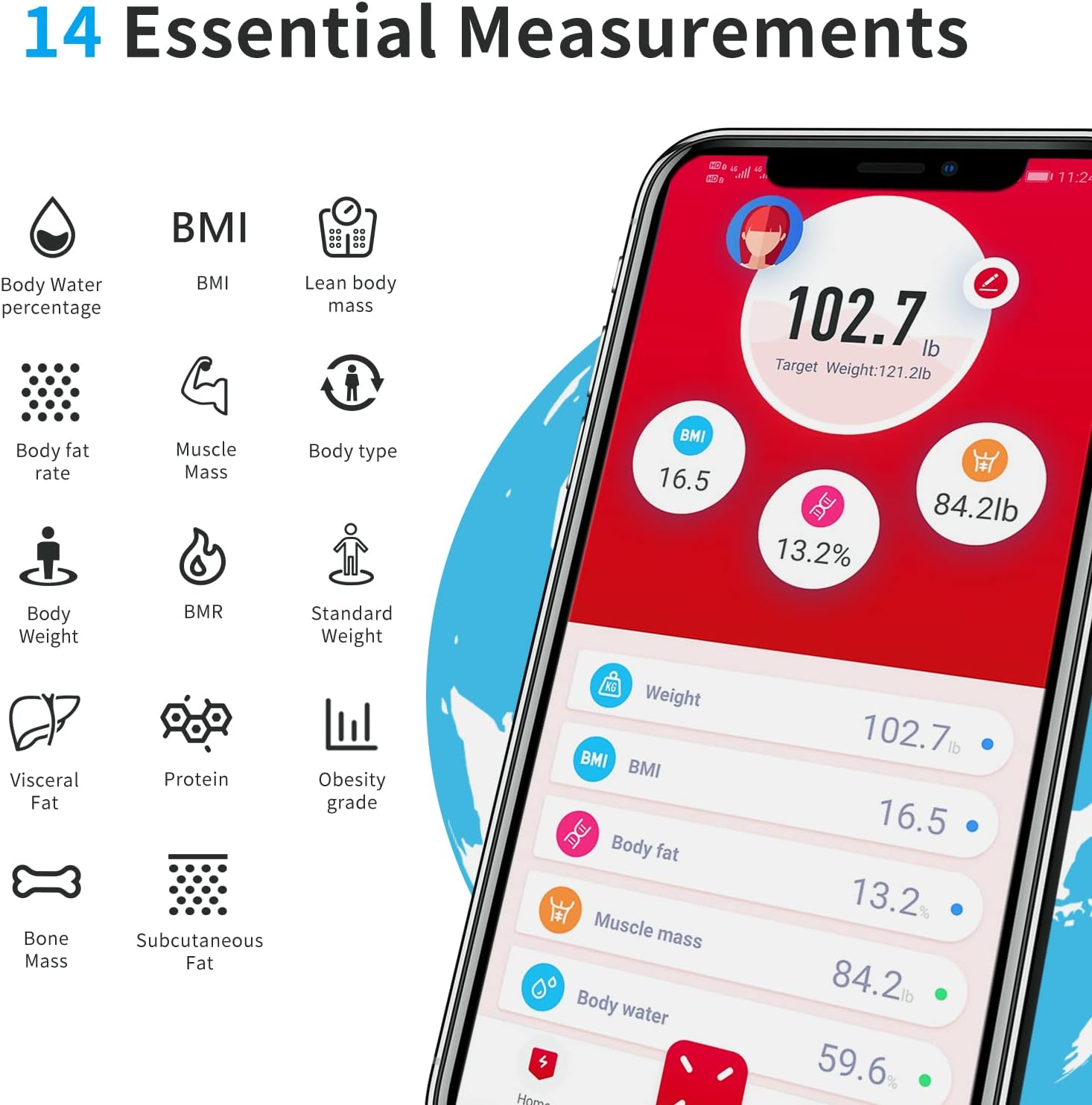
The SinoHealth app provides 14 essential body measurements, including Body Water percentage, BMI, Lean body mass, Body fat rate, Muscle Mass, Body type, Body Weight, BMR, Standard Weight, Visceral Fat, Protein, Obesity grade, Bone Mass, and Subcutaneous Fat. - جسماني وزن
- باڊي ماس انڊيڪس (BMI)
- جسم جي ٿلهي جي شرح
- عضلاتي ماس
- جسماني پاڻي جو سيڪڙوtage
- بون ماس
- Basal Metabolic Rate (BMR)
- ويسرل چربی
- پروٽين
- چمڙي هيٺان چربی
- ٿلهو جسماني ماس
- جسم جو قسم
- معياري وزن
- Obesity Grade
- The app will automatically sync and store your data, allowing you to track your progress over time.

SinoHealth App Usage
The SinoHealth app is your central hub for tracking and analyzing your body composition data. It is compatible with iOS and Android devices.
اهم خاصيتون:
- استعمال ڪندڙ پروfiles: گھڻن صارف پرو ٺاهيو ۽ منظم ڪريوfiles, making it ideal for families. The app can automatically recognize different users.
- Data Tracking: View historical data for all 14 body composition metrics in easy-to-read graphs and charts.
- گول سيٽنگ: Set personal health goals and track your progress towards them.
- انضمام: Syncs with popular fitness apps like Fitbit, Google Fit, and Apple Health for a holistic view of your health data.

The SinoHealth app allows easy sharing and synchronization of your body data with other popular fitness applications such as Fitbit, Google Fit, and Apple Health. - Health Reports: Generate detailed health reports based on your measurements.
For detailed instructions on specific app features, refer to the in-app help section or the SinoHealth webسائيٽ.
سار سنڀال ۽ سنڀال
- صفائي: اشتهار سان اسڪيل سطح کي صاف ڪريوamp ڪپڙو ۽ هلڪو صابڻ. گھڙڻ وارا صاف ڪندڙ استعمال نه ڪريو يا ترازو کي پاڻي ۾ نه ٻوڙيو.
- اسٽوريج: ترازو کي ٿڌي، سڪل جاءِ تي ذخيرو ڪريو. انتهائي گرمي پد کان پاسو ڪريو.
- بيٽري مٽائڻ: If the display shows "Lo" or becomes dim, it's time to replace the batteries. Use 3 new AAA batteries.
- اثر کان بچڻ: Protect the scale from strong impacts or dropping, as this can damage the sensors.
مشڪلاتون
| مسئلو | ممڪن سبب | حل |
|---|---|---|
| اسڪيل نه ٿو ڦري. | بيٽريون مئل يا غلط نصب ٿيل آهن. | بيٽري جي پولارٽي چيڪ ڪريو. نئين AAA بيٽرين سان تبديل ڪريو. |
| غلط پڙھڻ. | Scale is on an uneven surface; not calibrated; or moved. | Place scale on a hard, flat surface. Tap to turn on and wait for "0.0" before stepping on. Avoid moving the scale between uses. |
| "Lo" displayed. | گھٽ بيٽري. | بيٽرين کي تبديل ڪريو. |
| "Err" displayed. | اوورلوڊ يا ماپ جي غلطي. | Ensure weight is within the 396 lb (180 kg) limit. Step off and on again. |
| ايپ اسڪيل سان نه ڳنڍجي رهي آهي. | Bluetooth is off; app not open; scale not active; pairing issue. | Ensure Bluetooth is on. Open SinoHealth app. Step on scale to activate. Try re-pairing the device in the app settings. Ensure no other devices are connected to the scale. |
| Body composition data not showing. | Not stepping on barefoot; feet not fully on electrodes. | Step on the scale barefoot, ensuring both feet make full contact with all four metallic electrode pads. |
وضاحتون
- ماڊل: CS20B
- برانڊ: سينوڪيئر
- پيداوار جي ماپ: 4.34 x 4.34 x 0.39 inches (11 x 11 x 1 cm); 2.82 Pounds (1.28 kg)
- وزن جي حد: 396 پائونڊ (180 ڪلوگرام)
- ڊسپلي جو قسم: ڊجيٽل LED
- طاقت جو ذريعو: 3 x AAA بيٽريون (شامل)
- خاص خاصيتون: Body Fat, Body Mass Index, Smart Connectivity (Bluetooth)
- ماپ يونٽ: مڻ / ڪلوگرام / اسٽ
- سينسر: 4 اعليٰ صحت واري سينسر
وارنٽي ۽ سپورٽ
Sinocare provides a standard warranty for this product. For specific warranty terms, conditions, and support inquiries, please refer to the warranty card included in your package or visit the official Sinocare website. You may also contact Sinocare customer service through the contact information provided on their website or within the SinoHealth application.
For the latest information and updates, please visit the Sinocare Store on Amazon.