
تعارف
This manual provides instructions for the proper use and maintenance of your Bousnic Replacement USB Charging Cable. This cable is specifically designed to charge both the remote transmitter and the receiver collar simultaneously for Bousnic P-Collar 650 and P-Collar 680 dog training systems.
پيداوار ختمview
The Bousnic Replacement USB Charging Cable features a standard USB-A connector on one end and two Micro-USB connectors on the other. This dual-port design allows for convenient charging of two devices at once, such as your Bousnic training collar's remote and receiver.
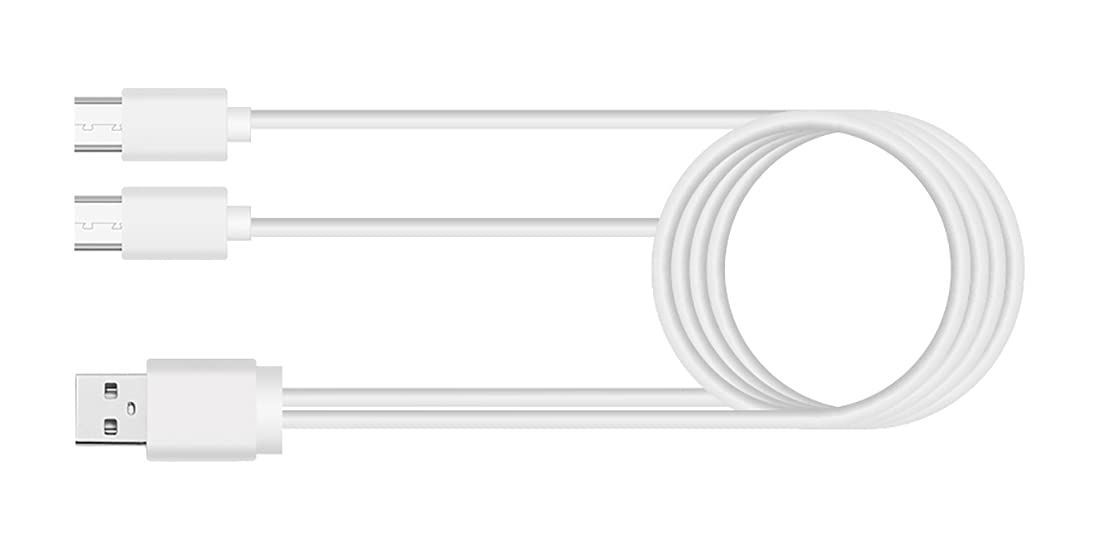
سيٽ اپ جون هدايتون
- پاور سورس سان ڳنيو: Insert the standard USB-A end of the charging cable into a compatible USB power adapter (not included) or a USB port on a computer. Ensure the power source provides 5V output.
- ڊوائيسز سان ڳنڍيو: Carefully insert each of the two Micro-USB ends into the charging ports of your Bousnic P-Collar 650 or P-Collar 680 remote transmitter and receiver collar.
- ڪنيڪشن جي تصديق ڪريو: Once connected, the charging indicator lights on your remote and receiver should illuminate, typically red or orange, to indicate that charging has begun. Refer to your specific P-Collar model's manual for exact indicator light behavior.
Operating Instructions (Charging)
The charging cable facilitates the power transfer from a USB source to your Bousnic P-Collar devices. No operational steps are required for the cable itself beyond proper connection.
- چارج ڪرڻ وقت: Charging times may vary depending on the battery level of your devices and the power output of your USB adapter. Typically, a full charge takes approximately 2-3 hours.
- مڪمل چارج اشارو: The charging indicator lights on your remote and receiver will usually change color (e.g., from red to green) or turn off when the devices are fully charged. Consult your P-Collar manual for specific details.
- حفاظت: Always ensure the charging cable is not bent sharply or placed under heavy objects during use. Disconnect the cable from the power source and devices once charging is complete.
سار سنڀال
- صفائي: Use a soft, dry cloth to wipe the cable clean. Avoid using liquid cleaners or abrasive materials.
- اسٽوريج: Store the cable in a cool, dry place away from direct sunlight and extreme temperatures. Avoid tightly coiling the cable to prevent internal wire damage.
- چڪاس: ڪنيڪٽرن جي خراب ٿيڻ، ٽٽڻ، يا نقصان جي ڪنهن به نشاني لاءِ وقتي طور تي ڪيبل جو معائنو ڪريو. جيڪڏهن ڪو نقصان نظر اچي ته استعمال بند ڪريو.
مشڪلاتون
- ڊوائيس چارج نه ٿيڻ:
- Ensure both the USB-A end and the Micro-USB ends are securely connected.
- Try a different USB power adapter or computer USB port to rule out a faulty power source.
- Verify that your Bousnic P-Collar remote and receiver are powered off or in a charging-compatible state (refer to their respective manuals).
- سست چارجنگ:
- Ensure your USB power adapter provides sufficient output (e.g., 5V/2A). Lower power output may result in slower charging.
- ڪيبل نقصان: If the cable shows any signs of physical damage, such as cuts, fraying, or bent connectors, discontinue use immediately to prevent potential hazards.
وضاحتون
| برانڊ | بوسنڪ |
| مطابقت رکندڙ ڊوائيسز | Bousnic P-Collar 650, Bousnic P-Collar 680 |
| ڪنيڪٽر جو قسم | USB-A to Dual Micro-USB |
| اوٽ وولٽtage | 5 وولٽ |
| آئوٽ پٽ ڪرنٽ | 2 Amps |
| واتtage | 10 واٽ |
| طاقت جو ذريعو | DC |
| رنگ | Black (Note: Product image may show white cable for illustration) |
| شيءِ جو وزن | 0.634 اونس (0.02 ڪلوگرام) |
| پيڪيج جي ماپ | 4.06 x 3.07 x 0.59 انچ |
وارنٽي ڄاڻ
Specific warranty details for this replacement charging cable may be included with your original product packaging or available on the official Bousnic website. Please retain your proof of purchase for any warranty claims. Generally, Bousnic products come with a limited warranty against manufacturing defects.
ڪسٽمر سپورٽ
For further assistance, technical support, or inquiries regarding your Bousnic Replacement USB Charging Cable, please contact Bousnic customer service. You can typically find contact information on the Bousnic official webسائيٽ يا پرچون ڪندڙ ذريعي جتي توهان پراڊڪٽ خريد ڪيو آهي.