
1. پراڊڪٽ ختمview
The Lexmark MX611DHE is a monochrome laser multifunction device designed for office environments, offering comprehensive capabilities including printing, copying, scanning, and faxing. This robust unit is engineered for high-volume output and efficient document handling.
- ملٽي فنڪشنلٽي: Integrates print, copy, fax, and scan functions into a single device.
- تيز رفتار ڪارڪردگي: Capable of printing and copying at speeds up to 50 pages per minute (ppm).
- Duplex ڇپائي: Supports automatic two-sided printing to conserve paper.
- ان پٽ گنجائش: Features a standard input capacity of 650 sheets, expandable for larger tasks.
- رابطي: Equipped with USB and Ethernet interfaces for versatile network integration.
- وجداني ڪنٽرول: Features a touchscreen display for easy navigation and operation.
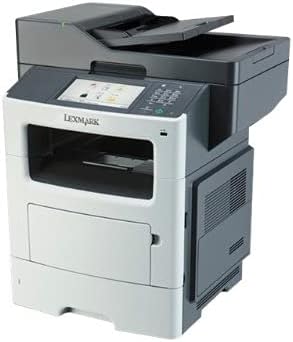
شڪل 1: سامهون view of the Lexmark MX611DHE multifunction printer, showcasing its compact design and front-facing paper tray.
2. سيٽ اپ گائيڊ
Follow these steps to set up your Lexmark MX611DHE printer for initial use.
- پيڪنگ کولڻ: پرنٽر کي احتياط سان ان جي پيڪنگ مان هٽايو. ڊوائيس جي ٻاهرين ۽ اندروني حصي مان سڀئي حفاظتي ٽيپ ۽ پيڪنگ مواد هٽايو.
- لڳائڻ: Place the printer on a stable, level surface with adequate ventilation. Ensure there is enough space around the printer for proper operation and maintenance.
- پاور ڪنيڪشن: Connect the power cord to the printer's power input and then to a grounded electrical outlet. Do not connect to a surge protector or extension cord initially.
- ڪاغذ جي لوڊشيڊنگ: Open the paper tray and load the appropriate paper size (up to 8.5 x 14 inches). Adjust the paper guides to fit the paper stack snugly.
- Network/USB Connection:
- For Network (Ethernet): پرنٽر جي ايٿرنيٽ پورٽ مان هڪ ايٿرنيٽ ڪيبل کي پنهنجي نيٽ ورڪ روٽر يا سوئچ سان ڳنڍيو.
- USB لاءِ: پرنٽر جي USB پورٽ مان هڪ USB ڪيبل پنهنجي ڪمپيوٽر سان ڳنڍيو.
- شروعاتي پاور آن: Press the power button to turn on the printer. Follow the on-screen prompts on the touchscreen display to select language, region, and perform initial setup configurations.
- ڊرائيور لڳائڻ: Install the necessary printer drivers on your computer. Drivers can typically be found on the Lexmark support website or on an included installation CD (if applicable).
3. آپريٽنگ هدايتون
This section provides basic instructions for using the Lexmark MX611DHE's primary functions.
3.1. ڇپائي
- پڪ ڪريو ته پرنٽر آن آهي ۽ توهان جي ڪمپيوٽر يا نيٽ ورڪ سان ڳنڍيل آهي.
- اهو دستاويز کوليو جيڪو توهان پنهنجي ڪمپيوٽر تي پرنٽ ڪرڻ چاهيو ٿا.
- چونڊيو File > ڇاپيو (يا توهان جي ايپليڪيشن ۾ برابر حڪم).
- Choose "Lexmark MX611DHE" from the list of available printers.
- Adjust print settings such as number of copies, paper size, and duplex options as needed.
- ڪلڪ ڪريو ڇپائي.
3.2. نقل ڪرڻ
- Place the document face-down on the scanner glass or face-up in the automatic document feeder (ADF).
- پرنٽر جي ٽچ اسڪرين تي، چونڊيو ڪاپي فنڪشن.
- Adjust settings such as number of copies, lightness/darkness, and paper size.
- کي دٻايو شروع ڪاپي ڪرڻ شروع ڪرڻ لاءِ بٽڻ.
3.3. اسڪيننگ

Figure 2: The Lexmark MX611DHE with its scanner lid open, revealing the flatbed scanner glass and the automatic document feeder mechanism.
- دستاويز کي اسڪينر شيشي تي يا ADF ۾ رکو.
- پرنٽر جي ٽچ اسڪرين تي، چونڊيو اسڪين فنڪشن.
- Choose your desired scan destination (e.g., Scan to Computer, Scan to Email, Scan to Network Folder).
- اسڪين سيٽنگون ترتيب ڏيو جهڙوڪ ريزوليوشن، رنگ موڊ، ۽ file فارميٽ.
- کي دٻايو شروع اسڪين شروع ڪرڻ لاءِ بٽڻ دٻايو.
3.4. فيڪسنگ
- Ensure the printer is connected to a telephone line.
- دستاويز کي اسڪينر شيشي تي يا ADF ۾ رکو.
- پرنٽر جي ٽچ اسڪرين تي، چونڊيو فيڪس فنڪشن.
- ڪنٽرول پينل تي ڪي پيڊ استعمال ڪندي وصول ڪندڙ جو فيڪس نمبر داخل ڪريو.
- ڪنهن به ضروري فيڪس سيٽنگون ترتيب ڏيو.
- کي دٻايو شروع فيڪس موڪلڻ لاءِ بٽڻ.
4. سار سنڀال
Regular maintenance ensures optimal performance and extends the lifespan of your Lexmark MX611DHE.
- ٻاهرين صفائي: نرم استعمال ڪريو، ڊيamp, lint-free cloth to wipe the exterior surfaces of the printer. Avoid abrasive cleaners.
- اسڪينر شيشي جي صفائي: For clear scans, regularly clean the scanner glass with a soft, lint-free cloth and a mild glass cleaner.
- ٽونر ڪارٽريج جي متبادل: When the toner low message appears, order a new Lexmark toner cartridge. Follow the instructions provided with the new cartridge for proper installation.
- ڪاغذ جي رستي جي صفائي: If paper jams become frequent, consult the printer's internal guides or the Lexmark support website for instructions on cleaning the paper path rollers.
5. مسئلا حل ڪرڻ
This section addresses common issues you might encounter with your Lexmark MX611DHE.
| مسئلو | ممڪن سبب | حل |
|---|---|---|
| پرنٽر جواب نه ڏئي رهيو آهي | بجلي ڪيبل ڪٽيل آهي، نيٽ ورڪ جو مسئلو، ڊرائيور جو مسئلو. | Check power connections. Verify network cable or USB connection. Reinstall printer drivers. |
| ڪاغذ جو جام | Incorrectly loaded paper, foreign object in paper path. | Open access covers and carefully remove jammed paper. Ensure paper is loaded correctly. |
| خراب پرنٽ معيار | Low toner, dirty print head/rollers, incorrect print settings. | Replace toner cartridge. Clean internal components as per maintenance guide. Adjust print quality settings in driver. |
| اسڪينر ڪم نه ڪري رهيو آهي | Scanner glass dirty, software issue, connectivity problem. | Clean scanner glass. Restart computer and printer. Check USB/network connection. |
6. وضاحتون
Detailed technical specifications for the Lexmark MX611DHE.
| خاصيت | تفصيل |
|---|---|
| برانڊ | ليڪس مارڪ |
| ماڊل نالو | MX611DHE |
| ڊسپلي جو قسم | LCD (Touchscreen) |
| ڇپائي ٽيڪنالاجي | ليزر (مونوڪروم) |
| وڌ ۾ وڌ پرنٽ اسپيڊ (مونوڪروم) | 50 پي پي ايم |
| وڌ ۾ وڌ ڪاپي اسپيڊ (ڪارو ۽ اڇو) | 50 پي پي ايم |
| قرارداد | 1200 x 1200 dpi |
| ميموري رکڻ جي صلاحيت | 1024 ايم بي |
| شيٽ سائيز سپورٽ | Up to 8.5 x 14 Inches |
| ھارڊويئر انٽرفيس | USB، Ethernet |
| پيداوار جي ماپ | 22.6 x 23.5 x 26.5 انچ |
| رنگ | ڳاڙهو / اڇو |
| يو پي سي | 656942073611 |
7. وارنٽي ۽ سپورٽ
Your Lexmark MX611DHE (Renewed) product is covered by a limited warranty and support resources.
- وارنٽي: هي پراڊڪٽ هڪ سان گڏ اچي ٿو 90 ڏينهن جي محدود وارنٽي. Please refer to your purchase documentation for specific terms and conditions of the Amazon Renewed Guarantee.
- ٽيڪنيڪل سپورٽ: For technical assistance, driver downloads, or further troubleshooting, please visit the official Lexmark support webسائيٽ يا انهن جي ڪسٽمر سروس سان رابطو ڪريو.
- آن لائين وسيلا: Additional user guides, FAQs, and firmware updates may be available on the Lexmark support portal.