
1. تعارف
خريد ڪرڻ لاءِ مهربانيasing the Rapoo N300 Optical Wired Gaming Mouse. This manual provides detailed instructions for setting up, operating, and maintaining your new mouse. Please read this manual thoroughly before use to ensure optimal performance and longevity of the product.
2. پراڊڪٽ ختمview
2.1 اهم خاصيتون
- High-Precision Optical Tracking: Equipped with a 2000 DPI tracking engine for accurate and responsive cursor control.
- 6 بٽڻ: Includes left, right, scroll wheel, DPI switch, and two side buttons for enhanced functionality.
- 2D Anti-Slip Scroll Wheel: Provides precise scrolling and tactile feedback.
- وسيع ڊيزائن: Ergonomically designed for comfortable use by both left and right-handed users.
- وائرڊ USB ڪنيڪشن: Ensures a stable and lag-free connection.
2.2 پيڪيج مواد
- Rapoo N300 Optical Wired Gaming Mouse
- استعمال ڪندڙ جو دستياب (ھي دستاويز)
2.3 پراڊڪٽ ڊاگرام

شڪل 1: مٿو view of the Rapoo N300 mouse, showing the left and right click buttons, scroll wheel, and DPI switch button. The Rapoo logo is visible at the base.

شڪل 2: پاسي view of the Rapoo N300 mouse, highlighting the two side buttons and the textured grip area for improved handling.
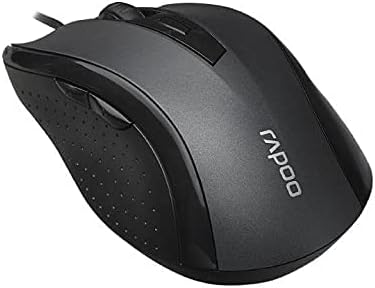
شڪل 3: زاويه view of the Rapoo N300 mouse, showcasing its ergonomic contour and the placement of the scroll wheel and side buttons.

شڪل 4: هيٺيون view of the Rapoo N300 mouse, displaying the optical sensor, product model number (N300), interface type (USB), and regulatory compliance markings.
3. سيٽ اپ جون هدايتون
- ماؤس کي ڳنڍيو: Locate an available USB port on your computer (desktop or laptop). Insert the USB connector of the Rapoo N300 mouse firmly into the USB port.
- ڊرائيور لڳائڻ: The Rapoo N300 mouse is a plug-and-play device. Your operating system (Windows XP, Windows 7, Linux, or newer versions) will automatically detect and install the necessary drivers. This process may take a few moments.
- تصديق: Once the drivers are installed, the mouse cursor should become responsive. Move the mouse to confirm functionality.
No additional software installation is typically required for basic functionality.
4. آپريٽنگ هدايتون
4.1 بنيادي ڪم
- کاٻي ڪلڪ ڪريو: Primary action, selection, opening items.
- ساڄي ڪلڪ ڪريو: Opens contextual menus.
- اسڪرول ويل: دستاويزن کي اسڪرول ڪري ٿو ۽ web pages vertically. Can also be pressed for middle-click functionality (application-dependent).
4.2 ڊي پي آئي ايڊجسٽمينٽ
The Rapoo N300 features a dedicated DPI switch button, usually located behind the scroll wheel. Press this button to cycle through different DPI (Dots Per Inch) sensitivity settings. Each press will change the cursor speed, allowing you to adjust it to your preference for various tasks, from precise editing to fast-paced gaming.
4.3 طرف وارا بٽڻ
The two side buttons typically function as "Forward" and "Backward" in web برائوزر ۽ file explorers. Their functionality may be customizable through operating system settings or third-party software, if available.
5. سار سنڀال
- صفائي: مائوس جي مٿاڇري کي صاف ڪرڻ لاءِ نرم، سڪل ڪپڙو استعمال ڪريو. ضدي مٽيءَ لاءِ، ٿورو ڊيampڪپڙي کي پاڻي يا نرم صفائي واري محلول سان ڌوئڻ ڏيو. سخت ڪيميڪلز يا رگڙيندڙ مواد استعمال ڪرڻ کان پاسو ڪريو.
- آپٽيڪل سينسر: Ensure the optical sensor on the bottom of the mouse remains clean and free of dust or debris for optimal tracking performance. Do not attempt to disassemble the mouse.
- ڪيبل جي سنڀال: نقصان کان بچڻ لاءِ USB ڪيبل تي تيز موڙ يا گهڻي ڇڪڻ کان پاسو ڪريو.
6. مسئلا حل ڪرڻ
| مسئلو | ممڪن حل |
|---|---|
| مائوس جواب نه ڏئي رهيو آهي |
|
| ڪرسر جي حرڪت بي ترتيب يا ٽپڪي آهي |
|
| ڊي پي آءِ بٽڻ حساسيت کي تبديل نه ڪري رهيو آهي |
|
7. وضاحتون
| خاصيت | تفصيل |
|---|---|
| ماڊل | N300 |
| Tracking Engine | بصري |
| ڊي پي آئي | 2000 DPI تائين |
| بٽڻ جو تعداد | 6 (Left, Right, Scroll Wheel, DPI, Side Button 1, Side Button 2) |
| اسڪرول ويل | 2D Anti-Slip |
| هٿ جو رخ | وچڙندڙ |
| انٽرفيس جو قسم | وائرڊ USB |
| آپريٽنگ سسٽم مطابقت | Windows XP, Windows 7, Linux, and newer versions |
| رنگ | ڪارو |
| شيءِ جو وزن | تقريبن 100 گرام |
| طول و عرض (پيڪيج) | 15.4 x 8.4 x 4.2 سينٽي |
8. وارنٽي ۽ سپورٽ
Rapoo products are designed for reliability and performance. For specific warranty information and support details, please refer to the warranty card included with your product or visit the official Rapoo webسائيٽ. وارنٽي دعوائن لاءِ خريداري جي ثبوت طور پنهنجي خريداري جي رسيد رکو.
For technical assistance or further inquiries, please contact Rapoo customer support through their official channels.