
تعارف
This manual provides detailed instructions for the operation and maintenance of your CHENFEC C50 16GB MP3 Player. Please read this guide thoroughly to ensure proper use and to maximize your device's functionality.
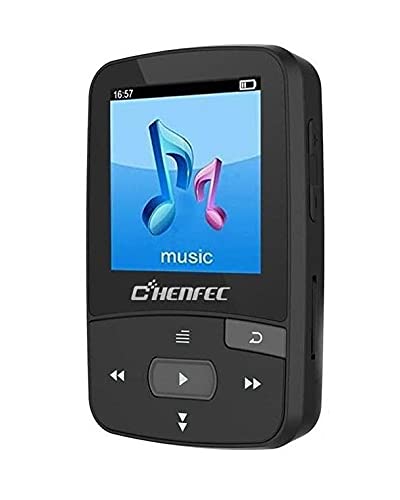
Image: The CHENFEC C50 MP3 Player, showcasing its compact design and rear clip.
پيداوار ختمview
Familiarize yourself with the various components and controls of your CHENFEC C50 MP3 Player.

Image: A detailed diagram of the CHENFEC C50 MP3 Player, indicating the display, volume controls, Micro SD card slot, return button, navigation buttons (last, play/pause, next, next song, last song).
- ڏيکاريو: Shows menus, track information, images, and e-book content.
- حجم مٿي / ھيٺ: آڊيو آئوٽ جي سطح کي ترتيب ڏئي ٿو.
- مائڪرو ايس ڊي ڪارڊ سلاٽ: 64GB تائين اسٽوريج وڌائڻ لاءِ.
- واپسي بٽڻ: Navigates back to the previous menu or screen.
- Navigation Buttons (Last Song, Next Song, Play/Pause): Controls media playback and menu navigation.
سيٽ اپ ڪريو
پيڪيج مواد
شروع ڪرڻ کان اڳ، پڪ ڪريو ته سڀئي شيون پيڪيج ۾ موجود آهن:

Image: The CHENFEC C50 MP3 Player and its accessories, including wired earphones, a USB charging/data cable, and a user manual.
- CHENFEC C50 MP3 Player
- USB چارجنگ / ڊيٽا ڪيبل
- وائرڊ ائڊفونز
- استعمال ڪندڙ جو دستياب (ھي دستاويز)
ڊوائيس چارج ڪرڻ
Connect the MP3 player to a computer's USB port or a compatible USB wall adapter using the provided USB cable. The battery indicator on the screen will show charging status. A full charge typically takes 2-3 hours.
پاور آن / آف
- To power on, press and hold the Power button (usually located on the side or top) until the screen illuminates.
- To power off, press and hold the Power button until the "Power Off" option appears, then select it.
Loading Music and Files
- اندروني اسٽوريج: Connect the MP3 player to your computer using the USB cable. The device will appear as a removable disk. Drag and drop your music (MP3, WAV) and other supported files (TXT for e-books, images) into the appropriate folders on the device.
- خارجي ذخيرو: Insert a Micro SD card (up to 64GB, not included) into the Micro SD card slot. You can then transfer files directly to the card via the player or by inserting the card into a computer's card reader.
آپريٽنگ هدايتون
بنيادي نيويگيشن
- استعمال ڪريو مٿي / هيٺ navigation buttons to scroll through menu options.
- کي دٻايو راند/روڪ button to select an option or confirm an action.
- کي دٻايو واپسي پوئين مينيو ڏانهن واپس وڃڻ لاءِ بٽڻ دٻايو.
موسيقي پلے بیک
- From the main menu, select "Music".
- فنڪار، البم، يا سڀني گيتن جي لحاظ کان پنهنجي ميوزڪ لائبريري کي براؤز ڪريو.
- Select a song and press راند/روڪ پلے بیک شروع ڪرڻ لاءِ.
- استعمال ڪريو آخري گانو ۽ ايندڙ گيت ٽريڪ ڇڏڻ لاءِ بٽڻ.
- حجم کي استعمال ڪندي ترتيب ڏيو حجم مٿي / ھيٺ بٽڻ
بلوٽوت ڪنيڪشن
The CHENFEC C50 supports Bluetooth for wireless audio output to compatible headphones or speakers.
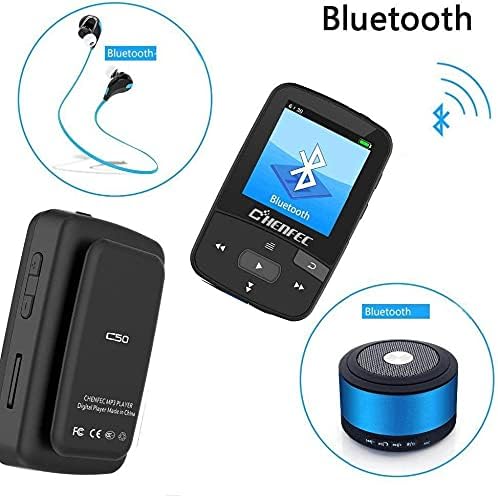
Image: The CHENFEC C50 MP3 Player demonstrating its Bluetooth connectivity with wireless headphones and a portable Bluetooth speaker.
- مين مينيو مان، "بلوٽوٿ" چونڊيو.
- پڪ ڪريو ته توهان جا بلوٽوٿ هيڊفون يا اسپيڪر پيئرنگ موڊ ۾ آهن.
- The player will scan for available devices. Select your device from the list.
- Once paired, audio will be routed wirelessly.
ايف ايم ريڊيو
- Plug in wired earphones (they act as the antenna).
- مين مينيو مان، "ايف ايم ريڊيو" چونڊيو.
- Use the navigation buttons to scan for stations or manually tune to a frequency (87.5MHz - 108MHz).
وائس رڪارڊر
- From the main menu, select "Voice Recorder".
- Choose "Start Recording" to begin.
- دٻايو راند/روڪ رڪارڊنگ کي روڪڻ ۽ محفوظ ڪرڻ لاءِ.
- Recordings are saved in WAV or MP3 format.
اي بک ريڊر
- Transfer TXT format e-books to the device's storage.
- From the main menu, select "E-book".
- Select the desired book to open and read.
تصوير Viewer
- تصوير منتقل ڪريو files to the device's storage.
- From the main menu, select "Image Viewer".
- Browse and select images to view them on the display.
سيٽنگون
Access the "Settings" menu to customize various options:
- ٻولي: Select from 24 supported languages, including English, German, French, Italian, Dutch, Portuguese, Spanish, and Russian.
- صوتي اثرات: Choose from 7 different equalizer presets.
- ڊسپلي سيٽنگون: Adjust brightness and backlight timeout.
- تاريخ ۽ وقت: موجوده تاريخ ۽ وقت مقرر ڪريو.
سار سنڀال
- ڊوائيس کي سڪل رکو. نمي يا مائع جي سامهون اچڻ کان پاسو ڪريو.
- ڊوائيس کي نرم، سڪل ڪپڙي سان صاف ڪريو. رگڙيندڙ صاف ڪندڙ يا محلول استعمال نه ڪريو.
- ڊوائيس کي ڇڏڻ يا ان کي مضبوط اثرن جي تابع ڪرڻ کان پاسو ڪريو.
- جڏهن استعمال ۾ نه هجي ته ڊوائيس کي ٿڌي، سڪل جڳهه ۾ ذخيرو ڪريو.
- پاڻ ڊوائيس کي ڌار ڪرڻ يا مرمت ڪرڻ جي ڪوشش نه ڪريو. اهو وارنٽي کي رد ڪري ڇڏيندو.
مشڪلاتون
| مسئلو | ممڪن حل |
|---|---|
| ڊوائيس تي طاقت نه آهي. | پڪ ڪريو ته ڊوائيس مڪمل طور تي چارج ٿيل آهي. ان کي پاور سورس سان ڳنڍيو ۽ ٻيهر ڪوشش ڪريو. |
| ائرفون مان ڪو به آواز نه ٿو اچي. | Check if earphones are properly plugged in. Verify volume level. Test with different earphones. |
| بلوٽوٿ ذريعي ڳنڍي نه ٿو سگهجي. | Ensure Bluetooth is enabled on both the player and the receiving device. Make sure the receiving device is in pairing mode and within range. |
| Files not appearing on the device. | يقين ڏياريو files are in supported formats (MP3, WAV for audio; TXT for e-books). Verify files were transferred to the correct folder. Check if the Micro SD card is properly inserted and recognized. |
| ڊوائيس منجمد ٿي وڃي ٿي يا غير جوابده ٿي وڃي ٿي. | Press and hold the Power button for 10-15 seconds to force a restart. If the issue persists, try resetting the device (refer to the settings menu for a reset option, if available). |
وضاحتون
| خاصيت | تفصيل |
|---|---|
| برانڊ جو نالو | CHENFEC |
| ماڊل نالو | سي50 |
| ميموري رکڻ جي صلاحيت | 16 جي بي (اندروني) |
| خارجي اسٽوريج سپورٽ | 64 GB تائين مائڪرو ايس ڊي ڪارڊ |
| جسماني مواد | پلاسٽڪ |
| خاص خاصيتون | FM Radio, Voice Recorder, Image Viewer, E-book Reader, Pedometer, Bluetooth |
| رابطي ٽيڪنالاجي | بلوٽوٿ |
| رنگ | ڪارو |
| اسڪرين جي ماپ | 2 انچ |
| مطابقت رکندڙ ڊوائيسز | ليپ ٽاپ، پرسنل ڪمپيوٽر |
| سپورٽ ٿيل آڊيو معيار | MP3, WAV (for recording) |
| سپورٽ ٿيل اي-بڪ فارميٽ | TXT |
| ايف ايم ريڊيو فريڪوئنسي | 87.5MHz ~ 108MHz |
| صوتي اثرات | 7 قسم |
| سپورٽ ٿيل ٻوليون | 24 languages (e.g., English, German, French, Italian, Dutch, Portuguese, Spanish, Russian) |
وارنٽي ۽ سپورٽ
For warranty information and technical support, please refer to the documentation provided with your purchase or contact CHENFEC customer service. Keep your proof of purchase for warranty claims.
اهم: Any unauthorized attempts to repair or modify the device will void the product warranty.