
1. تعارف
The BAOFENG UV-5R Pro is a high-performance, multi-functional two-way radio designed for reliable communication. It features long battery life, strong communication capabilities, flexible programming options, and multiple power adjustments, making it suitable for both professional and amateur radio enthusiasts. This manual provides essential information for the proper setup, operation, and maintenance of your device.
2. پيڪيج مواد
Please check the package carefully to ensure all items are present and in good condition. If any items are missing or damaged, contact your retailer.
- 1 × BAOFENG UV-5R Pro 8W Radio
- 1 × 3800mAh Li-ion Battery (Model: BL-5L)
- 1 × Support CHIRP Programming Cable
- 1 × Radio Case
- 1 × Handheld Microphone (MIC-01)
- 1 × پاور اڊاپٽر
- 1 × بيلٽ ڪلپ
- 1 × هٿ پٽي
- 1 × User's Manual (this document)
3. پراڊڪٽ ختمview
Familiarize yourself with the main components of your BAOFENG UV-5R Pro radio and its accessories.

شڪل 3.1: BAOFENG UV-5R Pro Radio. This image displays the front of the UV-5R Pro radio, showing the display screen, keypad, and various function buttons. The antenna is attached at the top.
3.1. Handheld مائڪروفون

شڪل 3.2: Handheld Microphone (Model: MIC-01). This image shows the handheld microphone accessory, which connects to the radio for external audio input and output. It features a speaker, microphone, and a coiled cable that can stretch up to 60 inches.
The included handheld microphone (MIC-01) provides convenient external control for transmitting and receiving audio. It features a speaker, microphone, and a push-to-talk (PTT) button. The coiled cable allows for flexible use.
3.2. Programming Cable

شڪل 3.3: Programming Cable. This image illustrates the USB programming cable used to connect the radio to a computer for channel and setting configuration via software like CHIRP.
The programming cable allows you to connect your UV-5R Pro radio to a computer for advanced configuration using compatible software, such as CHIRP. This enables customization of channels, frequencies, and other operational parameters.
3.3. 3800mAh Li-ion Battery

شڪل 3.4: 3800mAh Li-ion Battery (Model: BL-5L). This image shows the high-capacity Li-ion battery pack designed for the UV-5R Pro, providing extended operational time.
The radio is powered by a high-capacity 3800mAh Li-ion battery (Model: BL-5L), offering extended usage time. Proper battery installation and charging are crucial for optimal performance.
3.4. Radio Case
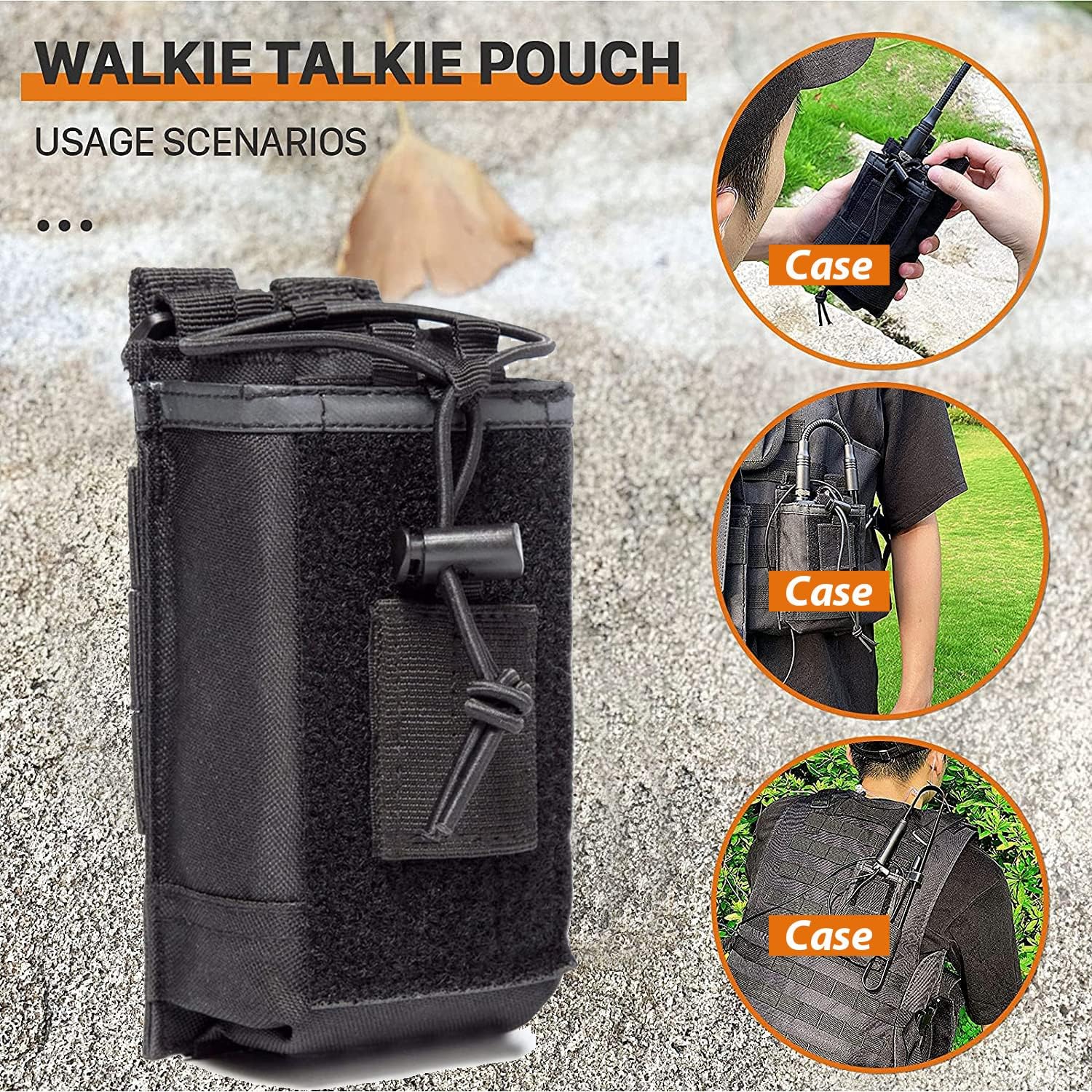
شڪل 3.5: Radio Case/Pouch. This image displays the included radio case, designed for secure and convenient carrying of the UV-5R Pro radio, suitable for various usage scenarios.
A durable radio case is included to protect your device during transport and use. It can be attached to belts or tactical gear for easy access.
4. سيٽ اپ
4.1. بيٽري لڳائڻ
- بيٽري پيڪ کي ريڊيو جي پوئين پاسي واري نالن سان ترتيب ڏيو.
- بيٽري پيڪ کي مٿي سلائڊ ڪريو جيستائين اهو جاءِ تي ڪلڪ نه ڪري.
- ڪڍڻ لاءِ، بيٽري رليز ليچ کي دٻايو (عام طور تي بيٽري جي تري ۾) ۽ بيٽري کي هيٺئين طرف سلائڊ ڪريو.
4.2. اينٽينا اٽيچمينٽ
- اينٽينا کي ريڊيو جي مٿي تي ڪنيڪٽر ۾ گھڙيال جي طرف اسڪرو ڪريو جيستائين اهو آڱر سان تنگ نه ٿئي. وڌيڪ تنگ نه ڪريو.
- Ensure the antenna is securely attached before operation to prevent damage and ensure optimal signal.
4.3. بيٽري کي چارج ڪرڻ
- پاور اڊاپٽر کي چارجنگ بيس سان ڳنڍيو.
- پاور اڊاپٽر کي AC آئوٽليٽ ۾ لڳايو.
- Place the radio with the battery installed into the charging base. The charging indicator light will typically turn red while charging and green when fully charged.
- A full charge typically takes 4-5 hours. Do not overcharge the battery for extended periods.
5. آپريٽنگ هدايتون
5.1. پاور آن/آف ۽ واليوم ڪنٽرول
- پاور آن: Rotate the volume knob (located on top of the radio) clockwise until you hear a click.
- بجلي بند: Rotate the volume knob counter-clockwise until you hear a click.
- حجم جي ترتيب: حجم وڌائڻ لاءِ حجم نوب کي گھڙيال جي طرف گھمايو ۽ گھٽائڻ لاءِ گھڙيال جي مخالف طرف گھمايو.
5.2. چينل جي چونڊ
- The UV-5R Pro supports both Frequency Mode (VFO) and Channel Mode (MR).
- کي دٻايو VFO/MR موڊ جي وچ ۾ سوئچ ڪرڻ لاءِ بٽڻ.
- چينل موڊ ۾، استعمال ڪريو مٿي / هيٺ arrow keys or the keypad to select a stored channel.
- In Frequency Mode, enter the desired frequency directly using the keypad.
5.3. منتقل ڪرڻ ۽ وصول ڪرڻ
- منتقل ڪرڻ لاءِ، دٻايو ۽ رکو PTT (Push-to-Talk) button on the side of the radio or the handheld microphone. Speak clearly into the microphone.
- جاري ڪريو پي ٽي ٽي ٽرانسميشن کي روڪڻ ۽ وصول ڪرڻ واري موڊ ڏانهن واپس وڃڻ لاءِ بٽڻ دٻايو.
- Ensure you are on an appropriate frequency or channel before transmitting.
5.4. Power Output Adjustment
The UV-5R Pro offers multiple power output options (High, Medium, Low) up to 8W. This allows you to adapt to communication needs at different distances and environments, conserving battery life when high power is not required.
- Access the power setting through the radio's menu. Consult the on-screen menu for specific navigation steps.
- Select the desired power level (High, Medium, or Low).
5.5. Programming with CHIRP Software
For advanced channel management and customization, use the included programming cable and CHIRP software. CHIRP is a free, open-source program that allows you to manage your radio's memory channels, frequencies, and other settings from your computer.
- Install the necessary drivers for the programming cable on your computer.
- CHIRP سافٽ ويئر جو جديد نسخو ڊائون لوڊ ۽ انسٽال ڪريو.
- Connect the programming cable to your computer's USB port and to the radio's accessory port.
- ريڊيو آن ڪريو.
- Launch CHIRP and follow the software's instructions to read data from the radio, make changes, and write data back to the radio.
Note: Detailed instructions for CHIRP software can be found on the official CHIRP webسائيٽ يا آن لائن وسيلن جي ذريعي.
6. سار سنڀال
- صفائي: نرم استعمال ڪريو، ڊيamp ريڊيو جي ٻاهرين حصي کي صاف ڪرڻ لاءِ ڪپڙو. سخت ڪيميڪل يا رگڙيندڙ ڪلينر استعمال نه ڪريو.
- بيٽري جي سنڀال: جڏهن استعمال ۾ نه هجي ته بيٽري کي ٿڌي ۽ سڪل جاءِ تي رکو. بيٽري جي عمر وڌائڻ لاءِ ان کي بار بار مڪمل طور تي چارج ڪرڻ کان پاسو ڪريو.
- اينٽينا: Ensure the antenna connection is clean and free of debris. Avoid bending or stressing the antenna.
- اسٽوريج: When storing the radio for extended periods, remove the battery and store it separately.
7. مسئلا حل ڪرڻ
| مسئلو | ممڪن سبب | حل |
|---|---|---|
| ريڊيو آن نٿو ٿئي. | بيٽري گهٽ آهي يا صحيح طرح سان نصب نه آهي. | بيٽري چارج ڪريو يا ان کي محفوظ طور تي ٻيهر انسٽال ڪريو. |
| منتقل يا وصول نٿو ڪري سگهجي. | Incorrect frequency/channel, antenna not connected, or low battery. | Verify frequency/channel, ensure antenna is secure, charge battery. |
| غريب آڊيو معيار. | Weak signal, incorrect squelch setting, or damaged microphone/speaker. | Adjust squelch, move to a better signal area, check microphone/speaker connections. |
| Programming issues with CHIRP. | Incorrect cable drivers, wrong COM port, or radio not in programming mode. | Install correct drivers, select proper COM port in CHIRP, ensure radio is on. |
8. وضاحتون
| خاصيت | تفصيل |
|---|---|
| برانڊ | باوفينگ |
| ماڊل نمبر | UV-5R Pro |
| رنگ | ڪارو |
| چينلن جو تعداد | 999 |
| خاص خاصيتون | Dual Band, Long Range, Multiple Power Output Options (up to 8W) |
| تعدد جي حد | VHF/UHF (420-450MHz) |
| ڳالهائڻ جي حد وڌ ۾ وڌ | 8 Miles (approximate, depends on terrain and conditions) |
| جلدtage | 7.4 وولٽ |
| پاڻي جي مزاحمت جي سطح | پاڻي مزاحمتي |
| بيٽري جو قسم | 3800mAh Li-ion (Model: BL-5L) |
| بيٽري جي سراسري زندگي | 18 Hours (typical usage) |
| شيءِ جو وزن | 250 گرام |
| رڪاوٽ | 50 اومس |
| ٽونر جو قسم | UHF/VHF |
| ٺاهيندڙ | Fujian Baofeng Electronics Co., Ltd |
9. وارنٽي ۽ سپورٽ
BAOFENG offers a comprehensive warranty program for your UV-5R Pro radio:
- ريڊيو باڊي: 2 سال وارنٽي.
- لوازمات: 1 سال وارنٽي.
- واپسي جي پاليسي: 30 ڏينهن جي بنا ڪنهن سبب جي واپسي جي پاليسي.
- پوسٽ وارنٽي سروس: Maintenance services are available at your cost after the warranty period.
For any questions, technical assistance, or warranty claims, please contact BAOFENG customer support through the Amazon platform for a prompt response within 12 hours. Please provide your product model and purchase details when contacting support.