
1. تعارف
This manual provides comprehensive instructions for the assembly, operation, and maintenance of your FLEXISPOT EN2 Electric Height Adjustable Standing Desk. Please read this manual thoroughly before assembly and use to ensure safe and efficient operation.
The FLEXISPOT EN2 desk features a spacious one-piece desktop, an electric height adjustment system with memory presets, and a removable clamp power strip for convenient device charging and cable management. It is designed to support a dynamic work environment, allowing seamless transitions between sitting and standing positions.
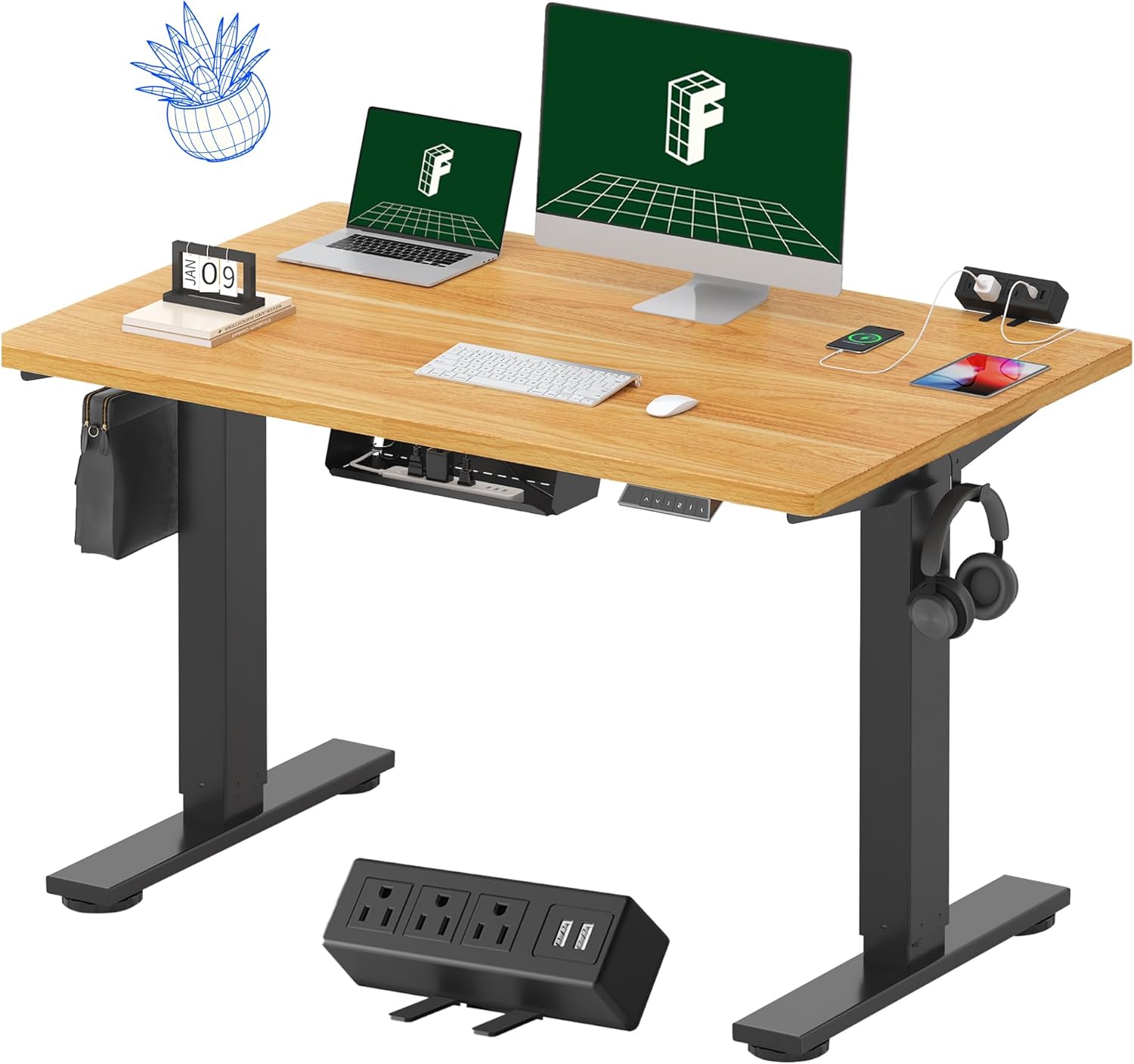
Image 1.1: FLEXISPOT EN2 Standing Desk with Maple Top and Black Frame, showcasing a typical setup with monitors, a laptop, and a clamp پاور پٽي.
2. حفاظت جي ڄاڻ
خبردار: انهن حفاظتي هدايتن تي عمل ڪرڻ ۾ ناڪامي جي نتيجي ۾ پيداوار کي زخم يا نقصان ٿي سگهي ٿو.
- هميشه احتياط سان اسيمبلي جي هدايتن تي عمل ڪريو.
- An electric drill (not included) may be required for assembly.
- Ensure the desk is properly anchored to prevent tipping.
- وڌ ۾ وڌ وزن جي سفارش ڪيل حد 176 پائونڊ (80 ڪلوگرام) کان وڌيڪ نه ڪريو.
- Keep the work surface clear of items that could fall and cause injury during height adjustments.
- Always unplug the desk before performing any maintenance or making adjustments to the frame or electrical components.
- آپريشن دوران ٻارن ۽ پالتو جانورن کي ڊيسڪ کان پري رکو.
3. پيڪيج مواد
Your FLEXISPOT EN2 Standing Desk will arrive in two separate packages, which may be shipped separately. Please ensure you have received both packages and all components before beginning assembly.

Image 3.1: Illustration showing the desk components arriving in two separate packages: one for the desktop and one for the desk frame.
شامل اجزاء:
- One-piece desktop (48" x 30" Maple Top)
- Electric height-adjustable frame (Black)
- 4 ميموري پري سيٽس سان 6 بٽڻ وارو ڊجيٽل ڪنٽرولر
- Removable clamp power strip (3 AC outlets, 2 USB charging ports)
- Cable management device
- Assembly hardware and tools (excluding electric drill)
4. سيٽ اپ ۽ اسيمبلي
Assembly typically requires two people and an electric drill (not included). Follow the detailed instructions provided in the separate assembly guide included with your product. The process involves attaching the legs to the desktop and connecting the control panel and motor.
اسيمبلي جي صلاح:
- سڀني حصن کي نرم، صاف مٿاڇري تي رکو ته جيئن ڇڪڻ کان بچي سگهجي.
- پڪ ڪريو ته سڀئي پيچ محفوظ طور تي مضبوط ڪيا ويا آهن، پر وڌيڪ تنگ نه ڪريو.
- Properly route all cables using the provided cable management solutions to avoid interference with desk movement.
Video 4.1: Official FLEXISPOT Standing Desk Frame Installation Guide. This video demonstrates the step-by-step process of assembling the desk frame and attaching it to the desktop.
5. آپريٽنگ هدايتون
5.1 ڊجيٽل ڪنٽرول پينل
The desk is operated using a 6-button digital controller, typically mounted on the underside of the desktop. It features up/down arrows, an LED display for height, and four programmable memory presets.

Image 5.1: Digital control panel with LED display showing current height, up/down arrows, and four numbered memory preset buttons.
5.2 اونچائي جي ترتيب
- کي دٻايو ۽ رکو مٿي تير (^) ڊيسڪ کي مٿي ڪرڻ لاءِ بٽڻ.
- کي دٻايو ۽ رکو هيٺيون تير (v) ڊيسڪ کي هيٺ ڪرڻ لاءِ بٽڻ.
- The desk adjusts smoothly from 28.1 inches (71.4 cm) to 45.7 inches (116.1 cm).
- The motor operates quietly at less than 50 dB.
5.3 ميموري پري سيٽ سيٽ ڪرڻ
The controller allows you to save up to four preferred height settings for quick adjustments.
- مٿي/هيٺ تيرن جي استعمال سان ڊيسڪ کي پنهنجي گهربل اوچائي تي ترتيب ڏيو.
- کي دٻايو ياداشت (ايم) بٽڻ. LED ڊسپلي چمڪي ويندي.
- Within 3 seconds, press one of the numbered preset buttons (1، 2، 3، يا 4) موجوده اوچائي کي ان پري سيٽ ۾ محفوظ ڪرڻ لاءِ.
- محفوظ ڪيل اوچائي کي ياد ڪرڻ لاءِ، صرف لاڳاپيل نمبر واري پري سيٽ بٽڻ کي دٻايو. ڊيسڪ خودڪار طريقي سان محفوظ ڪيل پوزيشن ڏانهن منتقل ٿي ويندي.
Video 5.2: FlexiSpot Brand Store video demonstrating the desk's height adjustment and memory preset functions.
6. خاصيتون
6.1 One-Piece Desktop
The desk features a spacious, single-piece desktop made of FSC-Certified wood. This design provides a smooth, seamless work surface, enhancing stability and aesthetics compared to multi-piece desktops.

Image 6.1: Visual comparison highlighting the smooth surface of a single-piece desktop against the visible seams of a two-piece desktop.
6.2 Removable Clamp پاور پٽي
A desktop-mounted power strip is included, featuring 3 AC outlets (125V/12A) and 2 USB charging ports (5V/2A). This allows for convenient charging of electronic devices directly from your desk. The power strip can be clipped to the back or side of your desk.

Image 6.2: Close-up of the removable clamp power strip, detailing its 3 AC outlets and 2 USB-A ports, and how it attaches to the desk edge.
6.3 ڪيبل مينيجمينٽ
The desk includes a cable management device to help organize and tidy up your workspace, preventing cables from dangling and interfering with desk movement.

Image 6.3: Illustration demonstrating effective cable management with an under-desk tray, showing a tidy setup compared to unmanaged cables.
7. سار سنڀال
- Regularly inspect all screws and connections to ensure they are tight.
- ڊيسڪ ٽاپ جي مٿاڇري کي نرم، ڊي سان صاف ڪريوamp ڪپڙو. گھڻائي صاف ڪندڙ کان بچاء جيڪي ختم ڪري سگھن ٿيون.
- Keep the motor and electrical components free from dust and moisture.
- Do not place hot items directly on the desktop without protective coasters.
8. مسئلا حل ڪرڻ
8.1 Desk Not Moving or Displaying Error Code (e.g., "r5t")
If your desk is not responding or the LED display shows an error code like "r5t", a system reset may be required.
- Unplug the desk from the power outlet.
- Wait for at least 10-15 seconds.
- Plug the desk back into the power outlet.
- Press and hold the "Down Arrow (v)" button until the desk reaches its lowest position and then slightly rises. This indicates a successful reset.
- جيڪڏهن مسئلو جاري رهي، ڪسٽمر سپورٽ سان رابطو ڪريو.
8.2 Desk Wobbling at Higher Heights
While the desk is designed for stability, minor wobbling can occur at maximum heights. Ensure the adjustable feet on the leg bases are properly leveled to compensate for uneven flooring.
9. وضاحتون
| خاصيت | تفصيل |
|---|---|
| برانڊ | FLEXISPOT |
| ماڊل | EN2 |
| ڊيسڪ ٽاپ مواد | FSC-Certified Maple Wood |
| ڊيسڪ ٽاپ جي ماپ | 48" (ڊبليو) x 30" (ڊي) |
| ڊيسڪ ٽاپ ٿلهي | 1 انچ |
| فريم مواد | Industrial-grade Alloy Steel (Black) |
| اونچائي جي ترتيب جي حد | 28.1" کان 45.7" (71.4 سينٽي ميٽر کان 116.1 سينٽي ميٽر) |
| موٽر شور جي سطح | <50 ڊي بي |
| وزن جي گنجائش | 176 پائونڊ (80 ڪلوگرام) |
| ڪنٽرول پينل | 4 ميموري پري سيٽس سان 6 بٽڻ وارو ڊجيٽل ڪنٽرولر |
| پاور ليٽليٽ | 3 AC outlets (125V/12A), 2 USB charging ports (5V/2A) |
| اسيمبلي گهربل | Yes (electric drill recommended) |
10. وارنٽي ۽ سپورٽ
10.1 وارنٽي ڄاڻ
- 5 سال وارنٽي: فريم، موٽر، ۽ ٻين مشيني ڊوائيسز کي ڍڪي ٿو.
- 2 سال وارنٽي: ڪنٽرولرز، سوئچز، ۽ اليڪٽرانڪس کي ڍڪي ٿو.
مھرباني ڪري وارنٽي جي دعوائن لاءِ خريداري جو ثبوت پاڻ وٽ رکو. وارنٽي عام استعمال هيٺ مواد ۽ ڪاريگري ۾ خرابين کي ڍڪيندي آهي.
10.2 ڪسٽمر سپورٽ
For any questions, troubleshooting assistance, or warranty claims, please contact FLEXISPOT customer support through their official webسائيٽ يا پرچون ڪندڙ جتي توهان پراڊڪٽ خريد ڪيو.