
1. تعارف
Thank you for choosing the CHONCHOW US801 Gaming Keyboard and Mouse Combo. This manual provides detailed instructions for setting up, operating, and maintaining your new peripheral set. Please read this manual carefully before use to ensure optimal performance and longevity of your product.

Image: The CHONCHOW US801 Gaming Keyboard and Mouse Combo, showcasing its full-size layout and ergonomic design.
2. پيڪيج مواد
The CHONCHOW US801 Gaming Keyboard and Mouse Combo package includes:
- 1 x CHONCHOW US801 Wired Gaming Keyboard
- 1 x CHONCHOW US801 Wired Gaming Mouse
- 1 x استعمال ڪندڙ دستياب (هي دستاويز)
3. سيٽ اپ جون هدايتون
The CHONCHOW US801 Gaming Keyboard and Mouse Combo is a plug-and-play device. No additional drivers or software are typically required for basic functionality.
- ڪي بورڊ ڳنڍيو: Locate an available USB 2.0 port on your computer, laptop, or gaming console. Insert the USB connector of the keyboard into the port.
- ماؤس کي ڳنڍيو: Locate another available USB 2.0 port. Insert the USB connector of the mouse into the port.
- سسٽم جي سڃاڻپ: Your operating system (Windows, Mac OS, Xbox, PS4) should automatically detect and install the necessary drivers. This process may take a few moments. A notification typically appears once the device is ready for use.
- Initial Functionality Test: After installation, test the keyboard by typing and the mouse by moving the cursor and clicking buttons to ensure they are working correctly.
Note on Initial Connection:
In rare cases, after connecting the USB cable, the keyboard backlight may not illuminate fully or correctly. This can occur due to static electricity or repeated disconnections/reconnections causing signal issues with the operating system. If this happens, please wait patiently for approximately 20 seconds for the keyboard's light control chip to restart. If the issue persists, ensure your computer is connected to the internet, then reconnect the keyboard and wait for the "driver installation is complete" notification. If problems continue, refer to the Troubleshooting section or contact customer support.
4. Keyboard Features and Operation
4.1. بڪ لائٽ ڪنٽرول
The keyboard features adjustable RGB backlighting with multiple modes and brightness levels.
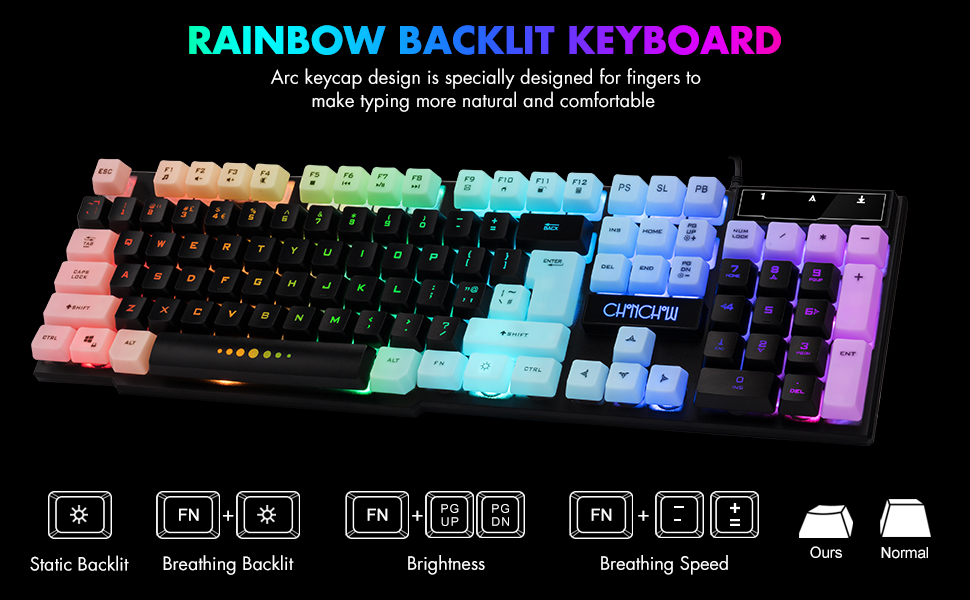
Image: Visual guide for controlling keyboard backlighting, showing key combinations for various effects.
- بيڪ لائيٽ آن/آف ڪريو: کي دٻايو بلب ٻاريو key (usually located near the right Ctrl key).
- Switch Backlight Mode (Breathing/Static): دٻايو FN + بلب ٻاريو چاٻي
- روشني کي ترتيب ڏيو: دٻايو FN + PG UP to increase brightness, or FN + PG DN روشني گھٽائڻ لاء.
- Adjust Breathing Speed: دٻايو FN + + to increase breathing speed, or FN + - to decrease breathing speed.
4.2. ملٽي ميڊيا ڪيز
The keyboard includes 12 multimedia function shortcut keys for quick access to common functions.

Image: Layout of the keyboard highlighting the 12 multimedia function keys and their corresponding FN key combinations.
| ڪنيڪشن | فنڪشن |
|---|---|
| FN + F1 | ميوزڪ پليئر |
| FN + F2 | حجم ھيٺ |
| FN + F3 | حجم مٿي |
| FN + F4 | گونگا |
| FN + F5 | راند / اسٽاپ |
| FN + F6 | اڳيون ٽريڪ |
| FN + F7 | راند/روڪ |
| FN + F8 | ايندڙ ٽريڪ |
| FN + F9 | اي ميل |
| FN + F10 | Web گهر |
| FN + F11 | لاڪ اسڪرين |
| FN + F12 | حساب ڪندڙ |
4.3. اينٽي گھوسٽنگ ڪيز
The keyboard features 19 anti-ghosting keys, ensuring that multiple key presses are registered simultaneously, which is crucial for gaming.

Image: The keyboard layout with 19 anti-ghosting keys visually indicated.
4.4. WIN Key Lock
The Windows key can be disabled to prevent accidental presses during gaming sessions.

Image: Close-up of the Windows key with an overlay indicating its lock function.
- Disable/Enable WIN Key: دٻايو FN + WIN چاٻي
5. Mouse Features and Operation
The gaming mouse features 7-color breathing LED lighting and adjustable DPI settings.

Image: The CHONCHOW gaming mouse displaying its 7-color LED breathing light effect.
5.1. ڊي پي آءِ ايڊجسٽمينٽ
The mouse offers four levels of DPI sensitivity to suit different tasks and preferences.
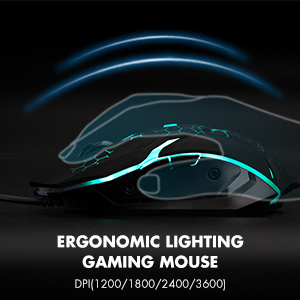
Image: The ergonomic design of the gaming mouse, highlighting its lighting and DPI settings.
- ڊي پي آئي سطح: 1200 / 1800 / 2400 / 3600 DPI.
- ڊي پي آءِ کي ترتيب ڏيو: کي دٻايو DPI بٽڻ (usually located behind the scroll wheel) to cycle through the available DPI settings.
5.2. Mouse Buttons
The mouse is equipped with 6 buttons for enhanced control:
- کاٻي بٽڻ تي ڪلڪ ڪريو
- ساڄي بٽڻ تي ڪلڪ ڪريو
- اسڪرول ويل (ڪلڪ ڪرڻ لائق)
- DPI بٽڻ
- فارورڊ بٽڻ
- پوئتي بٽڻ
6. مطابقت
The CHONCHOW US801 Gaming Keyboard and Mouse Combo offers wide compatibility with various operating systems and devices.
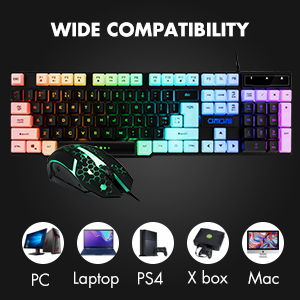
Image: Icons representing various compatible devices including PC, Laptop, PS4, Xbox, and Mac.
- آپريٽنگ سسٽم: Windows 2000 / 2003 / XP / Vista / Win7 / Win8 / Win10
- ڊوائيسز: PC, Computer, Laptop, PS4, Xbox, Mac
7. سار سنڀال
Proper maintenance ensures the longevity and optimal performance of your keyboard and mouse.
- صفائي: Use a soft, dry cloth to wipe down the surfaces of the keyboard and mouse. For deeper cleaning, especially for dust under keycaps, the keycaps are removable. Gently pull them off for cleaning and press them back into place. Avoid using harsh chemicals or abrasive materials.
- illsرندڙ: The keyboard features drainage holes to help mitigate damage from minor spills. In case of a liquid spill, immediately disconnect the keyboard from your device, turn it upside down to drain, and allow it to dry completely before reconnecting.
- اسٽوريج: ڪيبورڊ ۽ مائوس کي سڌي سج جي روشني ۽ انتهائي گرمي پد کان پري ٿڌي، سڪل جاءِ تي رکو.
8. مسئلا حل ڪرڻ
If you encounter issues with your CHONCHOW US801 Gaming Keyboard and Mouse Combo, please refer to the following common solutions:
- ڪي بورڊ/ماؤس جواب نه ڏئي رهيو آهي:
- Ensure both USB cables are securely plugged into your device's USB ports.
- Try connecting the keyboard and mouse to different USB ports.
- توهان جي ڪمپيوٽر يا گیمنگ ڪنسول کي ٻيهر شروع ڪريو.
- Test the devices on another computer to rule out system-specific issues.
- Backlight Issues (Not Bright / Partially Lit):
- Wait approximately 20 seconds after connecting; the keyboard's light control chip may be restarting due to static electricity or repeated connections.
- Ensure your computer is connected to the internet, then reconnect the keyboard. Wait for the "driver installation is complete" notification.
- استعمال ڪندي روشني کي ترتيب ڏيو FN + پي جي UP / PG ڊي اين.
- Keys Not Registering / Ghosting:
- پڪ ڪريو ته ڪيبورڊ صاف آهي ۽ ڪي ڪيپس جي هيٺان ملبي کان پاڪ آهي.
- Verify that the WIN key lock is not accidentally engaged if you are experiencing issues with the Windows key.
- ماؤس ڪرسر ٽپي ٿو يا بي ترتيب آهي:
- مائوس جي تري ۾ موجود آپٽيڪل سينسر کي صاف ڪريو.
- پڪ ڪريو ته توهان مائوس کي مناسب مٿاڇري تي استعمال ڪري رهيا آهيو (مثال طور، هڪ مائوس پيڊ).
- Adjust DPI settings to a lower value if the cursor is too sensitive.
If the problem persists after attempting these steps, please contact CHONCHOW customer support for further assistance.
9. وضاحتون
| خاصيت | تفصيل |
|---|---|
| برانڊ | چونچو |
| ماڊل نمبر | يو ايس 801 |
| رابطي ٽيڪنالاجي | USB وائرڊ |
| ڪي بورڊ لي آئوٽ | 104-Keys Full Size |
| ڪي بورڊ Backlighting | RGB (Rainbow Backlit) |
| ڪي بورڊ جون خاص خاصيتون | 19 Anti-Ghosting Keys, 12 Multimedia Keys, WIN Key Lock, Ergonomic, Removable Keycaps |
| مائوس جي ڊي پي آءِ ليولز | 1200 / 1800 / 2400 / 3600 ڊي پي آئي |
| مائوس بٽڻ | 6 Buttons (Left, Right, Forward, Backward, DPI, Scroll Wheel) |
| مائوس جي پٺڀرائي | 7-رنگ جي سانس جي ايل اي ڊي |
| پراڊڪٽ جي ماپ (ڪي بورڊ) | 17 x 5.1 x 1.3 انچ |
| شيءِ جو وزن | 1.94 پائونڊ |
| مواد | پلاسٽڪ |
10. وارنٽي ۽ سپورٽ
CHONCHOW stands behind the quality of its products. Your CHONCHOW US801 Gaming Keyboard and Mouse Combo is covered by the following:
- 30-Day Refund or Replacement: خريداري جي 30 ڏينهن اندر ڪنهن به مسئلي لاءِ.
- 12-Month After-Sales Service: For quality-related problems within 12 months of purchase.
For friendly and easy-to-reach support, please contact our customer service team. Refer to your purchase documentation or the CHONCHOW official webرابطي جي تفصيل لاءِ سائيٽ.