
1. تعارف
This manual provides essential instructions for the installation, operation, and maintenance of your Hikvision 8MP AcuSense WDR Mini Bullet Network Camera, model DS-2CD2083G2-IU. Please read this manual thoroughly before using the product and retain it for future reference.
پيداوار ختمview
The Hikvision DS-2CD2083G2-IU is a high-performance 8-megapixel (4K) network camera designed for advanced surveillance. It features AcuSense technology for accurate human and vehicle target classification, Wide Dynamic Range (WDR) for clear imaging against strong backlight, and a fixed 2.8mm lens for a wide field of view. Its IP67 rating ensures robust outdoor performance, and the integrated microphone allows for audio monitoring.
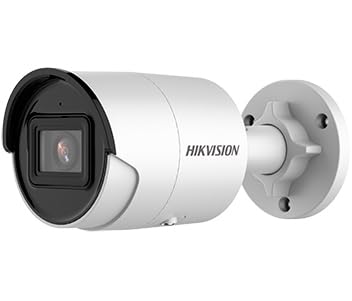
Figure 1: Hikvision 8MP AcuSense WDR Mini Bullet Network Camera (DS-2CD2083G2-IU)
This image displays the Hikvision 8MP AcuSense WDR Mini Bullet Network Camera, highlighting its compact bullet-style design suitable for various installation environments.
اهم خاصيتون
- 8 Megapixel (4K) Resolution: Delivers high-quality, detailed video.
- AcuSense Technology: Reduces false alarms by accurately classifying human and vehicle targets.
- وسيع متحرڪ رينج (WDR): Ensures clear images even in scenes with strong contrast.
- Fixed 2.8mm Lens: Provides a broad viewزاويه.
- انفراريڊ (IR) روشني: Night vision up to 40 meters.
- IP67 موسم جي مزاحمتي درجه بندي: مختلف موسمي حالتن ۾ ٻاهرين استعمال لاءِ موزون.
- بلٽ ان مائڪروفون: Enables audio monitoring.
- انٽيگريٽيڊ ڪارڊ ريڊر: Supports local storage (microSD card not included).
2. حفاظت جي ڄاڻ
پراڊڪٽ کي نقصان يا زخم کان بچڻ لاءِ مھرباني ڪري ھيٺ ڏنل حفاظتي احتياطي تدبيرن تي عمل ڪريو:
- Ensure the power supply meets the camera's requirements (6.5 Watts).
- ڪئميرا کي انتهائي گرمي پد، نمي، يا خراب ماحول ۾ نه لڳايو.
- Avoid pointing the lens directly at strong light sources, as this may damage the sensor.
- مقامي اليڪٽريڪل ڪوڊس جي مطابق، انسٽاليشن قابل اهلڪارن پاران ڪئي وڃي.
- صرف ٺاهيندڙ طرفان بيان ڪيل لوازمات استعمال ڪريو.
- ڪئميرا لينس کي نرم، سڪل ڪپڙي سان صاف ڪريو. سخت ڪيميڪلز کان پاسو ڪريو.
3. سيٽ اپ ۽ تنصيب
3.1 کولڻ
Carefully unpack the camera and check for any signs of damage. Ensure all components are present. (Typical components include: camera unit, mounting template, screws, waterproof connector, quick start guide).
3.2 جسماني تنصيب
The camera is designed for ceiling mounting. Select a suitable location that provides the desired field of view and is within reach of network and power cables. Due to its IP67 rating, it is suitable for outdoor environments.
- Use the provided mounting template to mark drill holes on the ceiling.
- ضروري سوراخ ڪريو ۽ جيڪڏهن ضرورت هجي ته وال پلگ لڳايو.
- فراهم ڪيل اسڪرو استعمال ڪندي ڪئميرا بيس کي چڙهڻ واري مٿاڇري تي محفوظ ڪريو.
- بهتر ڪوريج لاءِ ڪئميرا جي زاوي کي ترتيب ڏيو.
3.3 نيٽ ورڪ ۽ پاور ڪنيڪشن
This is an IP network camera. It requires a network connection and power. Power over Ethernet (PoE) is typically supported, simplifying installation by delivering both power and data over a single Ethernet cable. If PoE is not used, a separate 12V DC power adapter (not included) will be required.
- Connect an Ethernet cable from your network switch/router to the camera's RJ45 port. Use the waterproof connector for outdoor installations.
- If not using PoE, connect a 12V DC power adapter to the camera's power input.
- Once connected, the camera will power on. Allow a few minutes for it to boot up.
3.4 شروعاتي ترتيب
ڪئميرا تائين رسائي حاصل ڪريو web انٽرفيس ذريعي a web browser using its default IP address (refer to the quick start guide or use Hikvision's SADP tool to discover the IP address). You will be prompted to set a strong password for security. Follow the on-screen instructions to configure network settings, date/time, and other basic parameters.
4. آپريٽنگ هدايتون
4.1 زنده View ۽ رڪارڊنگ
شروعاتي سيٽ اپ کان پوءِ، توهان ڪري سگهو ٿا view the live feed from the camera through its web interface, a Network Video Recorder (NVR), or Hikvision's client software (e.g., iVMS-4200) or mobile app (Hik-Connect). Configure recording schedules and methods (continuous, motion-triggered) via the camera's settings or NVR.
4.2 AcuSense Smart Features
The AcuSense technology allows the camera to distinguish between humans, vehicles, and other moving objects, significantly reducing false alarms caused by animals, rain, or falling leaves. Configure these detection rules in the camera's event settings to receive more accurate alerts.
- حرڪت جي ڳولا 2.0: Set up detection zones and sensitivity for human and vehicle events.
- مداخلت جي چڪاس: Define virtual boundaries, and the camera will trigger an alarm if a human or vehicle crosses them.
- لائن ڪراسنگ جي سڃاڻپ: Similar to intrusion, but for a specific line.
4.3 وسيع متحرڪ رينج (WDR)
WDR compensates for extreme lighting conditions, such as strong backlight, to ensure that both bright and dark areas of the image are clearly visible. This feature is typically enabled by default but can be adjusted in the image settings.
4.4 Infrared (IR) Night Vision
The camera automatically switches to IR mode in low-light conditions, providing clear black-and-white video up to 40 meters. Ensure no obstructions block the IR LEDs for optimal night vision performance.
4.5 آڊيو مانيٽرنگ
With its built-in microphone, the camera can capture audio from the surveillance area. Audio settings, including gain control, can be configured in the camera's web interface. Ensure local regulations regarding audio recording are followed.
5. سار سنڀال
- صفائي: ڪئميرا لينس ۽ هائوسنگ کي باقاعدي طور تي نرم، ڊي سان صاف ڪريوamp ڪپڙو. گھڻائي صاف ڪندڙ استعمال نه ڪريو.
- فرم ويئر اپڊيٽس: وقت بوقت Hikvision آفيسر کي چيڪ ڪريو website for firmware updates. Keeping the firmware updated ensures optimal performance, new features, and security enhancements.
- ڪيبل جي چڪاس: For outdoor installations, periodically inspect cables and connections for wear or damage, especially the waterproof connectors.
- پاسورڊ مينيجمينٽ: Regularly change your camera's password to maintain security.
6. مسئلا حل ڪرڻ
| مسئلو | ممڪن سبب | حل |
|---|---|---|
| No image/camera offline | No power, network cable disconnected, incorrect IP address. | Check power supply and network cable. Verify IP address using SADP tool. Restart camera. |
| خراب تصوير جو معيار | Dirty lens, incorrect focus (if adjustable), poor lighting, network bandwidth issues. | Clean the lens. Ensure adequate lighting. Check network connection speed. Adjust image settings (WDR, exposure). |
| False alarms from motion detection | Sensitivity too high, environmental factors (trees, animals), AcuSense not configured. | Adjust motion detection sensitivity. Configure AcuSense human/vehicle detection. Adjust detection zones. |
| رسائي نه ٿو ڪري سگھجي web انٽرفيس | غلط IP پتو، نيٽ ورڪ ڪنيڪٽيويٽي جو مسئلو، برائوزر مطابقت. | Verify IP address. Ensure camera and PC are on the same network segment. Try a different browser. |
If the problem persists after attempting these solutions, please contact Hikvision technical support.
7. وضاحتون
| خاصيت | تفصيل |
|---|---|
| ماڊل نمبر | DS-2CD2083G2-IU |
| تصويري سينسر | CMOS |
| وڌ. قرارداد | 8 ايم پي (4 ڪلو) |
| لينس | 2.8mm فيڪٽر لينس |
| آئي آر رينج | 40 ميٽر تائين |
| WDR | حمايت ڪئي |
| اڪيسنس | Human and Vehicle Target Classification |
| آڊيو | بلٽ ان مائڪروفون |
| مقامي اسٽوريج | Integrated Card Reader (MicroSD slot) |
| Weatherproof جي درجه بندي | IP67 |
| بجلي جو استعمال | 6.5 واٽ |
| طول و عرض (L x W x H) | 15 x 15 x 8 سينٽي ميٽر (تقريبن) |
| چڙهڻ جو قسم | ڇت جو جبل |
| انتباہ جو قسم | Motion Only (configurable for human/vehicle) |
8. وارنٽي ۽ سپورٽ
هائڪ ويزن جون شيون عام طور تي محدود ٺاهيندڙ جي وارنٽي سان گڏ اينديون آهن. مھرباني ڪري پنھنجي پراڊڪٽ سان شامل وارنٽي ڪارڊ ڏسو يا سرڪاري هائڪ ويزن جو دورو ڪريو. webتوهان جي علائقي لاءِ مخصوص تفصيلي وارنٽي شرطن ۽ ضابطن لاءِ سائيٽ.
For technical support, firmware downloads, or further assistance, please visit the official Hikvision support portal or contact their customer service department. Ensure you have your product model number (DS-2CD2083G2-IU) and serial number ready when contacting support.
سرڪاري هائڪ ويزن Webسائيٽ: www.hikvision.com