
Cecotec Conga 9090 Ai
Cecotec Conga 9090 IA Robot Vacuum Cleaner
استعمال ڪندڙ دستي
تعارف
Thank you for choosing the Cecotec Conga 9090 IA Robot Vacuum Cleaner. This advanced 4-in-1 robot is designed to vacuum, sweep, mop, and scrub simultaneously, providing comprehensive floor cleaning. Equipped with Artificial Intelligence and laser technology, it offers maximum cleaning precision by recognizing household objects and adapting its cleaning path. This manual provides essential information for the safe and efficient operation and maintenance of your robot vacuum cleaner.
حفاظتي هدايتون
مھرباني ڪري اوزار استعمال ڪرڻ کان پھريان ھي حفاظتي ھدايتون احتياط سان پڙھو ۽ انھن کي مستقبل جي حوالي لاءِ رکو. انھن ھدايتن تي عمل ڪرڻ ۾ ناڪامي بجليءَ جو جھٽڪو، باهه، يا سنگين زخمي ٿي سگھي ٿي.
- طاقت جي مقدار کي يقيني بڻائيtage سان ملي ٿوtage جيڪو اوزار جي ريٽنگ ليبل تي بيان ڪيو ويو آهي.
- اوزار، بجلي جي تار، يا پلگ ان کي پاڻي يا ڪنهن ٻئي مائع ۾ نه وجھو.
- اوزار کي گرمي جي ذريعن، سڌي سج جي روشني، نمي ۽ تيز ڪنارن کان پري رکو.
- Do not use the appliance on wet surfaces or in areas with standing water.
- ٻارن جي نگراني ڪريو انهي کي يقيني بڻائي ته اهي اوزار سان راند نه ڪن.
- صفائي يا سار سنڀال کان اڳ، هميشه اوزار کي پاور آئوٽليٽ مان ڪڍي ڇڏيو.
- ڊوائيس کي نه هلايو جيڪڏهن پاور هارڊ يا پلگ خراب ٿي وڃي.
- Remove any loose cables, small objects, or fragile items from the cleaning area before operation to prevent entanglement or damage.
پيڪيج مواد
پيڪنگ کولڻ وقت پڪ ڪريو ته سڀئي جزا موجود آهن ۽ سٺي حالت ۾ آهن.
- Cecotec Conga 9090 IA Robot Vacuum Cleaner
- Special Silicone Brush for pets
- جليسڪو برش
- Vibration Wash Basin (Water Tank)
- Solid Tank (Dust Bin)
- ريموٽ ڪنٽرول
- 2 ماپ
- 2 پاسي وارا برش
- 1 High-Efficiency Filter
- Self-Cleaning Brush
- چارجنگ اسٽيشن
- پاور اڊاپٽر

Image: The Conga 9090 IA robot vacuum cleaner along with its comprehensive set of accessories, including various brushes, remote control, and a mobile phone showing the companion app.
پيداوار ختمview
The Conga 9090 IA features advanced components for intelligent and efficient cleaning.
- AI and Laser Technology: The robot uses a front camera and a three-dimensional sensor to recognize common household objects and adapt its cleaning path accordingly. It also identifies floors and rooms, automatically mapping them.
- Jalisco Brush: A specialized brush designed for effective cleaning on various floor types.
- Twerking Scrub Tank: Provides three intelligent scrubbing levels for thorough mopping.
- Room Assist: Intelligent room management for customized cleaning.

Image: The robot vacuum intelligently detects and navigates around obstacles like shoes, thanks to its advanced AI and laser technology.

Image: The robot vacuum positioned on a floor, ready to clean various small debris, demonstrating its powerful suction.

Image: The robot vacuum near its charging base, illustrating its object detection capabilities for items such as socks and power cables.
سيٽ اپ ڪريو
- چارجنگ اسٽيشن جي جڳھ: Place the charging station against a wall in an open area, ensuring there are no obstacles within 1 meter to the sides and 2 meters in front. Connect the power adapter to the charging station and a power outlet.
- شروعاتي چارج Place the robot on the charging station. Ensure the charging contacts on the robot align with those on the station. The robot will begin charging automatically. For first use, fully charge the robot (approximately 3-4 hours).
- سائڊ برش انسٽال ڪريو: Snap the left (L) and right (R) side brushes into their corresponding slots on the bottom of the robot until they click into place.
- Install Main Brush: If not already installed, insert the Jalisco brush into its compartment on the underside of the robot.
- Download the Conga App: ڳولھيو "Conga" in your smartphone's app store (iOS or Android) and download the official application.
- وائي فائي سان ڳنڍيو: Follow the in-app instructions to connect your robot to your home Wi-Fi network. This will enable smart features, mapping, and remote control.
آپريٽنگ هدايتون
Your Conga 9090 IA offers various cleaning modes and smart functionalities.
صفائي جا طريقا
- خودڪار موڊ: The robot automatically plans the optimal cleaning path for your entire home.
- ڪنڊ موڊ: ڀتين ۽ فرنيچر جي ڪنارن سان صفائي ڪري ٿو.
- اسپاٽ موڊ: صفائي کي هڪ مخصوص گندي علائقي تي مرڪوز ڪري ٿو.
- اسڪربنگ موڊ: Utilizes the vibration wash basin for deep mopping. You can select from three intelligent scrubbing levels via the app.
- محدود علائقا: Use the app to define no-go zones or virtual walls to prevent the robot from entering specific areas.

Image: The robot vacuum demonstrating its ability to respect virtual boundaries, preventing it from entering designated areas like a play zone.
سمارٽ خاصيتون
- ائپ ڪنٽرول: Use the Conga app to start/stop cleaning, select modes, schedule cleaning, view maps, and manage rooms.
- وائس ڪنٽرول: The robot is compatible with Amazon Echo and Google Home. You can control it using voice commands.

Image: The robot vacuum can be controlled via voice commands through smart home devices like Amazon Echo.
سار سنڀال
باقاعده سار سنڀال بهترين ڪارڪردگي کي يقيني بڻائي ٿي ۽ توهان جي روبوٽ ويڪيوم ڪلينر جي عمر وڌائي ٿي.
صفائي جي شيڊول
- هر استعمال کان پوء: Empty the dust bin and clean the main brush.
- هفتيوار: Clean the side brushes, filters, and sensors.
- مهيني: Clean the charging contacts and wheels. Replace filters and brushes as needed.
Detailed Cleaning Instructions
- Dust Bin and Filters: Open the robot's cover, remove the dust bin, and empty its contents. Tap the filter gently to remove dust. Do not wash the HEPA filter with water.
- پاڻي جي ٽانڪي ۽ ميپ: Remove the water tank and empty any remaining water. Detach and wash the mop pad with water. Allow it to air dry completely before reattaching.
- Main Brush (Jalisco Brush): Remove the main brush cover and lift out the brush. Use the provided cleaning tool to remove hair and debris.
- پاسي وارا برش: Pull the side brushes upwards to remove them. Clean any tangled hair or debris. If damaged, replace them.
- Sensors and Charging Contacts: Use a clean, dry cloth to wipe the anti-drop sensors (on the bottom) and the charging contacts (on the robot and charging station).
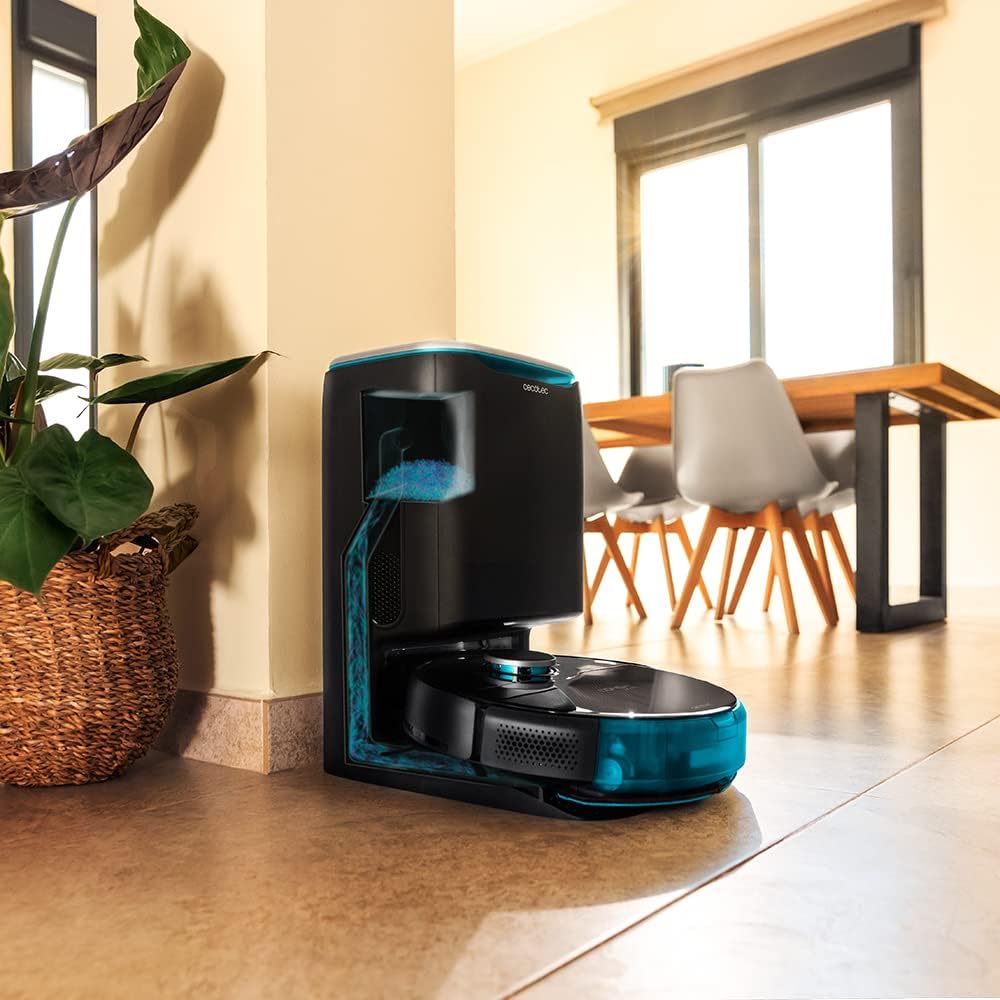
Image: The robot vacuum is compatible with the CongaHome 10.000 self-emptying station for convenient dust disposal.
مشڪلاتون
If you encounter issues with your robot vacuum cleaner, refer to the table below for common problems and solutions.
| مسئلو | ممڪن سبب | حل |
|---|---|---|
| روبوٽ نه آن ٿئي ٿو ۽ نه ئي چارج ٿئي ٿو. | بيٽري گهٽ آهي؛ چارجنگ رابطا گندا آهن؛ پاور اڊاپٽر ڳنڍيل نه آهي. | Place robot on charging station; clean charging contacts; ensure power adapter is securely connected. |
| خراب صفائي جي ڪارڪردگي. | ڪچري جو دٻو ڀريل؛ برش الجھا ٿيل؛ فلٽر بند ٿيل. | Empty dust bin; clean main and side brushes; clean or replace filter. |
| روبوٽ اڪثر ڦاسي پوندو آهي. | تمام گهڻيون رڪاوٽون؛ سينسر گندا آهن. | Clear the cleaning area of loose cables and small objects; clean all sensors. |
| ايپ ڪنيڪٽوٽي جا مسئلا. | Incorrect Wi-Fi password; weak Wi-Fi signal; robot not in pairing mode. | Verify Wi-Fi password; ensure robot is within Wi-Fi range; reset robot and re-attempt pairing as per app instructions. |
| روبوٽ غير معمولي آواز ڪڍي ٿو. | Brush or wheel obstructed; foreign object inside. | Check and clean main brush, side brushes, and wheels for obstructions. |
وضاحتون
| خاصيت | تفصيل |
|---|---|
| برانڊ | Cecotec |
| ماڊل نالو | Conga 9090 AI |
| ماڊل نمبر | 05416 |
| رنگ | ڪارو |
| پيداوار جي ماپ | 17.5 x 40 x 54.2 سينٽي |
| شيءِ جو وزن | 4.1 ڪلوگرام |
| گنجائش (مٽي جي دٻي) | 2.5 ليٽر |
| شور جي سطح | 64 ڊي بي |
| خودڪار بند | نه |
| مطابقت رکندڙ ڊوائيسز | Amazon ايڪو، گوگل هوم |
| خاص خصوصيت | پروگرام لائق |
وارنٽي ۽ سپورٽ
وارنٽي جي معلومات، ٽيڪنيڪل سپورٽ، يا سروس جي درخواستن لاءِ، مھرباني ڪري پنھنجي پراڊڪٽ سان شامل وارنٽي ڪارڊ جو حوالو ڏيو يا سرڪاري سيڪوٽيڪ جو دورو ڪريو. webسائيٽ. وارنٽي دعوائن لاءِ خريداري جي ثبوت طور پنهنجي خريداري جي رسيد رکو.
توھان پڻ دورو ڪري سگھو ٿا Amazon تي Cecotec اسٽور وڌيڪ پراڊڪٽ جي معلومات ۽ سپورٽ وسيلن لاءِ.
Ask a question about this manual
Ask about setup, troubleshooting, compatibility, parts, safety, or missing instructions. Manuals+ will review the question and use this page’s manual context to help answer it.