
FLEXISPOT E4 Classic
FLEXISPOT E4 Classic Electric Standing Desk User Manual
Model: E4 Classic | Brand: FLEXISPOT
تعارف
This manual provides detailed instructions for the assembly, operation, and maintenance of your FLEXISPOT E4 Classic Electric Standing Desk. Please read this manual thoroughly before use to ensure proper function and longevity of your product.

Figure 1: The FLEXISPOT E4 Classic Electric Standing Desk, featuring a bamboo contour desktop and silver frame, set up with dual monitors in an office environment.
حفاظت جي ڄاڻ
- پڪ ڪريو ته سڀئي اجزاء استعمال ڪرڻ کان اڳ محفوظ طور تي تيز آهن.
- آپريشن دوران ٻارن ۽ پالتو جانورن کي ڊيسڪ کان پري رکو.
- Do not overload the desk beyond its specified weight capacity (220 lbs).
- مائع کي سڌو سنئون ڪنٽرول پينل يا موٽر حصن تي رکڻ کان پاسو ڪريو.
- صفائي يا سار سنڀال کان اڳ بجلي بند ڪريو.
- صرف مهيا ڪيل پاور اڊاپٽر استعمال ڪريو.
پيڪيج مواد
مھرباني ڪري اسيمبلي شروع ڪرڻ کان اڳ پڪ ڪريو ته سڀئي حصا موجود آھن. جيڪڏھن ڪو به پرزو غائب يا خراب آھي، ڪسٽمر سپورٽ سان رابطو ڪريو.
- Bamboo Contour Whole-Piece Desktop (55"x28")
- Silver Frame Legs (Dual Motor)
- ڪنٽرول پينل
- پاور اڊاپٽر ۽ ڪيبل
- اسيمبلي هارڊويئر (اسڪرو، اوزار، وغيره)
- هدايت نامو (هي دستاويز)
سيٽ اپ ۽ اسيمبلي
هن پراڊڪٽ لاءِ اسيمبلي گهربل آهي. مھرباني ڪري انھن قدمن تي احتياط سان عمل ڪريو.
- انپيڪ اجزاء: پيڪنگ مان سڀني حصن کي احتياط سان هٽايو ۽ انهن کي صاف، نرم مٿاڇري تي رکو ته جيئن ڇڪڻ کان بچي سگهجي.
- ڊيسڪ ٽاپ سان ٽنگون ڳنڍيو: Position the desktop upside down. Align the leg frames with the pre-drilled holes on the underside of the desktop. Secure them using the provided screws and tools.
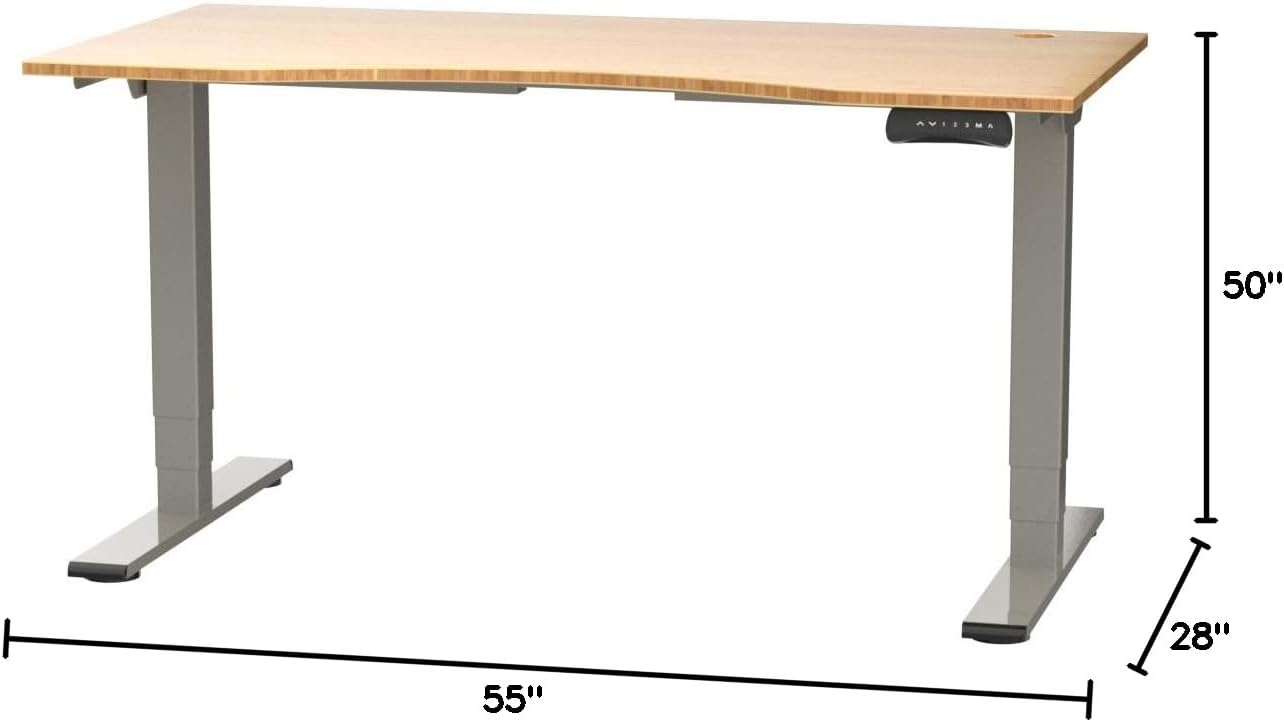
Figure 2: Desk dimensions indicating 55 inches width, 28 inches depth, and adjustable height up to 50 inches.
- ڪنٽرول پينل انسٽال ڪريو: Mount the control panel to the desired location on the underside of the desktop, typically on the front edge for easy access. Connect the control panel cable to the motor control box.

Figure 3: The programmable control panel with LED display, up/down buttons, and memory presets (1, 2, 3, M, A).
- پاور Connectنيو: Plug the power adapter into the control box, and then plug the power cable into a standard electrical outlet.
- ڪيبل جو انتظام: Utilize the two cable management holes on the desktop to route and organize your cables, preventing clutter.

Figure 4: Detail showing the integrated cable management holes and the water-resistant surface of the bamboo desktop.
- شروعاتي ڪيليبريشن: After assembly and power connection, the desk may require an initial calibration. Refer to the "Operating Instructions" section for details on resetting or calibrating the desk.
آپريٽنگ هدايتون
اونچائي جي ترتيب
The FLEXISPOT E4 Classic desk features a dual-motor lift system for smooth and quiet height adjustments.
- ڊيسڪ اٿارڻ: کي دٻايو ۽ رکو مٿي تير button (▲) on the control panel. The desk will move upwards.
- هيٺيون ڊيسڪ: کي دٻايو ۽ رکو هيٺيون تير button (▼) on the control panel. The desk will move downwards.
- Release the button at your desired height. The desk can adjust from 24.4 inches to 50 inches.
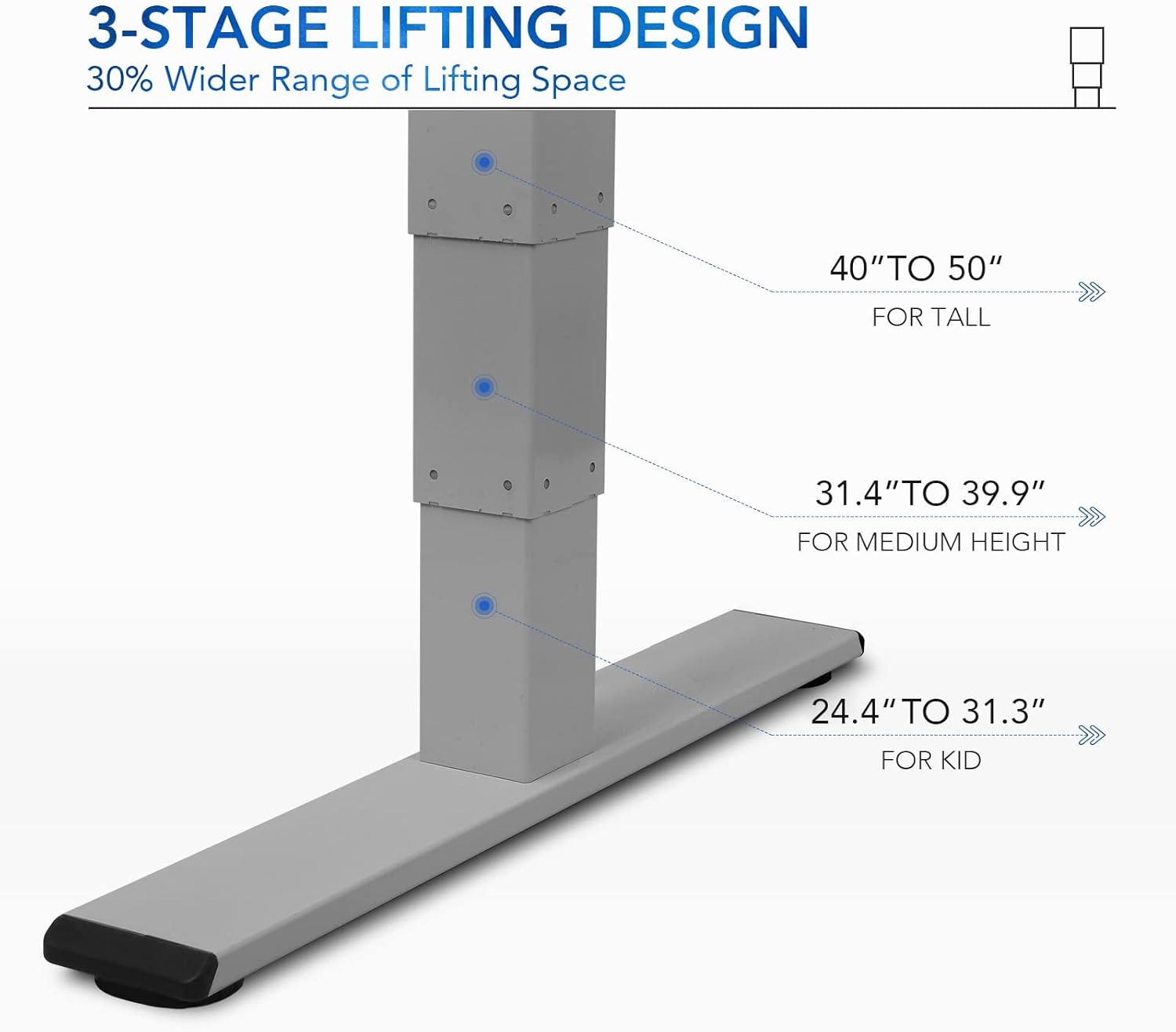
شڪل 5: 3-stage lifting design provides a wide range of height adjustments, suitable for various user heights, from 24.4" (kid) to 50" (tall).
Programmable Memory Presets
ڪنٽرول پينل توهان کي جلدي ترتيب ڏيڻ لاءِ ٽن ترجيحي اوچائي سيٽنگون محفوظ ڪرڻ جي اجازت ڏئي ٿو.
- ياداشت جي پوزيشن مقرر ڪريو:
- مٿي/هيٺ بٽڻن کي استعمال ڪندي ڊيسڪ کي پنهنجي گهربل اوچائي تي ترتيب ڏيو.
- کي دٻايو "م" button. The LED display will show "S-".
- 3 سيڪنڊن اندر، نمبر بٽڻن مان هڪ کي دٻايو ("1", "2"، يا "3") موجوده اوچائي کي ان پري سيٽ تي محفوظ ڪرڻ لاءِ. ڊسپلي تصديق ڪرڻ لاءِ "S-1"، "S-2"، يا "S-3" ڏيکاريندو.
- ياداشت جي پوزيشن کي ياد ڪريو: بس لاڳاپيل نمبر بٽڻ کي دٻايو ("1", "2"، يا "3"). ڊيسڪ خودڪار طريقي سان محفوظ ڪيل اوچائي ڏانهن منتقل ٿي ويندو.
ويٺي/اٿي ياد ڏياريندڙ
The "A" button can be used to set a reminder to switch between sitting and standing positions.
- Consult the full manual for detailed instructions on setting and customizing the sit/stand reminder function.
Ergonomic Curved Design
The 55"x28" desktop features an ergonomic curved design for enhanced comfort and efficiency during work or study.

Figure 6: The ergonomic curved edge of the desktop, designed to provide a more comfortable and natural working posture.
سار سنڀال
- صفائي: ڊيسڪ جي مٿاڇري ۽ فريم کي نرم، ڊي سان صاف ڪريوamp cloth. Avoid abrasive cleaners or harsh chemicals. The bamboo surface is designed to be water-resistant, making it easy to clean.
- موٽر سنڀال: The dual-motor system is designed for low noise and durability. No specific user maintenance is required for the motors.
- ڪيبل جو انتظام: Periodically check that all cables are neatly routed through the cable management holes and are not pinched or tangled.
- فاسٽنر چيڪ: Occasionally check all screws and fasteners to ensure they remain tight. Retighten if necessary.
مشڪلاتون
| مسئلو | ممڪن سبب | حل |
|---|---|---|
| ڊيسڪ حرڪت نٿي ڪري. | بجلي ڪيبل ڪٽيل آهي؛ اوورلوڊ تحفظ چالو ڪيو ويو آهي؛ موٽر ۾ غلطي. | Check power connections. Reduce weight on desk. Unplug and replug power after 10 minutes. Perform a reset (see below). |
| ڊيسڪ غير مساوي طور تي هلي ٿي يا غير معمولي شور ڪري ٿي. | Loose fasteners; obstruction; motor synchronization issue. | Check and tighten all assembly screws. Ensure no obstructions under the desk. Perform a reset. |
| LED display shows an error code (e.g., "E01", "RST"). | System error; need for reset. | ري سيٽ ڪرڻ جو طريقو: Press and hold the Down Arrow button until the desk reaches its lowest position and then slightly rises. Release the button. If the error persists, unplug the desk for 10 minutes and try again. |
| ميموري پري سيٽ ڪم نه ڪري رهيا آهن. | پري سيٽ صحيح طرح محفوظ نه ٿيا آهن. | Re-save your desired memory positions following the "Programmable Memory Presets" instructions. |
If the issue persists after attempting these solutions, please contact FLEXISPOT customer support.
وضاحتون
| خاصيت | تفصيل |
|---|---|
| ماڊل | E4 Classic |
| برانڊ | FLEXISPOT |
| ڊيسڪ ٽاپ مواد | Bamboo Contour Whole-Piece Board |
| فريم مواد | Alloy Steel (Silver Frame) |
| پيداوار جا طول و عرض (ڊي x ڊبليو x ايڇ) | 28"ڊي x 55"ڊبليو x 50"ايڇ (وڌ کان وڌ اوچائي) |
| اونچائي جي ترتيب جي حد | 24.4" کان 50" تائين |
| لفٽنگ سسٽم | ڊبل موٽر، 3-ايسtage Lifting |
| وزن جي گنجائش | 220 پائونڊ تائين |
| خاص خاصيتون | Electric Height Adjustment, Programmable Memory Presets, Sit/Stand Reminder, Curved Ergonomic Design, Cable Management Holes, Waterproof Surface |
| اسيمبلي گهربل | ها |
وارنٽي ۽ سپورٽ
FLEXISPOT products are designed for durability and performance. For specific warranty details regarding your E4 Classic Electric Standing Desk, please refer to the warranty card included with your purchase or visit the official FLEXISPOT webسائيٽ.
For technical support, troubleshooting assistance, or to inquire about replacement parts, please contact FLEXISPOT customer service:
- Webسائيٽ: www.flexispot.com
- اي ميل: support@flexispot.com
- فون: سرڪاري حوالي ڪريو webعلائقائي رابطي جي نمبرن لاءِ سائيٽ.
When contacting support, please have your product model (E4 Classic) and purchase information ready.
Ask a question about this manual
Ask about setup, troubleshooting, compatibility, parts, safety, or missing instructions. Manuals+ will review the question and use this page’s manual context to help answer it.