
1. حفاظت جي ڄاڻ
Please read all instructions carefully before assembly and use. Failure to follow these instructions may result in injury or product damage. Keep this manual for future reference.
- This desk requires assembly. Ensure all components are correctly installed before use.
- The maximum weight capacity for this desk is 220 pounds (100 kg). Do not exceed this limit.
- When adjusting the desk height, ensure there are no obstructions above or below the desk that could interfere with its movement.
- آپريشن دوران ٻارن ۽ پالتو جانورن کي ڊيسڪ کان پري رکو.
- Do not attempt to manually force the desk up or down. Use only the electric control panel.
- Ensure the power cord is properly connected and routed to prevent tripping hazards or damage.
- For optimal stability, ensure the desk is placed on a level surface.
Important Note: When using the LED control panel to adjust height, the three height keys must be pressed and held continuously until the desired height is reached.
2. پيڪيج مواد
اسيمبلي شروع ڪرڻ کان اڳ پڪ ڪريو ته سڀئي حصا موجود آهن. جيڪڏهن ڪو به پرزو غائب يا خراب آهي، مهرباني ڪري ڪسٽمر سپورٽ سان رابطو ڪريو.
- Desktop (71"x32" Black Top)
- Desk Frame (Black Frame)
- 4 ٽنگون
- ڪنٽرول پينل
- پاور اڊاپٽر ۽ ڪيبل
- اسيمبلي هارڊويئر (اسڪرو، بولٽ، وغيره)
- ھدايت وارو دستور
3. اسيمبليءَ جون هدايتون
Assembly typically requires two people. Please follow these steps carefully. A power drill may be helpful for some steps, but is not strictly required.
- انپيڪ اجزاء: پيڪنگ مان سڀني حصن کي احتياط سان هٽايو ۽ انهن کي صاف، نرم مٿاڇري تي رکو ته جيئن ڇڪڻ کان بچي سگهجي.
- ٽنگون فريم سان ڳنڍيو: Securely attach the four legs to the desk frame using the provided hardware. Ensure all connections are tight.
- Install Desktop: Place the desktop upside down on a soft surface. Carefully align the assembled frame with the pre-drilled holes on the underside of the desktop. Secure the frame to the desktop using the appropriate screws.
- ڪنٽرول پينل مائونٽ ڪريو: Attach the LED control panel to the underside of the desktop, typically on the front edge, using the provided screws.
- ڪيبل ڳنڍڻ: Connect the motor cables from the legs to the control box. Connect the control panel cable to the control box. Finally, connect the power adapter to the control box and plug it into a power outlet. Ensure all cables are neatly managed to avoid interference with desk movement.
- شروعاتي سيٽ اپ: Once assembled, carefully flip the desk upright. Perform an initial height calibration by pressing and holding the 'Down' button until the desk reaches its lowest point, then release. The desk is now ready for operation.

Figure 3.1: Fully assembled FLEXISPOT 4 Leg Standing Desk.
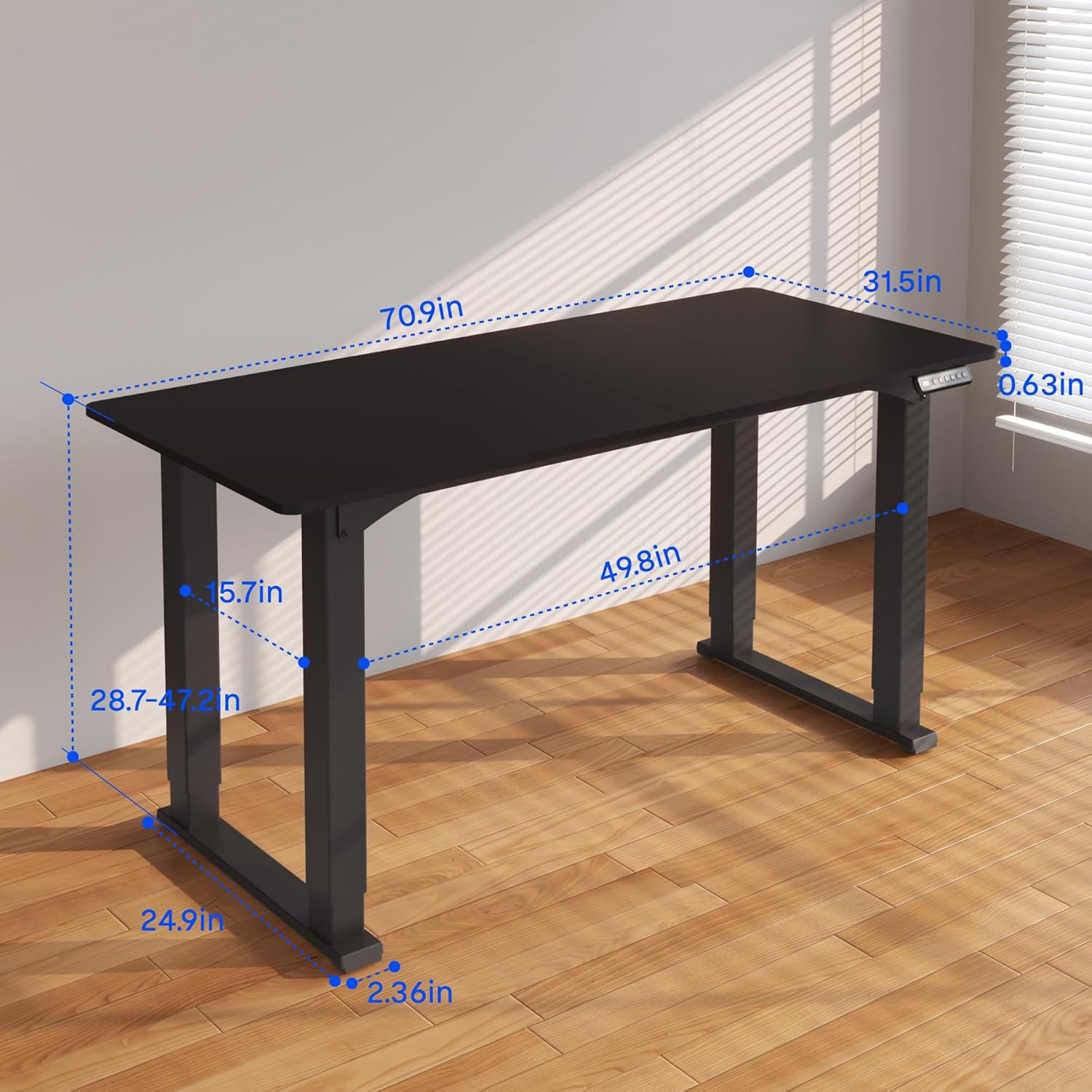
Figure 3.2: Detailed dimensions of the desk, including height range and desktop size.
4. آپريٽنگ هدايتون
The FLEXISPOT 4 Leg Standing Desk features an intuitive LED control panel for easy height adjustments and memory settings.
4.1. ڪنٽرول پينل اوورview

Figure 4.1: Digital Keypad with memory functions and up/down controls.
- مٿي/هيٺ تير (▲ / ▼): Press and hold to adjust the desk height upwards or downwards. The current height is displayed on the LED screen.
- ميموري بٽڻ (1، 2، 3): اهي بٽڻ توهان کي ترجيحي اوچائي سيٽنگون محفوظ ڪرڻ ۽ ياد ڪرڻ جي اجازت ڏين ٿا.
- ميموري سيٽ بٽڻ (M): Used to program a height into a memory slot.
4.2. اونچائي کي ترتيب ڏيڻ
To adjust the desk height, press and hold the ▲ (Up) or ▼ (Down) arrow button until the desk reaches your desired position. The desk will move smoothly between 28.7 inches and 47.2 inches.
4.3. Saving Memory Presets
You can save up to three preferred height settings for quick recall:
- مٿي/هيٺ تيرن جي استعمال سان ڊيسڪ کي پنهنجي گهربل اوچائي تي ترتيب ڏيو.
- Press the 'M' button. The LED display will show 'S-'.
- Within 3 seconds, press one of the memory buttons (1, 2, or 3). The LED display will show 'S-1', 'S-2', or 'S-3' to confirm the setting has been saved.
4.4. Recalling Memory Presets
To move the desk to a saved height, press and رکو the corresponding memory button (1, 2, or 3) until the desk reaches the programmed height.
4.5. ٽڪراءُ مخالف نظام
The desk is equipped with an anti-collision system to prevent damage. If the desk encounters an obstruction during movement, it will stop and reverse slightly. Remove the obstruction before resuming operation.

Figure 4.2: Anti-collision system in action, preventing damage from obstructions.
5. سار سنڀال
Regular maintenance ensures the longevity and smooth operation of your standing desk.
- صفائي: ڊيسڪ ٽاپ ۽ فريم کي نرم، ڊي سان صاف ڪريوamp ڪپڙو. سخت ڪيميڪلز يا رگڙيندڙ صاف ڪندڙن کان پاسو ڪريو.
- ڪيبل جو انتظام: وقتي طور تي ڪيبلن کي چيڪ ڪريو ۽ ترتيب ڏيو ته جيئن ڇڪتاڻ کي روڪيو وڃي ۽ پڪ ڪريو ته اهي ڊيسڪ جي حرڪت ۾ مداخلت نه ڪن.
- فاسٽنر چيڪ: ڪڏهن ڪڏهن سڀني اسڪرو ۽ بولٽن کي چيڪ ڪريو ته جيئن پڪ ڪري سگهجي ته اهي سخت رهن. جيڪڏهن ضروري هجي ته ٻيهر مضبوط ڪريو.
- موٽر سنڀال: The electric motors are maintenance-free. Do not attempt to lubricate or disassemble them.
6. مسئلا حل ڪرڻ
جيڪڏهن توهان کي پنهنجي ڊيسڪ سان مسئلا درپيش اچن ٿا، ته هيٺ ڏنل عام مسئلن ۽ حلن جو حوالو ڏيو:
- ڊيسڪ نه حرڪت:
- چيڪ ڪريو ته ڇا پاور ڪنڊ ڊيسڪ ۽ وال آئوٽليٽ ٻنهي ۾ محفوظ طور تي لڳل آهي.
- پڪ ڪريو ته سڀئي موٽر ڪيبل ڪنٽرول باڪس سان صحيح طرح سان ڳنڍيل آهن.
- Perform a reset: Press and hold the 'Down' button until the desk reaches its lowest point and slightly retracts, then release.
- Uneven Movement or Wobbling:
- Ensure the desk is on a level surface. Adjust the leveling feet if necessary.
- Check that all assembly screws and bolts are tightened securely.
- Verify that the weight on the desk does not exceed the maximum capacity of 220 lbs and is evenly distributed.
- ڊسپلي تي غلطي ڪوڊ:
- If an error code appears, try performing a reset as described above.
- If the error persists, disconnect power for 10 minutes, then reconnect and try again.
- Consult the manufacturer's website or contact customer support with the specific error code.
- ميموري پريزٽس ڪم نه ڪري رهيا آهن:
- Ensure you are pressing and رکڻ the memory button until the desk reaches the saved height.
- Re-program the memory presets if they are not recalling correctly.
جيڪڏهن انهن قدمن سان مسئلو حل نه ٿيو ته مهرباني ڪري وڌيڪ مدد لاءِ FLEXISPOT ڪسٽمر سپورٽ سان رابطو ڪريو.
7. وضاحتون
| خاصيت | تفصيل |
|---|---|
| برانڊ | FLEXISPOT |
| ماڊل نمبر | QS2B-1880-AU |
| ڊيسڪٽاپ جي سائيز | 71"D x 32"W (approx. 180.3cm x 81.3cm) |
| Adjustable اوچائي رينج | 28.7" to 47.2" (approx. 72.9cm to 119.9cm) |
| وڌ ۾ وڌ وزن جي گنجائش | 220 پائونڊ (100 ڪلوگرام) |
| فريم مواد | ڌاتو |
| مٿيون مواد | ڪاٺ |
| رنگ | ڪارو فريم ۽ ڪارو مٿي |
| ڪنٽرول قسم | LED Digital Keypad with Memory Presets |
| خاص خاصيتون | 4-Leg Design, Anti-Collision System, Corded Operation |
| اسيمبلي گهربل | ها |
8. وارنٽي ۽ سپورٽ
FLEXISPOT توهان جي ذهني سڪون لاءِ جامع وارنٽي ڪوريج فراهم ڪري ٿو:
- 5 سال وارنٽي: Covers the desk frame and motor components.
- 2 سال وارنٽي: Covers the control panel and other electronic parts.
For warranty claims, technical support, or any questions regarding your FLEXISPOT product, please visit the official FLEXISPOT website or contact their customer service department. Please have your model number (QS2B-1880-AU) and proof of purchase available when contacting support.