
1. حفاظتي هدايتون
Please read these safety instructions carefully before using the product. Keep this manual for future reference.
- هي پراڊڪٽ صرف اندروني استعمال لاءِ ٺهيل آهي. نمي يا انتهائي گرمي پد جي سامهون نه اچو.
- ڊوائيس کي کولڻ يا تبديل ڪرڻ جي ڪوشش نه ڪريو. اهو وارنٽي کي رد ڪري سگهي ٿو ۽ حفاظتي خطرو پيدا ڪري سگهي ٿو.
- ڊوائيس کي ٻارن کان پري رکو.
- Use only the provided micro-USB cable for charging.
- سڌو سنئون LED لائٽ ماخذ ۾ نه ڏسو.
2. پيڪيج مواد
پڪ ڪريو ته سڀئي شيون پيڪيج ۾ موجود آهن:
- ANSMANN Under-Cabinet Light M
- مائڪرو-USB چارجنگ ڪيبل
- ھدايت وارو دستور
3. پراڊڪٽ ختمview
The ANSMANN Under-Cabinet Light M is a versatile, rechargeable LED lamp designed for various indoor applications. It features a motion sensor, adjustable color temperatures, and a slim design for discreet placement.

Image 1: The ANSMANN Under-Cabinet Light M, showcasing its sleek, white design and integrated motion sensor.
اهم خاصيتون:
- پي آءِ آر موشن سينسر: Automatically activates the light when motion is detected in low-light conditions.
- Twilight Sensor: Ensures the light only activates in dark environments, conserving battery life.
- ترتيب ڏيڻ وارو رنگ گرمي پد: Choose between 3 color temperatures (cool white, neutral white, warm white) or activate all LEDs for maximum brightness.
- بي قدم مدھم ڪرڻ: Adjust brightness by holding down the control button.
- Rechargeable بيٽري: Integrated battery for cordless operation, charged via micro-USB.
- مقناطيسي چڙهڻ: Easy installation and removal with a magnetic strip.

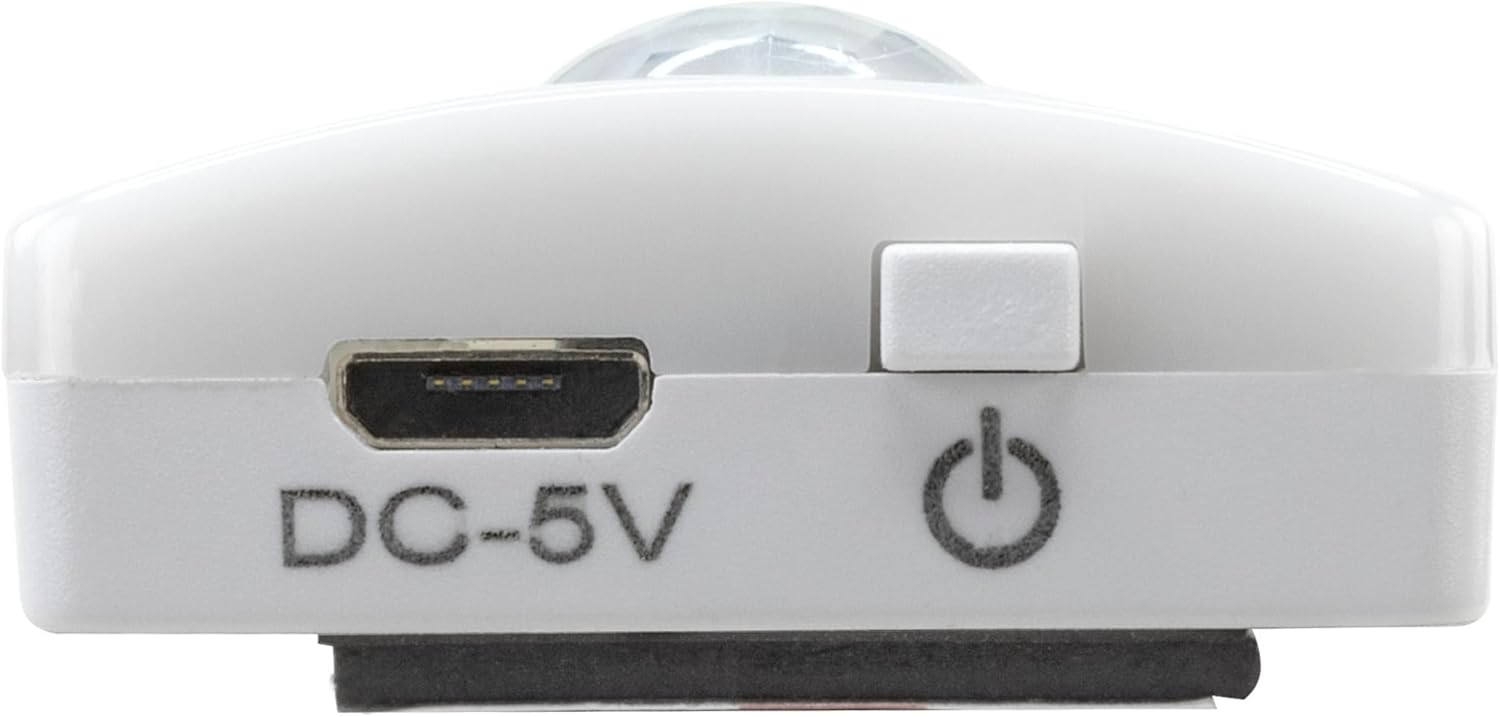
Image 2: Diagram illustrating the Micro-USB Port, On/Off button, and PIR motion sensor on the device.
4. سيٽ اپ ۽ تنصيب
The Under-Cabinet Light M offers flexible installation options using its integrated magnetic strip.
مقناطيسي چڙهڻ:
- Identify a suitable, clean, and dry surface for installation (e.g., inside a cabinet, under a shelf).
- The light comes with a fixed magnetic strip on its back. For non-metallic surfaces, use the included adhesive strip.
- Peel off the protective film from the adhesive strip and firmly press it onto the desired surface.
- Attach the Under-Cabinet Light M to the adhesive strip. The magnetic connection will hold it in place.
تصوير 3: ويجهو تصوير view of the magnetic strip and the removable adhesive strip, demonstrating the mounting mechanism.

تصوير 4: اڳوڻيample of the under-cabinet light installed in a modern kitchen setting, providing illumination over a countertop.
5. آپريشن
The Under-Cabinet Light M offers intuitive control for its lighting functions.
پاور آن / آف:
- Locate the On/Off button (refer to Image 2).
- Press the button once to turn the light on or off.
رنگ جي درجه حرارت کي ترتيب ڏيڻ:
- With the light on, short press the control button repeatedly to cycle through the 3 available color temperatures: cool white, neutral white, and warm white.
- A fourth press will activate all LEDs for maximum brightness.
ڊمنگ فنڪشن:
- To adjust the brightness, press and hold the control button. The light will gradually dim or brighten. Release the button when the desired brightness level is reached.
Motion and Twilight Sensor:
- When the light is in motion sensor mode, it will automatically turn on when movement is detected within its range.
- The integrated twilight sensor ensures that the motion sensor only activates the light in dark environments, preventing unnecessary illumination during daylight hours.
6. چارج ڪرڻ
The Under-Cabinet Light M is equipped with a rechargeable battery for convenient cordless use.
- When the battery is low, the light output may decrease or the light may not turn on.
- Gently detach the light from its magnetic mounting surface.
- Connect the provided micro-USB cable to the micro-USB port on the light (refer to Image 2).
- Connect the other end of the micro-USB cable to a suitable USB power source (e.g., USB wall adapter, computer USB port).
- An indicator light will show the charging status (e.g., red for charging, green for fully charged).
- Once fully charged, disconnect the cable and reattach the light to its mounting surface.

تصوير 5: تفصيلي view of the Micro-USB charging port and the On/Off button, essential for charging and operation.
7. سار سنڀال
To ensure the longevity and optimal performance of your Under-Cabinet Light M, follow these simple maintenance guidelines:
- Clean the light regularly with a soft, dry cloth. Do not use abrasive cleaners or solvents.
- Ensure the motion sensor lens is kept clean and free from obstructions for proper function.
- Store the light in a cool, dry place if not in use for extended periods.
8. مسئلا حل ڪرڻ
If you encounter issues with your Under-Cabinet Light M, refer to the following common problems and solutions:
| مسئلو | ممڪن سبب | حل |
|---|---|---|
| روشني doesرندي ناهي. | بيٽري ختم ٿي وئي آهي. | Charge the light using the micro-USB cable. |
| موشن سينسر حرڪت کي نه ٿو سڃاڻي. | Ensure the sensor is clean and unobstructed. Check if the environment is dark enough for the twilight sensor to activate. | |
| روشني چارج نٿي ٿئي. | ناقص ڪيبل يا طاقت جو ذريعو. | Try a different micro-USB cable or USB power adapter. |
| چارجنگ پورٽ گندو آهي. | Gently clean the micro-USB port with a dry, soft brush. | |
| روشني ٽمڪي رهي آهي يا مدھم آهي. | گھٽ بيٽري. | ڊوائيس ري چارج ڪريو. |
جيڪڏهن انهن حلن جي ڪوشش ڪرڻ کان پوءِ به مسئلو برقرار رهي، مهرباني ڪري ڪسٽمر سپورٽ سان رابطو ڪريو.
9. وضاحتون
| خاصيت | تفصيل |
|---|---|
| ماڊل نمبر | 1600-0438 |
| پيداوار جي ماپ | 25L x 3.5W x 1.3H سينٽي ميٽر (9.84L x 1.38W x 0.51H انچ) |
| شيءِ جو وزن | 112 گرام (0.25 پائونڊ) |
| طاقت جو ذريعو | بيٽري سان هلندڙ |
| چارجنگ پورٽ | Micro-USB (DC-5V) |
| مواد | پلاسٽڪ |
| رنگ | اڇو |
| انسٽاليشن جو قسم | ڀت تي لڳل جبل (مقناطيسي) |
| ڪمري جو قسم | Dining Room, Kitchen, Wardrobe, Hallway, etc. |
10. وارنٽي ۽ سپورٽ
ANSMANN products are manufactured with high-quality standards. For information regarding warranty terms and conditions, please refer to the documentation provided with your purchase or visit the official ANSMANN webسائيٽ.
For technical support or inquiries, please contact ANSMANN customer service through their official channels.