
1. تعارف
This manual provides instructions for the HCDZ Replacement Remote Control, designed for use with various Epson 3LCD 4K Large Venue Laser Projectors. This remote offers direct functionality without the need for programming.
پيڪيج مواد:
- 1 x HCDZ Replacement Remote Control
Note: Batteries and additional instructions are not included in the package.
2. سيٽ اپ
2.1 بيٽري لڳائڻ
ريموٽ ڪنٽرول کي ٻه AAA بيٽريون گهرجن (شامل نه آهن). انهن کي انسٽال ڪرڻ لاءِ انهن قدمن تي عمل ڪريو:
- ريموٽ ڪنٽرول جي پٺيءَ تي بيٽري جي دٻي جي احاطي کي ڳولھيو.
- ڍڪ کي هيٺئين طرف سلائڊ ڪريو يا لچ کي دٻايو ۽ ڪمپارٽمينٽ کولڻ لاءِ مٿي ڪريو.
- ٻہ AAA بيٽريون داخل ڪريو، پڪ ڪريو ته مثبت (+) ۽ منفي (-) ٽرمينل ڪمري اندر نشانن سان صحيح طرح سان ترتيب ڏين.
- بيٽري جي ڪمپارٽمينٽ جي ڍڪ کي تبديل ڪريو، ان کي واپس جاءِ تي سلائڊ ڪريو جيستائين اهو محفوظ طور تي ڪلڪ نه ڪري.

Image: Back of the remote control with the battery compartment open, illustrating correct AAA battery placement.
2.2 شروعاتي استعمال
Once batteries are correctly installed, the remote control is ready for immediate use. No programming or pairing is required. Point the remote directly at your Epson projector's infrared (IR) sensor.
3. ريموٽ ڪنٽرول کي هلائڻ
This remote control provides full functionality for your compatible Epson projector. Refer to your projector's original user manual for specific functions of each button.
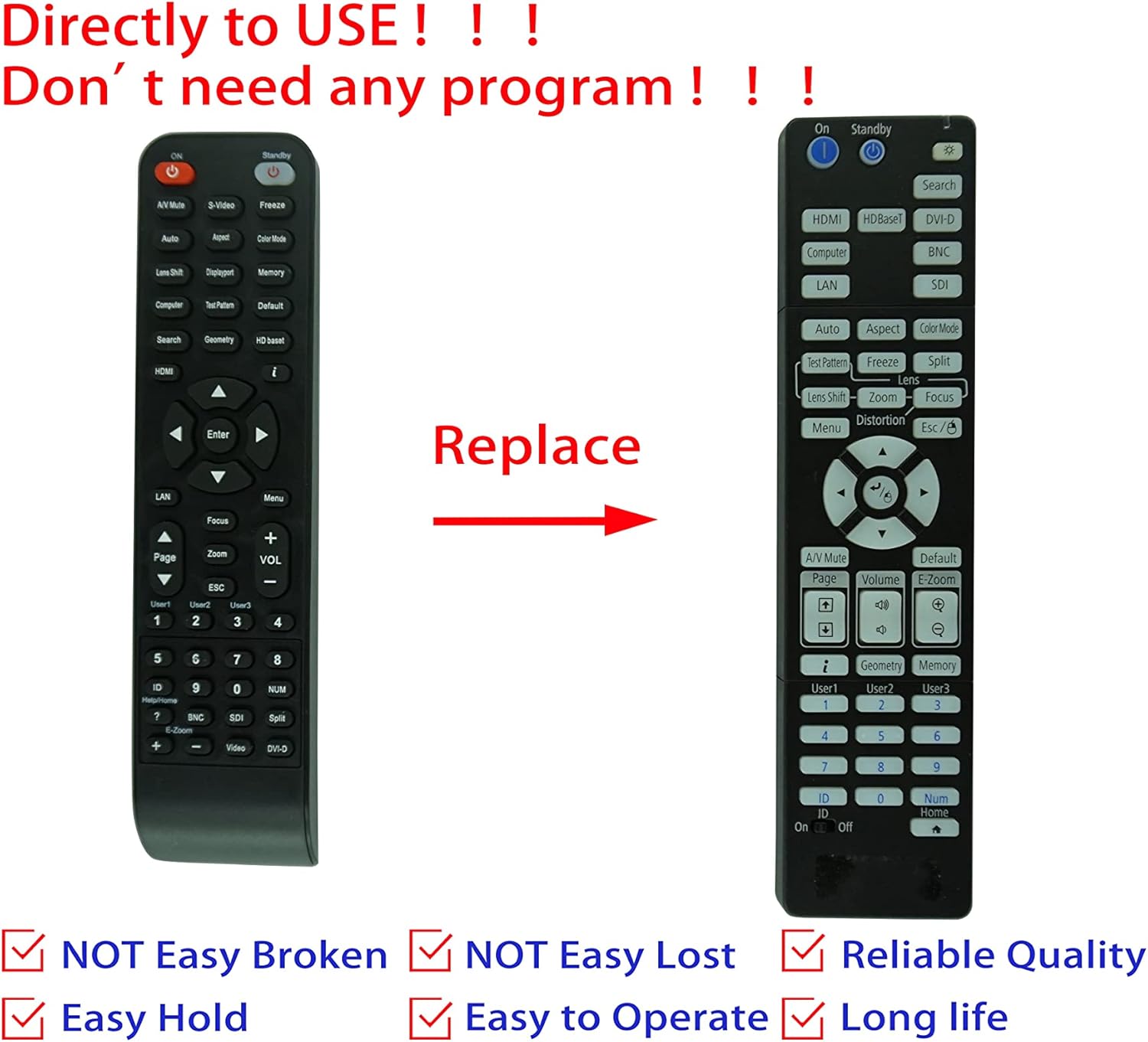
Image: Comparison of an original Epson remote (left) and the HCDZ replacement remote (right), highlighting the replacement functionality.
3.1 Key Functions (General)
- پاور آن / آف: Typically a dedicated button, often red or clearly marked.
- ان پٽ چونڊ: Buttons for HDMI, Computer, Video, etc., to switch input sources.
- نيويگيشن: Arrow keys (Up, Down, Left, Right) and an Enter/OK button for menu navigation.
- مينيو: Accesses the projector's on-screen display (OSD) menu.
- حجم: Adjusts audio output if the projector has built-in speakers or audio pass-through.
- زوم/فوڪس: Adjusts the projected image size and clarity.
- عددي ڪي پيڊ: For direct input or selecting specific functions.
4. سار سنڀال ۽ سنڀال
To ensure the longevity and proper functioning of your remote control, observe the following guidelines:
- صفائي: ريموٽ کي نرم، سڪل ڪپڙي سان صاف ڪريو. مائع صاف ڪندڙ يا رگڙيندڙ مواد استعمال نه ڪريو.
- ماحول: Avoid exposing the remote to extreme temperatures, high humidity, or direct sunlight.
- بيٽري مٽائڻ: Replace both batteries simultaneously. Do not mix new and old batteries, or different types of batteries.
- اسٽوريج: جيڪڏهن ريموٽ ڊگهي عرصي تائين استعمال نه ٿيندو، ته پوءِ ليڪيج ۽ امڪاني نقصان کي روڪڻ لاءِ بيٽريون هٽايو.
- اثر: ريموٽ کي ڇڏڻ يا ان کي مضبوط اثرن جي تابع ڪرڻ کان پاسو ڪريو.

تصوير: پوئين پاسي view of the HCDZ remote control, illustrating its design.
5. مسئلا حل ڪرڻ
جيڪڏهن توهان کي پنهنجي ريموٽ ڪنٽرول سان مسئلا درپيش اچن ٿا، ته هيٺ ڏنل مسئلا حل ڪرڻ جا قدم آزمايو:
- ريموٽ جواب نه ڏيڻ:
- پڪ ڪريو ته بيٽريون صحيح پولارٽي سان صحيح طرح سان داخل ڪيون ويون آهن.
- پراڻين بيٽرين کي تازين AAA بيٽرين سان تبديل ڪريو.
- Check for any obstructions between the remote and the projector's IR sensor.
- Ensure you are within the effective range and pointing the remote directly at the projector.
- وقفي واري ڪارڪردگي:
- Strong light sources (e.g., direct sunlight, fluorescent lights) can interfere with IR signals. Try operating the remote in a different lighting condition.
- پڪ ڪريو ته بيٽري رابطا صاف ۽ سنکنرن کان پاڪ آهن.
6. وضاحتون
| خاصيت | تفصيل |
|---|---|
| برانڊ | ايڇ سي ڊي زيڊ |
| مطابقت | Epson EB-PU2010B, EB-PU1007B, EB-PU2010W, EB-PU1007W, EB-PU1008B, EB-PU1006W, EB-PU1008W Projectors |
| رابطي ٽيڪنالاجي | انفراريڊ (IR) |
| طاقت جو ذريعو | 2 x AAA بيٽريون (شامل نه آهن) |
| پروگرامنگ گهربل | نه |
| رنگ | ڪارو |
7. وارنٽي ۽ سپورٽ
This HCDZ replacement remote control comes with a 90-day warranty from the date of purchase. This warranty covers manufacturing defects under normal use.
For warranty claims or technical support, please contact your retailer or the HCDZ customer service department with your purchase details.
مھرباني ڪري وارنٽي جي مقصدن لاءِ خريداري جو ثبوت رکو.