
1. پراڊڪٽ ختمview
The emotal Dual-Mic AI Noise Cancelling Bluetooth Headset is designed for clear communication and extended use, ideal for cell phone calls, driving, and business environments. It features advanced AI noise-cancelling technology, dual HD microphones, and a lightweight, ergonomic design for comfort.
اهم خاصيتون شامل آهن:
- AI Noise-Cancelling: Isolates your voice from background noise for crystal-clear conversations.
- وڌايل ڳالهائڻ جو وقت: Up to 30 hours of HD talk time and 240 hours of standby on a 1.5-hour charge. Includes a quick charge feature for 3 hours of playtime with a 10-minute charge.
- Ultralight & Ergonomic: Weighing only 0.5oz, designed for comfortable, secure fit during long periods of use.
- IPX6 پنروڪ: ڇِپڙن ۽ پسيني کان بچاءُ فراهم ڪري ٿو.
- ٻٽي بيٽري سسٽم: Comes with an extra battery for continuous use.

Image: The emotal Dual-Mic AI Noise Cancelling Bluetooth Headset, showcasing its sleek black design and over-ear hook.
2. پيڪيج مواد
پڪ ڪريو ته سڀئي شيون پيڪيج ۾ موجود آهن:
- 1x emotal Bluetooth Headset
- 1x USB-C چارجنگ ڪيبل
- 6x Eartips (one pair pre-installed)
- 1x استعمال ڪندڙ دستياب
- 1x اضافي بيٽري
3. سيٽ اپ گائيڊ
3.1 شروعاتي چارجنگ
Before first use, fully charge the headset. The headset needs to be detached from the ear hook for charging.
- Detach the main headset unit from the ear hook.
- Connect the USB-C cable to the charging port on the headset unit.
- USB-C ڪيبل جي ٻئي ڇيڙي کي هڪ مطابقت رکندڙ USB پاور سورس سان ڳنڍيو (مثال طور، وال اڊاپٽر، ڪمپيوٽر USB پورٽ).
- The indicator light will show charging status (refer to LED indicator section for details). A full charge takes approximately 1.5 hours.
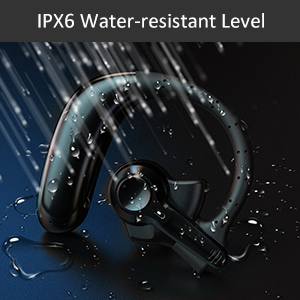
Image: Correct USB-C charging method for the headset, showing the detachable unit being charged.
3.2 Eartip Selection
For optimal sound quality and comfort, select the eartip size that best fits your ear canal. Three sizes are provided.

Image: Illustration of different eartip sizes and how to achieve a secure and comfortable fit in the ear.
3.3 هيڊ سيٽ پائڻ
The headset is designed for use in either the left or right ear. The main unit can be rotated and the microphone adjusted for optimal positioning.
- ڪن جي ڪُنڊ کي پنهنجي ڪن تي رکو.
- Insert the eartip into your ear canal.
- Adjust the main unit by rotating it 180 degrees to switch between left and right ear wear.
- Adjust the microphone boom to point towards your mouth for clear voice pickup.
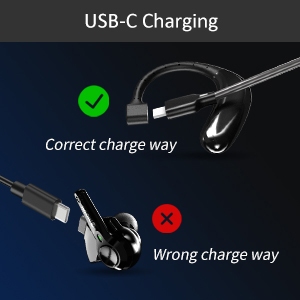
Image: Step-by-step guide on how to switch the headset for left or right ear use by rotating the main unit and adjusting the microphone.
3.4 بلوٽوٽ جوڙي
پنهنجي هيڊ سيٽ کي ڪنهن ڊوائيس سان ڳنڍڻ لاءِ:
- پڪ ڪريو ته هيڊ سيٽ چارج ٿيل آهي ۽ بند آهي.
- Press and hold the multi-function button on the headset for 3-5 seconds until the indicator light flashes blue and red, indicating pairing mode.
- پنهنجي ڊوائيس (اسمارٽ فون، ٽيبليٽ، ليپ ٽاپ) تي، بلوٽوٿ کي فعال ڪريو.
- ڳولھيو "emotal UFO4-01" (or similar name) in the list of available Bluetooth devices.
- Select the headset to connect. Once connected, the indicator light will turn solid blue or flash slowly.
نوٽ: The headset cannot connect with two devices simultaneously.
4. آپريٽنگ هدايتون
4.1 بنيادي ڪنٽرول
The headset features a single multi-function button for various operations:
- پاور آن / آف: Long touch for 3 seconds to power on, 5 seconds to power off.
- اڳيون گيت: Double touch the button.
- جواب ڏيو / ڪال بند ڪريو: Double touch the button.
- حجم مٿي Long touch the button. (Note: There is no dedicated volume down or mute button on the headset itself. Volume down must be controlled via the connected device.)
- وائيس اسسٽنٽ (سري/گوگل اسسٽنٽ) کي چالو ڪريو: Triple touch the button.

Image: Visual representation of the single button controls for power, music playback, call management, volume, and voice assistant activation.
4.2 ڪال مئنيجمينٽ
The dual-mic AI noise-cancelling technology ensures clear conversations even in noisy environments.

Image: Diagram illustrating how dual-mic and AI noise cancelling technology reduce background noise for clearer calls, showing "Before" and "After" sound wave comparisons.
For business professionals and truckers, the headset provides a hands-free solution for reliable communication on the go.
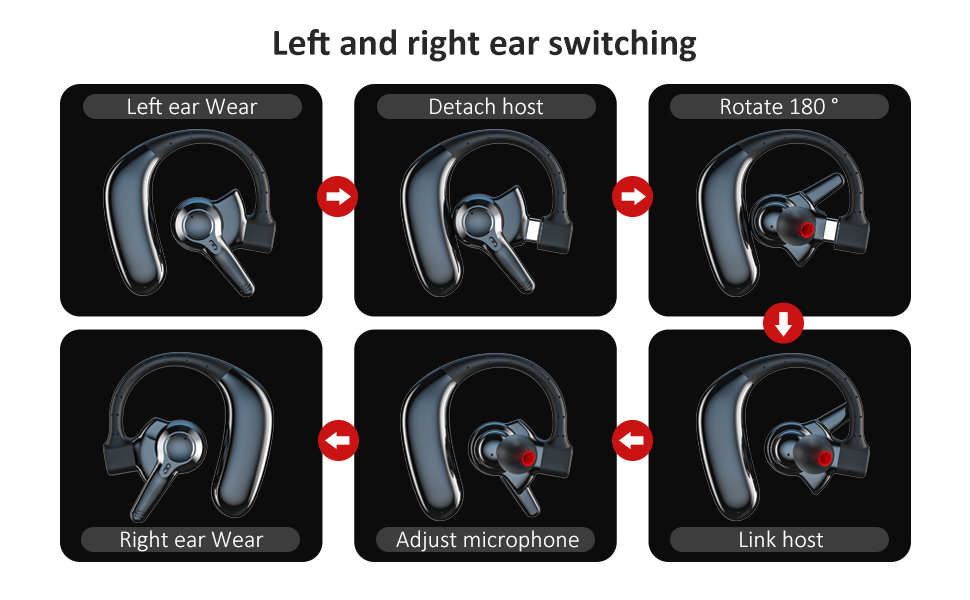
Image: A man driving a car while wearing the headset, emphasizing its hands-free functionality for calls on the road.
4.3 بيٽري جو انتظام
The headset offers significant battery life and comes with an extra battery for extended use.

Image: Visual representation of the headset's battery life, highlighting 30 hours of HD talk time and 240 hours of standby time.
To swap batteries:
- Gently detach the current battery unit from the headset.
- Attach the fully charged spare battery to the headset.
- Charge the depleted battery using the USB-C cable for future use.
5. سار سنڀال ۽ سنڀال
To ensure the longevity and optimal performance of your emotal Bluetooth Headset, follow these care instructions:
- صفائي: هيڊ سيٽ کي نرم، سڪل ڪپڙي سان صاف ڪريو. رگڙيندڙ صاف ڪندڙ يا سالوينٽس استعمال نه ڪريو.
- پاڻي جي مزاحمت: The headset is IPX6 waterproof, meaning it is protected against powerful water jets. It can withstand sweat and light rain, but it is not designed for submersion in water.
- اسٽوريج: هيڊ سيٽ کي انتهائي گرمي پد ۽ سڌي سج جي روشني کان پري ٿڌي، سڪل جاءِ تي رکو.
- بيٽري جي سنڀال: Avoid fully depleting the battery frequently. Charge it regularly to maintain battery health.
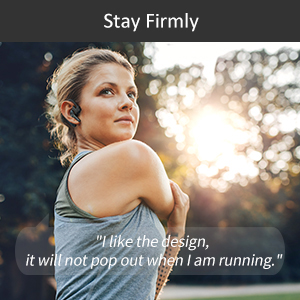
Image: Visual depicting the headset's IPX6 water resistance, showing water splashing on the device.
6. مسئلا حل ڪرڻ
جيڪڏهن توهان کي پنهنجي هيڊ سيٽ سان مسئلا درپيش اچن ٿا، ته هيٺ ڏنل حل آزمايو:
| مسئلو | ممڪن حل |
|---|---|
| Headset won't power on. | Ensure the headset is fully charged. Press and hold the multi-function button for 3 seconds. |
| ڊوائيس سان جوڙو نه ٿو ٺاهي سگهجي. | Ensure Bluetooth is enabled on your device and the headset is in pairing mode (flashing blue/red light). Make sure the headset is not already connected to another device. Restart both devices and try again. |
| ڪالن دوران خراب آڊيو معيار. | Ensure the microphone is adjusted to point towards your mouth. Check for obstructions. Move closer to your connected device to avoid interference. |
| Volume is too low/high. | Adjust volume using the long touch on the multi-function button (volume up only) or directly from your connected device. |
| هيڊ سيٽ بار بار ڪٽجي ويندو آهي. | Ensure you are within the Bluetooth range (approx. 33 feet/10 meters). Avoid strong electromagnetic interference. Re-pair the headset if necessary. |
7. وضاحتون
| خاصيت | تفصيل |
|---|---|
| ماڊل نالو | UFO4-01 |
| رابطي ٽيڪنالاجي | وائرليس (بلوٽوٿ 5.0) |
| شور ڪنٽرول | Active Noise Cancellation (AI Noise Cancelling) |
| ڳالهائڻ جو وقت | Up to 30 Hours HD Talk Time |
| اسٽينڊ بائي ٽائيم | 240 ڪلاڪ تائين |
| چارج ڪرڻ وقت | لڳ ڀڳ. 1.5 ڪلاڪ |
| پاڻي جي مزاحمت جي سطح | IPX6 پنروڪ |
| شيءِ جو وزن | 0.48 آونس (تقريبن 0.03 پائونڊ) |
| پيداوار جي ماپ | 2.36 x 1.96 x 1.1 انچ |
| مطابقت رکندڙ ڊوائيسز | Cellphones (iOS/Android), Windows |
| ڪنٽرول قسم | Voice Control (Siri, Google Assistant) |
| ڪن جي شڪل | Circle (In Ear with Over-Ear Hook) |
| مواد | جامع |
| يو پي سي | 850040753158 |
8. وارنٽي ۽ سپورٽ
emotal offers comprehensive customer support for your headset:
- وارنٽي: Replacement within 18 months of purchase.
- ڪسٽمر سروس: 24-hour customer service is available for any concerns or inquiries. Please contact us via message through your purchase platform.
- اضافي وسيلا: For further details, you may refer to the official User Guide and Safety Information PDFs available online.
For the most up-to-date support information, please visit the official emotal store or contact customer service directly.