
1. تعارف
Thank you for choosing the FLEXISPOT EG1 Electric Standing Desk. This manual provides essential information for the safe and efficient assembly, operation, and maintenance of your new height-adjustable desk. The EG1 desk is designed to promote a healthier work environment by allowing seamless transitions between sitting and standing positions, enhancing focus and comfort throughout your workday.
The FLEXISPOT EG1 features a wide height adjustment range, a smooth one-piece desktop, and an intuitive control panel for ease of use. Please read this manual thoroughly before assembly and operation to ensure proper functionality and longevity of your product.
2. حفاظت جي ڄاڻ
- Ensure all components are present and undamaged before assembly. Do not use if any parts are missing or damaged.
- زخم کان بچڻ لاءِ آپريشن دوران ٻارن ۽ پالتو جانورن کي ڊيسڪ کان پري رکو.
- Do not place hands or other objects near moving parts (e.g., lifting columns) during height adjustment.
- Ensure the desk is placed on a level surface to maintain stability.
- ڊيسڪ کي اوورلوڊ نه ڪريو. وڌ ۾ وڌ وزن جي گنجائش لاءِ وضاحتن جو حوالو ڏيو.
- صرف مهيا ڪيل پاور اڊاپٽر ۽ ڪيبل استعمال ڪريو.
- صفائي يا سار سنڀال کان اڳ بجلي بند ڪريو.
- ڪنٽرول پينل يا بجليءَ جي حصن تي مائع ڦھلائڻ کان پاسو ڪريو.
- This desk is equipped with an anti-collision rebound function. However, always be aware of surroundings during movement.
3. پيڪيج مواد
The FLEXISPOT EG1 Electric Standing Desk is shipped in two separate packages to ensure better protection during transit. Please verify that all components listed below are present before beginning assembly.
- Desktop (1 piece)
- Desk Frame (includes legs, motor, control box)
- ڪنٽرول پينل
- پاور اڊاپٽر ۽ ڪيبل
- اسيمبلي هارڊويئر (اسڪرو، بولٽ، اوزار)
- ھدايت وارو دستور

Image: The FlexiSpot EG1 desk components are shipped in two distinct packages: one containing the desktop and another for the desk frame, ensuring secure delivery.
4. سيٽ اپ ۽ اسيمبلي
Assembly of the FLEXISPOT EG1 desk is designed to be straightforward with pre-drilled holes and a complete set of tools included. Follow these general steps for assembly:
- انپيڪ اجزاء: پيڪنگ مان سڀني حصن کي احتياط سان هٽايو ۽ انهن کي صاف، نرم مٿاڇري تي رکو ته جيئن ڇڪڻ کان بچي سگهجي.
- ڊيسڪ فريم گڏ ڪريو: Attach the lifting columns to the crossbar, ensuring all screws are securely tightened.
- پير ڳنڍيو: Secure the foot pads to the bottom of the lifting columns. The anti-slip foot pads provide stability and protect your floor.
- ماؤنٽ ڊيسڪ ٽاپ: Carefully place the desktop upside down on a soft surface. Align the assembled desk frame with the pre-drilled holes on the desktop and secure it with the provided screws.
- ڪنٽرول پينل انسٽال ڪريو: Attach the control panel to the underside of the desktop in a convenient location.
- ڪيبل ڳنڍڻ: Connect the motor cables, control panel cable, and power adapter to the control box. Ensure all connections are firm.
- ڪيبل جو انتظام: Use cable ties or clips (if provided) to organize and secure cables, preventing them from snagging during height adjustments.
- پوزيشن ڊيسڪ: Carefully flip the desk upright and place it in its desired location. Ensure there is adequate clearance for height adjustments.
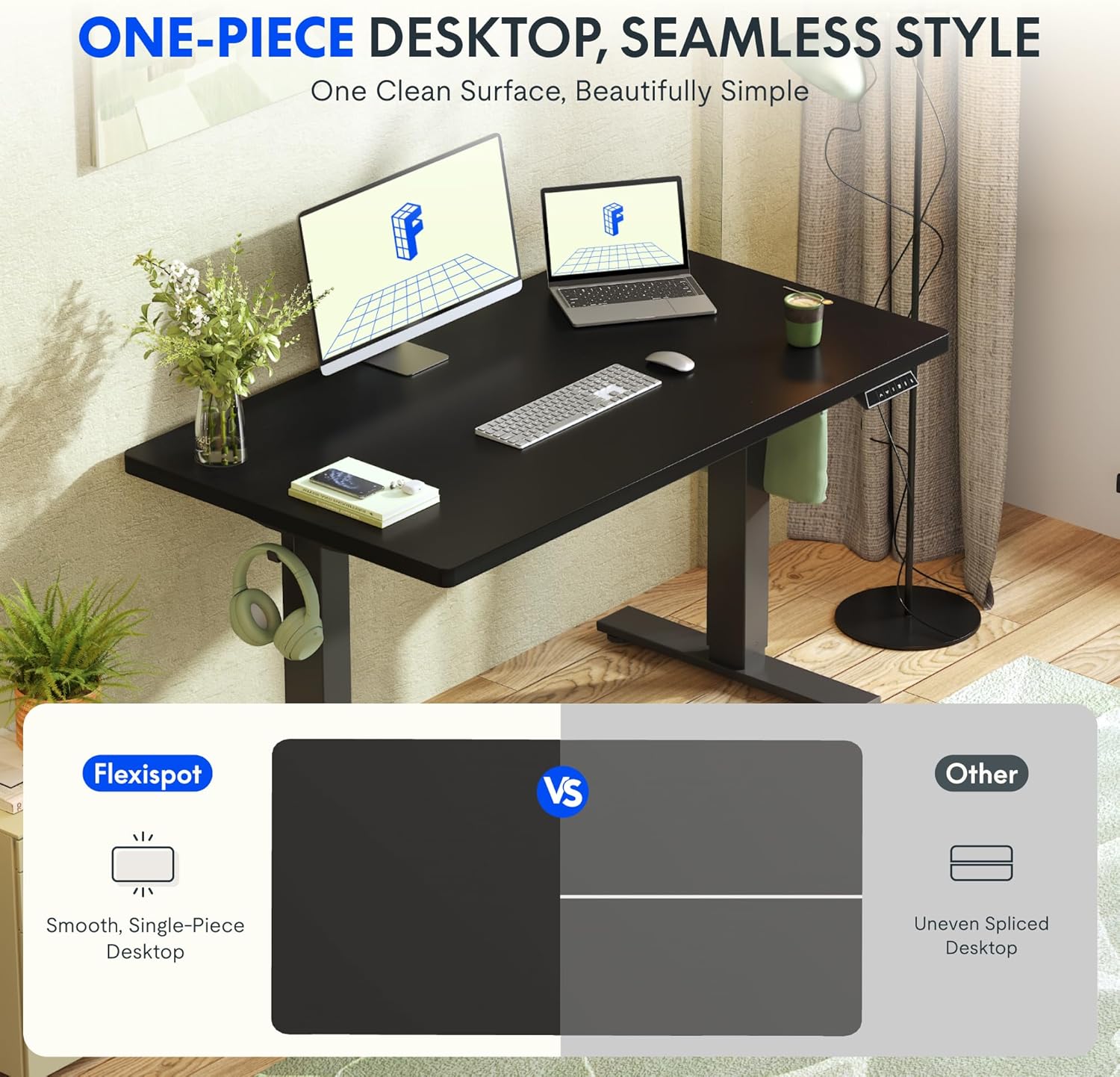
Image: The desk features a smooth, one-piece desktop, eliminating gaps and burrs often found in spliced desktops, contributing to a clean and stable work surface.
5. آپريٽنگ هدايتون
The FLEXISPOT EG1 Electric Standing Desk is operated using a simple 2-button control panel, allowing for quick and easy height adjustments and memory presets.
5.1 ڪنٽرول پينل جا ڪم

Image: The smart control panel features an LED display, up/down buttons for height adjustment, and four memory preset buttons for saving preferred desk heights.
- ايل ايل ڊسپلي: Shows the current desk height in centimeters or inches.
- مٿي/هيٺ بٽڻ (▲ / ▼): Press and hold to move the desk up or down. Release the button to stop at the desired height.
- ياداشت جا اڳواٽ سيٽ (1، 2، 3، 4): These buttons allow you to save and recall up to four preferred desk heights.
5.2 ميموري پري سيٽ سيٽ ڪرڻ
- مٿي/هيٺ بٽڻن کي استعمال ڪندي ڊيسڪ کي پنهنجي گهربل اوچائي تي ترتيب ڏيو.
- Press the 'M' or 'SET' button (if available, otherwise proceed to step 3). The display may flash.
- Press one of the numbered memory buttons (1, 2, 3, or 4) within a few seconds. The display will confirm the setting.
- To recall a saved height, simply press the corresponding numbered memory button. The desk will automatically move to that height.
5.3 ٽڪراءُ مخالف خصوصيت
The desk is equipped with an anti-collision system. If the desk encounters an obstacle during height adjustment, it will automatically stop and reverse slightly to prevent damage. Always ensure the area around the desk is clear during operation.

Image: The desk offers a wide height range (71.5 to 116 cm), accommodating various users for comfortable sitting or standing positions.
6. سار سنڀال
Regular maintenance ensures the longevity and optimal performance of your FLEXISPOT EG1 Electric Standing Desk.
- صفائي: ڊيسڪ ٽاپ ۽ فريم کي نرم، ڊي سان صاف ڪريوamp ڪپڙو. گھڙڻ وارا صاف ڪندڙ يا سخت ڪيميڪلز کان پاسو ڪريو جيڪي ختم کي نقصان پهچائي سگھن ٿا. صفائي ڪرڻ کان اڳ پڪ ڪريو ته ڊيسڪ پلگ ٿيل آهي.
- ڪيبل جو انتظام: Periodically check cables for wear or damage. Ensure they are neatly organized and not pinched or tangled.
- فاسٽنر چيڪ: ڪڏهن ڪڏهن سڀني اسڪرو ۽ بولٽن کي چيڪ ڪريو ته جيئن پڪ ٿئي ته اهي تنگ آهن. جيڪڏهن ضروري هجي ته ٻيهر مضبوط ڪريو.
- تحريڪ جي چڪاس: Operate the desk through its full height range periodically to ensure smooth and consistent movement.
7. مسئلا حل ڪرڻ
If you encounter issues with your FLEXISPOT EG1 desk, refer to the following troubleshooting guide:
| مسئلو | ممڪن سبب | حل |
|---|---|---|
| ڊيسڪ حرڪت نٿي ڪري. | Power cable disconnected, control box error, motor issue. | Check power connections. Unplug and replug the desk for 10 seconds to reset. If problem persists, contact customer support. |
| ڊيسڪ غير مساوي طور تي هلي ٿي يا غير معمولي شور ڪري ٿي. | اڻ برابر لوڊ، ڍلو فاسٽنرز، رڪاوٽ. | Ensure weight is evenly distributed. Check and tighten all assembly fasteners. Clear any obstructions. |
| ترتيب ڏيڻ دوران ڊيسڪ رڪجي ٿي. | Anti-collision activated, overload. | Remove any obstacles. Reduce weight on the desk if it exceeds maximum capacity. |
| ميموري پري سيٽ ڪم نه ڪري رهيا آهن. | Presets not properly saved. | سيڪشن 5.2 ۾ ڏنل هدايتن تي عمل ڪندي ميموري پري سيٽس کي ٻيهر محفوظ ڪريو. |
8. وضاحتون
Key specifications for the FLEXISPOT EG1 Electric Standing Desk:
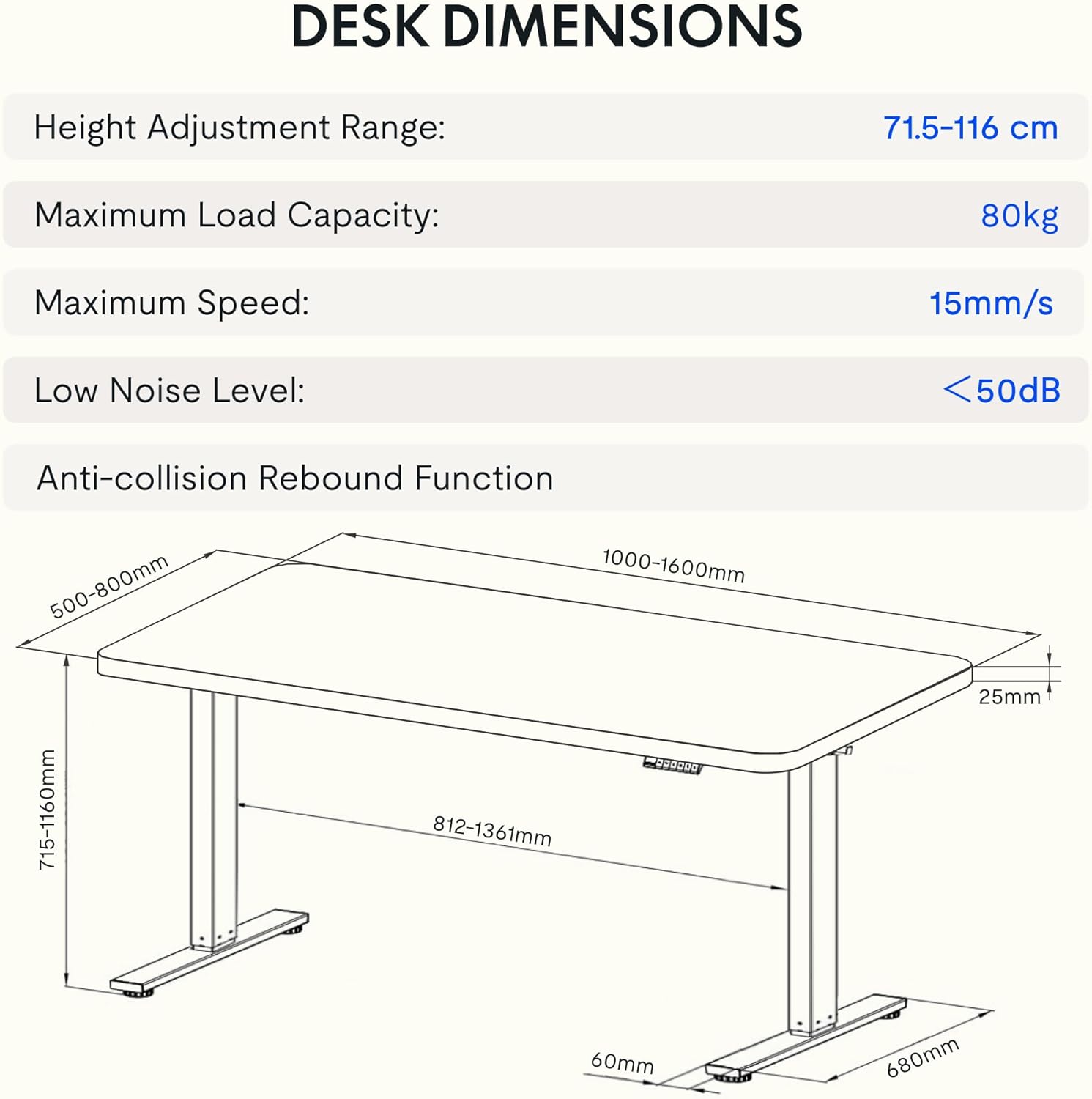
Image: Detailed diagram illustrating the desk's dimensions, height adjustment range (71.5-116 cm), maximum load capacity (80kg), maximum speed (15mm/s), and low noise level (<50dB).
| خاصيت | تفصيل |
|---|---|
| ماڊل نمبر | EG1B+TP1608-Black |
| اونچائي جي ترتيب جي حد | 71.5 - 116 سينٽي ميٽر (28 - 48 انچ) |
| وڌ ۾ وڌ لوڊ گنجائش | 80 ڪلوگرام (176 پائونڊ) |
| وڌ ۾ وڌ رفتار | 15mm/s |
| گھٽ شور جي سطح | <50 ڊي بي |
| ڊيسڪ ٽاپ مواد | Wood (2.5 cm thickness) |
| فريم مواد | اسٽيل |
| پيداوار جا طول و عرض (ڊي x ڊبليو x ايڇ) | 31.5" x 62.99" x 11.02" (packaged) |
| شيءِ جو وزن | 30 ڪلوگرام |
| خاص خاصيتون | Electric, Anti-collision Rebound Function, 4 Memory Presets |
9. وارنٽي ۽ سپورٽ
FLEXISPOT is committed to providing high-quality ergonomic solutions. With over 20 years of experience, our products undergo rigorous testing and meet various European certifications (IGR, CE, TÜV).
For warranty information, technical support, or any questions regarding your FLEXISPOT EG1 Electric Standing Desk, please visit the official FLEXISPOT website or contact our customer service department. You can find more information and contact details on the Amazon تي FLEXISPOT اسٽور.