1. تعارف
The Generic MP20 Home Mini LED Portable Smart Pocket Cinema Video Projector is designed for versatile multimedia entertainment. Featuring a compact design and multiple input options, it allows you to project movies, photos, and text onto various surfaces. This manual provides essential information for setting up, operating, and maintaining your projector.
اهم خاصيتون:
- جديد ڊيزائن: Crafted from environmental projection ABS plastic, ensuring a safe and pollution-free experience.
- Exquisite & Realistic Pictures: Optimized picture quality frame by frame according to digital projector color standard DCI-P3, restoring original filmstrip colors for vivid and smooth visuals.
- Diffuse Reflection Eye Protection: Utilizes diffuse reflection imaging technology for soft light that is gentle on the eyes, promoting a healthy viewتجربو.
- پورٽبل چارج: Supports charging via power bank for convenient use on the go.
- ترقي يافته کولنگ سسٽم: Equipped with an advanced hydraulic axial fan for efficient heat dissipation and low noise operation, ideal for family entertainment.
- مڪمل HD 1080p سپورٽ: Supports up to 1920*1080 pixels resolution for input, with a native resolution of 320*240 pixels.
2. پيڪيج مواد
Upon unpacking, ensure all items listed below are present. If any items are missing or damaged, please contact customer support.
- Generic MP20 Mini LED Projector
- Power Adapter (with UK adapter included)
- Remote Control (requires 2x AAA batteries, not included)
- اي ڪي ڪيبل
- استعمال ڪندڙ ھدايت

Figure 2.1: Generic MP20 Mini LED Projector and its accessories, including the projector unit, power adapter, remote control, and AV cable.
Video 2.1: An unboxing demonstration of the Generic MP20 Mini LED Projector, showcasing the packaging, included accessories, and initial impressions of the device. (Content from 00:00 to 03:52)
3. پراڊڪٽ ختمview
3.1. ڊوائيس جي ترتيب

شڪل 3.1: ختمview of the Generic MP20 Mini LED Projector's control buttons and various input/output interfaces.
3.2. بندرگاهن ۽ ڪنٽرول
- سامهون: Projection Lens, Focus Adjustment Dial.
- مٿي: Power Button, Navigation Buttons (Up, Down, Left, Right, OK), Menu Button, Back Button.
- Side (Right): DC IN (Power Input), HDMI Port, USB Port, 3.5mm Headphone Jack.
- Side (Left): Micro SD Card Slot, AV Input, Micro USB (5V-2A) Port.
- پوئتي: Ventilation Grille.
- هيٺيون: Tripod Mount, Anti-slip Pads.

Figure 3.2: Close-up of the projector's side panel, showing the DC IN, HDMI, USB, and headphone jack ports.
3.3. ڪمپيڪٽ ڊيزائن
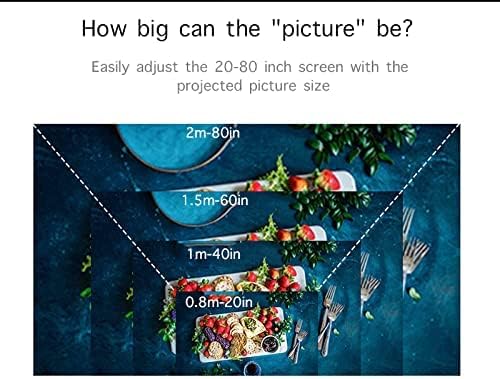
Figure 3.3: The compact size of the MP20 projector, designed for easy portability and handling.
4. سيٽ اپ
4.1. پروجيڪٽر کي پاور آن ڪرڻ
- پاور اڊاپٽر کي پروجيڪٽر تي DC IN پورٽ سان ڳنڍيو.
- پاور اڊاپٽر کي پاور آئوٽليٽ ۾ لڳايو.
- ڊوائيس کي آن ڪرڻ لاءِ پروجيڪٽر يا ريموٽ ڪنٽرول تي پاور بٽڻ کي دٻايو.
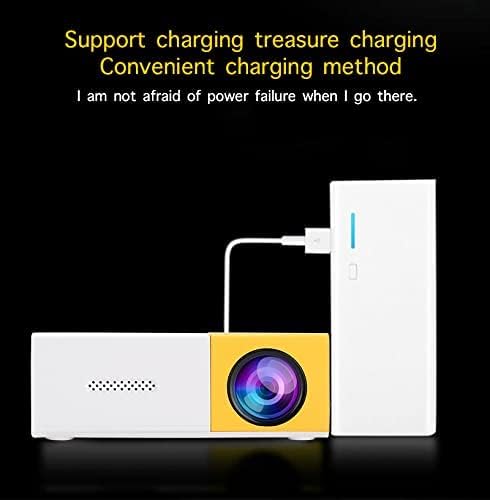
Figure 4.1: The projector can be powered via the included adapter or a portable power bank for flexible use.
4.2. فوڪس کي ترتيب ڏيڻ
Rotate the Focus Adjustment Dial located near the projection lens until the image on the screen appears clear and sharp.
4.3. پروجيڪٽر جي پوزيشن
Place the projector on a stable surface or mount it on a tripod using the bottom screw mount. The optimal projection distance is between 0.8 to 2 meters, yielding a screen size of 24 to 80 inches.

Figure 4.2: The projector offers flexible screen sizes from 24 to 80 inches, depending on the projection distance.
5. آپريٽنگ هدايتون
5.1. ان پٽ سورس چونڊڻ
Use the navigation buttons on the projector or remote to select your desired input source from the main menu. Available inputs include HDMI, USB, Micro SD, and AV.
5.2. مينيو نيويگيشن
The main menu allows selection between Movie, Music, Photo, and Text modes. Further settings for picture, sound, and time can be accessed through the Options menu.
Video 5.1: A demonstration of the projector's operating menu, input selection, and projection quality for various media types including movies, photos, and text. (Content from 03:52 to 08:35)
5.3. تصوير جي معيار
The projector delivers bright and colorful images. While the native resolution is 320x240 pixels, it supports input resolutions up to 1920x1080 pixels. For optimal viewing, especially with text or subtitles, ensure a dark environment and use a large font size.

شڪل 5.1: مثالample of a vibrant image projected by the MP20, highlighting its color reproduction.
6. وضاحتون
| خاصيت | تفصيل |
|---|---|
| امتيازي ٽيڪنالاجي | TFT LCD |
| اصلي قرارداد | 320*240 پکسلز |
| حمايت ٿيل قرارداد | 1920*1080 پکسلز |
| روشني | 400-600 Lumens |
| نور جو ذريعو | ايل اي ڊي |
| LED لائف ٽائيم | 30000+ ڪلاڪ |
| برعڪس | 800:1 |
| آپريشن موڊ | دستي آپريشن |
| پروجيڪٽر جو مفاصلو | 0.8-2 ايم |
| اسڪرين جي ماپ | 24-80 انچ |
| اسپيڪٽ ريشو | 4:3/16:9 |
| رنگ جي پيداوار | 16.7K |
| ان پٽ | USB/SD/VGA/AV |
| اسپيڪر | 8Ω1W |
| ٻولي جي حمايت | انگريزي، چيني وغيره. |
| يونٽ جي ماپ | 12.7*8.15*4.85cm |
| شيءِ جو وزن | 1.09 پائونڊ |
| پيداوار جي ماپ | 5 x 3.21 x 1.91 انچ |
7. سار سنڀال
7.1. لينس صاف ڪرڻ
Use a soft, lint-free cloth specifically designed for optical lenses to gently wipe the projection lens. Avoid using abrasive materials or harsh chemicals.
7.2. پروجيڪٽر جي جسم کي صاف ڪرڻ
Wipe the exterior of the projector with a soft, dry cloth. Do not use liquid cleaners or solvents.
7.3. وينٽيليشن
Ensure that the ventilation grilles are not blocked to prevent overheating. Regular airflow is crucial for the longevity of the LED light source.

Figure 7.1: The advanced cooling system ensures efficient heat dissipation, crucial for maintaining projector performance.
8. مسئلا حل ڪرڻ
- ڪابه تصوير: Check power connection, ensure the correct input source is selected, and verify the connected device is powered on and sending a signal.
- مبهم تصوير: Adjust the focus dial on the projector. Ensure the projection surface is flat and the projector is within the recommended distance.
- آواز ناهي: Check the volume settings on both the projector and the connected device. If using external speakers, ensure they are properly connected and powered.
- ريموٽ ڪم نه ڪري رهيو آهي: Replace the batteries in the remote control. Ensure there are no obstructions between the remote and the projector's IR receiver.
9. وارنٽي ۽ سپورٽ
وارنٽي جي معلومات ۽ ڪسٽمر سپورٽ لاءِ، مھرباني ڪري پنھنجي خريداري سان گڏ ڏنل دستاويز ڏسو يا پرچون ڪندڙ سان رابطو ڪريو. ڪنھن به وارنٽي دعوائن لاءِ پنھنجي خريداري جو ثبوت رکو.


