
One For All URC 3661
One For All URC 3661 Universal Remote Control
استعمال ڪندڙ دستي
پيداوار ختمview
The One For All URC 3661 is a universal remote control designed to consolidate multiple remote controls into a single, easy-to-use device. It is compatible with a wide range of electronic devices, including televisions, set-top boxes, audio systems, DVD players, and Blu-ray players. This remote features backlit keys for improved visibility in low-light conditions and includes a learning function to copy commands from original remotes.

شڪل 1: زاويه view of the URC 3661 Universal Remote Control.
سيٽ اپ ڪريو
1. بيٽري لڳائڻ
The URC 3661 remote control requires two (2) AA batteries for operation. Follow these steps to install them:
- ريموٽ ڪنٽرول جي پٺي تي بيٽري جي خاني کي ڳوليو.
- Slide the battery cover downwards and lift it off.
- ٻه AA بيٽريون داخل ڪريو، پڪ ڪريو ته مثبت (+) ۽ منفي (-) ٽرمينل ڪمپارٽمينٽ اندر نشانن سان برابر هجن.
- بيٽري جي ڍڪ کي واپس جاءِ تي سلائڊ ڪندي تبديل ڪريو جيستائين اهو محفوظ طور تي ڪلڪ نه ڪري.
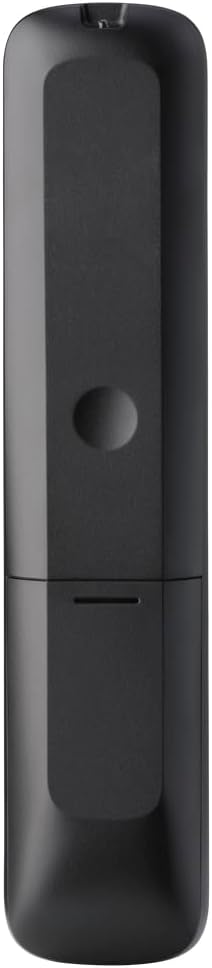
شڪل 2: پوئتي view of the remote, highlighting the battery compartment.
2. ريموٽ ڪنٽرول کي پروگرام ڪرڻ
The URC 3661 can be programmed using direct code entry, auto code search, or the learning function. It is recommended to try direct code entry first.
سڌو ڪوڊ داخلا:
- ان ڊوائيس کي آن ڪريو جيڪو توهان ڪنٽرول ڪرڻ چاهيو ٿا (مثال طور، ٽي وي، ڊي وي ڊي پليئر).
- کي دٻايو ۽ رکو سيٽ اپ ڪريو button until the LED light under the device key (e.g., TV, DVD) blinks twice and stays lit.
- Press the device key you want to program (e.g., TV). The LED will remain lit.
- Enter the 4-digit or 5-digit setup code for your brand and device. Refer to the code list provided with your remote or visit the One For All website for the most up-to-date codes.
- After entering the code, the LED will blink twice and turn off if the code is valid. If it blinks once and stays lit, the code is invalid; re-enter the code.
- ريموٽ کي دٻائي ٽيسٽ ڪريو پاور button. If the device turns off, try other functions like volume or channel. If it works, programming is complete. If not, try the next code for your brand or use the Auto Code Search.
خودڪار ڪوڊ ڳولا:
- هن ڊوائيس کي بند ڪيو جيڪو توهان ڪنٽرول ڪرڻ چاهيندا آهيو.
- کي دٻايو ۽ رکو سيٽ اپ ڪريو button until the LED blinks twice and stays lit.
- Press the device key you want to program.
- ريموٽ کي ڊوائيس ڏانهن اشارو ڪريو ۽ دٻايو پاور بٽڻ کي بار بار دٻايو (تقريبن هر 3 سيڪنڊن ۾) جيستائين ڊوائيس بند نه ٿئي.
- Once the device turns off, immediately press the سيٽ اپ ڪريو button to save the code. The LED will blink twice and turn off.
- Test the remote. If it doesn't work correctly, repeat the process.
سکيا فنڪشن:
The learning function allows the URC 3661 to copy functions directly from your original remote control, which is useful for commands not available via direct code entry or auto search.
- Place the URC 3661 and your original remote on a flat surface, facing each other, about 1-2 inches apart.
- کي دٻايو ۽ رکو سيٽ اپ ڪريو button until the LED blinks twice and stays lit.
- Press the button on the URC 3661 that you want to teach a function to (e.g., a specific input button). The LED will blink rapidly.
- Press and hold the corresponding button on your original remote control until the LED on the URC 3661 blinks twice, indicating successful learning.
- Repeat for all desired buttons.
- سکيا واري موڊ مان نڪرڻ لاءِ، دٻايو سيٽ اپ ڪريو button. The LED will blink twice and turn off.
ريموٽ ڪنٽرول کي هلائڻ
The URC 3661 is designed for intuitive operation. Familiarize yourself with the button layout and their primary functions.

شڪل 3: سامهون view of the URC 3661 with button layout.
اهم ڪم:
- Device Keys (TV, STB, AUDIO, BLURAY, DVD, STREAM): Select the device you wish to control. The LED under the selected device key will illuminate.
- طاقت: چونڊيل ڊوائيس کي آن يا آف ڪري ٿو.
- VOL +/-: حجم کي ترتيب ڏئي ٿو.
- CH +/-: چينل تبديل ڪري ٿو.
- Navigation Pad (UP, DOWN, LEFT, RIGHT, OK): مينيو نيويگيشن ۽ چونڊ لاءِ استعمال ٿيندو آهي.
- مينيو ڊوائيس جو مکيه مينيو کوليندو آهي.
- ھدايت: Displays the electronic program guide (if supported by the device).
- ڄاڻ: موجوده پروگرام يا ان پٽ بابت معلومات ڏيکاري ٿو.
- گهر: ڊوائيس جي هوم اسڪرين ڏانهن واپس اچي ٿو.
- نڪرڻ: Exits menus or applications.
- Playback Controls (PLAY, PAUSE, STOP, REWIND, FAST FORWARD, SKIP): ميڊيا پلے بیک کي ڪنٽرول ڪريو.
- نمبر ڪيز (0-9): For direct channel entry or numerical input.
- App Shortcut Keys (Netflix, Prime Video, YouTube): مشهور اسٽريمنگ سروسز تائين سڌو رسائي.
- پوئتي روشني: The keys are backlit for easy use in dark environments. The backlight activates automatically when a button is pressed.
سار سنڀال
ريموٽ صاف ڪرڻ:
To maintain the remote's appearance and functionality, clean it regularly:
- ريموٽ جي مٿاڇري کي صاف ڪرڻ لاءِ نرم، سڪل ڪپڙو استعمال ڪريو.
- ضدي مٽيءَ لاءِ، ٿورو ڊيampڪپڙي کي پاڻي يا نرم، غير رگڙيندڙ صاف ڪندڙ سان ڌوئڻ ڏيو. گهڻي نمي کان پاسو ڪريو.
- Do not use harsh chemicals, solvents, or abrasive cleaning agents, as these can damage the remote's finish or internal components.
بيٽري مٽائڻ:
Replace batteries when the remote's performance degrades or the LED indicator blinks unusually. Refer to the "Battery Installation" section under Setup for detailed instructions.
مشڪلاتون
If you encounter issues with your URC 3661 remote control, try the following troubleshooting steps:
| مسئلو | ممڪن سبب | حل |
|---|---|---|
| ريموٽ ڊوائيس کي هلائي نٿو سگهي. | غلط ڊوائيس چونڊيو ويو آهي. بيٽريون گهٽ آهن يا غلط طور تي لڳايون ويون آهن. Incorrect code programmed. | Ensure the correct device key (TV, DVD, etc.) is pressed. بيٽري جي رخ جي جانچ ڪريو ۽ جيڪڏهن ضروري هجي ته ان کي تبديل ڪريو. Re-program the remote using a different code or the Auto Code Search/Learning function. |
| ڪجھ بٽڻ ڪم نه ڪندا آھن. | Incomplete programming. Device does not support the function. | Use the Learning function to copy specific commands from your original remote. Verify if the original remote has that function. |
| LED blinks once and stays lit during code entry. | Invalid code entered. | Ensure you are entering the correct 4 or 5-digit code. Try another code from the list or use Auto Code Search. |
| Remote LED does not light up. | مئل بيٽريون. | بيٽرين کي نئين AA بيٽرين سان تبديل ڪريو. |
For further assistance, visit the official One For All support website or consult the comprehensive online manual.
وضاحتون
| خاصيت | تفصيل |
|---|---|
| ماڊل نمبر | يو آر سي 3661 |
| برانڊ | سڀني لاءِ هڪ |
| پيداوار جي ماپ | 0.39 x 0.39 x 0.39 انچ |
| شيءِ جو وزن | 6.7 اونس |
| بيٽرين جي ضرورت آهي | 2 AA بيٽريون |
| سپورٽ ٿيل ڊوائيسز جو وڌ ۾ وڌ تعداد | 6 ڊوائيسز تائين |
| مطابقت رکندڙ ڊوائيسز | Television, Set-top Box, Audio, Blu-ray, DVD, Streaming devices |
| خاص خصوصيت | Universal, Learning Function, Backlit Keys |

Figure 4: Product packaging indicating compatibility with up to 6 devices.
وارنٽي ۽ سپورٽ
Warranty information for the One For All URC 3661 Universal Remote Control is typically provided with your purchase documentation. Please refer to the warranty card or leaflet included in the product packaging for details regarding coverage, terms, and conditions.
For technical support, frequently asked questions, or to find the latest programming codes, please visit the official One For All webسائيٽ. ڪسٽمر سروس لاءِ رابطي جي معلومات ٺاهيندڙ جي ويب سائيٽ تي پڻ ملي سگهي ٿي webسائيٽ يا توهان جي پراڊڪٽ دستاويزن ۾.
One For All Official Webسائيٽ: www.oneforall.com