
تعارف
Thank you for choosing the MageGee GT860 96-Key Wired RGB Backlit Gaming Keyboard. This keyboard is designed for both gaming and daily use, featuring a compact layout, ergonomic design, and customizable RGB backlighting. This manual will guide you through the setup, operation, and maintenance of your new keyboard to ensure optimal performance and user experience.
پيڪيج مواد
- MageGee GT860 96-Key Wired RGB Backlit Gaming Keyboard
- استعمال ڪندڙ دستي
پيداوار ختمview
ڪي بورڊ لي آئوٽ
The MageGee GT860 features a 92% compact layout, retaining essential keys while offering a space-saving design. It includes a full numeric keypad and function keys.

تصوير: ميج گي GT860 ڪيبورڊ شوڪasing its 96-key layout with RGB backlighting and black and yellow keycaps.

تصوير: هڪ تفصيلي view of the standard 96-key layout with full RGB backlighting, highlighting the compact yet functional design.
اهم خاصيتون
- 92٪ ڪمپيڪٽ لي آئوٽ: Offers a balance between full functionality and a space-saving design.
- مشيني احساس سان جھلي: هڪ ڇُپائي ٽائيپنگ جي تجربي لاءِ جديد نقلي ميڪيڪل ٽيڪنالاجي استعمال ڪري ٿو.
- Ergonomic ڊيزائن: Key layout is engineered for comfortable use during extended periods, reducing fatigue.
- آر جي بي بيڪ لائيٽنگ: Features multiple lighting modes and colors, with adjustable brightness and breathing speed.
- پلگ ۽ راند: No drivers required for basic functionality.
- وسيع مطابقت: Supports Windows 10, 8, 7, XP, VISTA, and Mac OS.
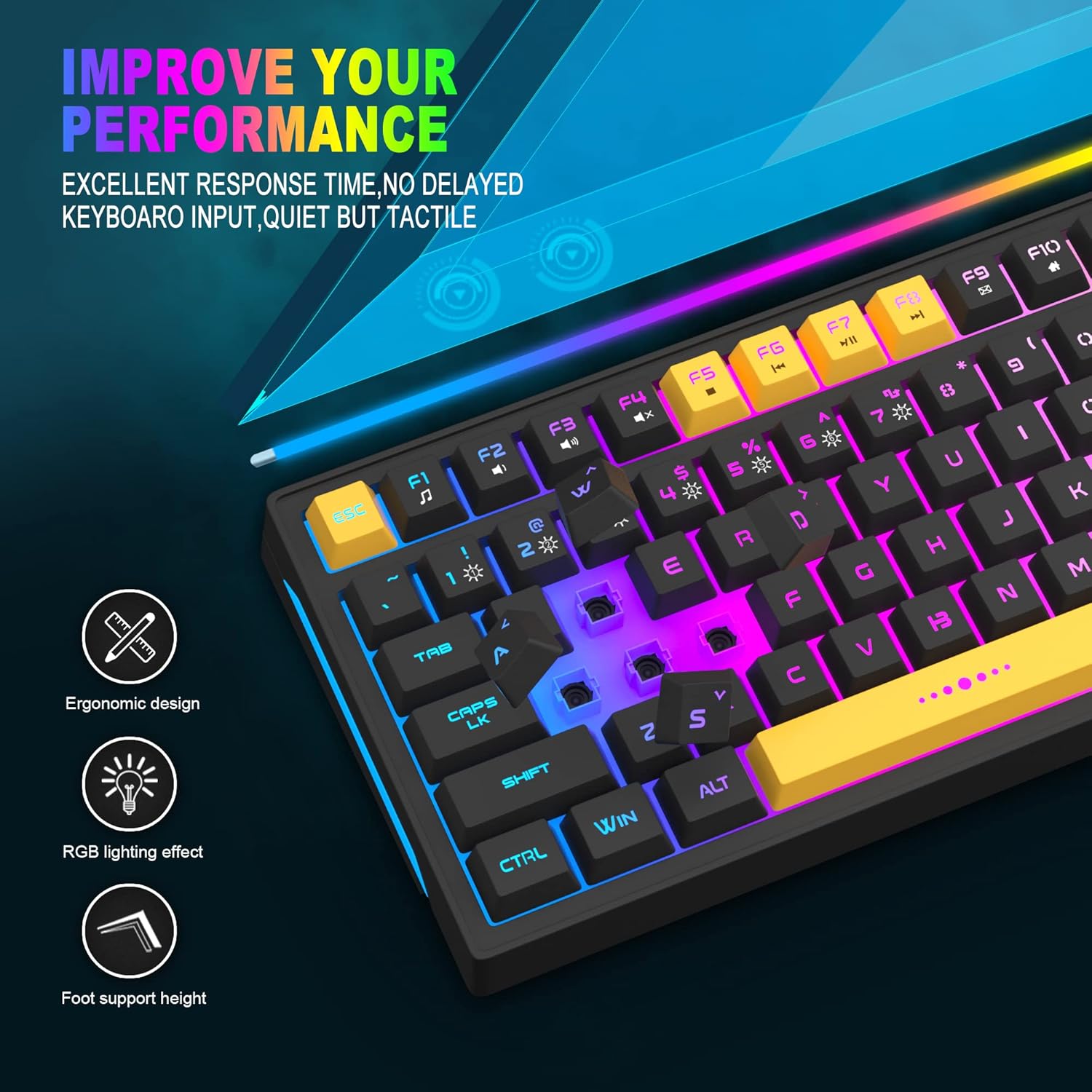
Image: Close-up showing the ergonomic design and RGB lighting effect of the keyboard, emphasizing comfort and visual appeal.

تصوير: هڪ پاسي view of the keyboard illustrating its thoughtful ergonomic design with a 7-degree tilt for improved typing posture.
سيٽ اپ جون هدايتون
- Unpack the keyboard and ensure all package contents are present.
- ڪيبورڊ مان USB ڪيبل کي پنهنجي ڪمپيوٽر تي موجود USB پورٽ سان ڳنڍيو.
- The keyboard is plug-and-play and should be automatically recognized by your operating system (Windows, Mac OS). No additional drivers are typically required for basic functionality.
- Once connected, the RGB backlighting will illuminate, indicating the keyboard is powered on and ready for use.
آپريٽنگ هدايتون
آر جي بي بيڪ لائيٽ ڪنٽرول
The MageGee GT860 keyboard features customizable RGB backlighting with various modes and effects.
- روشني جا طريقا تبديل ڪرڻ: کي دٻايو FN key combined with keys 1 ذريعي 6 to cycle through different RGB lighting effects and colors.
- روشني کي ترتيب ڏيڻ: Use specific key combinations (refer to keyboard legends or experiment with FN + Arrow keys if not explicitly labeled) to increase or decrease backlight brightness.
- Adjusting Breathing Speed: Some modes allow adjustment of the breathing or animation speed.

Image: The keyboard displaying various RGB backlit lighting modes, illustrating the range of color options available.

Image: A dynamic view of the keyboard showcasing its 18 RGB LED light effects, highlighting the vibrant backlighting.
ملٽي ميڊيا ۽ فنڪشن ڪيز
The keyboard includes dedicated function keys (F1-F12) that can be accessed by pressing the FN گهربل ايف-ڪي سان گڏ هڪ ئي وقت چاٻي.
| ڪنيڪشن | فنڪشن |
|---|---|
| FN + F1 | ميڊيا پليئر |
| FN + F2 | حجم ھيٺ |
| FN + F3 | حجم مٿي |
| FN + F4 | گونگا |
| FN + F5 | اڳيون ٽريڪ |
| FN + F6 | ايندڙ ٽريڪ |
| FN + F7 | راند/روڪ |
| FN + F8 | روڪ |
| FN + F9 | اي ميل |
| FN + F10 | هوم صفحو |
| FN + F11 | اسڪرول لاڪ |
| FN + F12 | حساب ڪندڙ |

Image: Diagram illustrating the various multimedia and function key combinations using the FN key (FN + F1-F12).
سار سنڀال
پنهنجي MageGee GT860 ڪيبورڊ جي ڊگهي عمر ۽ بهترين ڪارڪردگي کي يقيني بڻائڻ لاءِ، انهن سار سنڀال جي هدايتن تي عمل ڪريو:
- صفائي: Regularly clean the keyboard with a soft, dry cloth. For deeper cleaning, use compressed air to remove dust and debris from between the keys. A slightly damp cloth (not wet) can be used for keycap surfaces.
- مائع کان بچاء: ڪيبورڊ تي پاڻي نه اڇلايو. جيڪڏهن ڪو به پاڻي پکڙجي وڃي ته فوري طور تي ڪيبورڊ کي پنهنجي ڪمپيوٽر کان ڌار ڪريو ۽ ٻيهر ڳنڍڻ کان اڳ ان کي مڪمل طور تي سڪي وڃڻ ڏيو.
- اسٽوريج: جڏهن گهڻي عرصي تائين استعمال ۾ نه هجي ته ڪيبورڊ کي سڌي سج جي روشني ۽ انتهائي گرمي پد کان پري ٿڌي، سڪل جاءِ تي رکو.
- ڪيبل جي سنڀال: اندروني نقصان کي روڪڻ لاءِ USB ڪيبل کي گهڻو موڙڻ يا مروڙڻ کان پاسو ڪريو.

تصوير: هڪ ويجهو تصوير view of the keyboard with some keycaps removed, showing the underlying switches. This illustrates the internal structure for cleaning purposes.
مشڪلاتون
If you encounter issues with your MageGee GT860 keyboard, please refer to the following common troubleshooting steps:
- ڪي بورڊ جواب نه ڏئي رهيو آهي:
- Ensure the USB cable is securely connected to both the keyboard and your computer's USB port.
- ڪيبورڊ کي پنهنجي ڪمپيوٽر تي ڪنهن ٻئي USB پورٽ سان ڳنڍڻ جي ڪوشش ڪريو.
- ٻئي ڪمپيوٽر تي ڪيبورڊ ٽيسٽ ڪريو ته اهو طئي ڪيو وڃي ته مسئلو ڪيبورڊ سان آهي يا توهان جي سسٽم سان.
- بيڪ لائيٽنگ ڪم نه ڪري رهي آهي يا غلط آهي:
- Verify that the keyboard is properly connected and receiving power.
- Cycle through the RGB lighting modes using FN + 1-6 to ensure a mode is selected.
- Adjust the brightness settings.
- رجسٽر نه ٿيندڙ چاٻيون:
- Clean the affected keys to remove any debris that might be obstructing the switch.
- پڪ ڪريو ته ڪو به سافٽ ويئر تڪرار موجود نه آهي (مثال طور، ٻيا ڪي بورڊ ڊرائيور يا گيمنگ سافٽ ويئر).
- غير متوقع رويو:
- پنهنجي ڪمپيوٽر کي ٻيهر شروع ڪريو.
- If the issue persists, contact MageGee customer support for further assistance.
وضاحتون
| خاصيت | تفصيل |
|---|---|
| برانڊ | ميج گي |
| ماڊل | جي تي 860 |
| ترتيب | 96 ڪيز (92٪ ڪمپيڪٽ) |
| رابطي | وائرڊ USB |
| پٺڀرائي | RGB Backlit (Multiple modes) |
| اهم قسم | Membrane with Mechanical Feeling |
| ايرگونومڪس | Ergonomic ڊيزائن |
| مطابقت رکندڙ OS | Windows 10, 8, 7, XP, VISTA, Mac OS |
| پيداوار جي ماپ | 35.56 x 10.16 x 5.08 سينٽي (14 x 4 x 2 انچ) |
| وزن | 744 گرام (1.64 پائونڊ) |
| جلدtage | 5 وولٽ |
| رنگ | ڪارو پيلو |
وارنٽي ۽ سپورٽ
For warranty information or technical support, please refer to the documentation provided with your purchase or contact MageGee customer service directly. Contact details can typically be found on the manufacturer's official webسائيٽ تي يا پراڊڪٽ پيڪنگنگ تي.
مھرباني ڪري ڪنھن به وارنٽي دعوائن لاءِ خريداري جو ثبوت رکو.