
1. تعارف
This manual provides detailed instructions for the safe and efficient operation of your InFocus P120 INL412 Multimedia Projector (Model INL4128). Please read this manual thoroughly before using the projector and keep it for future reference. This projector is designed for high-quality image projection, suitable for various applications including presentations, home entertainment, and gaming.
2. حفاظت جي ڄاڻ
پروجيڪٽر کي نقصان کان بچائڻ ۽ استعمال ڪندڙ جي حفاظت کي يقيني بڻائڻ لاءِ هيٺ ڏنل حفاظتي احتياطن تي عمل ڪريو:
- وينٽيليشن: Ensure adequate ventilation around the projector. Do not block ventilation openings. Maintain a minimum distance of 30 cm (12 inches) from walls or other objects.
- طاقت جو ذريعو: صرف مخصوص پاور سپلائي ۽ وول استعمال ڪريوtage. Connect the power cord securely.
- گرمي: The projector generates heat during operation. Do not touch the projector's vents or exhaust areas directly after use.
- روشني جي پيداوار: جڏهن ايلamp تي آهي، ڇاڪاڻ ته تيز روشني اکين کي نقصان پهچائي سگهي ٿي.
- لڳائڻ: Place the projector on a stable, level surface. Avoid placing it in direct sunlight, near heat sources, or in areas with high humidity or dust.
- صفائي: صفائي ڪرڻ کان اڳ بجلي جي تار کي ڌار ڪريو. نرم، سڪل ڪپڙو استعمال ڪريو. مائع يا ايروسول ڪلينر استعمال نه ڪريو.
- خدمت ڪرڻ: پروجيڪٽر جي پاڻ خدمت ڪرڻ جي ڪوشش نه ڪريو. سڀني خدمت کي قابل خدمت اهلڪارن جي حوالي ڪريو.
3. پراڊڪٽ ختمview
3.1 Top Panel and Lens Area
The top panel features the control buttons for basic operation and the lens area with focus and zoom adjustments.

شڪل 3.1: مٿي view of the InFocus P120 INL412 projector, highlighting the control panel on the right and the lens adjustment area on the left. The InFocus logo is visible on the top surface.
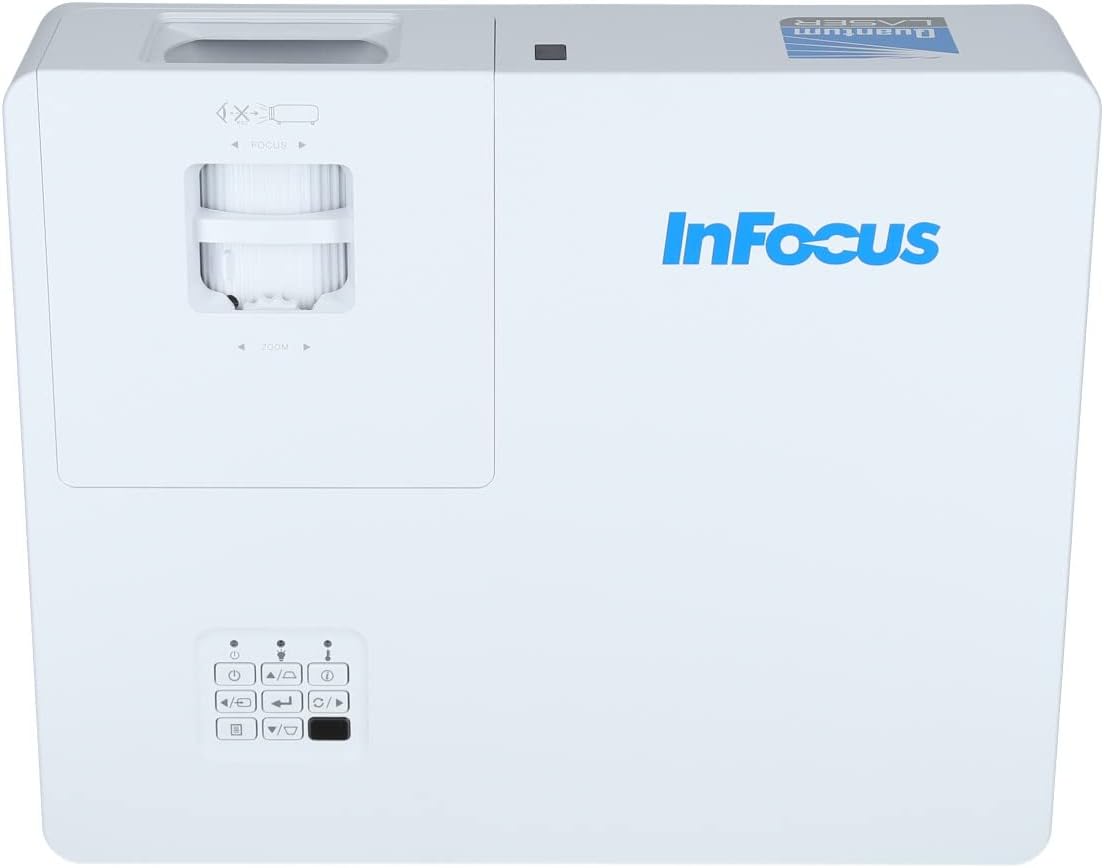
شڪل 3.2: هڪ ويجهو view of the projector's top panel, showing the focus and zoom rings near the lens opening and the array of control buttons for power, menu, source selection, and navigation.
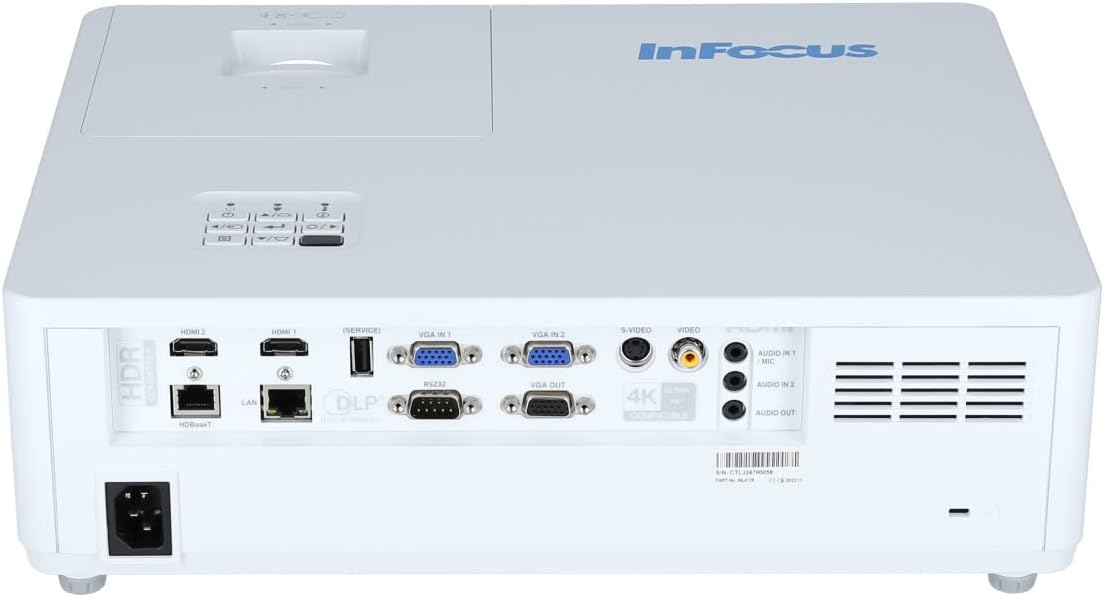
3.2 ريئر پينل ڪنيڪشن
پوئين پينل ٻاهرين ڊوائيسز کي ڳنڍڻ لاءِ مختلف ان پٽ ۽ آئوٽ پُٽ پورٽ فراهم ڪري ٿو.

Figure 3.3: Rear panel of the InFocus P120 INL412 projector, displaying a comprehensive array of connectivity options including HDMI (x2), USB, S-Video, Ethernet (LAN), VGA In (x2), VGA Out, RS232, and Audio In/Out ports. The power input is located on the bottom left.
اهم بندرگاهن ۾ شامل آهن:
- HDMI 1 ۽ 2: For connecting high-definition digital video and audio sources.
- USB: For connecting USB devices, potentially for media playback or firmware updates.
- ايس وڊيو For connecting older video sources.
- VGA IN 1 & 2: For connecting computers or other devices with VGA output.
- وي جي اي آئوٽ: ٻاهرين مانيٽر سان ڳنڍڻ لاءِ.
- Ethernet (LAN): نيٽ ورڪ ڪنيڪشن ۽ ڪنٽرول لاءِ.
- Audio IN 1 & 2 / Audio OUT: For analog audio connections.
- آر ايس 232: سيريل ڪنٽرول لاءِ.
- پاور ان پٽ: اي سي پاور ڪنڊ کي ڳنڍڻ لاءِ.
3.3 Front and Side Panels
The front panel houses the projection lens and front ventilation, while the side panels feature additional ventilation grilles.

شڪل 3.4: سامهون view of the InFocus P120 INL412 projector, displaying the main projection lens on the right and the extensive front ventilation grille on the left, crucial for heat dissipation.
شڪل 3.5: پاسي view of the InFocus P120 INL412 projector, illustrating the side ventilation grilles that contribute to maintaining optimal operating temperature.
4. سيٽ اپ
4.1 پروجيڪٽر جي جاءِ
Position the projector on a stable, flat surface or mount it securely. Ensure the projector is within the optimal projection distance for your screen size. Maintain clear space around the projector for proper ventilation.
4.2 ڳنڍڻ وارا آلات
Before connecting any cables, ensure the projector and all source devices are powered off.
- HDMI ڪنيڪشن: Connect an HDMI cable from your source device (e.g., laptop, Blu-ray player, gaming console) to either the HDMI 1 or HDMI 2 port on the projector.
- VGA ڪنيڪشن: Connect a VGA cable from your computer to either VGA IN 1 or VGA IN 2. For audio, connect a separate audio cable from your computer's audio output to the corresponding Audio IN port on the projector.
- USB ڪنيڪشن: Insert a USB drive into the USB port for media playback (if supported by firmware) or service functions.
- ايٿرنيٽ (LAN) ڪنيڪشن: Connect an Ethernet cable to the LAN port for network control or updates.
- آڊيو آئوٽ: If using external speakers, connect an audio cable from the Audio OUT port on the projector to your audio system.
4.3 پاور ڪنيڪشن
Connect the power cord to the projector's power input and then plug the other end into a grounded electrical outlet.
5. آپريٽنگ هدايتون
5.1 پاور آن/آف
- پاور آن: کي دٻايو طاقت button on the projector's control panel or the remote control. The power indicator light will change.
- بجلي بند: کي دٻايو طاقت button again. A confirmation message may appear. Press the button a second time to confirm shutdown. Allow the projector to cool down before unplugging it.
5.2 Adjusting Focus and Zoom
لينس جي چوڌاري فوڪس رنگ کي گھمايو جيستائين تصوير تيز ۽ صاف نظر نه اچي. پنهنجي اسڪرين تي فٽ ٿيڻ لاءِ تصوير جي سائيز کي ترتيب ڏيڻ لاءِ زوم رنگ استعمال ڪريو.
5.3 ان پٽ سورس چونڊڻ
کي دٻايو ذريعو button on the control panel or remote control to cycle through available input sources (HDMI 1, HDMI 2, VGA 1, VGA 2, S-Video, USB). Select the input corresponding to your connected device.
5.4 مينيو نيويگيشن
استعمال ڪريو مينيو button to access the on-screen display (OSD) menu. Use the arrow buttons to navigate through menu options and the داخل ڪريو چونڊڻ لاءِ بٽڻ. دٻايو مينيو againيهر نڪرڻ لاءِ.
6. سار سنڀال
6.1 لينس صاف ڪرڻ
Gently wipe the lens with a soft, lint-free cloth specifically designed for optical surfaces. Do not use abrasive cleaners or excessive force, as this can scratch the lens.
6.2 Cleaning the Projector Exterior
پروجيڪٽر جي سي کي صاف ڪرڻ لاءِ نرم، سڪل ڪپڙو استعمال ڪريو.asinج. ضدي مٽيءَ لاءِ، دampen the cloth slightly with water, then wipe dry immediately. Avoid getting liquids into the projector's openings.
6.3 Ventilation Care
Regularly check the projector's ventilation grilles for dust accumulation. Use a soft brush or a vacuum cleaner with a brush attachment to gently remove dust from the vents to ensure proper airflow and prevent overheating.
7. مسئلا حل ڪرڻ
7.1 ڪا به تصوير نه ڏيکاري وئي آهي
- پڪ ڪريو ته پروجيڪٽر آن آهي ۽ پاور انڊيڪيٽر لائيٽ مضبوط آهي.
- Verify that the video cable (HDMI, VGA, etc.) is securely connected to both the projector and the source device.
- چيڪ ڪريو ته پروجيڪٽر تي صحيح ان پٽ سورس چونڊيو ويو آهي.
- Confirm that the source device (laptop, player) is powered on and outputting a signal.
7.2 Image is Blurry or Out of Focus
- پروجيڪٽر لينس تي فوڪس رنگ کي ترتيب ڏيو جيستائين تصوير تيز نه ٿئي.
- پڪ ڪريو ته پروجيڪٽر اسڪرين کان صحيح فاصلي تي آهي.
- Clean the projector lens if it appears dirty.
7.3 آواز ڪونهي
- If using HDMI, ensure the source device's audio output is set to HDMI.
- If using VGA, ensure a separate audio cable is connected from the source to the projector's Audio IN port.
- پروجيڪٽر ۽ سورس ڊيوائس ٻنهي تي واليوم سيٽنگز چيڪ ڪريو.
- If using external speakers, ensure they are properly connected to the Audio OUT port and powered on.
8. وضاحتون
| خاصيت | تفصيل |
|---|---|
| برانڊ | InFocus |
| ٺاهيندڙ | فوڪس ۾ |
| ماڊل نالو | P120 INL412 |
| ماڊل نمبر | INL4128 |
| سال | 2023 |
| ھارڊويئر انٽرفيس | Ethernet, HDMI, S-Video, USB |
| شين جو تعداد | 1 |
| اسپيڪٽ ريشو | 16:9 |
| واتtage | 341 واٽ |
| بيٽريون شامل آهن | نه |
| بيٽرين جي ضرورت آهي | نه |
| فارم فيڪٽر | ڊيسڪ ٽاپ |
| چڙهڻ جو قسم | ٽيبل تي چڙهڻ |
| ريموٽ ڪنٽرول شامل | ها |
| پيداوار جي ماپ | 56.13 x 46.48 x 25.15 سينٽي |
| شيءِ جو وزن | 5.5 ڪلو |
| وڌ ۾ وڌ تصويري سائيز | 308.28 انچ |
| گھٽ ۾ گھٽ تصويري سائيز | 910.63 ملي ميٽر |
| پهرين دستياب تاريخ | جنوري 5، 2022 |
9. وارنٽي ۽ سپورٽ
For warranty information and technical support, please refer to the documentation included with your purchase or visit the official InFocus webسائيٽ. وارنٽي دعوائن لاءِ خريداري جو ثبوت رکو.