
1. تعارف
The My Arcade Gamer V Classic is a portable gaming system designed for on-the-go entertainment. This device comes preloaded with 220 classic video games, offering a wide variety of genres including entertainment, sports, and adventure. Its compact size and 2.5-inch color display make it suitable for use at home, during travel, or at social gatherings. This manual provides essential information for setting up, operating, maintaining, and troubleshooting your Gamer V Classic.
2. دٻي ۾ ڇا آهي
- Gamer V Classic Portable Gaming System
- يوزر گائيڊ (هي دستاويز)
3. مصنوعات جون خاصيتون
- ٻارن جي دوستي ڊيزائن: No console or controllers required.
- Excellent Gaming Experience: Perfect for travel, birthday parties, gifts, and more.
- Rich Collection of Classic Games: Includes 220 preloaded video games including various types such as entertainment, sports, and adventure.
- آسان: 2.5" color display, suitable for playing portable games outdoors.
- حجم ڪنٽرول: Integrated volume control for adjustable audio.
- ننڍو ۽ هلڪو وزن: Designed for easy portability.
- طاقت جو ذريعو: Powered by 3 AAA batteries (not included).
4. سيٽ اپ
4.1 بيٽري لڳائڻ
- Locate the battery compartment on the back of the Gamer V Classic unit.
- بيٽري جي ڪمري واري ڍڪ کي کوليو.
- 3 نيون AAA بيٽريون داخل ڪريو، صحيح پولارٽي (+/-) کي يقيني بڻائي جيئن ڪمري اندر ڏيکاريل آهي.
- بيٽري جي ڪمري واري ڍڪ کي محفوظ طور تي بند ڪريو.
نوٽ: Batteries are not included. Alternatively, the unit can be powered via a USB-C cable (not included) connected to a 5V power source.
4.2 پاور آن
Press and hold the power button (usually located on the top left of the device) for a few seconds until the screen illuminates and the My Arcade logo appears.

Image: The Gamer V Classic in use, showing its compact design and screen.
5. آپريٽنگ هدايتون
5.1 ڪنٽرول ختمview
- ڊي-پيڊ (ڊائريڪشنل پيڊ): Located on the left, used for movement and menu navigation.
- A/B Buttons: Action buttons located on the right, used for jumping, firing, selecting, etc.
- شروع بٽڻ: Initiates games and pauses gameplay.
- ري سيٽ بٽڻ: Returns to the main menu or restarts the current game.
- هوم بٽڻ: Returns to the game selection screen.
- حجم ڪنٽرول: Adjusts the audio level of the device.
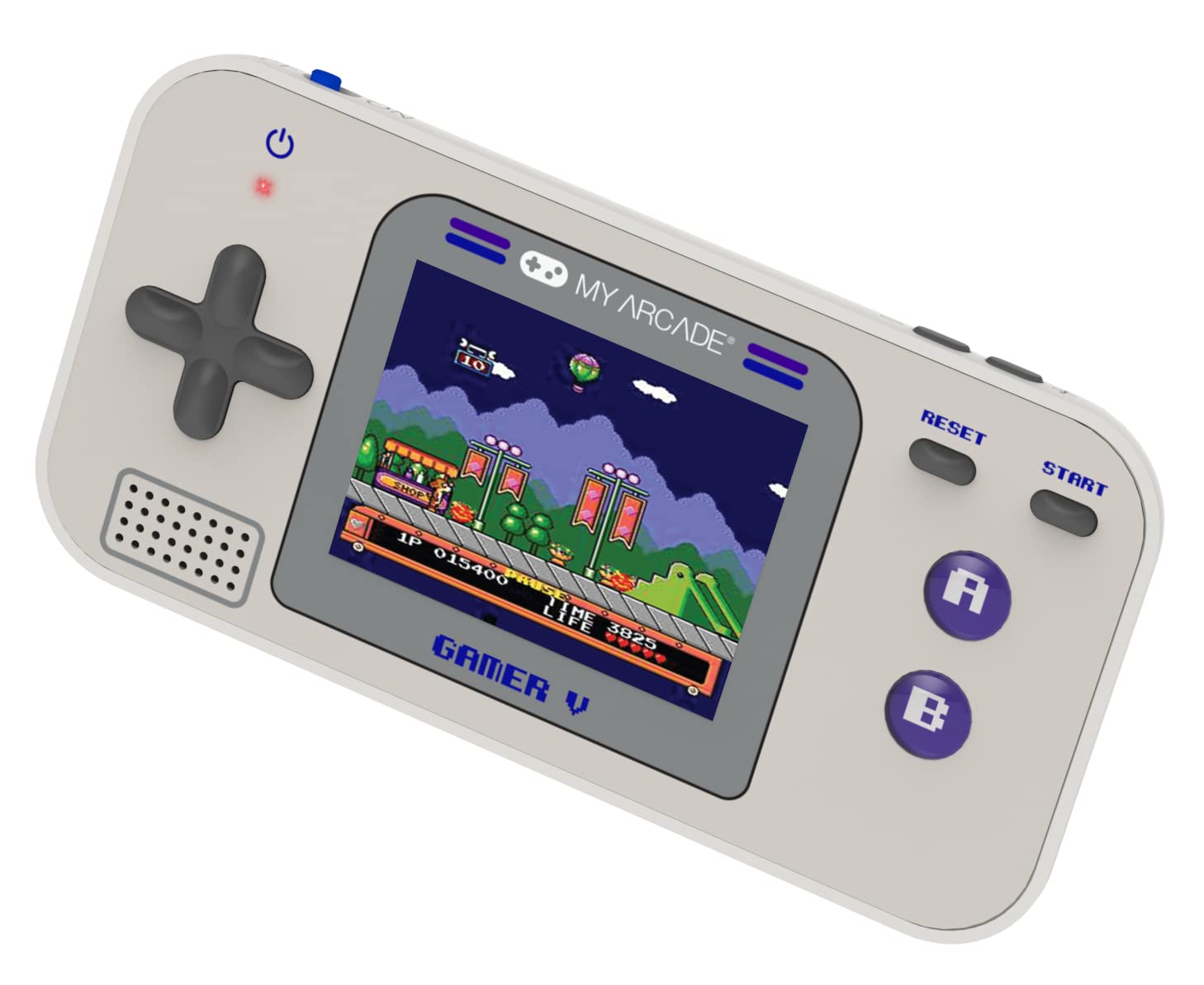
تصوير: تفصيلي view of the Gamer V Classic controls.
5.2 راند جي چونڊ ۽ راند
- After powering on, the device will display the main game selection menu.
- Use the D-Pad to scroll through the list of available games.
- Press the 'A' button or 'Start' button to select and launch a game.
- Follow on-screen instructions for specific game controls.
- To return to the game selection menu, press the 'Home' button.
5.3 حجم کي ترتيب ڏيڻ
Use the dedicated volume control buttons or switch (location may vary slightly by unit) to increase or decrease the sound output.
6. سار سنڀال
- صفائي: ڊوائيس کي صاف ڪرڻ لاءِ نرم، سڪل ڪپڙو استعمال ڪريو. مائع صاف ڪندڙ يا ايروسول استعمال نه ڪريو.
- اسٽوريج: Store the device in a cool, dry place away from direct sunlight and extreme temperatures. If storing for an extended period, remove the batteries.
- بيٽري جي سنڀال: Replace all batteries at the same time. Do not mix old and new batteries or different types of batteries. Dispose of used batteries responsibly.
- اثر کان بچڻ: Do not drop or subject the device to strong impacts, as this may damage internal components or the screen.
7. مسئلا حل ڪرڻ
| مسئلو | ممڪن سبب | حل |
|---|---|---|
| ڊوائيس آن نٿو ٿي. | گهٽ يا ختم ٿيل بيٽريون. بيٽري جي غلط انسٽاليشن. | Replace batteries with new ones, ensuring correct polarity. Try powering via USB-C cable. |
| اسڪرين خالي يا مسخ ٿيل آهي. | Low battery power. Device malfunction. | Replace batteries or connect to USB-C power. If problem persists, contact customer support. |
| ڪابه آواز يا گهٽ آواز ناهي. | Volume set too low. Mute function activated. | Adjust volume using the volume controls. Ensure no external headphones are connected if not intended. |
| بٽڻ غير جوابي آهن. | Device frozen. Low battery power. | Try pressing the 'Reset' button. Replace batteries. Power cycle the device (turn off and on). |
8. وضاحتون
- پيداوار جي ماپ: 5"ليٽر x 2.5"ڊبليو x 0.75"ايڇ
- ڪنٽرولر جو قسم: بٽڻ ڪنٽرول
- شيء جو وزن: 0.15 ڪلوگرام (5.3 اونس)
- اسڪرين جي ماپ: 2.5 انچ
- طاقت جو ذريعو: بيٽري طاقت (3 AAA بيٽريون گهربل، شامل نه آهن)
- هارڊويئر انٽرفيس: Internal with removable media
- عمر جي حد (وضاحت): Kid, Teen
- ڊسپلي جو قسم: LCD يا LED
- مواد: پلاسٽڪ
- فارم فيڪٽر: هٿ سان
- شئي ماڊل نمبر: DGUN-3920
- ٺاهيندڙ: منهنجو آرڪيڊ
9. وارنٽي ۽ سپورٽ
For warranty information and customer support, please refer to the official My Arcade webسائيٽ تي وڃو يا انهن جي ڪسٽمر سروس ڊپارٽمينٽ سان رابطو ڪريو. خريداري جي ثبوت طور پنهنجي خريداري جي رسيد رکو.