
اهم حفاظتي ڄاڻ
Please read this manual carefully before assembly and use to ensure safe operation and to prevent damage to the product or injury to yourself.
- وڌ ۾ وڌ لوڊ گنجائش کان وڌيڪ نه ڪريو 100 ڪلو. Overloading can cause instability and damage.
- پڪ ڪريو ته سڀئي ڪيبل صحيح طرح سان منظم ۽ محفوظ آهن ته جيئن اوچائي جي ترتيب دوران ٽرپنگ جي خطرن يا نقصان کي روڪيو وڃي.
- آپريشن دوران ٻارن ۽ پالتو جانورن کي ڊيسڪ کان پري رکو.
- Do not place hands or other body parts near moving parts of the desk frame during height adjustment.
- Only use the desk for its intended purpose as a workstation.
- Regularly check all screws and bolts to ensure they are tightened.
پيداوار ختمview
The FLEXISPOT E1B Electric Standing Desk is designed to provide a versatile and ergonomic workspace. It features a robust dual-motor system for smooth height adjustments and a durable tabletop.
اهم خاصيتون:
- دوئي موٽر سسٽم: Ensures stable and efficient height adjustment at 25 mm/s.
- اونچائي جي حد: Adjustable from 70 cm to 119 cm to suit various user heights and work preferences.
- لوڊ گنجائش: Supports up to 100 kg, accommodating multiple monitors and office equipment.
- ياداشت جي اڳڪٿي: Control panel with memory functions for saving preferred height settings.
- High-Quality Tabletop: 160x80cm black tabletop, made in the EU from FSC-certified MDF with scratch-resistant high-pressure laminate.
پيڪيج مواد
Before starting assembly, verify that all components listed below are present and undamaged. If any parts are missing or damaged, please contact customer support.
- Desk Frame (E1B) components (legs, feet, crossbar, motor, control box)
- Tabletop (DT1608-BLACK-EU18)
- ميموري ڪمن سان ڪنٽرول پينل
- پاور اڊاپٽر ۽ ڪيبل
- Assembly Hardware (screws, bolts, Allen keys)
- ڪيبل مينيجمينٽ لوازمات
- استعمال ڪندڙ دستي
سيٽ اپ ۽ اسيمبلي جون هدايتون
Assembly is designed to be straightforward. It is recommended to assemble the desk on a soft, clean surface to prevent scratches. Two people are recommended for easier assembly.
قدم 1: اجزاء کي کوليو
پيڪنگ مان سڀني حصن کي احتياط سان هٽايو ۽ انهن کي ٻاهر رکو. پيڪيج جي مواد جي فهرست جي خلاف چيڪ ڪريو.
قدم 2: ڊيسڪ فريم کي گڏ ڪريو
- Attach the lifting columns to the crossbar using the provided screws.
- ڊيسڪ جي پيرن کي کڻڻ واري ڪالمن جي تري ۾ محفوظ ڪريو.
- Mount the control box to the designated area on the frame.
- Connect the motor cables from the lifting columns to the control box.
- ڪنٽرول پينل ڪيبل کي ڪنٽرول باڪس سان ڳنڍيو.

Image: The FLEXISPOT E1B desk frame in black and white, illustrating the height adjustment range from 70cm to 119cm, highlighting the dual motor system, 25mm/s adjustment speed, and low noise operation (less than 50dB).
قدم 3: ٽيبل ٽاپ ڳنڍيو
Carefully place the tabletop upside down on a soft surface. Position the assembled desk frame onto the tabletop, aligning the pre-drilled holes. Secure the tabletop to the frame using the provided screws.

Image: A FLEXISPOT desk with a black tabletop, featuring a laptop, books, and a pen holder, demonstrating a functional and organized workspace.
Step 4: Connect Power and Cable Management
Connect the power adapter to the control box and then to a power outlet. Use the included cable management accessories to organize and secure all cables, preventing them from interfering with the desk's movement.
آپريٽنگ هدايتون
ڪنٽرول پينل ختمview:
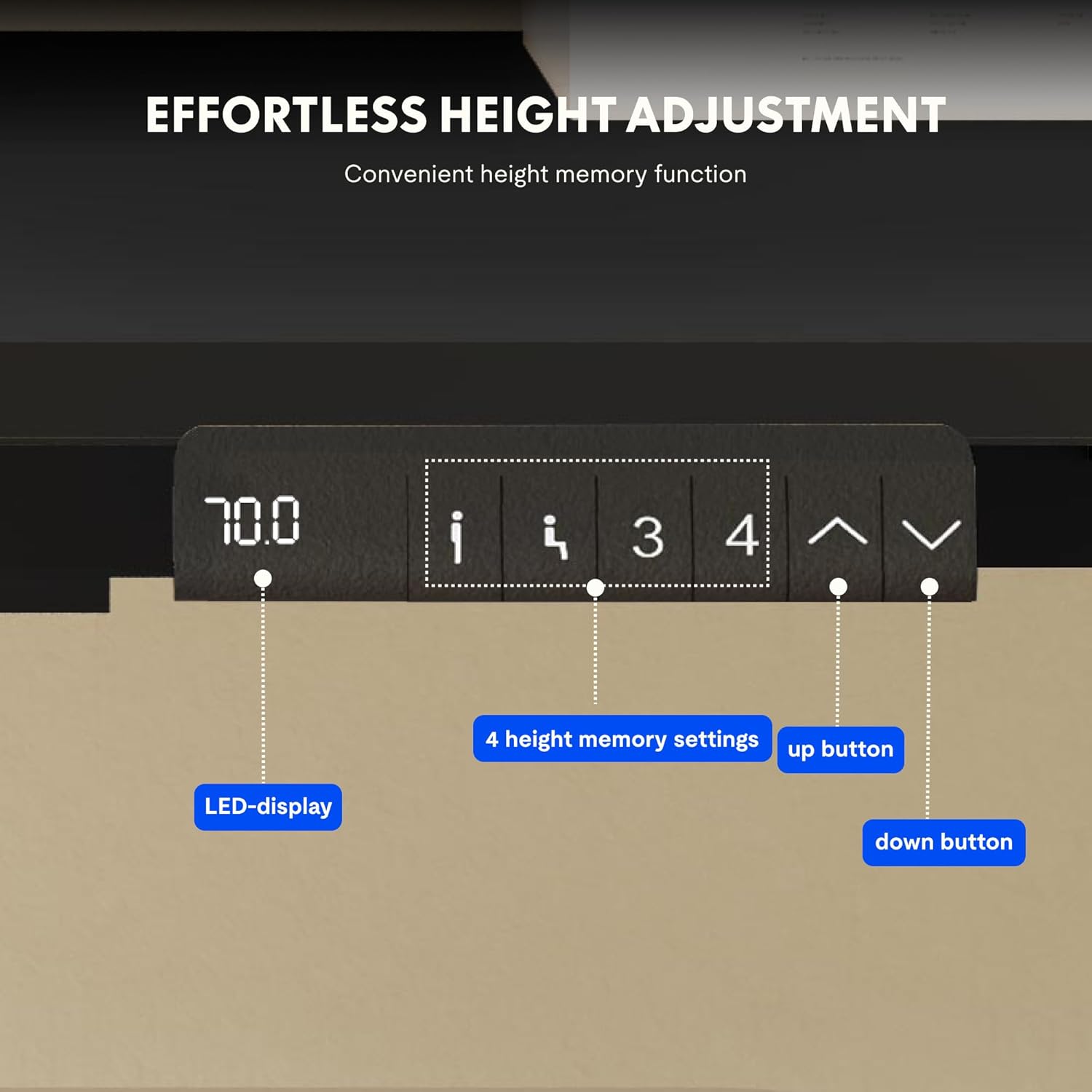
Image: Close-up of the FLEXISPOT desk control panel, showing the LED display for current height, up and down arrow buttons for manual adjustment, and four numbered buttons for saving and recalling height memory presets.
Manual Height Adjustment:
- کي دٻايو ۽ رکو Up arrow (^) ڊيسڪ کي مٿي ڪرڻ لاءِ بٽڻ.
- کي دٻايو ۽ رکو Down arrow (v) ڊيسڪ کي هيٺ ڪرڻ لاءِ بٽڻ.
- Release the button at your desired height. The LED display will show the current height.
ميموري پري سيٽ سيٽ ڪرڻ:
- مٿي/هيٺ تيرن جي استعمال سان ڊيسڪ کي پنهنجي گهربل اوچائي تي ترتيب ڏيو.
- کي دٻايو "م" or "سيٽ ڪريو" button (if available, otherwise proceed to step 3).
- نمبر ٿيل ميموري بٽڻن مان هڪ کي دٻايو (1، 2، 3، يا 4) within 3 seconds. The display will show "S-" followed by the number, indicating the height is saved.
ياداشت جي اڳواٽ ياد ڪرڻ:
بس گهربل نمبر واري ميموري بٽڻ کي دٻايو (1، 2، 3، يا 4). ڊيسڪ خودڪار طريقي سان محفوظ ڪيل اوچائي ڏانهن منتقل ٿي ويندو.
ري سيٽ فنڪشن:
If the desk encounters an error or does not move smoothly, a reset may be required. Press and hold the "Down" button until the desk reaches its lowest position, then release and press it again for 5-10 seconds until the display shows "RST" or "E-1" and then returns to the lowest height. The desk will then reset to its factory lowest position.
سار سنڀال
- صفائي: ڊيسڪ جي مٿاڇري ۽ فريم کي نرم، ڊي سان صاف ڪريوamp ڪپڙو. گھڙڻ وارا صاف ڪندڙ يا سخت ڪيميڪلز کان پاسو ڪريو.
- چڪاس: وقت بوقت سڀني پيچرن ۽ ڪنيڪشنن کي چيڪ ڪريو ته جيئن پڪ ٿئي ته اهي تنگ آهن. جيڪڏهن ضروري هجي ته ٻيهر مضبوط ڪريو.
- ڪيبل جو انتظام: Ensure cables remain tidy and do not obstruct the desk's movement.
- وزن جي تقسيم: Distribute weight evenly on the tabletop to prevent strain on the motors and frame.
مشڪلاتون
| مسئلو | ممڪن سبب | حل |
|---|---|---|
| ڊيسڪ حرڪت نٿي ڪري. | Power cable disconnected; control box error; overloaded desk. | Check power connections. Perform a reset (see Operating Instructions). Reduce weight on the desk. |
| ڊيسڪ غير مساوي طور تي هلي ٿي يا غير معمولي آواز ڪري ٿي. | ڍلو ڳنڍ؛ رڪاوٽ؛ وزن جي غير مساوي ورڇ. | Check all screws and connections. Remove any obstructions. Redistribute weight evenly. Perform a reset. |
| ڊسپلي هڪ غلطي ڪوڊ ڏيکاري ٿو (مثال طور، E01، E02). | اندروني نظام جي غلطي. | Perform a reset. If the error persists, contact customer support. |
| ميموري پري سيٽ ڪم نه ڪري رهيا آهن. | پري سيٽ صحيح طرح محفوظ نه ٿيا آهن. | Re-save the memory presets following the instructions. |
وضاحتون
| خاصيت | تفصيل |
|---|---|
| برانڊ | FLEXISPOT |
| ماڊل نمبر | E1B+DT1608-BLACK-EU18 |
| ٽيبل ٽاپ طول و عرض (L x W) | 160 سينٽي x 80 سينٽي ميٽر |
| اونچائي جي ترتيب جي حد | 70 سينٽي - 119 سينٽي ميٽر |
| لوڊ ڪرڻ جي صلاحيت | 100 ڪلو |
| ترتيب ڏيڻ جي رفتار | 25mm/s |
| موٽر جو قسم | ڊبل موٽر |
| ٽيبل ٽاپ مواد | FSC-certified MDF with high-pressure laminate |
| فريم مواد | مصر جو اسٽيل |
| رنگ | Black Tabletop + Black Frame |
وارنٽي ۽ سپورٽ
FLEXISPOT products are manufactured to high-quality standards. For warranty information and customer support, please refer to the official FLEXISPOT webسائيٽ يا پنهنجي پرچون ڪندڙ سان رابطو ڪريو.
- وارنٽي: Specific warranty terms may vary by region and product. Please check your purchase documentation or the manufacturer's webتفصيل لاءِ سائيٽ.
- ڪسٽمر سپورٽ: For technical assistance, missing parts, or operational questions, please visit the FLEXISPOT Brand Store or contact their official support channels.