
تعارف
Thank you for choosing the SURFOU Wireless Doorbell Kit N6. This kit includes two plug-in receivers and one battery-powered transmitter, designed to provide a reliable and convenient alert system for your home or office. With a strong wireless range, multiple melodies, and adjustable volume, this doorbell is built for ease of use and durability.

Image: The SURFOU Wireless Doorbell Kit N6, showing one plug-in receiver and one battery-powered transmitter.
پيڪيج مواد
مھرباني ڪري پيڪيج جي مواد کي چيڪ ڪريو ته جيئن پڪ ڪري سگھجي ته سڀئي شيون موجود آھن:
- 2 x Plug-in Receivers
- 1 x Battery-Powered Transmitter
- 1 x 12V23A Battery (for transmitter)
- 1 x اسڪوائر
- 2 x اسڪرو جا سيٽ
- 2 x Double-Sided Adhesive Tapes
- 1 x استعمال ڪندڙ دستياب
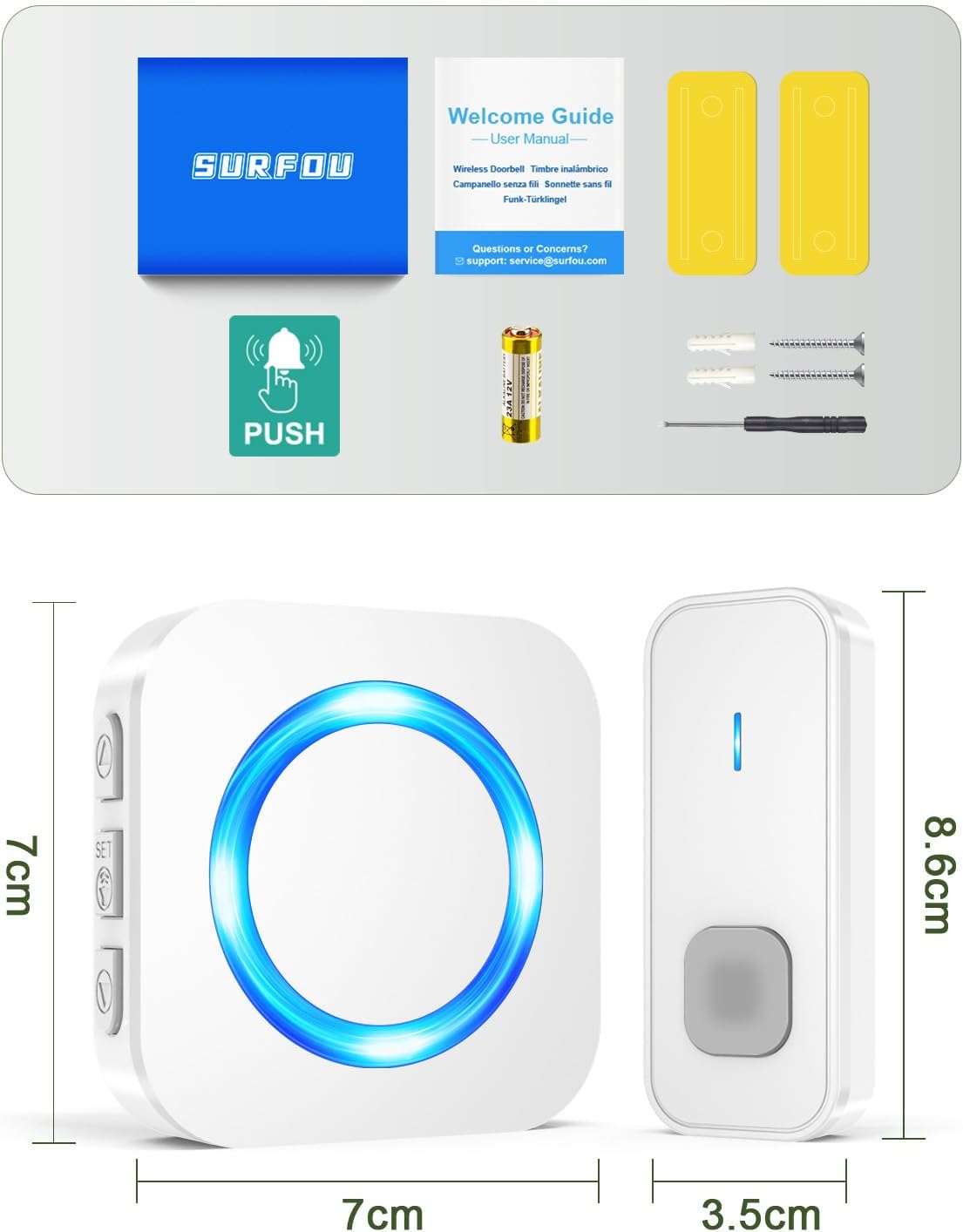
Image: All components included in the SURFOU Wireless Doorbell Kit N6 package, including receivers, transmitter, battery, screwdriver, screws, and adhesive tapes.
سيٽ اپ ۽ تنصيب
Follow these steps to set up your SURFOU Wireless Doorbell:
1. ٽرانسميٽر جي بيٽري جي انسٽاليشن
- Open the back cover of the transmitter using the provided screwdriver.
- Insert the 12V23A battery, ensuring correct polarity.
- پوئتي ڍڪ کي محفوظ طور تي بند ڪريو.

Image: A diagram showing the battery compartment of the transmitter and the 12V23A battery.
2. رسيور جي جاءِ
Plug the receivers into standard electrical outlets in desired locations within your home. Ensure they are within the 400-meter wireless range of the transmitter, considering walls and obstacles may reduce this range.

Image: An illustration demonstrating the 400-meter wireless range of the doorbell system, with receivers placed inside a house.
3. ٽرانسميٽر لڳائڻ
You have two options for mounting the transmitter:
- Adhesive Tape Method:
- چڙهڻ واري مٿاڇري کي چڱي طرح صاف ڪريو.
- Peel off one side of the double-sided adhesive tape and attach it to the back of the transmitter.
- Peel off the other side and firmly press the transmitter onto the desired location (e.g., door frame).
- Screw Method:
- Mark the desired mounting points on the wall.
- جيڪڏھن ضروري ھجي ته پائلٽ سوراخ ڪريو.
- Secure the transmitter to the wall using the provided screws.

Image: Visual guide showing both adhesive tape and screw installation methods for the doorbell transmitter.
آپريٽنگ هدايتون
1. سُرن کي تبديل ڪرڻ
The doorbell offers 55 different melodies. To change the melody:
- کي دٻايو موسيقي جي چونڊ بٽڻ on the side of the receiver to cycle through the available melodies.
- هڪ دفعو توهان کي پنهنجي پسند جو سُر ٻڌڻ ۾ اچي، بٽڻ دٻائڻ بند ڪريو. دروازي جي گھنٽي توهان جي چونڊ کي ياد رکندي.

Image: A visual representation of the receiver with icons indicating 55 melodies, LED display, and 5 volume levels.
2. حجم کي ترتيب ڏيڻ
There are 5 adjustable volume levels, up to 110 dB. To adjust the volume:
- کي دٻايو حجم بٽڻ on the side of the receiver to cycle through the volume levels.
- The volume will decrease or increase with each press.
- A mute mode (0 dB) is also available, where only the LED indicator will flash.

Image: A graphic illustrating the 5 volume levels (0dB to 110dB) and the mute mode feature.
3. Pairing Additional Transmitters/Receivers (Optional)
If you purchase additional SURFOU doorbell components, you can pair them:
- Plug in the new receiver.
- کي دٻايو ۽ رکو حجم بٽڻ on the receiver for 5 seconds until it emits a "ding" sound and the LED flashes. This indicates pairing mode.
- Immediately press the button on the new transmitter. The receiver will ring, confirming successful pairing.
- Repeat for any other additional components.

Image: An illustration showing multiple receivers and transmitters, indicating the system's expandability.
سار سنڀال
- صفائي: Wipe the doorbell units with a soft, dry cloth. Do not use abrasive cleaners or solvents.
- بيٽري مٽائڻ: When the transmitter's range decreases or it stops working, replace the 12V23A battery.
- ماحولياتي حالتون: The transmitter is IP55 dustproof and waterproof, designed to withstand temperatures from -30°C to 70°C. However, avoid prolonged exposure to extreme conditions or direct submersion in water.

Image: The doorbell transmitter highlighting its IP55 dustproof and waterproof rating, 1-3 years battery life, and operating temperature range of -30°C to 70°C.
مشڪلاتون
| مسئلو | ممڪن سبب | حل |
|---|---|---|
| Doorbell does not ring. |
|
|
| Shortened wireless range. |
|
|
| رسيور LED چمڪي ٿو پر آواز نٿو اچي. | Volume is set to mute (0 dB). | Press the Volume Button to increase the volume. |
وضاحتون
| خاصيت | تفصيل |
|---|---|
| ماڊل نمبر | N6 |
| برانڊ | سرفو |
| وائرلیس رينج | Up to 400 meters (in open areas) |
| راڳ | 55 چونڊيل راڳ |
| حجم جي سطح | 5 levels (0 dB to 110 dB) |
| پنروڪ درجه بندي (ٽرانسميٽر) | IP55 |
| آپريٽنگ جي درجه حرارت | -30 ° C کان 70 ° C (-22 ° F کان 158 ° F) |
| ٽرانسميٽر جي بيٽري | 1 x 12V23A (included) |
| وصول ڪندڙ پاور | AC پلگ ان |
| مواد | ABS |
| طول و عرض (ٽرانسميٽر) | لڳ ڀڳ. 8.6 X 3.5 x 2 سينٽ |
| طول و عرض (وصول ڪندڙ) | لڳ ڀڳ. 7 X 7 x 6.5 سينٽ |
| وزن | 92.2 Grams (total package weight) |
وارنٽي ۽ سپورٽ
SURFOU is committed to providing reliable products and excellent customer service. If you encounter any issues or have questions regarding your doorbell kit, please contact our support team. While specific warranty details are not provided in this manual, SURFOU offers 24/7 customer support to assist you.
For support, please refer to the contact information provided with your purchase or visit the official SURFOU webسائيٽ.