
1. پراڊڪٽ ختمview
The Gebildet 19mm High Head SPST Latching Push Button Switch is a durable, waterproof, and self-locking switch designed for various electrical applications. Constructed from stainless steel, it features a high head design and solder pin terminals, making it suitable for both indoor and outdoor use in demanding environments.
This switch operates with a latching mechanism: press once to turn ON, press again to turn OFF. It is rated for DC/AC 250V 3A and offers excellent mechanical and electrical life.
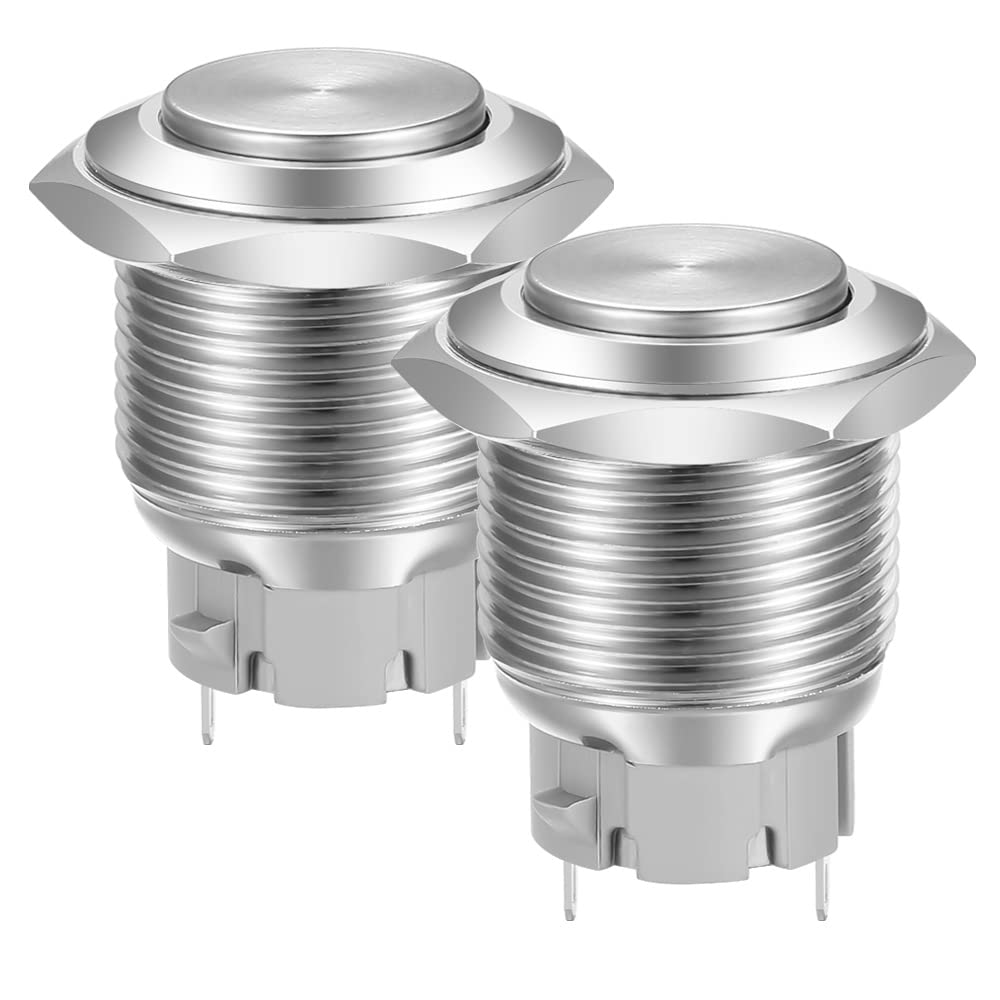
Image 1: Two Gebildet 19mm High Head SPST Latching Push Button Switches. These switches feature a polished metal finish and a high-profile button, ready for installation.
2. اهم خاصيتون
- اعليٰ معيار جي تعمير: Made from stainless steel for durability and resistance to corrosion.
- Latching Operation: Self-locking mechanism (press ON, press again OFF) for continuous state control.
- پنروڪ ڊيزائن: IP65 rated for protection against water jets and dust, suitable for outdoor and humid conditions.
- اثر مزاحمت: IK08 rated for protection against mechanical impacts.
- آسان تنصيب: Features solder pin terminals for secure electrical connections.
- وسيع ايپليڪيشن: Versatile for use in automotive, marine, industrial equipment, home appliances, and medical devices.
3. ٽيڪنيڪل وضاحتون
| درجه بندي Voltage ۽ موجوده | DC/AC 250V 3A |
| مواد | المونيم مصر، اسٽينلیس سٹیل |
| چڙهڻ سوراخ قطر | 19 ملي ميٽر |
| رابطي جي ترتيب | 1 NO (Normally Open) |
| آپريشن جو قسم | Latching / Self-locking |
| Front Shape | High Head / Round |
| تحفظ جي درجه بندي | IP65، IK08 |
| رابطي جي مزاحمت | ≤50mΩ |
| موصليت جي مزاحمت | ≥1000mΩ |
| Dielectric طاقت | 2000VAC |
| آپريٽنگ جي درجه حرارت | -20 ℃ کان +55 ℃ |
| مشيني زندگي | > 1,000,000 ڀيرا |
| برقي زندگي | > 200,000 ڀيرا |
| وائرنگ جو قسم | Solder Pin |
| پينل ٿلهي | 1-11 ملي ميٽر |
| Nut Torque | 5-14 اين ايم |
| ماڊل نمبر | جي ايس-19 |

Image 2: Detailed diagram showing the dimensions and key specifications of the 19mm push button switch, including mounting hole size, switch type, operation type, head shape, shell material, current, voltage, wiring type, panel thickness, nut torque, protection class, and lifespan.
4. سيٽ اپ ۽ تنصيب
4.1 چڙهڻ
- پڪ ڪريو ته انسٽاليشن کان پهريان پاور سپلائي منقطع آهي.
- Drill a circular mounting hole with a diameter of 19mm in your panel. The panel thickness should be between 1mm and 11mm.
- Insert the switch body into the drilled hole from the front of the panel.
- Secure the switch in place by tightening the provided nut on the back of the panel. Apply a nut torque between 5-14 Nm.
4.2 وائرنگ
The switch uses solder pin terminals for electrical connections. Carefully solder your wires to the appropriate terminals. This switch has a 1 NO (Normally Open) contact configuration.
- Identify the terminals for the switch contacts. Typically, these are marked or can be identified by testing continuity.
- Solder the positive and negative wires of your circuit to the respective terminals.
- Ensure all solder joints are clean, secure, and free from short circuits.
نوٽ: If you are unsure about wiring, consult a qualified electrician or refer to a wiring diagram specific to your application.
5. آپريٽنگ هدايتون
This is a latching (self-locking) push button switch. Its operation is straightforward:
- چالو ڪرڻ لاءِ: Press the button once. The button will remain in the depressed position, and the circuit will be closed (ON).
- بند ڪرڻ: Press the button again. The button will return to its original position, and the circuit will be opened (OFF).
The video below demonstrates the latching operation of the switch.
Video 1: Demonstration of the Gebildet 19mm Latching Push Button Switch. The video shows the switch being pressed to activate a connected light, and then pressed again to deactivate it, illustrating its self-locking functionality.

تصوير 3: هڪ سابقample of the 19mm push button switch installed on a wall panel, being pressed by a finger. This illustrates a common application for the switch, such as an access control button or doorbell.
6. سار سنڀال
The Gebildet push button switch is designed for durability and minimal maintenance.
- صفائي: For general cleaning, wipe the switch surface with a soft, damp cloth. Avoid abrasive cleaners or solvents that could damage the metal finish.
- ماحولياتي تحفظ: With an IP65 rating, the switch is protected against dust ingress and low-pressure water jets. It is suitable for outdoor and humid environments, but avoid prolonged submersion or high-pressure water exposure.
- چڪاس: Periodically check the wiring connections to ensure they remain secure, especially in applications subject to vibration.

Image 4: The Gebildet 19mm push button switch shown with water splashes, highlighting its IP65 waterproof and IK08 impact resistance ratings. This indicates its suitability for use in challenging environmental conditions.
7. مسئلا حل ڪرڻ
If the switch is not functioning as expected, consider the following:
- طاقت ناهي: Check the power supply to your circuit. Ensure it is within the specified voltage and current ratings (DC/AC 250V 3A).
- غلط وائرنگ: Verify all solder connections are correct and secure. A loose connection or short circuit can prevent proper operation.
- Damaged Switch: If the switch has been subjected to excessive force or improper installation, it may be damaged. Inspect for any visible physical damage.
- ليچنگ ميڪانيزم: Confirm you are operating the latching mechanism correctly (press once for ON, press again for OFF).
If issues persist, contact Gebildet customer support for further assistance.
8. وارنٽي ۽ سپورٽ
For warranty information, technical support, or any inquiries regarding your Gebildet 19mm High Head SPST Latching Push Button Switch, please contact the seller or Gebildet customer service directly. Refer to your purchase documentation for specific warranty terms and contact details.
You can often find support information on the official Gebildet website or through the platform where the product was purchased.