
1. تعارف
This instruction manual provides essential information for the safe and effective use of your Vineyuan BP-264 NI-MH Battery Charger BC-192. Please read this manual thoroughly before operating the charger to ensure proper functionality and to prevent damage to the product or connected devices. This charger is designed for specific ICOM two-way radio models and their compatible BP-264 NI-MH batteries.
2. حفاظت جي ڄاڻ
زخم يا نقصان کان بچڻ لاءِ هيٺ ڏنل حفاظتي احتياطن تي عمل ڪريو:
- Do not open the battery pack or charger base.
- Do not heat the battery above 60°C (140°F).
- بيٽري ٽرمينل کي شارٽ سرڪٽ نه ڪريو.
- Use this charger only with specified radios and BP-264 NI-MH batteries.
- چارجر کي پاڻي ۽ نمي کان پري رکو.
- جڏهن استعمال ۾ نه هجي يا صفائي دوران چارجر کي پاور آئوٽليٽ مان ڪڍو.
نيڪال: Do not dispose of batteries in household waste. Follow local regulations for proper disposal of NI-MH batteries.
3. پيڪيج مواد
پڪ ڪريو ته هيٺ ڏنل سڀئي شيون توهان جي پيڪيج ۾ شامل آهن:
- 1 x BC-192 Charger Base
- 1 ايڪس سي پاور اڊاپٽر
- 1 x BP-264 NI-MH Battery
- 1 x بيلٽ ڪلپ
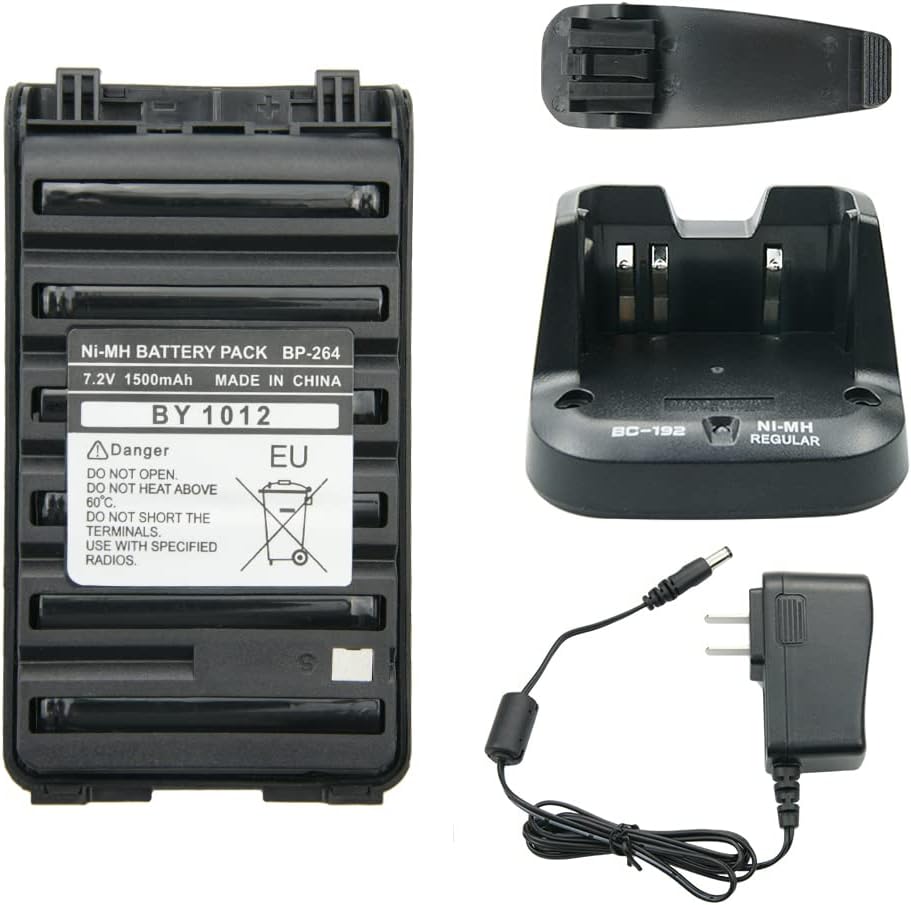
شڪل 3.1: ختمview of the BP-264 NI-MH Battery Charger BC-192 package contents, including the battery, charger base, AC adapter, and belt clip.
4. سيٽ اپ
پنهنجو چارجر سيٽ اپ ڪرڻ لاءِ انهن قدمن تي عمل ڪريو:
- Connect the AC power adapter cable to the DC input port on the back of the BC-192 charger base.
- Plug the AC power adapter into a standard 110-240V wall outlet.
- چارجر هاڻي استعمال لاءِ تيار آهي.

Figure 4.1: The BC-192 charger base connected to its AC power adapter, ready for power connection.
5. آپريٽنگ هدايتون
To charge the BP-264 NI-MH battery:
- Ensure the charger base is powered on (refer to Section 4: Setup).
- Carefully insert the BP-264 NI-MH battery into the charging slot of the BC-192 charger base. Ensure it is seated correctly.
- The charging indicator light on the charger base will illuminate ڳاڙهو, indicating that the battery is charging.
- Once the battery is fully charged, the indicator light will turn سائو.
- Remove the fully charged battery from the charger base.
اهم نوٽ: All new batteries are not fully charged from the factory. It is recommended to fully charge the battery before its first use.

Figure 5.1: The BP-264 battery correctly placed in the BC-192 charger base for charging.
6. سار سنڀال
To ensure the longevity and optimal performance of your charger and battery:
- Keep the charger base and battery contacts clean and free from dust or debris. Use a dry, soft cloth for cleaning.
- چارجر ۽ بيٽري کي ٿڌي، سڪل جاءِ تي ذخيرو ڪريو جڏهن استعمال ۾ نه هجي.
- Avoid exposing the charger or battery to extreme temperatures, direct sunlight, or high humidity.
7. مسئلا حل ڪرڻ
عام مسئلن ۽ انهن جي حل لاءِ هيٺ ڏنل جدول جو حوالو ڏيو:
| مسئلو | ممڪن سبب / حل |
|---|---|
| Charger indicator flashes red/green without battery. | This is normal behavior. The charger is in standby mode, awaiting a battery. |
| Battery does not charge (no red light). |
|
| Battery charges slowly or not fully. |
|
8. وضاحتون
BP-264 NI-MH Battery
- ڪيمسٽري: اين ايڇ پنهور
- جلدtage: 7.2V
- گنجائش: 1500mAh
- وزن: تقريبن 200 گرام (7 آونس)
- طول و عرض: Approximately 10.3 cm (4.05 inches) x 5.7 cm (2.24 inches)

Figure 8.1: Detailed dimensions of the BP-264 NI-MH battery.
BC-192 Charger Base
- ان پٽ: 110-240V AC, 50/60Hz, 500mA
- پيداوار: 12 وي ڊي سي ، 1000 ايم اي
- وزن: تقريبن 170 گرام (5.99 آونس)
- پيداوار جي ماپ: تقريبن 4.7 x 2.9 x 1.6 انچ
9. Compatible Radios and Batteries
Compatible ICOM Two-Way Radios
- ICOM IC-V80, IC-V80E, IC-G80
- ICOM IC-T70A, IC-T70E
- ICOM IC-F27SR
- ICOM IC-F3001, IC-F4001
- ICOM IC-F3002, IC-F4002
- ICOM IC-F3003, IC-F4003
- ICOM IC-F3011, IC-F4011
- ICOM IC-F3101D, IC-F4101D
- ICOM IC-F3102D, IC-F4102D
- ICOM IC-F3103D, IC-F4103D
مطابقت واري بيٽري ماڊل
- BP-264 NI-MH Battery

Figure 9.1: An ICOM IC-F3011 radio demonstrating compatibility with the BC-192 charger.
10. وارنٽي ۽ سپورٽ
For warranty information or technical support, please refer to the documentation provided with your purchase or contact the seller directly. Keep your purchase receipt as proof of purchase for any warranty claims.