
PowerDrive PWD2000P
PowerDrive 2000 Watt Power Inverter User Manual
Model: PWD2000P
تعارف
This manual provides detailed instructions for the safe and efficient operation, installation, and maintenance of your PowerDrive 2000 Watt Power Inverter, Model PWD2000P. This device converts 12V DC power from your vehicle battery into 110V AC power, allowing you to operate various AC devices and charge electronic devices on the go. Please read this manual thoroughly before using the inverter.
اهم حفاظتي ڄاڻ
انورٽر يا ڳنڍيل ڊوائيسز کي زخم يا نقصان کان بچڻ لاءِ هميشه هيٺ ڏنل حفاظتي احتياطن تي عمل ڪريو:
- انورٽر نه کوليو casing. اندر ڪو به استعمال ڪندڙ جي خدمت لائق پرزا نه آهن.
- Ensure proper ventilation around the inverter. Do not block cooling vents.
- انورٽر کي پاڻي، نمي ۽ ٻرندڙ مواد کان پري رکو.
- انورٽر کي صرف 12V DC پاور سورس سان ڳنڍيو.
- Do not exceed the inverter's rated power output (2000 Watts continuous, 4000 Watts surge).
- Always connect the inverter to the battery before plugging in AC devices.
- جڏهن استعمال ۾ نه هجي ته انورٽر کي بيٽري کان ڌار ڪريو.
- ھن پراڊڪٽ ۾ ڪيميڪل شامل آھن جيڪي ڪيليفورنيا جي رياست کي سڃاتل آھن جيڪي ڪينسر ۽ پيدائشي نقص يا ٻي پيدائشي نقصان جو سبب بڻجن ٿا. هٿ ڪرڻ کان پوءِ هٿ ڌوئڻ.
پيداوار جا اجزاء
The PowerDrive 2000 Watt Power Inverter comes with the following components:
- PowerDrive 2000 Watt Power Inverter unit
- 39-inch heavy-duty installation cables (red for positive, black for negative)
- هٽائڻ واري LCD اسڪرين
- چڙهڻ واري بريڪٽس

شڪل 1: سامهون view of the PowerDrive 2000 Watt Power Inverter, showing the digital display, power button, Bluetooth indicator, four AC 120V outlets, one USB-C port, and one USB-A port. The unit features a durable yellow and black casing with ventilation grilles.

شڪل 2: مٿانview of the PowerDrive 2000 Watt Power Inverter with key dimensions (14.54" length, 9.8" width, 4.25" height) and included accessories. The image displays the inverter unit, red and black 39-inch battery cables, and a 12-foot remote LCD cable.
سيٽ اپ ۽ تنصيب
Proper installation is crucial for the inverter's performance and safety. Follow these steps carefully:
- جڳھ چونڊيو: Select a dry, well-ventilated area for mounting the inverter. Ensure it is away from direct sunlight, heat sources, and any flammable materials. The mounting brackets can be used to secure the unit.
- بيٽري تيار ڪريو: Ensure your vehicle's battery is a 12V DC system. Turn off the vehicle and any accessories.
- ڪيبل ڳنڍڻ:
- ڳنڍيو ڳاڙهو (positive) cable to the هاڪاري (+) انورٽر جو ٽرمينل.
- ڳنڍيو ڪارو (negative) cable to the ناڪاري (-) انورٽر جو ٽرمينل.
- جي ٻئي آخر سان ڳنڍيو ڳاڙهو ڪيبل ڏانهن هاڪاري (+) terminal of the vehicle battery.
- جي ٻئي آخر سان ڳنڍيو ڪارو ڪيبل ڏانهن ناڪاري (-) terminal of the vehicle battery.
اهم: Always connect the inverter terminals first, then the battery terminals. Ensure connections are tight and secure.
- Connect Remote LCD (Optional): If desired, connect the removable LCD screen to the inverter using the provided cable. This allows for remote monitoring and control.
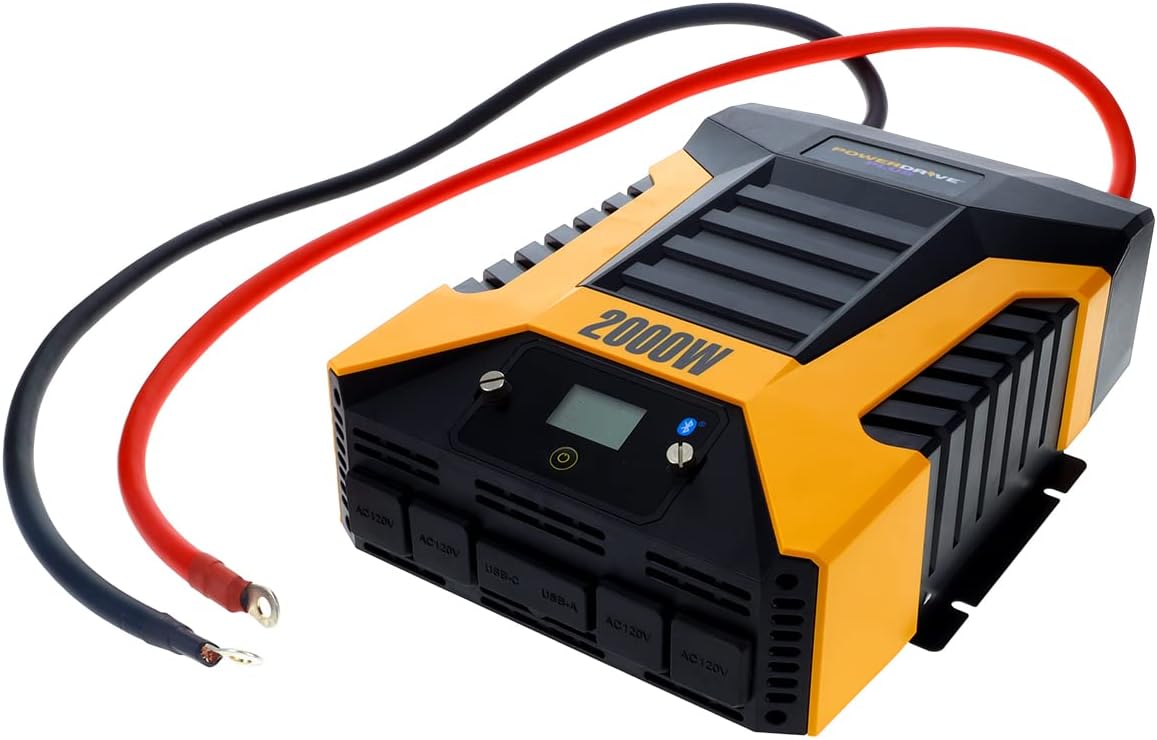
شڪل 3: The PowerDrive 2000 Watt Power Inverter with the red positive and black negative battery cables securely connected to its terminals, ready for connection to a vehicle battery. This illustrates the correct cable attachment for power input.
آپريٽنگ هدايتون
Once installed, the inverter is ready for operation:
- پاور آن: Press the power button on the inverter's front panel or on the remote LCD screen. The digital display will illuminate, showing battery voltage ۽ ٻاھر ڪڍوtage.
- ڪنيڪشن ڊوائيسز: Plug your AC devices into the four 3-prong AC outlets. For charging smartphones and tablets, use the standard USB 2.4 Amp port or the fast-charging USB-C 3.0 Amp بندرگاهه.
- نگراني: The digital display provides real-time information on battery voltage, output power (watts), and any error codes.
- Bluetooth وائرليس ٽيڪنالاجي:
- مفت ڊائون لوڊ ڪريو PowerDrive Plus app from your smartphone's app store (compatible with Android and iOS).
- Enable Bluetooth on your smartphone and pair it with the inverter.
- The app allows you to remotely monitor battery voltage, output power, and product temperature. You can also set up protections like undervoltage and overload, and power the inverter on/off from a distance.
- بجلي بند ڪرڻ: Press and hold the power button until the display turns off, or use the PowerDrive Plus app. Disconnect devices before turning off the inverter.

شڪل 4: ويجهو سامهون وارو نظارو view of the PowerDrive 2000 Watt Power Inverter, highlighting its four AC 120V outlets, one USB-C port, and one USB-A port. These ports provide versatile power options for various electronic devices and appliances.

شڪل 5: A smartphone screen showing the PowerDrive Plus application interface. The app displays real-time data such as output power (842 watts), battery power percentage (88%), battery voltage (12.6 VDC), and output voltage (120 VAC), along with temperature readings and control options.
سار سنڀال
To ensure the longevity and optimal performance of your PowerDrive inverter, follow these maintenance guidelines:
- صاف رکو: Regularly wipe the exterior of the inverter with a dry, soft cloth. Do not use liquid cleaners or solvents.
- وينٽيليشن: Ensure the cooling fan vents are clear of dust and debris. The high-speed cooling fan automatically activates when needed and is designed for quiet operation.
- ڪيبل ڪنيڪشن: Periodically check that all cable connections to the battery and inverter terminals are secure and free from corrosion.
- اسٽوريج: جڏهن گهڻي عرصي تائين استعمال ۾ نه هجي، ته انورٽر کي ٿڌي، سڪل جاءِ تي، بيٽري کان ڌار ٿيل، ذخيرو ڪريو.

شڪل 6: ريڙهه view of the PowerDrive 2000 Watt Power Inverter, showcasing its two high-speed cooling fans and the robust battery input terminals. Proper airflow through these fans is essential for maintaining optimal operating temperature.
مشڪلاتون
جيڪڏهن توهان کي پنهنجي انورٽر سان مسئلا درپيش اچن ٿا، ته هيٺ ڏنل عام مسئلن ۽ حلن جو حوالو ڏيو:
| مسئلو | ممڪن سبب | حل |
|---|---|---|
| ڪابه پاور آئوٽ پُٽ ناهي / انورٽر آن نه ٿي رهيو آهي |
|
|
| انورٽر بار بار بند ٿئي ٿو |
|
|
| Digital display shows error code | Specific error condition (e.g., over-voltage ، انڊر والtage, overload, short circuit) | Refer to the PowerDrive Plus app or contact customer support for specific error code interpretations and solutions. Address the underlying issue (e.g., reduce load, check battery). |
پيداوار جي وضاحت
| خاصيت | تفصيل |
|---|---|
| برانڊ | پاور ڊرائيو |
| ماڊل نمبر | PWD2000P |
| مسلسل طاقت | 2000 واٽ |
| سرج پاور | 4000 واٽ |
| انٽ واليمtage | 12V ڊي سي |
| اوٽ وولٽtage | 110V AC |
| AC دڪان | Four 3-prong outlets |
| USB بندرگاهن | هڪ USB 2.4 Amp, One USB-C 3.0 Amp |
| رابطي | Bluetooth Wireless Technology (PowerDrive Plus App compatible) |
| ڏيکاريو | Digital display (removable LCD screen) |
| کولڻ | تيز رفتار واري ٿڌي فين |
| شيءِ جو وزن | 9 پائونڊ |
| پيداوار جي ماپ | 5.7 x 17 x 12 انچ |
وارنٽي ۽ سپورٽ
For warranty information, technical support, or service inquiries, please contact PowerDrive customer service. Keep your purchase receipt as proof of purchase.
For additional resources and frequently asked questions, visit the official PowerDrive website or refer to the PowerDrive Plus app.
Ask a question about this manual
Ask about setup, troubleshooting, compatibility, parts, safety, or missing instructions. Manuals+ will review the question and use this page’s manual context to help answer it.