
تعارف
Thank you for choosing the Varmilo MA Series V2 Summit R2 Mechanical Keyboard. This manual provides essential information for setting up, operating, maintaining, and troubleshooting your new keyboard. Please read this manual thoroughly to ensure optimal performance and longevity of your device.
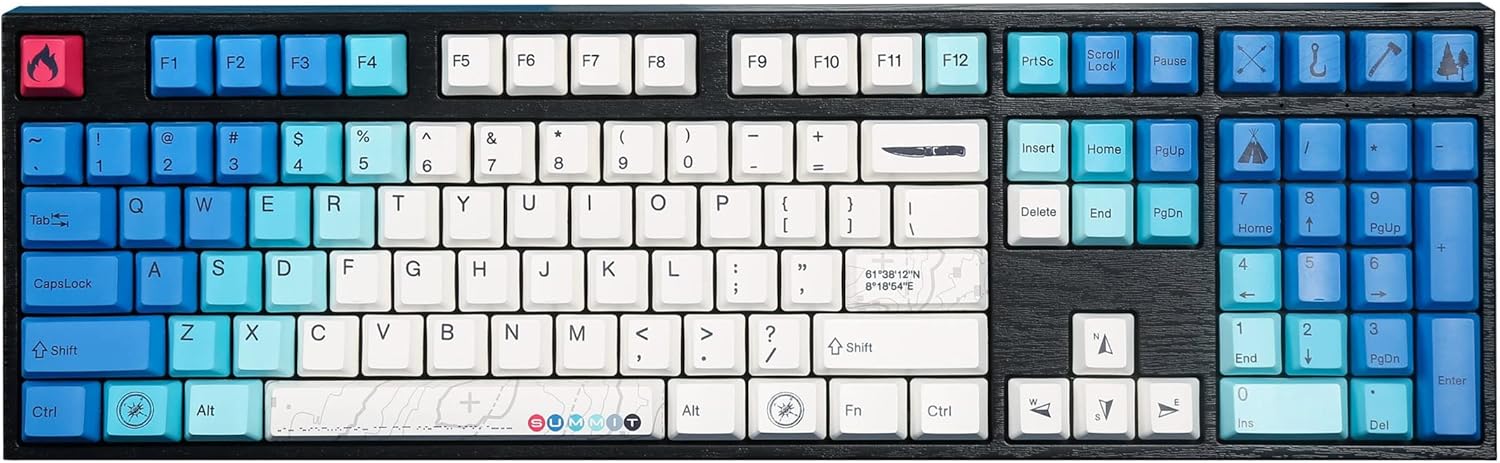
Image: The Varmilo MA Series V2 Summit R2 Mechanical Keyboard, showcasing its full layout and unique keycap design.
سيٽ اپ ڪريو
1. انباڪسنگ
احتياط سان ڪيبورڊ ۽ سڀئي لوازمات پيڪنگ مان هٽايو. پڪ ڪريو ته هيٺيون شيون موجود آهن:
- Varmilo MA Series V2 Summit R2 Mechanical Keyboard
- USB-سي ڪيبل
- ڪي ڪيپ ڇڪڻ وارو (جيڪڏهن شامل هجي)
- استعمال ڪندڙ جو دستياب (ھي دستاويز)
2. ڪي بورڊ کي ڳنڍڻ
- ڪيبورڊ جي پوئين پاسي USB-C پورٽ ڳوليو.
- مهيا ڪيل USB-C ڪيبل جي هڪ پڇاڙي کي ڪيبورڊ سان ڳنڍيو.
- USB-C ڪيبل جي ٻئي ڇيڙي کي پنهنجي ڪمپيوٽر تي موجود USB پورٽ سان ڳنڍيو.
- ڪيبورڊ پلگ اينڊ پلي آهي ۽ توهان جي آپريٽنگ سسٽم طرفان خودڪار طريقي سان سڃاڻي سگهجي ٿو.
3. Adjusting Keyboard Angle
The Varmilo MA Series V2 features a double-section kickstand, allowing for two different typing angles. Gently flip out the desired sections of the kickstand located on the underside of the keyboard to adjust its height and angle for ergonomic comfort.

تصوير: سائڊ پروfile of the Varmilo keyboard, illustrating the adjustable kickstand in an extended position.
آپريٽنگ هدايتون
1. بنيادي اهم ڪم
The keyboard features a standard full-size (104-key) layout. All alphanumeric and standard function keys operate as expected. The Varmilo EC Ivy V2 switches provide a smooth and responsive typing experience.
2. Function (Fn) Key Combinations
The Fn key (typically located near the right Alt key) allows access to secondary functions printed on certain keycaps. Hold down the Fn key and press the desired function key simultaneously.
- ايف اين + ايف 1-ايف 12: Multimedia controls (e.g., volume, play/pause, stop).
- ايف اين + تير جون چاٻيون: LED brightness or effect control (refer to specific keycap legends).
- ايف اين + ون: ونڊوز ڪي کي لاڪ/ان لاڪ ڪريو.

تصوير: هڪ ويجهو تصوير view of the right side of the Varmilo keyboard, highlighting the special function keys and their legends.
3. LED Backlighting Control
The keyboard features White LED backlighting. Use the Fn key combinations to adjust the brightness and switch between various lighting effects. Specific key legends will indicate the corresponding functions for LED control.
سار سنڀال
1. ڪي بورڊ صاف ڪرڻ
ڪيبورڊ جي ظاهر ۽ ڪارڪردگي کي برقرار رکڻ لاءِ:
- صفائي ڪرڻ کان اڳ ڪيبورڊ کي ڪمپيوٽر کان ڌار ڪريو.
- نرم، لِنٽ کان خالي ڪپڙو استعمال ڪريو ٿورڙو ڊيampڪي ڪيپس کي صاف ڪرڻ لاءِ پاڻي يا هلڪي صفائي واري محلول سان صاف ڪريو ۽ سيasing.
- ڪي ڪيپس جي وچ ۾ مٽي ۽ ملبي لاءِ، دٻيل هوا استعمال ڪريو.
- Avoid using harsh chemicals, abrasives, or solvents, as these can damage the PBT keycaps and finish.
2. ڪي ڪيپ هٽائڻ ۽ متبادل
The keyboard features durable Dye Sub PBT keycaps. If you need to remove keycaps for deep cleaning or customization:
- Use the provided keycap puller (if applicable) or a similar tool.
- Gently attach the keycap puller to the keycap and pull straight up to remove it. Avoid twisting or excessive force.
- To replace, align the keycap with the switch stem and press down firmly until it clicks into place.

Image: A collection of individual Varmilo keycaps, including special design keycaps, demonstrating their PBT material and dye-sublimated legends.
مشڪلاتون
If you encounter issues with your Varmilo keyboard, please refer to the following common solutions:
- ڪي بورڊ جواب نه ڏئي رهيو آهي:
- پڪ ڪريو ته USB-C ڪيبل ڪيبورڊ ۽ ڪمپيوٽر ٻنهي سان محفوظ طور تي ڳنڍيل آهي.
- ڪيبورڊ کي پنهنجي ڪمپيوٽر تي ڪنهن ٻئي USB پورٽ سان ڳنڍڻ جي ڪوشش ڪريو.
- سسٽم جي مخصوص مسئلن کي رد ڪرڻ لاءِ ٻئي ڪمپيوٽر تي ڪيبورڊ آزمايو.
- پنهنجي ڪمپيوٽر کي ٻيهر شروع ڪريو.
- LEDs Not Working or Incorrect:
- Ensure the LED brightness is not set to the lowest level using Fn key combinations.
- Check if any specific lighting modes are active that might turn off certain LEDs.
- رجسٽر نه ٿيندڙ چاٻيون:
- Remove the keycap and inspect the switch for any obstructions.
- Clean around the switch stem with compressed air.
فيڪٽري ري سيٽ
If issues persist, a factory reset may resolve them. Consult the Varmilo official website or support for specific reset procedures for your model, as these can vary.
وضاحتون
The following are the technical specifications for the Varmilo MA Series V2 Summit R2 Mechanical Keyboard:
| خاصيت | تفصيل |
|---|---|
| برانڊ | ورميلو |
| ماڊل | MA Series V2 Summit R2 |
| ترتيب | Full-size (104 + 4 keys) |
| سوئچ جو قسم | Varmilo EC Ivy V2 Mechanical Switches |
| ڪي ڪيپ مواد | Dye Sub PBT |
| رابطي | USB-C |
| پٺڀرائي | اڇو LED |
| مواد | Polybutylene Terephthalate, Silicone |
| طاقت جو ذريعو | USB ويڊيو |
| مطابقت رکندڙ ڊوائيسز | ڪمپيوٽر (USB-C ذريعي) |
وارنٽي ۽ سپورٽ
Varmilo products are manufactured to high-quality standards. For information regarding warranty coverage, technical support, or service inquiries, please visit the official Varmilo webسائيٽ تي وڃو يا سڌو سنئون انهن جي ڪسٽمر سپورٽ سان رابطو ڪريو. وارنٽي دعوائن لاءِ خريداري جي ثبوت طور پنهنجي خريداري جي رسيد رکو.
Official Varmilo Store: Varmilo Store on Amazon