
PCsensor 3 Key Mini Keypad
PCsensor 3-Key Mini Keypad User Manual
Model: 3 Key Mini Keypad
برانڊ: پي سي سينسر
تعارف
This manual provides detailed instructions for the setup, operation, and maintenance of your PCsensor 3-Key Mini Keypad. This wireless mechanical gaming keyboard is designed for customized hotkey programming, offering flexibility and enhanced control for various applications.

Image: The PCsensor 3-Key Mini Keypad in white, showcasing its three mechanical keys with red RGB backlighting. The compact design highlights its portability and functionality.
دٻي ۾ ڇا آهي
پڪ ڪريو ته سڀئي شيون پيڪيج ۾ موجود آهن:
- PCsensor 3-Key Mini Keypad (White-Bluetooth model)
- USB Type-C to USB-A Charging Cable
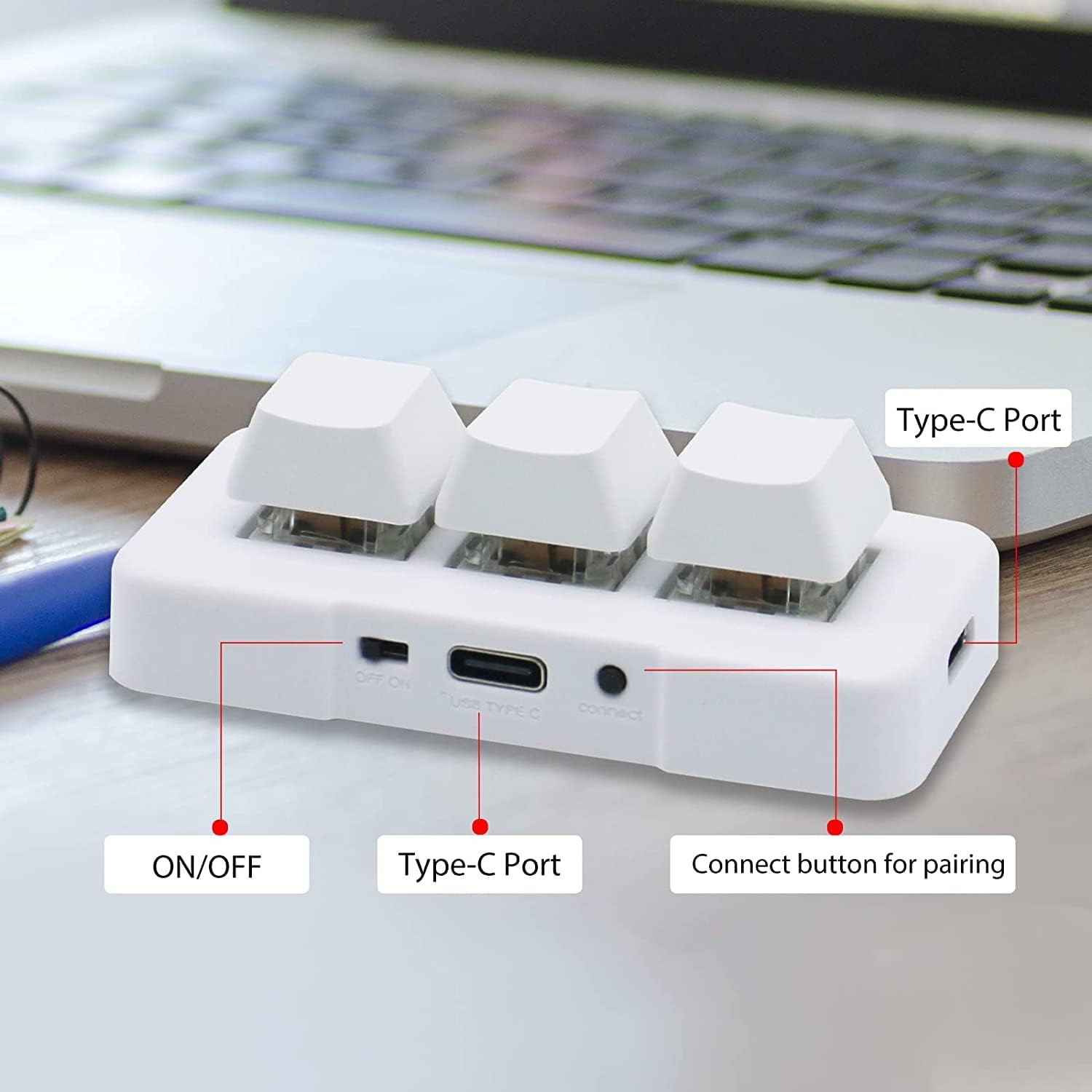
Image: A diagram illustrating the dimensions of the 3-Key Mini Keypad (approximately 3 inches long) and the included 59-inch (1500mm) USB Type-C charging cable.
پيداوار ختمview
Familiarize yourself with the components of your mini keypad:
- مشيني چاٻيون: Three programmable keys with durable mechanical switches.
- آن/آف سوئچ: Located on the side for power control.
- USB قسم-سي پورٽ: وائرڊ ڪنيڪشن ۽ چارجنگ لاءِ.
- ڳنڍڻ جو بٽڻ: بلوٽوٿ جوڙڻ لاءِ استعمال ٿيندو آهي.
- RGB LED Backlighting: Customizable lighting under each key.

تصوير: هڪ ويجهو تصوير view of the white 3-Key Mini Keypad, clearly labeling the ON/OFF switch, USB Type-C port, and the small connect button for pairing.
سيٽ اپ ڪريو
ڪي پيڊ چارج ڪرڻ
- Connect the provided USB Type-C cable to the keypad's Type-C port.
- ڪيبل جي ٻئي ڇيڙي کي USB پاور سورس سان ڳنڍيو (مثال طور، ڪمپيوٽر USB پورٽ، وال اڊاپٽر).
- The keypad's LED light will indicate charging status. A full charge typically takes 2 hours and can provide up to 3 months of use. The LED will flash every 3 seconds when the battery is low.
رابطي جا اختيار
The keypad supports both wired (USB) and wireless (Bluetooth) connections.
Wired Connection (USB Mode)
- Ensure the keypad is turned بند ON/OFF سوئچ استعمال ڪندي.
- Connect the USB Type-C cable from the keypad to your computer's USB port.
- The keypad will automatically be recognized as a standard keyboard. In USB mode, the key backlighting will typically display a blue light.
Wireless Connection (Bluetooth Mode)
- Turn the keypad ON ON/OFF سوئچ استعمال ڪندي.
- Long press the "connect" button on the side of the keypad until the LED light starts flashing rapidly, indicating pairing mode.
- On your device (computer, smartphone, tablet), navigate to Bluetooth settings and search for new devices.
- Select "3 Key Mini Keypad" or a similar name from the list of available devices to pair.
- Once successfully paired, the LED light will stop flashing and remain solid, typically displaying a red light in wireless mode.

Image: The 3-Key Mini Keypad illustrating the different LED colors for connectivity modes: blue light indicates USB mode, and red light indicates wireless (Bluetooth) mode.
نوٽ: For initial setup and programming, it is recommended to connect the keypad to a Windows system first. Once programmed, it can be freely used with Windows, Linux, Mac OS, Android, and iOS systems.
آپريٽنگ هدايتون
اهم پروگرامنگ
The 3-Key Mini Keypad is fully programmable, allowing you to assign custom hotkeys, shortcuts, or macros to each of its three keys. Programming is done via dedicated software.
- Download the official programming software from the PCsensor website. (Refer to the product packaging or manufacturer's webڊائون لوڊ لنڪ لاءِ سائيٽ).
- پنهنجي ونڊوز ڪمپيوٽر تي سافٽ ويئر انسٽال ڪريو.
- Connect the keypad to your computer via USB. Ensure the software recognizes the device.
- Within the software interface, select the key you wish to program.
- Assign the desired function (e.g., single key press, key combination, multimedia control, macro).
- Save the configuration to the keypad's onboard memory. The programmed functions will work across all compatible operating systems without needing the software running.

Image: A screenshot of the PCsensor programming software interface, showing options for customizing key functions and device settings. This software is essential for assigning specific commands to each key.

Image: A person interacting with the PCsensor programming software on a desktop computer, demonstrating the user interface for customizing the keypad's functions.
RGB LED ڪنٽرول
The keypad features RGB LED backlighting. The lighting can often be controlled through the programming software, allowing you to adjust colors, effects, or turn them off to conserve battery life.
سار سنڀال
To ensure the longevity and optimal performance of your keypad, follow these maintenance guidelines:
- صفائي: ڪي پيڊ جي مٿاڇري کي صاف ڪرڻ لاءِ نرم، سڪل ڪپڙو استعمال ڪريو. ضدي مٽيءَ لاءِ، ٿورو ڊيamp هلڪي صابڻ سان ڪپڙو استعمال ڪري سگهجي ٿو، انهي ڳالهه کي يقيني بڻائي ته ڪو به مائع ڊوائيس ۾ داخل نه ٿئي.
- اسٽوريج: ڪي پيڊ کي سڌي سج جي روشني ۽ انتهائي گرمي پد کان پري ٿڌي، سڪل جاءِ تي رکو.
- بيٽري جي سنڀال: Avoid fully discharging the battery frequently. Charge the keypad regularly to maintain battery health.
- مائع کان بچاء: Do not expose the keypad to water or other liquids.
- سنڀال سان سنڀال: Avoid dropping or subjecting the keypad to strong impacts.
مشڪلاتون
If you encounter issues with your PCsensor 3-Key Mini Keypad, refer to the following common problems and solutions:
| مسئلو | حل |
|---|---|
| Keypad not responding (Wired) |
|
| Keypad not connecting (Bluetooth) |
|
| Keys not performing programmed functions |
|
| بيٽري جلدي ختم ٿي ويندي آهي |
|
وضاحتون
| خاصيت | تفصيل |
|---|---|
| ماڊل نمبر | 3 Key Mini Keypad |
| رابطي | Bluetooth, USB-C (Wired) |
| ڪنجي جو تعداد | 3 |
| اهم قسم | مشيني |
| پٺڀرائي | RGB LED |
| وائرليس فاصلو | 33 فوٽ (10 ميٽر) تائين |
| بيٽري جو قسم | 1 ليتيم آئن (شامل) |
| بيٽري جي زندگي | Up to 3 months on a 2-hour charge (usage dependent) |
| مطابقت | ونڊوز، لينڪس، ميڪ او ايس، اينڊرائيڊ، آئي او ايس |
| طول و عرض | 3.11 x 2.2 x 1.54 انچ |
| شيءِ جو وزن | 2.82 اونس |
| ٺاهيندڙ | PC سينسر |
وارنٽي ۽ سپورٽ
PCsensor products are designed for durability and performance. For specific warranty information, please refer to the product packaging or the official PCsensor webسائيٽ.
For technical support, troubleshooting assistance, or inquiries regarding your 3-Key Mini Keypad, please visit the PCsensor Store on Amazon or contact PCsensor customer service directly.
يوزر مينوئل جو PDF ورجن پڻ ڊائون لوڊ لاءِ موجود آهي: يوزر مينوئل (PDF)
Ask a question about this manual
Ask about setup, troubleshooting, compatibility, parts, safety, or missing instructions. Manuals+ will review the question and use this page’s manual context to help answer it.