
Cherry JK-9100US-2
چيري ڪلوواٽ 9100 سلم وائرليس ڪي بورڊ يوزر مينوئل
Model: JK-9100US-2
1. تعارف
Thank you for choosing the Cherry KW 9100 Slim Wireless Keyboard. This manual provides essential information for setting up, operating, and maintaining your new keyboard. The KW 9100 Slim is designed for both work and home office environments, offering flexible connectivity options and a comfortable typing experience with its silent SX Scissor Mechanism.

شڪل 1.1: مٿي کان هيٺ view of the Cherry KW 9100 Slim Wireless Keyboard, showcasing its full layout and sleek design.
2. پيڪيج مواد
مھرباني ڪري تصديق ڪريو ته سڀ شيون توھان جي پيڪيج ۾ موجود آھن:
- Cherry KW 9100 Slim Wireless Keyboard
- USB ڪيبل (USB-A کان USB-C تائين)
- USB Receiver (2.4 GHz RF dongle)
- هدايت نامو (هي دستاويز)
- Magnetic Support Bar (pre-attached or separate)
3. اهم خاصيتون
- ٻٽي ڪنيڪشن: Seamlessly switch between wireless RF (2.4 GHz) and Bluetooth transmission modes.
- Rechargeable بيٽري: Built-in lithium rechargeable battery with USB-C connection for convenient charging.
- SX Scissor Mechanism: Cherry's proprietary low-profile scissor technology ensures a quiet and precise typing experience.
- Slim and Stable Design: هڪ پتلي پرو جي خاصيت آهيfile with a built-in metal plate for maximum stability and rigidity.
- Adjustable Typing Angle: Includes a removable magnetic support bar for a steeper typing angle preference.
- حالت LEDs: Integrated LEDs for CAPS LOCK, NUM, and SCROLL keys.
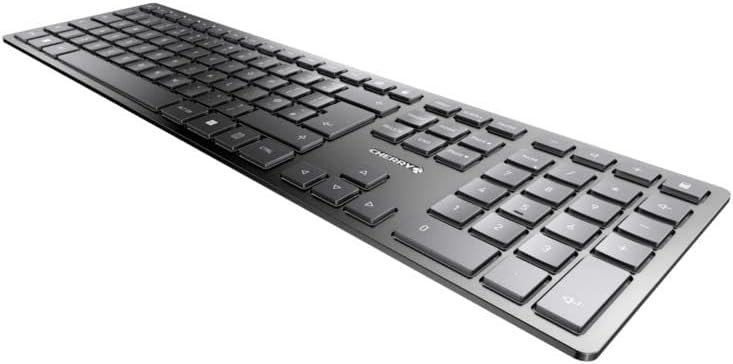
شڪل 3.1: زاويه view سلم پرو کي اجاگر ڪرڻfile and key layout of the keyboard.

شڪل 3.2: بند اپ view of the keys, illustrating the low-profile design and quiet SX Scissor Mechanism.
4. سيٽ اپ ۽ ڪنيڪشن
4.1 ڪي بورڊ کي چارج ڪرڻ
Before first use, it is recommended to fully charge the keyboard.
- فراهم ڪيل USB-A کان USB-C ڪيبل کي ڪيبورڊ تي USB-C پورٽ سان ڳنڍيو.
- Connect the other end of the cable to a USB-A port on your computer or a compatible USB power adapter.
- The charging indicator LED will illuminate. The keyboard can be used while charging.

Figure 4.1: Location of the USB-C charging port on the Cherry KW 9100 Slim keyboard.
4.2 Connecting via 2.4 GHz RF Wireless
For a stable and fast wireless connection, use the included USB receiver.
- Locate the USB receiver (dongle) in the package.
- USB رسيور کي پنهنجي ڪمپيوٽر تي موجود USB-A پورٽ ۾ لڳايو.
- On the keyboard, locate the connectivity switch (usually on the back or side) and set it to the "RF" or 2.4 GHz icon position.
- The keyboard should automatically connect to your computer.
4.3 بلوٽوت ذريعي ڳنڍڻ
The keyboard supports Bluetooth connectivity for devices with Bluetooth capabilities.
- On the keyboard, set the connectivity switch to the "Bluetooth" icon position.
- The Bluetooth indicator LED on the keyboard will start blinking, indicating it's in pairing mode.
- پنهنجي ڪمپيوٽر يا ڊوائس تي، بلوٽوٿ سيٽنگون کوليو.
- ڳولھيو new devices and select "Cherry KW 9100 Slim" from the list.
- جوڙڻ جي عمل کي مڪمل ڪرڻ لاءِ ڪنهن به آن-اسڪرين اشارن تي عمل ڪريو.
4.4 Attaching the Magnetic Support Bar
The keyboard comes with a magnetic support bar that can be attached to adjust the typing angle.
- Locate the magnetic support bar.
- Align the bar with the magnetic strip on the underside of the keyboard.
- The magnets will snap the bar into place, providing an elevated typing angle.
- To remove, simply pull the bar away from the keyboard.

شڪل 4.2: پاسي view of the keyboard demonstrating the elevated angle with the magnetic support bar attached.

Figure 4.3: Illustration of how the magnetic support bar attaches to the keyboard's underside.
5. آپريشن
5.1 بنيادي استعمال
Once connected, the Cherry KW 9100 Slim functions as a standard keyboard. Type as you normally would.

Figure 5.1: A user demonstrating typing on the Cherry KW 9100 Slim keyboard in an office setting.
5.2 Function Keys (F-Keys)
The F-keys (F1-F12) on the top row may have secondary functions accessible by pressing the Fn key simultaneously. Refer to the keycap legends for specific functions such as media control, volume adjustment, or brightness control.
5.3 اسٽيٽس LEDs
The keyboard features indicator LEDs for:
- ڪيپس لاڪ: Illuminates when Caps Lock is active.
- NUM: Illuminates when Num Lock is active.
- سکرول: Illuminates when Scroll Lock is active.
- Battery/Charging: Indicates charging status or low battery.
6. سار سنڀال
6.1 ڪي بورڊ صاف ڪرڻ
ڪيبورڊ جي ظاهر ۽ ڪارڪردگي کي برقرار رکڻ لاءِ:
- صفائي ڪرڻ کان اڳ ڪيبورڊ کي ڪمپيوٽر کان ڌار ڪريو.
- نرم، لِنٽ کان خالي ڪپڙو استعمال ڪريو ٿورڙو ڊيampپاڻي يا نرم صفائي جي حل سان ختم ڪيو وڃي.
- گهڻي نمي کان پاسو ڪريو ۽ صاف ڪندڙ کي سڌو سنئون ڪيبورڊ تي نه اسپري ڪريو.
- چاٻين جي وچ ۾ مٽي ۽ ملبي لاءِ، دٻيل هوا استعمال ڪريو.
6.2 بيٽري جي سنڀال
The built-in rechargeable battery is designed for long life.
- Recharge the keyboard when the battery indicator shows low power.
- بيٽري جي عمر وڌائڻ لاءِ ان کي بار بار مڪمل طور تي چارج ڪرڻ کان پاسو ڪريو.
- جيڪڏهن گهڻي عرصي تائين استعمال نه ڪيو وڃي ته ڪيبورڊ کي ٿڌي، سڪل جاءِ تي رکو.
7. مسئلا حل ڪرڻ
| مسئلو | ممڪن سبب | حل |
|---|---|---|
| Keyboard not responding (RF) | USB receiver not plugged in; keyboard not in RF mode; low battery. | Ensure USB receiver is securely plugged in. Set keyboard switch to RF mode. Charge the keyboard. Try a different USB port. |
| ڪي بورڊ جواب نه ڏئي رهيو آهي (بلوٽوٿ) | Keyboard not in Bluetooth mode; not paired; out of range; low battery. | Set keyboard switch to Bluetooth mode. Ensure keyboard is paired with the device. Move keyboard closer to the device. Charge the keyboard. |
| چاٻيون چپچپا يا غير جوابده آهن | Debris under keys; liquid spill. | Clean the keyboard using compressed air. If liquid spill, disconnect immediately and allow to dry completely before use. Do not attempt to disassemble. |
| بيٽري چارج نه ٿي | Faulty USB cable or port; power source issue. | Try a different USB cable and/or USB port. Ensure the power source is active. |
8. وضاحتون
| خاصيت | تفصيل |
|---|---|
| ماڊل نمبر | JK-9100US-2 |
| رابطي | Bluetooth, 2.4 GHz RF (with USB receiver), USB-C (for charging) |
| ڪي بورڊ جي وضاحت | Wireless, Full-size |
| اهم ميڪانيزم | SX Scissor Mechanism |
| ڪنجي جو تعداد | 108 |
| رنگ | ڪارو |
| مواد | Metal (built-in plate) |
| شيءِ جو وزن | 1.49 پائونڊ (تقريبن 676 گرام) |
| پيڪيج جي ماپ | 18.19 x 6.69 x 1.26 انچ |
| ٺاهيندڙ | چيري |
| مطابقت رکندڙ ڊوائيسز | PC |
| تجويز ڪيل استعمال | Gaming, Office, Work |
9. وارنٽي ۽ سپورٽ
For warranty information and technical support, please refer to the official Cherry website or contact Cherry customer service. Keep your proof of purchase for warranty claims.
Official Cherry Webسائيٽ: www.cherry.de/en/
ڪسٽمر سروس: سرڪاري ويب سائيٽ تي رابطي واري حصي جو حوالو ڏيو webعلائقائي مدد جي تفصيل لاءِ سائيٽ.