
1. تعارف
This manual provides detailed instructions for the setup, operation, and maintenance of your MageGee Star98 Mechanical Keyboard. Designed for gaming and daily use, this 98-key wired keyboard features blue mechanical switches, customizable backlighting, and a hot-swappable design for personalized key switch replacement.
2. پيڪيج مواد
- MageGee Star98 Mechanical Keyboard
- USB ڪيبل
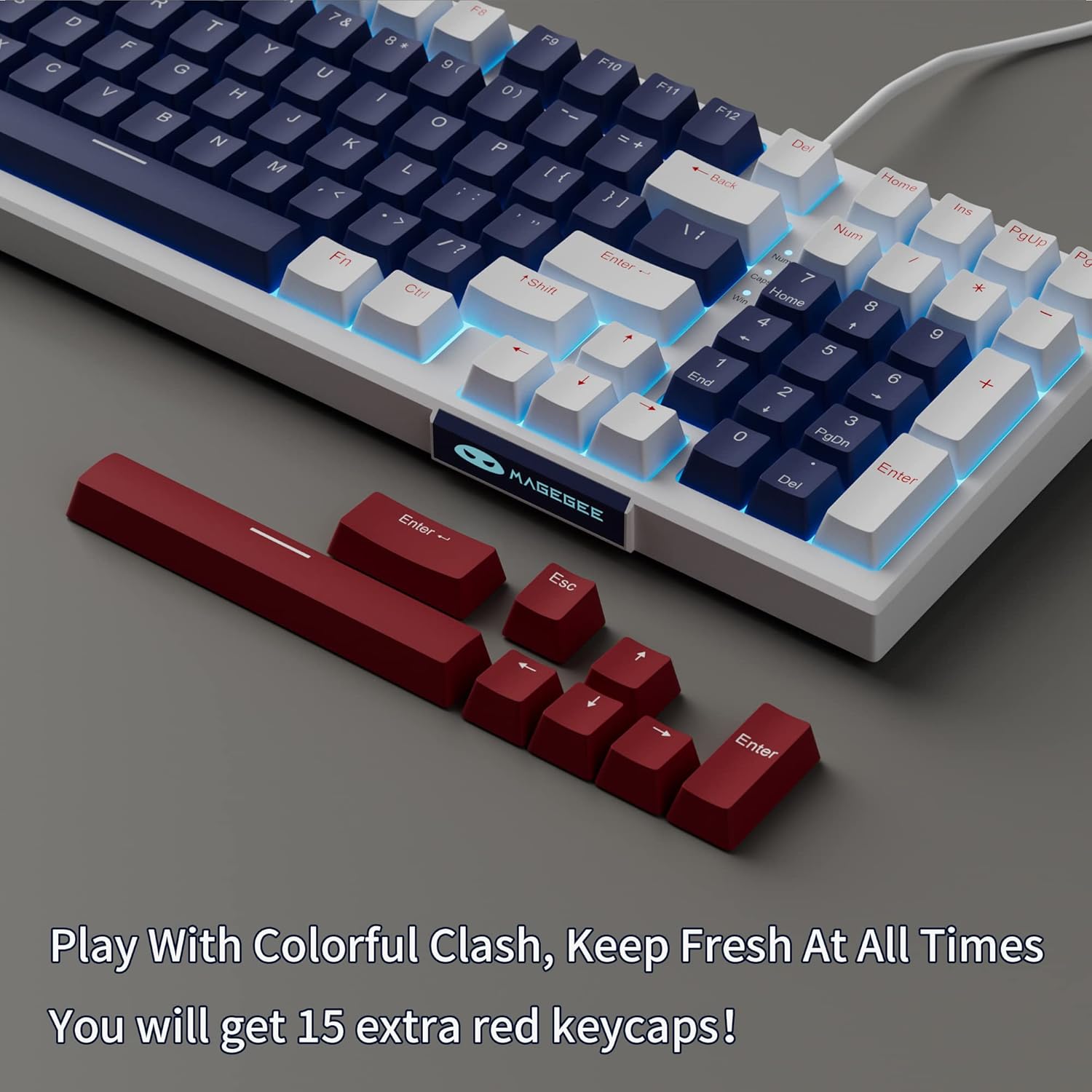
- Additional Red Keycaps (15 pieces)

Image: The MageGee Star98 keyboard displayed with a set of 15 additional red keycaps, highlighting the customization option.
3. مصنوعات جون خاصيتون
- Comfortable Typing Experience: Equipped with blue mechanical switches for tactile feedback and a stepped layout for ergonomic typing.
- 98-اهم اينٽي گھوسٽنگ: All 98 keys can be pressed simultaneously without conflict, ensuring fast and accurate input.
- Mixed Keycaps & Adjustable Tilt Legs: Features 3-color mixed double injection keycaps for clear backlighting and foldable brackets for adjustable typing angles.
- گرم مٽائي سگهڻ وارو ڊيزائن: گھڻن 3-پن ۽ 5-پن ميڪيڪل سوئچز سان مطابقت رکندڙ، آسان ڪسٽمائيزيشن ۽ متبادل جي اجازت ڏئي ٿو.
- Solid Sea Blue Backlight: Multiple backlight modes with a solid sea blue color, which can also be turned off.
- وسيع مطابقت: Supports Win2000, Win XP, Win ME, Vista, Win7, Win8, Win10, Android, Linux, Mac operating systems. Plug and play functionality via USB.

Image: A diagram illustrating the compact 98-key layout of the MageGee Star98 keyboard, highlighting its space-saving design while retaining full functionality.
4. سيٽ اپ جون هدايتون
- ڪي بورڊ ڳنڍيو: Locate the USB cable provided in the package. Plug one end into the USB port on the back of the keyboard and the other end into an available USB port on your computer.
- سسٽم جي سڃاڻپ: Your operating system should automatically detect and install the necessary drivers for the keyboard. This is a plug-and-play device, so no additional software installation is typically required.
- جھڪندڙ ٽنگن کي ترتيب ڏيو: For ergonomic comfort, unfold the adjustable tilt legs located on the underside of the keyboard to achieve your preferred typing angle.

Image: The MageGee Star98 keyboard connected to a laptop, demonstrating the USB connection point and overall setup.
5. آپريٽنگ هدايتون
5.1 Backlight ڪنٽرول
The keyboard features a solid sea blue backlight with multiple operating modes. Use the following key combinations to control the backlighting:
- ايف اين + [چاٻي]: Specific key combinations for changing backlight modes are typically indicated on the keycaps themselves (e.g., Fn + Ins, Fn + Home, Fn + PgUp, Fn + Del, Fn + End, Fn + PgDn). Refer to the keycap legends for exact functions.
- ايف اين + مٿي/هيٺ تير: backlight جي روشني کي ترتيب ڏيو.
- ايف اين + کاٻو/ساڄو تير: Adjust backlight speed (for dynamic modes).
- ايف اين + ون: Locks the Windows key to prevent accidental presses during gaming.
5.2 گرم مٽائڻ وارا سوئچ
The MageGee Star98 keyboard supports hot-swappable mechanical switches, allowing you to change switches without soldering. This feature is compatible with most 3-pin and 5-pin mechanical switches on the market.
- ڪي ڪيپ هٽايو: Use a keycap puller (not included) to gently remove the desired keycap.
- سوئچ هٽايو: Use a switch puller (not included) to carefully grip the switch and pull it straight up.
- نئون سوئچ داخل ڪريو: Align the pins of the new switch with the holes on the PCB. Press down firmly until the switch clicks into place. Ensure the pins are not bent.
- ڪي ڪيپ تبديل ڪريو: Place the keycap onto the new switch stem and press down.
تصوير: هڪ ويجهو تصوير view of the keyboard demonstrating the hot-swappable switch feature, with several keycaps and switches removed to show the underlying mechanism.
Video: An official video demonstrating the features of the MageGee Sky98 Mechanical Gaming Keyboard, including its hot-swappable switches and design.
6. سار سنڀال
- ڪي ڪيپس جي صفائي: نرم استعمال ڪريو، ڊيamp cloth to wipe down keycaps. For deeper cleaning, keycaps can be removed using a keycap puller (not included) and washed with mild soap and water. Ensure they are completely dry before reattaching.
- صفائي جا سوئچ: Use compressed air to remove dust and debris from between the switches. Avoid spraying liquids directly into the switches.
- ڪيبل جي سنڀال: نقصان کان بچڻ لاءِ USB ڪيبل ۾ تيز موڙ يا ڪنڪ کان پاسو ڪريو.
- اسٽوريج: ڪيبورڊ کي صاف، سڪل ماحول ۾ انتهائي گرمي پد ۽ سڌي سج جي روشني کان پري رکو.
7. مسئلا حل ڪرڻ
- ڪي بورڊ جواب نه ڏئي رهيو آهي:
Ensure the USB cable is securely connected to both the keyboard and the computer. Try plugging the keyboard into a different USB port or a different computer to rule out port issues.
- چاٻيون ڪم نه ڪري رهيون آهن:
If individual keys are not responding, check if any debris is lodged under the keycap or switch. For hot-swappable switches, try removing and re-inserting the switch, or replacing it with a known working switch.
- Backlight Not Working/Flickering:
Ensure the backlight is not turned off (check Fn key combinations). Try adjusting brightness. If flickering persists, ensure the keyboard is connected to a stable USB port providing sufficient power.
- ونڊوز ڪي لاڪ ٿيل:
دٻايو Fn+Win ونڊوز ڪي لاڪ فنڪشن کي ٽوگل ڪرڻ لاءِ.
8. وضاحتون
| خاصيت | تفصيل |
|---|---|
| برانڊ | ميج گي |
| ماڊل نمبر | اسٽار98 |
| ڪي بورڊ جي وضاحت | مشيني |
| ڪنجي جو تعداد | 98 |
| سوئچ جو قسم | Tactile (Blue Switches) |
| رابطي ٽيڪنالاجي | وائرڊ (USB) |
| پٺڀرائي | Single Color (Sea Blue), Multiple Modes |
| گرم-سٻرندڙ | Yes (3-pin and 5-pin switches) |
| مطابقت رکندڙ ڊوائيسز | پي سي، ليپ ٽاپ |
| مطابقت رکندڙ OS | Win2000, Win XP, Win ME, Vista, Win7, Win8, Win10, Android, Linux, Mac |
| مواد | Acrylonitrile Butadiene Styrene (ABS) |
| خاص خصوصيت | Ergonomic, Anti-Ghosting |
9. وارنٽي ۽ سپورٽ
The MageGee Star98 Mechanical Keyboard comes with a 1 سال وارنٽي خريداري جي تاريخ کان. هي وارنٽي پيداوار جي خرابين ۽ عام استعمال مان پيدا ٿيندڙ مسئلن کي ڍڪيندي آهي.
For technical support, warranty claims, or any questions regarding your product, please contact MageGee customer service through the retailer's platform or the official MageGee website. Please have your purchase receipt and product model number (Star98) ready when contacting support.