
تعارف ۽ ختمview
The FLEXISPOT EN2 Whole-Piece Standing Desk is designed to provide a versatile and ergonomic workspace, allowing seamless transitions between sitting and standing positions. This electric height-adjustable desk features a durable, single-piece desktop, integrated power outlets, and intuitive controls for enhanced productivity and comfort in any office or home environment.

Image: The FLEXISPOT EN2 Standing Desk, showcasing its spacious rustic brown desktop, black frame, and integrated power strip, set up with dual monitors and various office accessories.
اهم خاصيتون
- هٽائڻ وارو ڊيسڪ ٽاپ پاور آئوٽليٽ: Equipped with 3 AC power outlets and 2 USB charging ports for convenient device charging. Can be clipped to the back or side of the desk.
- Ampلي هول پيس ڊيسڪ ٽاپ: A 1" eco-friendly desktop (55" x 28") provides generous space for computer setups, documents, and accessories.
- 4 ميموري بٽڻ: A 6-button digital controller with 4 programmable memory presets allows easy switching between sitting and standing heights (28.1" to 45.7").
- پائيدار تعمير: Industrial-grade steel frame and solid tabletop support up to 176 pounds, rigorously tested for performance and safety.
- خاموش آپريشن: The motorized height-adjustable system operates smoothly and quietly at less than 50 dB.
- ڪيبل جو انتظام: Includes devices to help tidy up your workspace and manage cables effectively.

Image: Detail of the removable desktop power outlet, highlighting its 3 AC outlets and 2 USB charging ports for easy access.

Image: The 6-button digital controller with a clear display, showing the current height and four programmable memory presets for quick adjustments.
پيڪيج مواد
Your FLEXISPOT EN2 Standing Desk will arrive in two separate packages, which may be shipped independently. Please ensure you have received both packages before beginning assembly.
- Desktop (55" Rustic Brown)
- Desk Frame (Black)
- ڊجيٽل ڪنٽرولر
- Removable Desktop Power Outlet (3 AC, 2 USB)
- Cable Management Devices
- Assembly Hardware and Tools (Note: Electric drill not included, but may be required for some steps.)
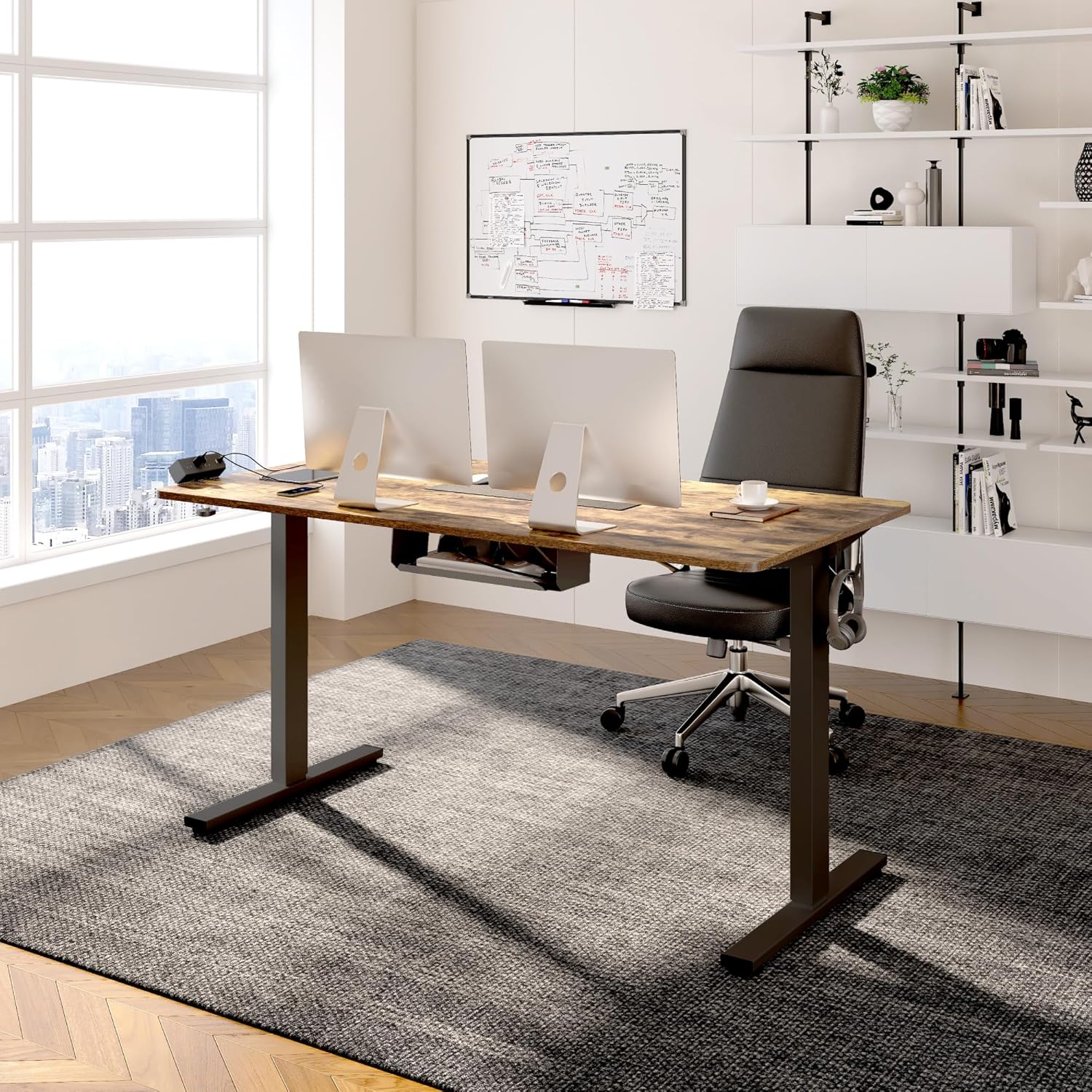
Image: Illustration showing the two separate packages for the FlexiSpot desk: one for the desktop and one for the desk frame.
حفاظت جي ڄاڻ
Please read all instructions carefully before assembly and use. Keep children and pets away from the desk during operation. Ensure all cables are properly managed to prevent tripping hazards and interference with the desk's movement. Do not overload the desk beyond its maximum weight capacity of 176 pounds. Assembly may require an electric drill, which is not included. Always ensure the desk is level and stable before placing heavy items on it.
سيٽ اپ ۽ اسيمبلي
Assembly is straightforward, but it is recommended to have two people for easier installation. An electric drill may be helpful for certain steps, particularly for securing the controller and horizontal support bar.
- انپيڪ اجزاء: Carefully remove all parts from both packages and lay them out on a clean, soft surface to prevent scratches. Verify all components are present against the packing list.
- ڊيسڪ فريم گڏ ڪريو: Follow the detailed instructions provided in the included manual to assemble the desk frame. Pay close attention to the crossbar adjustment; ensure screws are loose enough to extend the crossbar to its full length before tightening in a later step.
- ڊيسڪ ٽاپ لڳايو: Carefully place the desktop upside down on a soft surface. Align the assembled desk frame with the pre-drilled holes on the desktop. Secure the frame to the desktop using the provided screws.
- انسٽال ڪريو ڪنٽرولر: The controller can be mounted on either the left or right side of the desk. While pre-drilled holes may exist, you might need to drill pilot holes for optimal security, especially for the controller and additional horizontal support bar areas.
- Install Power Outlet and Cable Management: Attach the removable power outlet to your desired location (back or side of the desktop) using its clamp mechanism. Utilize the included cable management devices to route and secure all power and device cables, ensuring they do not interfere with the desk's movement.
- Flip and Level Desk: With assistance, carefully flip the assembled desk upright. Adjust the leveling feet at the bottom of the desk legs to ensure the desk is stable and level on your floor.

Image: A visual comparison demonstrating effective cable management, transforming a cluttered setup into a neat and organized workspace.
آپريٽنگ هدايتون
The FLEXISPOT EN2 desk features an intuitive digital controller for easy height adjustments and memory presets.
- اوچائي کي ترتيب ڏيڻ: استعمال ڪريو ▲ (مٿي) ۽ ▼ (down) arrow buttons on the digital controller to manually adjust the desk height. The current height will be displayed on the LED screen.
- ميموري پري سيٽ سيٽ ڪرڻ: The controller has four programmable memory buttons (1, 2, 3, 4). To set a preset:
- ڊيسڪ کي پنهنجي گهربل اوچائي تي ترتيب ڏيو.
- Press and hold one of the memory buttons (1-4) until the display flashes or beeps, indicating the height has been saved.
- ميموري پري سيٽ استعمال ڪندي: Simply press the corresponding memory button (1-4) to automatically move the desk to your saved sitting or standing position. The desk will move smoothly and quietly.
- Using the Power Outlet: Plug your electronic devices into the 3 AC outlets or use the 2 USB charging ports on the removable power strip for convenient charging directly from your desk.
Video: An official FLEXISPOT video demonstrating the features and operation of the standing desk, including height adjustment and integrated power solutions.
سار سنڀال
To ensure the longevity and optimal performance of your FLEXISPOT EN2 Standing Desk, follow these simple maintenance guidelines:
- صفائي: ڊيسڪ ٽاپ جي مٿاڇري کي باقاعدي طور تي نرم، ڊي سان صاف ڪريوamp cloth. Avoid abrasive cleaners or harsh chemicals that could damage the finish. For stubborn marks, a mild soap solution can be used.
- ڪنيڪشن چيڪ ڪريو: Periodically inspect all electrical connections and cables to ensure they are secure and free from damage. Ensure cables are not pinched or tangled, especially during height adjustments.
- لوڻ: The motorized components are generally maintenance-free. Do not attempt to lubricate internal mechanisms unless specifically instructed by FLEXISPOT support.
مشڪلاتون
If you encounter any issues with your FLEXISPOT EN2 Standing Desk, refer to the common troubleshooting tips below:
| مسئلو | ممڪن سبب / حل |
|---|---|
| Desk does not move / No power. | Check if the power cord is securely plugged into both the desk and a working wall outlet. Ensure the power outlet is switched on. |
| ڊيسڪ لڏپلاڻ وارو يا غير مستحڪم آهي. | Ensure all assembly screws are tightened. Adjust the leveling feet at the bottom of the desk legs to compensate for uneven flooring. Avoid placing excessive weight on one side of the desk. |
| موٽر غير معمولي شور ڪري ٿي. | A slight hum is normal. If the noise is loud or unusual, check for any obstructions under the desk or contact customer support. |
| Height adjustment is not smooth. | Ensure the desk is not overloaded. Check for any obstructions that might be hindering movement. |
If the above steps do not resolve the problem, please contact FLEXISPOT customer support for further assistance.
وضاحتون
| وصف | تفصيل |
|---|---|
| برانڊ | FLEXISPOT |
| ماڊل | EN2 |
| ڊيسڪ ٽاپ جي ماپ | 55"W x 28"D x 1"H |
| رنگ | Black Frame + Rustic Brown Desktop |
| اونچائي جي ترتيب جي حد | 28.1" کان 45.7" تائين |
| وزن جي گنجائش | 176 پائونڊ تائين |
| شور جي سطح | 50 ڊي بي کان گھٽ |
| پاور ليٽليٽ | 3 AC آئوٽليٽس (125V/12A)، 2 USB چارجنگ پورٽ (5V/2A) |
| اسيمبلي گهربل | ها (2 ماڻهن جي سفارش ڪئي وئي) |
| مواد | Alloy Steel Frame, Wood Desktop |
وارنٽي ۽ سپورٽ
FLEXISPOT stands behind the quality of its products. Your EN2 Standing Desk comes with the following warranty coverage:
- 5 سال وارنٽي: Applies to frames, motors, and other mechanical devices.
- 2 سال وارنٽي: Applies to controllers, switches, and electronics.
For any questions, technical support, or warranty claims, please contact FLEXISPOT Customer Support. You can find contact information on the official FLEXISPOT webسائيٽ يا توهان جي خريداري پليٽ فارم ذريعي.