
1. تعارف
Thank you for choosing the Devoko Electric Height Adjustable Desk. This manual provides essential information for the safe and efficient operation of your new desk. Please read it thoroughly before assembly and use, and retain it for future reference.
This desk is designed to promote healthy work habits by allowing you to easily switch between sitting and standing positions, which can help reduce the effects of a sedentary lifestyle and alleviate back pain.
2. حفاظتي هدايتون
- Ensure all components are present and undamaged before assembly. Do not use if any parts are missing or damaged.
- زخم کان بچڻ لاءِ آپريشن دوران ٻارن ۽ پالتو جانورن کي ڊيسڪ کان پري رکو.
- Do not place hands or other body parts near moving parts of the desk during height adjustment.
- Ensure there are no obstructions above or below the desk when adjusting its height. The anti-collision system is designed to prevent impacts, but caution is always advised.
- Do not overload the desk. The maximum load capacity is approximately 70 kg.
- Use only the power adapter supplied with the desk.
- صفائي يا سار سنڀال کان اڳ بجلي جي فراهمي بند ڪريو.
- هي پراڊڪٽ صرف اندروني استعمال لاء آهي.

Image: Desk highlighting 70KG load capacity, anti-collision system, 21mm/s lift speed, and quiet operation (under 45dB).
3. پيڪيج مواد
Please check the package to ensure all items are included:
- Desktop sections (4 pieces)
- Desk frame (legs, crossbar)
- ڪنٽرول پينل
- پاور اڊاپٽر ۽ ڪيبل
- ڪيبل انتظام ٽري
- Mounting hardware (screws, Allen keys)
- Optional: Caster wheels (4 pieces)
- استعمال ڪندڙ دستي

تصوير: مٿانview of the Devoko Electric Height Adjustable Desk setup, including optional caster wheels.
4. سيٽ اپ ۽ اسيمبلي
Assembly typically requires two people. Follow the detailed instructions provided in the separate assembly guide for step-by-step installation.
- ڊيسڪ فريم کي گڏ ڪريو: Attach the legs to the crossbar using the provided screws.
- Attach Desktop Sections: Secure the four desktop sections to the assembled frame. Ensure they are aligned correctly.
- ڪنٽرول پينل انسٽال ڪريو: Mount the control panel to the underside of the desktop in an easily accessible location.
- ڪيبل ڳنڍڻ: Connect the motor cables to the control box and the control panel cable to the control box. Plug the power adapter into the control box and then into a power outlet.
- ڪيبل مئنيجمينٽ ٽري انسٽال ڪريو: Attach the cable management tray to the underside of the desk to organize wires.
- Optional Caster Wheels: If desired, replace the standard feet with the provided caster wheels for mobility. The desk supports both fixed and mobile modes.
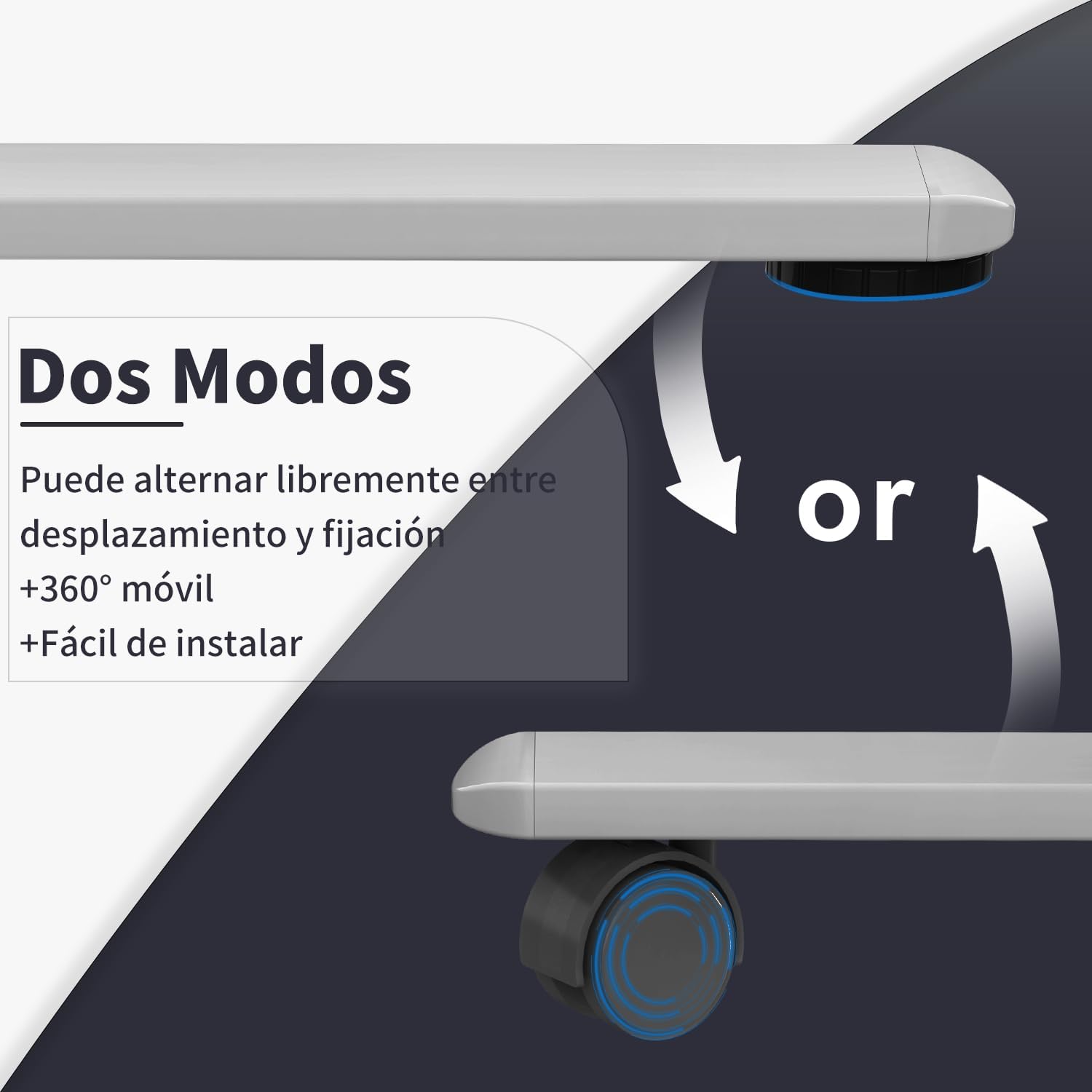
Image: Desk modes, illustrating the option to use fixed feet or 360-degree mobile caster wheels.
5. آپريٽنگ هدايتون
5.1 ڪنٽرول پينل ختمview

Image: Multifunctional control panel with USB charging ports and height adjustment buttons.
- مٿي/هيٺ بٽڻ (▲ / ▼): Press and hold to adjust the desk height manually.
- ياداشت جا اڳواٽ سيٽ (1، 2، 3): Store and recall preferred sitting and standing heights.
- "S" Button (Set): Used to save a memory preset.
- USB-C / USB-A Charging Ports: For charging compatible electronic devices.
5.2 اوچائي کي ترتيب ڏيڻ
- دستي ترتيب: کي دٻايو ۽ رکو مٿي (▲) or هيٺ (▼) button until the desk reaches your desired height. Release the button to stop.
- ميموري پري سيٽ استعمال ڪندي:
- جي طرف Save a Preset: Adjust the desk to your desired height. Press the "ايس" button, then press one of the memory buttons (1، 2، يا 3) within 3 seconds. The display will show "S-" followed by the number to confirm.
- جي طرف Recall a Preset: لاڳاپيل ميموري بٽڻ کي دٻايو (1، 2، يا 3). ڊيسڪ خودڪار طريقي سان محفوظ ڪيل اوچائي ڏانهن منتقل ٿي ويندو.
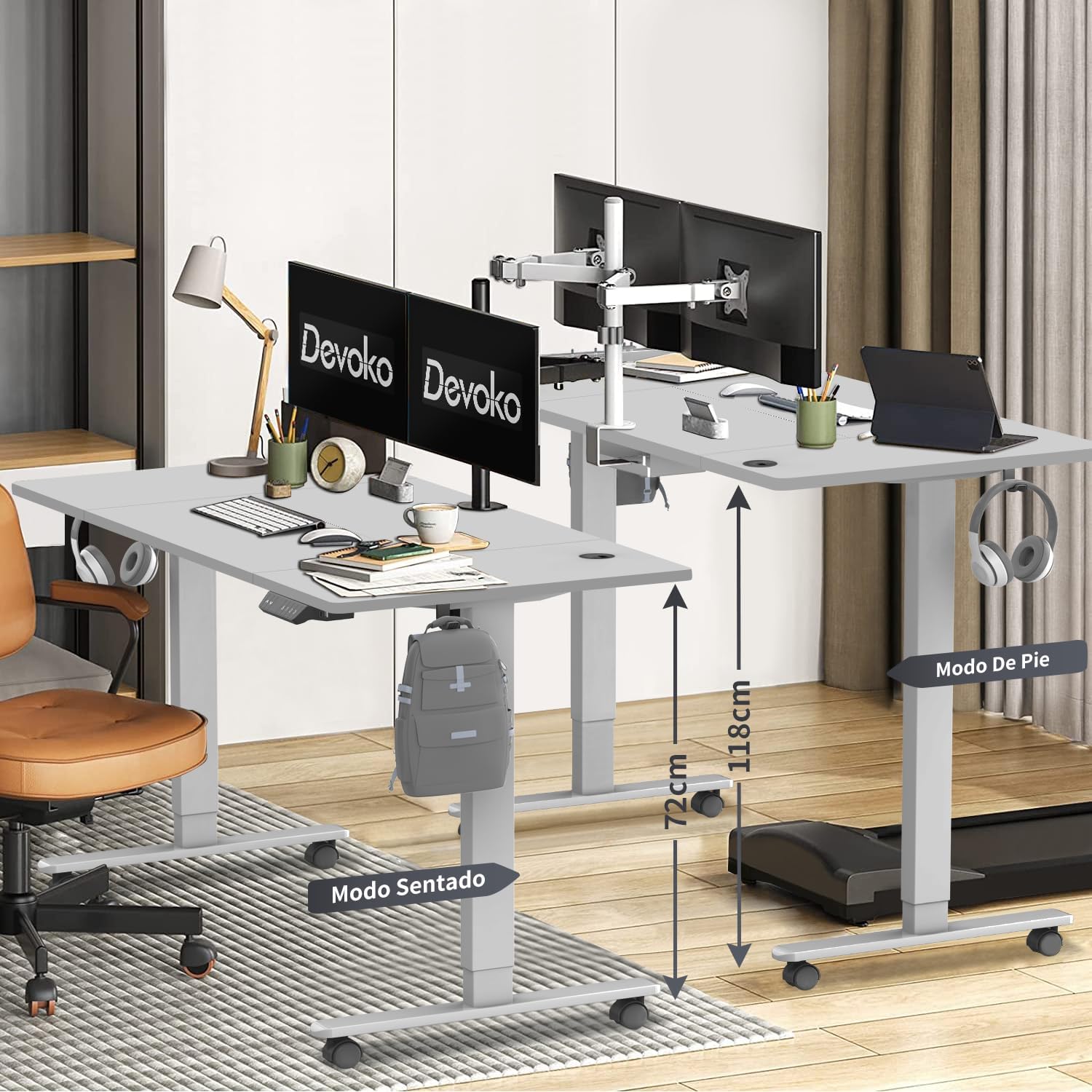
Image: Desk height adjustment range from 72cm (sitting) to 118cm (standing).
5.3 USB چارجنگ پورٽ
The integrated USB-C and USB-A ports allow you to conveniently charge your electronic devices directly from the desk. Simply connect your device's charging cable to the appropriate port.
6. سار سنڀال
- صفائي: ڊيسڪ جي مٿاڇري ۽ فريم کي نرم، ڊي سان صاف ڪريوamp cloth. Avoid abrasive cleaners or solvents. Ensure the power is disconnected before cleaning.
- ڪيبل جو انتظام: ڪيبل مئنيجمينٽ ٽري ۾ ڪيبلن کي باقاعدي چيڪ ڪريو ۽ ترتيب ڏيو ته جيئن الجھن ۽ نقصان کي روڪيو وڃي.
- چڪاس: وقت بوقت سڀني پيچرن ۽ ڪنيڪشنن کي چيڪ ڪريو ته جيئن پڪ ٿئي ته اهي تنگ آهن. جيڪڏهن ضروري هجي ته ٻيهر مضبوط ڪريو.
7. مسئلا حل ڪرڻ
| مسئلو | ممڪن سبب | حل |
|---|---|---|
| ڊيسڪ حرڪت نٿي ڪري. | بجلي ڪيبل ڪٽيل آهي. اوور لوڊ. موٽر غلطي. |
پاور ڪنيڪشن چيڪ ڪريو. Reduce weight on desk. Unplug for 10 minutes, then plug back in. If issue persists, contact support. |
| ڊيسڪ غير مساوي طور تي هلي ٿي يا غير معمولي شور ڪري ٿي. | لوڻ رابطا. رڪاوٽ. |
چيڪ ڪريو ۽ سڀني پيچرن کي مضبوط ڪريو. Ensure no objects are interfering with the legs. |
| ٽڪراءُ مخالف نظام بار بار شروع ٿئي ٿو. | حساسيت تمام گهڻي آهي. رڪاوٽ. |
Check for obstructions. Refer to the full assembly guide for anti-collision sensitivity adjustment if available. |
| USB پورٽ چارج نه ٿي رهيا آهن. | Desk not powered. ڊوائيس جي غير مطابقت. |
Ensure desk is plugged in and powered on. Try a different device or cable. |
8. وضاحتون
- برانڊ: ديووڪو
- ماڊل نمبر: 0428
- رنگ: ڀورو
- ڊيسڪ ٽاپ جا طول و عرض: 160 سينٽي (ڊگھائي) x 80 سينٽي (ويڪر)
- Adjustable قد جي حد: 72 سينٽي - 118 سينٽي ميٽر
- مواد: Engineered Wood (Desktop), Steel/Metal (Frame)
- پيداوار جو وزن: 25.6 ڪلو
- وڌ ۾ وڌ لوڊ گنجائش: لڳ ڀڳ 70 ڪلو
- Lift Speed: 20mm/s
- شور جي سطح: <45 ڊي بي
- خاص خاصيتون: USB-C & USB-A Charging Ports, 3 Memory Presets, Anti-Collision System, Optional Caster Wheels
- سرٽيفڪيشن: TUV، CE

Image: Desk dimensions (160cm x 80cm) with protective edge detail.
9. وارنٽي ۽ سپورٽ
وارنٽي: The Devoko Electric Height Adjustable Desk comes with a 5-year warranty on the motor and desk frame, effective from the date of purchase.
واپسي جي پاليسي: A 30-day unconditional return policy is offered.
ڪسٽمر سپورٽ: For any installation issues, operational questions, or warranty claims, please contact Devoko customer support through the Amazon platform. We aim to respond to all inquiries within 24 hours.