
1. تعارف
Thank you for choosing the FLEXISPOT EF1 Basic Plus Electric Height-Adjustable Desk. This manual provides essential information for the safe and efficient assembly, operation, and maintenance of your new desk. Please read these instructions thoroughly before use and retain them for future reference.
حفاظتي ڊيڄاريندڙ
- Always follow the assembly instructions carefully to prevent accidents and ensure proper function.
- Do not exceed the maximum load capacity of 70 kg (154 lbs) on the desktop. Overloading can compromise stability and cause damage.
- To prevent tipping, especially when the desk is at its maximum height (121 cm), ensure the desk is anchored correctly to a stable wall.
- Keep children and pets away from the desk during operation to avoid injury from moving parts.
- پڪ ڪريو ته اوچائي جي ترتيب دوران ڊيسڪ جي رستي ۾ ڪا به رڪاوٽ نه آهي.
- ڊيسڪ تي نه ويهو ۽ نه بيهو.
- صفائي ڪرڻ يا ڪنهن به سار سنڀال ڪرڻ کان اڳ بجلي بند ڪريو.
2. سيٽ اپ ۽ اسيمبلي
The FLEXISPOT EF1 Basic Plus desk requires assembly. Please ensure all components are present before beginning. Refer to the included assembly guide for detailed step-by-step instructions.
پيڪنگ ۽ اجزاء جي چڪاس
Carefully unpack all parts and lay them out on a soft, clean surface to prevent scratches. Verify that all components listed in the packing list are present.
اسيمبلي ختمview
- Attach the lifting columns to the desk feet.
- ڪراس بار کي کڻڻ واري ڪالمن سان ڳنڍيو.
- ڊيسڪ ٽاپ کي گڏ ٿيل فريم سان محفوظ ڪريو.
- Install the control panel and cable management tray (if included).
- Connect all motor and control cables according to the wiring diagram.
- بجلي واري تار کي گرائونڊ آئوٽليٽ ۾ لڳايو.

شڪل 1: The FLEXISPOT EF1 Basic Plus Electric Height-Adjustable Desk with a black tabletop and white frame, set up in a home office environment.

شڪل 2: This image illustrates the smooth, single-piece desktop construction of the FlexiSpot desk, contrasting it with typical multi-piece desktops that may have uneven surfaces.

شڪل 3: An illustrative diagram detailing various desktop size and color options, along with key specifications for the desk frame, including adjustable height range, static and dynamic load capacities, and lifting noise levels.
3. آپريٽنگ هدايتون
ڪنٽرول پينل ختمview

شڪل 4: هڪ تفصيلي view of the desk's Smart Control Panel, highlighting the LED display, the up and down adjustment buttons, and four numbered buttons for memory presets.
The desk is equipped with an advanced all-in-one keypad for easy height adjustment and memory functions.
- ايل ايل ڊسپلي: Shows the current desk height in centimeters.
- مٿي/هيٺ بٽڻ (⌃ / ⌄): ڊيسڪ جي اوچائي کي مٿي يا هيٺ دستي طور تي ترتيب ڏيڻ لاءِ دٻايو ۽ رکو. گهربل اوچائي تي روڪڻ لاءِ بٽڻ کي ڇڏي ڏيو.
- ياداشت جا اڳواٽ سيٽ (1، 2، 3، 4): Four programmable buttons to save and recall your preferred sitting and standing heights.
ميموري پري سيٽ سيٽ ڪرڻ
- مٿي/هيٺ بٽڻن کي استعمال ڪندي ڊيسڪ کي پنهنجي گهربل اوچائي تي ترتيب ڏيو.
- Press the "M" or "SET" button (if available, otherwise proceed to step 3) to activate memory mode.
- Press one of the numbered preset buttons (1, 2, 3, or 4) within 3 seconds. The LED display will show "S-1", "S-2", etc., indicating the height has been saved to that preset.
ياداشت جي اڳواٽ سيٽن کي ياد ڪرڻ
Simply press the desired numbered preset button (1, 2, 3, or 4). The desk will automatically move to the saved height.
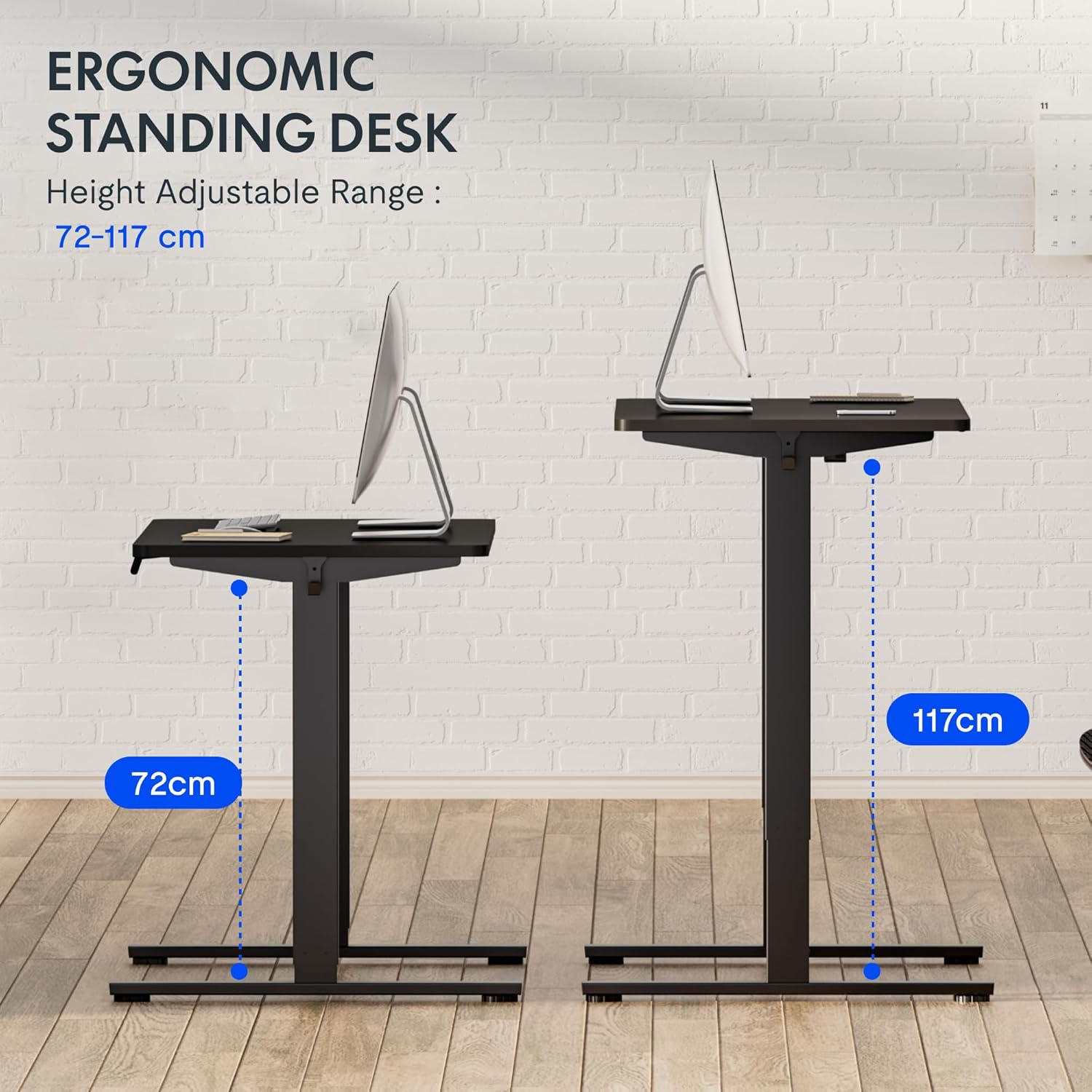
شڪل 5: This image demonstrates the height adjustment capabilities of the desk, showing a range from 72 cm (sitting height) to 117 cm (standing height). Note that the full adjustable range for this model is 71 cm to 121 cm.
4. سار سنڀال
Regular maintenance ensures the longevity and optimal performance of your FLEXISPOT desk.
- صفائي: ڊيسڪ ٽاپ ۽ فريم کي نرم، ڊي سان صاف ڪريوamp ڪپڙو. گھڙڻ وارا صاف ڪندڙ يا سخت ڪيميڪلز کان پاسو ڪريو جيڪي ختم کي نقصان پهچائي سگھن ٿا.
- ڪيبل جو انتظام: Periodically check and organize cables to prevent tangles and ensure smooth operation.
- چڪاس: Regularly inspect all screws and bolts to ensure they are tight. Retighten if necessary.
- لوڻ: The lifting columns are generally maintenance-free. Do not attempt to lubricate internal components unless specifically instructed by customer support.
5. مسئلا حل ڪرڻ
جيڪڏهن توهان کي پنهنجي ڊيسڪ سان ڪا به پريشاني پيش اچي ٿي، ته هيٺ ڏنل عام مسئلن ۽ حلن جو حوالو ڏيو.
| مسئلو | ممڪن سبب | حل |
|---|---|---|
| ڊيسڪ حرڪت نٿي ڪري. |
|
|
| ڊيسڪ غير مساوي طور تي هلي ٿي يا غير معمولي آواز ڪري ٿي. |
|
|
| Error code displayed on LED. |
|
|
ڪاروائي ٻيھر ترتيب ڏيو
If the desk is not functioning correctly, a reset may resolve the issue.
- Press and hold the "Down" button until the desk reaches its lowest position and slightly retracts, then releases.
- If this does not initiate a reset, unplug the desk from the power outlet for at least 10 seconds, then plug it back in.
- Repeat step 1. The desk should now be reset.
6. وضاحتون
| برانڊ | FLEXISPOT |
| ماڊل نمبر | HU-XI-201 |
| Desktop Dimensions (L x W x Thickness) | 120 x 80 x 2.5 سينٽي |
| Adjustable Height Range (without tabletop) | 71 سينٽي - 121 سينٽي ميٽر |
| Max Lifting Speed | 2.5 سينٽي في سيڪنڊ |
| وڌ ۾ وڌ لوڊ گنجائش | 70 ڪلوگرام (154 پائونڊ) |
| Lifting Noise Level | <50 ڊي بي |
| ڊيسڪ ٽاپ مواد | Engineered Wood (MDF) with High-Pressure Laminate |
| فريم مواد | پائوڊر- Coated اسٽيل |
| رنگ | Black tabletop + White frame |
| خاصيتون | Electric height adjustment, 4 memory presets |
7. وارنٽي ۽ سپورٽ
وارنٽي ڄاڻ
FLEXISPOT stands behind the quality of its products. Your EF1 Basic Plus desk comes with the following warranty:
- 3 سال وارنٽي: Covers controllers and motors.
- 5 سال وارنٽي: Covers the desk frame.
Please retain your proof of purchase for warranty claims. The warranty covers manufacturing defects under normal use. It does not cover damage caused by misuse, accidents, unauthorized modifications, or failure to follow the instructions in this manual.

شڪل 6: An image outlining the warranty coverage for FlexiSpot desks, specifically mentioning a 3-year warranty for controllers and motors, and a 5-year warranty for the desk frame.
ڪسٽمر سپورٽ
For technical assistance, warranty claims, or any questions regarding your FLEXISPOT EF1 Basic Plus desk, please contact FLEXISPOT customer support.
Webسائيٽ: www.flexispot.com (or regional equivalent)
اي ميل: Refer to your purchase documentation or the official FlexiSpot webرابطي جي اي ميل لاءِ سائيٽ.
فون: Refer to your purchase documentation or the official FlexiSpot webرابطي جي فون نمبر لاءِ سائيٽ.