
تعارف
This manual provides essential information for the safe and efficient use of your ONN 42-Inch Full HD LED Smart TV, Model 100018254. Please read these instructions thoroughly before operating your television and retain them for future reference.
دٻي ۾ ڇا آهي
سيٽ اپ سان اڳتي وڌڻ کان اڳ پڪ ڪريو ته سڀئي جزا موجود آهن.
- ONN 42-Inch Full HD LED Smart TV
- ريموٽ ڪنٽرول
- ٽي وي اسٽينڊ (2 ٽڪرا)
- ٽي وي اسٽينڊ لاءِ اسڪرو
- پاور ڪنڊ
- تڪڙي شروعات جي ھدايت (ھن دستور ۾ شامل نه آھي)

تصوير: سامهون view of the ONN 42-inch Smart TV displaying the Roku TV home screen with various streaming app icons like Netflix, Disney+, Apple TV, Hulu, Peacock, and Roku Channel. The TV is black with slim bezels and two stand feet.
سيٽ اپ ڪريو
1. ٽي وي اسٽينڊ ڳنڍڻ
- نقصان کان بچڻ لاءِ احتياط سان ٽي وي اسڪرين کي نرم، صاف مٿاڇري تي رکو.
- هر اسٽينڊ پيس کي ٽي وي جي تري ۾ لاڳاپيل اسڪرو سوراخن سان ترتيب ڏيو.
- هر اسٽينڊ پيس کي ڏنل اسڪرو سان محفوظ ڪريو. پڪ ڪريو ته اهي مضبوطيءَ سان مضبوط ڪيا ويا آهن.

Image: A diagram illustrating the dimensions of the ONN 42-inch TV, showing its width as 43 inches and height as 37 inches when placed on its stand.
2. ڀت تي چڙهڻ (اختياري)
This TV is compatible with VESA standard wall mounts. Refer to your wall mount's instructions for proper installation. Ensure the wall mount can support the weight of the television.

تصوير: پوئين پاسي view of the ONN 42-inch TV, highlighting the VESA mounting screw holes in a square pattern and various input ports on the side and bottom right.
3. ڪنيڪشن جا آلات
پنهنجا ٻاهرين ڊوائيسز جهڙوڪ ڪيبل باڪس، گيمنگ ڪنسولز، يا بلو ري پليئرز کي ٽي وي جي ان پٽ پورٽن سان ڳنڍيو.
- HDMI: For high-definition audio and video. Use an HDMI cable to connect devices like set-top boxes, game consoles, or streaming sticks.
- USB: ميڊيا هلائڻ لاءِ USB اسٽوريج ڊوائيسز کي ڳنڍڻ لاءِ files.
- وائي فائي: For internet connectivity to access smart TV features and streaming services.
4. شروعاتي پاور آن ۽ سيٽ اپ مددگار
- پاور ڪنڊ کي ٽي وي ۾ ۽ پوءِ وال آئوٽليٽ ۾ لڳايو.
- ريموٽ ڪنٽرول تي يا ٽي وي تي ئي پاور بٽڻ دٻايو.
- Follow the on-screen instructions to complete the initial setup, including language selection, network connection (Wi-Fi), channel scanning, and linking to your Roku account (if applicable).
ٽي وي کي هلائڻ
1. ريموٽ ڪنٽرول اوورview
The remote control allows you to navigate the TV's interface and control various functions.
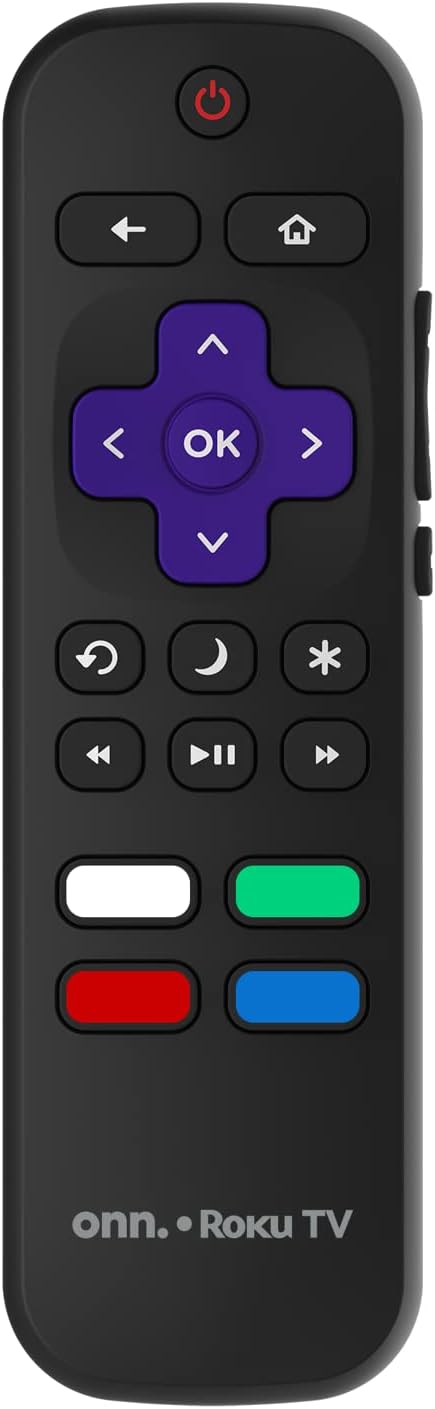
Image: The ONN Roku TV remote control, featuring a power button, directional pad, OK button, home button, back button, volume controls, and dedicated buttons for popular streaming services.
- پاور بٽڻ: ٽي وي کي آن يا بند ڪري ٿو.
- Directional Pad (D-Pad) & OK: مينيو کي نيويگيٽ ڪري ٿو ۽ چونڊن جي تصديق ڪري ٿو.
- هوم بٽڻ: روڪو ٽي وي هوم اسڪرين تي واپس اچي ٿو.
- پوئتي بٽڻ: پوئين اسڪرين يا مينيو ڏانھن واپسي.
- حجم مٿي / ھيٺ: آڊيو حجم کي ترتيب ڏئي ٿو.
- گونگا بٽڻ: آواز کي خاموش يا غير خاموش ڪري ٿو.
- چينل مٿي / هيٺ: Changes channels (for antenna/cable inputs).
- وقف ٿيل ايپ بٽڻ: Quick access to popular streaming services like Netflix, Hulu, etc.
2. سمارٽ ٽي وي جون خاصيتون
Your ONN Smart TV provides access to a wide range of streaming content and smart functionalities.
- اسٽريمنگ خدمتون: Access pre-installed apps like Netflix, YouTube, and many more through the Roku Channel Store.
- وائس ڪنٽرول: Compatible with Alexa and Google Assistant for hands-free control (requires a separate compatible voice assistant device).
- خودڪار سافٽ ويئر اپڊيٽس: The TV will automatically update its software when connected to the internet, ensuring you have the latest features and security.
3. انٽ چونڊ
To switch between connected devices (e.g., cable box, game console), use the ان پٽ button on your remote or select the desired input from the Roku TV home screen.
4. تصوير ۽ آواز سيٽنگون
Access the TV's settings menu to customize picture and sound preferences. Navigate to سيٽنگون > ٽي وي تصوير سيٽنگون or سيٽنگون> آڊيو to adjust options like brightness, contrast, color, sound mode, and equalizer settings.
سار سنڀال
1. اسڪرين صاف ڪرڻ
- Always turn off the TV and unplug it before cleaning.
- نرم، لِنٽ کان پاڪ ڪپڙو استعمال ڪريو، ٿورو ڊيampپاڻي يا خاص اسڪرين ڪلينر سان صاف ڪيو وڃي.
- صاف ڪندڙ کي سڌو سنئون اسڪرين تي نه اسپري ڪريو. پهرين ان کي ڪپڙي تي لڳايو.
- گھڙڻ وارا صاف ڪندڙ، الڪوحل، بينزين، يا ٿنڊر استعمال ڪرڻ کان پاسو ڪريو، ڇاڪاڻ ته اهي اسڪرين کي نقصان پهچائي سگهن ٿا.
2. سافٽ ويئر اپڊيٽ
Ensure your TV is connected to the internet to receive automatic software updates. These updates improve performance, add features, and enhance security. You can manually check for updates in the سيٽنگون> سسٽم> سسٽم اپڊيٽ مينيو
مشڪلاتون
جيڪڏهن توهان کي پنهنجي ٽي وي سان مسئلا درپيش اچن ٿا، ته هيٺ ڏنل عام حلن جو حوالو ڏيو:
ڪابه طاقت
- چيڪ ڪريو ته ڇا پاور ڪنڊ ٽي وي ۽ وال آئوٽليٽ ٻنهي ۾ محفوظ طور تي لڳل آهي.
- ٻئي ڊوائيس کي پلگ ان ڪندي پڪ ڪريو ته وال آئوٽليٽ ڪم ڪري رهيو آهي.
- صرف ريموٽ تي نه پر ٽي وي تي پاور بٽڻ کي دٻائڻ جي ڪوشش ڪريو.
ڪابه تصوير ناهي / بگڙيل تصوير
- پڪ ڪريو ته صحيح ان پٽ سورس چونڊيو ويو آهي (مثال طور، HDMI 1، HDMI 2).
- ٽي وي ۽ ٻاهرين ڊوائيسز جي وچ ۾ سڀ ڪيبل ڪنيڪشن چيڪ ڪريو.
- جيڪڏهن ممڪن هجي ته هڪ مختلف HDMI ڪيبل آزمايو.
- ٽي وي مينيو ۾ تصوير جي سيٽنگز (چمڪ، برعڪس) کي ترتيب ڏيو.
ڪابه آواز ناهي / گهٽ آواز
- Check if the TV is muted or if the volume is turned down.
- Ensure external audio devices (soundbars, receivers) are properly connected and powered on.
- ٽي وي مينيو ۾ آڊيو سيٽنگون چيڪ ڪريو.
نيٽ ورڪ ڪنيڪشن جا مسئلا
- Verify your Wi-Fi router is powered on and functioning.
- پنهنجو روٽر ۽ موڊيم ٻيهر شروع ڪريو.
- ڏانهن وڃو سيٽنگون > نيٽ ورڪ > ڪنيڪشن چيڪ ڪريو on your TV to diagnose the issue.
- پڪ ڪريو ته توهان صحيح وائي فائي پاسورڊ داخل ڪري رهيا آهيو.
وضاحتون
| خاصيت | تفصيل |
|---|---|
| ماڊل نمبر | 100018254 |
| اسڪرين جي ماپ | 42 انچ |
| ڊسپلي ٽيڪنالاجي | ايل اي ڊي |
| قرارداد | 1080p (مڪمل HD) |
| ريفريش جي شرح | 60 هز |
| رابطي | USB، وائي فائي |
| سپورٽ انٽرنيٽ سروسز | Netflix, YouTube (and others via Roku platform) |
| ڪنٽرول جو طريقو | Voice (via Alexa & Google Assistant compatible devices), Remote Control |
| چڙهڻ جو قسم | وال ماؤنٽ (VESA مطابقت رکندڙ) |
| رنگ | ڪارو |
| يو پي سي | 671227025567 |

Image: Energy Guide label for Television Model 100018254, indicating an estimated yearly energy cost of $11 based on 12 cents per kWh and 5 hours use per day.
وارنٽي ۽ سپورٽ
For warranty information and technical support, please refer to the documentation included with your purchase or visit the official ONN support webسائيٽ. وارنٽي جي دعوي لاء توهان جي خريداري جي رسيد رکو.