
1. تعارف
Thank you for choosing the Devoko Electric Height Adjustable Desk. This manual provides comprehensive instructions for the assembly, operation, and maintenance of your new desk. Designed for a healthier work-life balance, this desk allows you to seamlessly switch between sitting and standing positions, promoting better posture and productivity.
Key features include a robust steel frame, a spacious 120x80cm desktop, integrated USB-A and USB-C charging ports, and a smart control panel with memory presets and anti-collision functionality.

The Devoko Electric Height Adjustable Desk, showcasing its clean design and ampڪم جي جڳهه.
2. حفاظت جي ڄاڻ
- اسيمبليءَ ۽ استعمال کان اڳ سڀ هدايتون احتياط سان پڙهو.
- آپريشن دوران ٻارن ۽ پالتو جانورن کي ڊيسڪ کان پري رکو.
- پڪ ڪريو ته سڀئي ڪيبل صحيح طرح سان روٽ ٿيل ۽ محفوظ آهن ته جيئن ٽرپنگ جي خطرن يا نقصان کي روڪي سگهجي.
- Do not overload the desk beyond its maximum weight capacity (70 kg dynamic, 80 kg static).
- مائع کي سڌو سنئون ڪنٽرول پينل تي يا بجلي جي حصن جي ويجهو رکڻ کان پاسو ڪريو.
- In case of malfunction, unplug the desk immediately and contact customer support.
- The desk is equipped with an anti-collision system. Do not obstruct its movement.
3. پيڪيج مواد
اسيمبلي شروع ڪرڻ کان اڳ مھرباني ڪري چيڪ ڪريو ته سڀئي جزا موجود آھن:
- ڊيسڪ ٽاپ پينل (4 حصا)
- ڊيسڪ ٽنگون (2)
- Crossbar/Frame Components
- ڪنٽرول باڪس
- Control Panel with USB Ports
- پاور اڊاپٽر ۽ ڪيبل
- ڪيبل جو انتظام وارو ٽري
- اسيمبلي هارڊويئر (اسڪرو، بولٽ، وغيره)
- اسيمبلي جا اوزار (ايلن رنچ، اسڪرو ڊرايور)
- استعمال ڪندڙ دستي
4. اسيمبليءَ جون هدايتون
Assembly is designed to be straightforward, typically taking around 30 minutes. All necessary tools are included.
قدم بہ قدم ھدايت:
- پيڪ کوليو ۽ منظم ڪريو: Carefully unpack all components and lay them out on a clean, soft surface to prevent scratches. Identify each part using the provided diagram.
- فريم گڏ ڪريو: Attach the crossbar components to the desk legs using the provided hardware. Ensure all connections are secure.
- ڊيسڪ ٽاپ پينلز ڳنڍيو: Secure the four desktop panels to the assembled frame. The pre-drilled holes will guide you.
- Install Control Box and Panel: Mount the control box and the control panel to the underside of the desktop as indicated in the instructions.
- ڪيبل ڳنڍڻ: Connect the motor cables from the legs to the control box, and then connect the control panel cable to the control box. Finally, connect the power adapter to the control box.
- ڪيبل مئنيجمينٽ ٽري انسٽال ڪريو: Attach the cable management tray to the underside of the desk to organize your power strips and cables.
- آخري چڪاس: Double-check all screws and connections to ensure they are tight and secure.

The desk is designed for very easy installation, with assembly tools included.

The included cable management tray helps keep your workspace tidy.
5. آپريشن گائيڊ
Your Devoko desk features an intelligent control panel for effortless height adjustment and convenient charging.
ڪنٽرول پينل افعال:
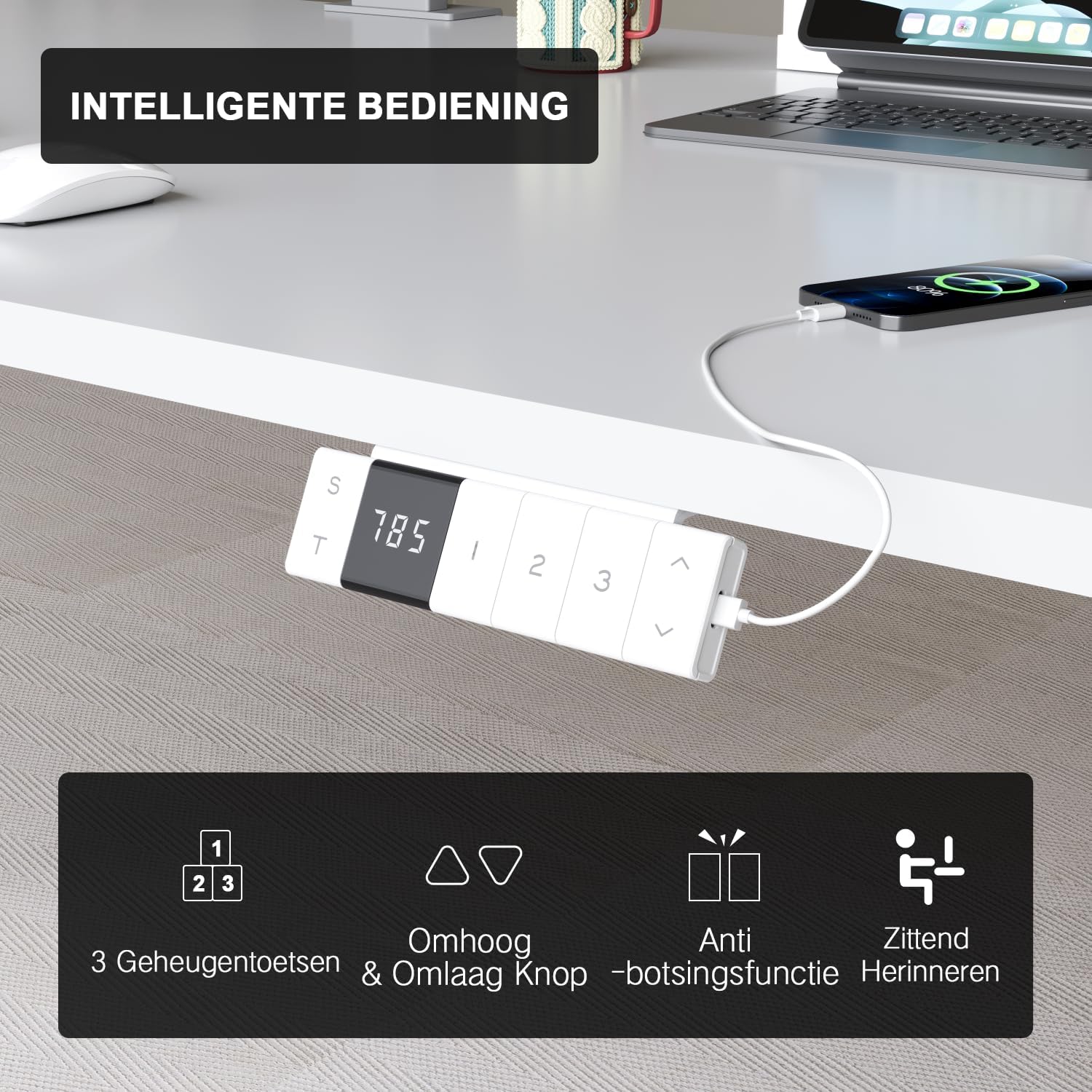
The intelligent control panel features a digital display, height adjustment buttons, memory presets, and USB charging ports.
- مٿي/هيٺ بٽڻ (▲ / ▼): Press and hold to smoothly adjust the desk height. The desk moves at a speed of 20mm/s with operating noise less than 45dB.
- ياداشت جا اڳواٽ سيٽ (1، 2، 3): Save your preferred sitting and standing heights. To set a preset: adjust the desk to the desired height, then press the 'S' button followed by the desired number (1, 2, or 3). The desk will automatically move to this height with a single press.
- USB-A & USB-C Charging Ports: Conveniently located on the control panel, these ports allow you to charge your devices directly from the desk, eliminating the need for extra wall adapters.
- ٽڪراءُ مخالف فنڪشن: The desk is equipped with a sensitive anti-collision system that detects obstacles during movement and automatically stops to prevent damage or injury.
- Sitting Reminder (T): The control panel may feature a timer function (indicated by 'T') to remind you to switch between sitting and standing positions for healthier work habits.

Easily switch between sitting mode (72 cm) and standing mode (118 cm) to optimize your comfort and health.
6. سار سنڀال
- صفائي: نرم استعمال ڪريو، ڊيamp ڊيسڪ ٽاپ ۽ فريم کي صاف ڪرڻ لاءِ ڪپڙو. گھڙڻ وارا صاف ڪندڙ يا سخت ڪيميڪلز کان پاسو ڪريو جيڪي ختم کي نقصان پهچائي سگهن ٿا.
- ڪيبل جو انتظام: Periodically check and reorganize cables to prevent tangles and ensure smooth operation.
- فاسٽنرز: ڪڏهن ڪڏهن سڀني اسڪرو ۽ بولٽن کي چيڪ ڪريو ته جيئن پڪ ڪري سگهجي ته اهي سخت رهن. جيڪڏهن ضروري هجي ته ٻيهر مضبوط ڪريو.
- موٽر سنڀال: The motor is designed for durability and has been tested over 10,000 cycles. No special maintenance is required for the motor itself.
7. مسئلا حل ڪرڻ
If you encounter any issues with your Devoko desk, please refer to the following common problems and solutions:
| مسئلو | ممڪن سبب | حل |
|---|---|---|
| ڊيسڪ حرڪت نٿي ڪري. | Power cable disconnected; Control box error. | Check power connection. Unplug and replug the desk for 10 seconds to reset the control box. |
| ڊيسڪ غير مساوي طور تي هلي ٿي يا غير معمولي شور ڪري ٿي. | Loose connections; Obstruction. | Check all assembly connections. Ensure no objects are obstructing the legs' movement. |
| Anti-collision system triggers too often. | Sensitivity setting; Obstruction. | Ensure no objects are near the desk's path. Refer to the full manual for anti-collision sensitivity adjustment if available. |
| USB پورٽ چارج نه ٿي رهيا آهن. | Desk not powered; Device compatibility. | Ensure the desk is plugged in and powered on. Check if the device requires specific charging protocols. |
If the problem persists after trying these solutions, please contact Devoko customer support for further assistance.
8. وضاحتون
| خاصيت | تفصيل |
|---|---|
| برانڊ | ديووڪو |
| ماڊل نمبر | 0077B-1222 |
| رنگ | اڇو |
| Desktop Dimensions (L x W) | 120 سينٽي x 80 سينٽي (47.2 x 31.5 انچ) |
| اونچائي جي حد | 72 cm to 118 cm (28.3 to 46.5 inches) |
| مواد | FSC-certified particle board (desktop), Industrial-grade steel (frame) |
| متحرڪ لوڊ گنجائش | 70 ڪلوگرام (154 پائونڊ) |
| جامد لوڊ گنجائش | 80 ڪلوگرام (176 پائونڊ) |
| کڻڻ جي رفتار | 20mm/s |
| شور جي سطح | <45 ڊي بي |
| خاص خاصيتون | Electric height adjustment, Ergonomic design, Integrated USB-A & USB-C charging, 3-Function Memory, Anti-collision system, Mobile with wheels |
| سرٽيفڪيشن | TÜV, CE |
| پيداوار جو وزن | 24.5 ڪلوگرام (54 پائونڊ) |

Desktop dimensions: 120cm x 80cm.

Key performance metrics: 70kg load capacity, 20mm/s speed, quiet operation, and anti-collision safety.
9. وارنٽي ۽ سپورٽ
The Devoko Electric Height Adjustable Desk comes with a 5 سال وارنٽي, ensuring peace of mind regarding its durability and performance. This warranty covers manufacturing defects and motor malfunctions under normal use.
For technical support, warranty claims, or any questions not covered in this manual, please contact Devoko customer service through the retailer's platform or the official Devoko website. Please have your model number (0077B-1222) and purchase date ready when contacting support.