
1. تعارف
Thank you for choosing the JELLICO X7 In-Ear Earphones with Microphone. This manual provides essential information for the proper setup, operation, and maintenance of your earphones. Please read it carefully before use to ensure optimal performance and longevity of your product.
2. پراڊڪٽ ختمview
The JELLICO X7 earphones are designed for clear audio playback and convenient communication. They feature an integrated microphone and an in-line remote for easy control of music and calls.
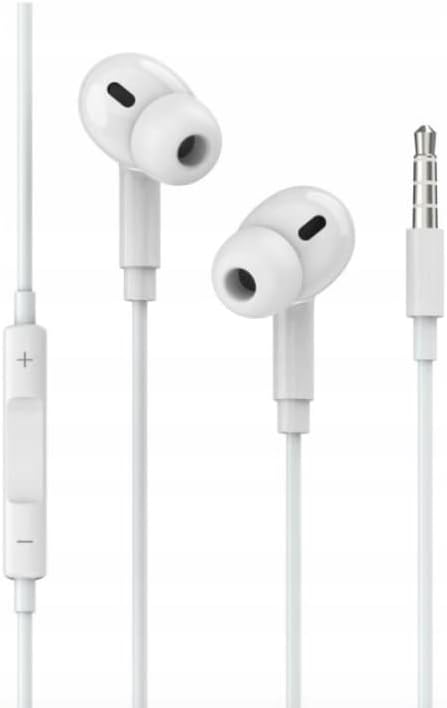
تصوير 1: JELLICO X7 In-Ear Earphones. This image displays the white in-ear earphones, connected by a cable, featuring an in-line remote control with volume buttons and a 3.5mm audio jack at the end of the cable.
اهم اجزاء:
- ڪن جايون: Designed for comfortable in-ear fit, delivering audio.
- ان لائن ريموٽ ڪنٽرول: Located on the cable, this unit houses the microphone and control buttons.
- مربوط مائڪروفون: هٿ کان سواءِ ڪالن ۽ وائس ڪمانڊن لاءِ.
- 3.5mm Mini Jack: Universal connector for audio devices.
3. سيٽ اپ
Connecting your JELLICO X7 earphones is straightforward:
- Identify the Audio Port: Locate the 3.5mm audio jack on your smartphone, tablet, computer, or other compatible audio device. This port is typically marked with a headphone icon.
- Insert the Connector: Gently insert the 3.5mm mini jack of your JELLICO X7 earphones into the audio port of your device until it is fully seated.
- حجم کي ترتيب ڏيو: Once connected, play audio and adjust the volume using your device's volume controls or the in-line remote control on the earphone cable.
توهان جا ائرفون هاڻي استعمال لاءِ تيار آهن.
4. آپريٽنگ هدايتون
The in-line remote control provides convenient access to various functions:
- موسيقي هلايو/روڪ ڪريو: آڊيو پلے بیک کي هلائڻ يا روڪڻ لاءِ هڪ ڀيرو مرڪزي بٽڻ کي دٻايو.
- اڳيون ٽريڪ: Press the central button twice quickly to skip to the next song.
- پويون ٽريڪ: Press the central button three times quickly to go back to the previous song.
- جواب/آخر ڪال: جڏهن ڪو ڪال اچي، جواب ڏيڻ لاءِ هڪ ڀيرو مرڪزي بٽڻ دٻايو. ڪال ختم ڪرڻ لاءِ ان کي ٻيهر دٻايو.
- ڪال رد ڪريو: Press and hold the central button for approximately 2 seconds to reject an incoming call.
- حجم مٿي حجم وڌائڻ لاءِ '+' بٽڻ دٻايو.
- حجم ھيٺ حجم گهٽائڻ لاءِ '-' بٽڻ دٻايو.
Note: Functionality may vary slightly depending on your device's operating system and audio player application.
5. سار سنڀال
To ensure the longevity and optimal performance of your JELLICO X7 earphones, follow these maintenance guidelines:
- صفائي: Gently wipe the earbuds and cable with a soft, dry, lint-free cloth. Do not use harsh chemicals, cleaning solvents, or strong detergents.
- اسٽوريج: When not in use, store your earphones in a clean, dry place, preferably in a protective pouch, to prevent tangling and damage. Avoid extreme temperatures.
- نمي کان بچڻ: Do not expose the earphones to water or excessive moisture. They are not waterproof.
- سنڀال سان سنڀال: Avoid pulling the cable forcefully or bending the 3.5mm jack at sharp angles, as this can damage internal wiring.
6. مسئلا حل ڪرڻ
If you encounter issues with your JELLICO X7 earphones, try the following solutions:
| مسئلو | ممڪن حل |
|---|---|
| آواز ناهي: |
|
| مائڪروفون ڪم نه ڪري رهيو آهي: |
|
| ريموٽ ڪنٽرول جواب نه ڏئي رهيو آهي: |
|
If the problem persists after trying these steps, please contact JELLICO customer support.
7. وضاحتون
| خاصيت | تفصيل |
|---|---|
| برانڊ: | جيليڪو |
| ماڊل: | X7 |
| قسم: | ان-ڪن ائرفون |
| رابطي: | 3.5mm Mini Jack (wired) |
| مائڪروفون: | ضم ٿيل |
| ڪنٽرول: | In-line remote with music and call control, volume adjustment |
| رنگ: | اڇو |
| ASIN: | B0C5448LB1 |
8. وارنٽي ۽ سپورٽ
JELLICO products are designed for reliability and performance. For information regarding warranty coverage, technical support, or service inquiries, please refer to the warranty card included with your purchase or visit the official JELLICO website. Please have your product model (X7) and ASIN (B0C5448LB1) ready when contacting support.
For further assistance, you may contact JELLICO customer service through their official channels.