
تعارف
Thank you for choosing the Diyeeni Portable Vintage Radio Speaker. This device combines a classic retro design with modern functionality, offering AM/FM/SW radio reception, Bluetooth connectivity, and multiple playback modes. Its portable and lightweight design makes it ideal for both indoor and outdoor use. Please read this manual carefully to ensure proper operation and to maximize your enjoyment of this product.
حفاظت جي ڄاڻ
- ڊوائيس کي مينهن، نمي، يا انتهائي گرمي پد جي سامهون نه رکو.
- ڊوائيس کي مضبوط اثرن لاءِ ڇڏڻ يا تابع ڪرڻ کان پاسو ڪريو.
- ڊوائيس کي پاڻ ڌار نه ڪريو يا مرمت ڪرڻ جي ڪوشش نه ڪريو. سڀني سروسنگ کي قابل اهلڪارن جي حوالي ڪريو.
- ڊوائيس کي مضبوط مقناطيسي شعبن کان پري رکو.
- Use only the provided charging cable and battery, or compatible replacements.
- ڊوائيس هلائڻ دوران مناسب وينٽيليشن کي يقيني بڻايو وڃي.
پيڪيج مواد
مھرباني ڪري ھيٺ ڏنل شين لاءِ پيڪيج چيڪ ڪريو:
- 1 x Portable Vintage Radio Speaker (Model RXBT628)
- 1 x Matching Rechargeable Battery
- 1 x USB چارجنگ ڪيبل
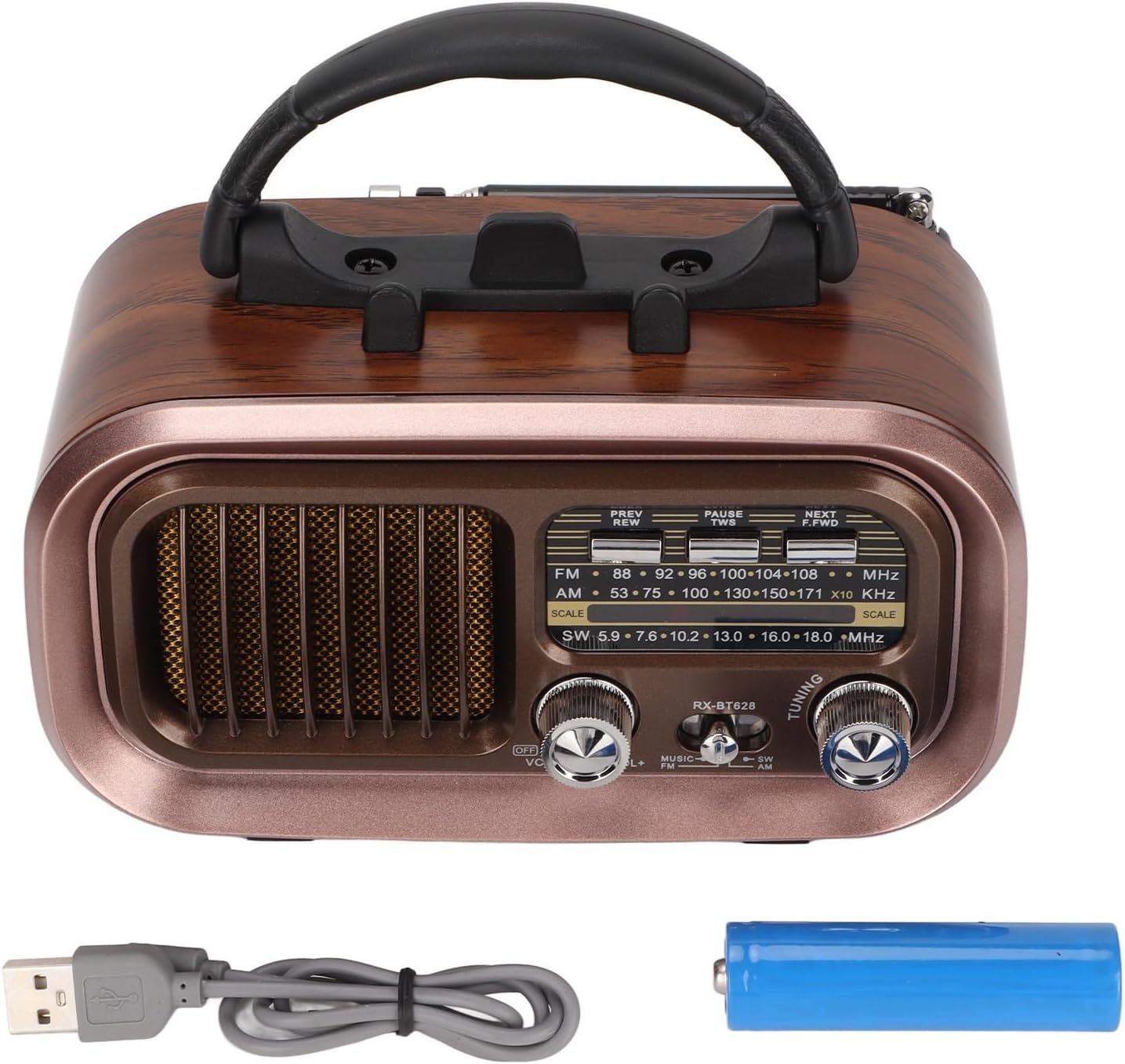
Image: The Diyeeni Portable Vintage Radio Speaker shown with its included rechargeable battery and USB charging cable.
پراڊڪٽ لي آئوٽ ۽ ڪنٽرول

تصوير: سامهون view of the radio speaker, highlighting the main controls and display area.
- اينٽينا: Extendable telescopic antenna for improved radio reception.
- سنڀال: آسان پورٽيبلٽي لاءِ مربوط هينڊل.
- PREV/REW Button: Short press for previous track (Bluetooth/USB/TF), long press for rewind.
- PAUSE/TWS Button: Play/Pause (Bluetooth/USB/TF). Long press for TWS pairing (Bluetooth mode).
- NEXT/F.FWD Button: Short press for next track (Bluetooth/USB/TF), long press for fast forward.
- تعدد ڊسپلي: Analog display for radio frequencies.
- OFF/VOL Knob: Power On/Off and Volume control. Rotate to adjust volume.
- MUSIC/SW/AM/FM Switch: Selects between Bluetooth/USB/TF (MUSIC) mode and radio bands (SW, AM, FM).
- ٽيوننگ نوب: Rotate to tune into radio stations.

Image: Side panel of the radio speaker, showing the USB port, TF card slot, power indicator, charge indicator, and DC 5V input port.
- USB پورٽ: USB فليش ڊرائيو پلے بیک لاءِ.
- TF ڪارڊ سلاٽ: TF (مائڪرو ايس ڊي) ڪارڊ پلے بیک لاءِ.
- پاور اشارو: روشني وڌي ٿي جڏهن ڊوائيس هلندي آهي.
- چارج اشارو: Lights up during charging.
- ڊي سي 5 وي پورٽ ۾: اندروني بيٽري چارج ڪرڻ لاءِ مائڪرو USB پورٽ.
سيٽ اپ ڪريو
1. بيٽري لڳائڻ
The radio speaker uses a rechargeable battery. Before first use, ensure the battery is correctly installed.
- يونٽ جي پوئين پاسي بيٽري جي خاني کي ڳوليو.
- بيٽري جي ڪمري واري ڍڪ کي سلائيڊ ڪريو کليل.
- Insert the provided rechargeable battery, ensuring the polarity (+/-) matches the diagram inside the compartment.
- بيٽري جي ڪمري واري ڍڪ کي محفوظ طور تي بند ڪريو.

تصوير: پوئين پاسي view of the radio speaker, showing the battery compartment cover and specifications label.
2. بيٽري کي چارج ڪرڻ
Before initial use, fully charge the battery for optimal performance.
- Connect the small end of the USB charging cable to the DC 5V IN port on the side of the radio.
- Connect the larger end of the USB charging cable to a standard USB power adapter (not included) or a computer USB port.
- The CHARGE indicator light will illuminate, indicating that the battery is charging.
- Once fully charged, the CHARGE indicator light may change color or turn off (refer to specific model behavior). Disconnect the charging cable.
آپريٽنگ هدايتون
1. پاور آن/آف ۽ واليوم ڪنٽرول
- To power on the device, rotate the OFF/VOL knob clockwise until you hear a click and the POWER indicator lights up.
- Continue rotating the OFF/VOL knob clockwise to increase the volume, and counter-clockwise to decrease it.
- بجلي بند ڪرڻ لاءِ، گھمايو OFF/VOL knob counter-clockwise until you hear a click and the POWER indicator turns off.
2. موڊ چونڊ
استعمال ڪريو MUSIC/SW/AM/FM switch to select the desired operating mode:
- FM: ايف ايم ريڊيو جي استقبال لاءِ.
- ص: For AM radio reception.
- SW: For Shortwave radio reception.
- موسيقي: For Bluetooth, USB, or TF card playback. The device will automatically detect and switch to the available source (Bluetooth, then USB, then TF).
3. ريڊيو آپريشن (AM/FM/SW)
- Extend the telescopic antenna for better reception, especially for FM and SW bands.
- سيٽ ڪريو MUSIC/SW/AM/FM switch to the desired radio band (FM, AM, or SW).
- آهستي آهستي گھمايو ٽيوننگ knob to scan for radio stations. The frequency display will indicate the approximate frequency.
- Adjust the antenna position for optimal signal clarity.
4. بلوٽوٽ جوئر
- سيٽ ڪريو MUSIC/SW/AM/FM ڏانهن تبديل ڪريو موسيقي mode. The device will enter Bluetooth pairing mode, indicated by an audible prompt.
- پنهنجي موبائل ڊوائس (اسمارٽ فون، ٽيبليٽ، وغيره) تي، بلوٽوٿ کي فعال ڪريو ۽ موجود ڊوائيسز جي ڳولا ڪريو.
- Select "RXBT628" (or similar name) from the list of found devices to pair.
- Once paired, you will hear a confirmation sound, and you can now play audio from your device through the speaker.
- استعمال ڪريو PREV/REW, روڪ / ٽي وي ايس، ۽ اڳيون/F.FWD پلے بیک کي ڪنٽرول ڪرڻ لاءِ بٽڻ.
5. USB/TF ڪارڊ پلے بیک
- Ensure your USB flash drive or TF (Micro SD) card contains audio files MP3، WMA، يا WAV فارميٽ ۾.
- سيٽ ڪريو MUSIC/SW/AM/FM ڏانهن تبديل ڪريو موسيقي موڊ.
- Insert the USB flash drive into the USB port or the TF card into the TF card slot. The device will automatically detect and begin playing audio.
- استعمال ڪريو PREV/REW, روڪ / ٽي وي ايس، ۽ اڳيون/F.FWD پلے بیک کي ڪنٽرول ڪرڻ لاءِ بٽڻ.
سار سنڀال
- صفائي: ڊوائيس جي ٻاهرين حصي کي نرم، سڪل ڪپڙي سان صاف ڪريو. رگڙيندڙ صاف ڪندڙ يا محلول استعمال نه ڪريو.
- اسٽوريج: جڏهن گهڻي عرصي تائين استعمال ۾ نه هجي، ته ڊوائيس کي ٿڌي، سڪل جاءِ تي، سڌي سج جي روشني ۽ انتهائي گرمي پد کان پري رکو.
- بيٽري جي سنڀال: If the device will not be used for a long time, it is recommended to charge the battery periodically to maintain its lifespan.
مشڪلاتون
| مسئلو | ممڪن سبب | حل |
|---|---|---|
| طاقت نه آهي | بيٽري ختم ٿي وئي آهي يا صحيح طرح سان نصب نه ڪئي وئي آهي. | بيٽري چارج ڪريو. پڪ ڪريو ته بيٽري صحيح پولارٽي سان داخل ڪئي وئي آهي. |
| ناقص ريڊيو استقبال | اينٽينا نه وڌايو ويو، ڪمزور سگنل، يا مداخلت. | Fully extend the telescopic antenna. Adjust the antenna position. Try moving to a different location. |
| بلوٽوٿ جوڙو ناهي | Device not in pairing mode, or too far from the speaker. | Ensure the speaker is in MUSIC mode. Make sure Bluetooth is enabled on your mobile device. Keep devices within 10 meters (33 feet). |
| USB/TF ڪارڊ نه پيو هلي | غلط file format, card not inserted properly, or damaged card. | آڊيو کي يقيني بڻايو files are MP3, WMA, or WAV. Reinsert the USB drive/TF card. Try a different USB drive/TF card. |
| آواز ڪونهي | Volume too low, or device muted. | Increase the volume using the OFF/VOL knob. Check if the connected Bluetooth device's volume is also up. |
وضاحتون
| خاصيت | تفصيل |
|---|---|
| ماڊل نمبر | RXBT628 |
| برانڊ | ديئيني |
| رنگ | Black (Retro Style) |
| رابطي ٽيڪنالاجي | بلوٽوٿ |
| Tuner ٽيڪنالاجي | ايم، ايف ايم، ايس ڊبليو (3-بينڊ) |
| طاقت جو ذريعو | بيٽري سان هلندڙ (ريچارج لائق) |
| مواد | پلاسٽڪ |
| ھارڊويئر انٽرفيس | USB |
| مطابقت رکندڙ ڊوائيسز | اسمارٽ فون، ٽيبليٽ، ليپ ٽاپ |
| پلے بیک موڊس | Bluetooth, USB, TF Card (MP3, WMA, WAV formats) |
| خاص خاصيتون | Lightweight, Portable, External Antenna |
وارنٽي ۽ سپورٽ
This product comes with a standard manufacturer's warranty. For specific warranty details, please refer to the documentation provided with your purchase or contact Diyeeni customer support. If you encounter any issues not covered in this manual, please reach out to the retailer or manufacturer for assistance.
For further support, please visit the official Diyeeni store or contact their customer service channels.