
1. تعارف
Thank you for choosing the FLEXISPOT L-Shaped Electric Standing Desk. This manual provides essential information for the safe assembly, operation, and maintenance of your new desk. Please read these instructions carefully before use and retain them for future reference. This desk is designed to provide a versatile and ergonomic workspace, allowing seamless transitions between sitting and standing positions.
2. حفاظتي هدايتون
محفوظ آپريشن کي يقيني بڻائڻ ۽ زخم يا نقصان کي روڪڻ لاءِ، مھرباني ڪري ھيٺ ڏنل حفاظتي ھدايتن تي عمل ڪريو:
- پڪ ڪريو ته سڀئي اجزاء استعمال ڪرڻ کان اڳ محفوظ طور تي تيز آهن.
- آپريشن دوران ٻارن ۽ پالتو جانورن کي ڊيسڪ کان پري رکو.
- Do not place hands or other body parts near moving parts of the desk frame.
- Avoid overloading the desk. The maximum load capacity is 80 kg.
- ڊيسڪ تي نه ويهو ۽ نه بيهو.
- ڊيسڪ کي صرف خشڪ ماحول ۾ گهر اندر استعمال ڪريو.
- صفائي يا سار سنڀال کان اڳ بجلي بند ڪريو.
- جيڪڏهن ڪو به پرزو خراب يا غائب آهي، ته فوري طور تي ڪسٽمر سپورٽ سان رابطو ڪريو. ڊيسڪ کي پاڻ مرمت ڪرڻ جي ڪوشش نه ڪريو.
3. پيڪيج مواد
Please verify that all parts are present and undamaged before beginning assembly. Refer to the assembly diagram for a complete list of components.
- L-Shaped Desktop (2 parts)
- 4-Leg Frame (Dual Motor Mechanism)
- ذھني ڪنٽرول پينل
- پاور اڊاپٽر ۽ ڪيبلز
- اسيمبلي هارڊويئر (اسڪرو، اوزار، وغيره)
- استعمال ڪندڙ دستي
4. سيٽ اپ ۽ اسيمبلي
اسيمبليءَ لاءِ عام طور تي ٻن ماڻهن جي ضرورت هوندي آهي. انهن قدمن تي احتياط سان عمل ڪريو:
- انپيڪ اجزاء: پيڪنگ مان سڀني حصن کي احتياط سان هٽايو ۽ انهن کي نرم، صاف مٿاڇري تي رکو ته جيئن ڇڪڻ کان بچي سگهجي.
- Assemble the 4-Leg Frame: Connect the frame components according to the included diagram. Ensure all bolts are tightened securely. The 4-leg design provides enhanced stability.
- Install Dual Motor Mechanism: The dual motor system is integrated into the frame. Ensure all motor connections are secure. This mechanism allows for smooth and precise height adjustments.
- ڊيسڪ ٽاپ پينلز ڳنڍيو: Carefully place the two desktop panels onto the assembled frame. Align the pre-drilled holes and secure the desktop to the frame using the provided screws. The L-shaped design offers ampڪم جي جڳهه.
- ڪنٽرول پينل مائونٽ ڪريو: Attach the intelligent control panel to the underside of the desktop in an easily accessible location. Connect the control panel cable to the main control box.
- پاور Connectنيو: Plug the power adapter into the control box, then plug the power cord into a standard electrical outlet.
- شروعاتي ري سيٽ: After connecting power, perform an initial reset. Press and hold the 'Reset' button (usually marked with a circular arrow) until the desk reaches its lowest position and then slightly rises. This calibrates the desk.
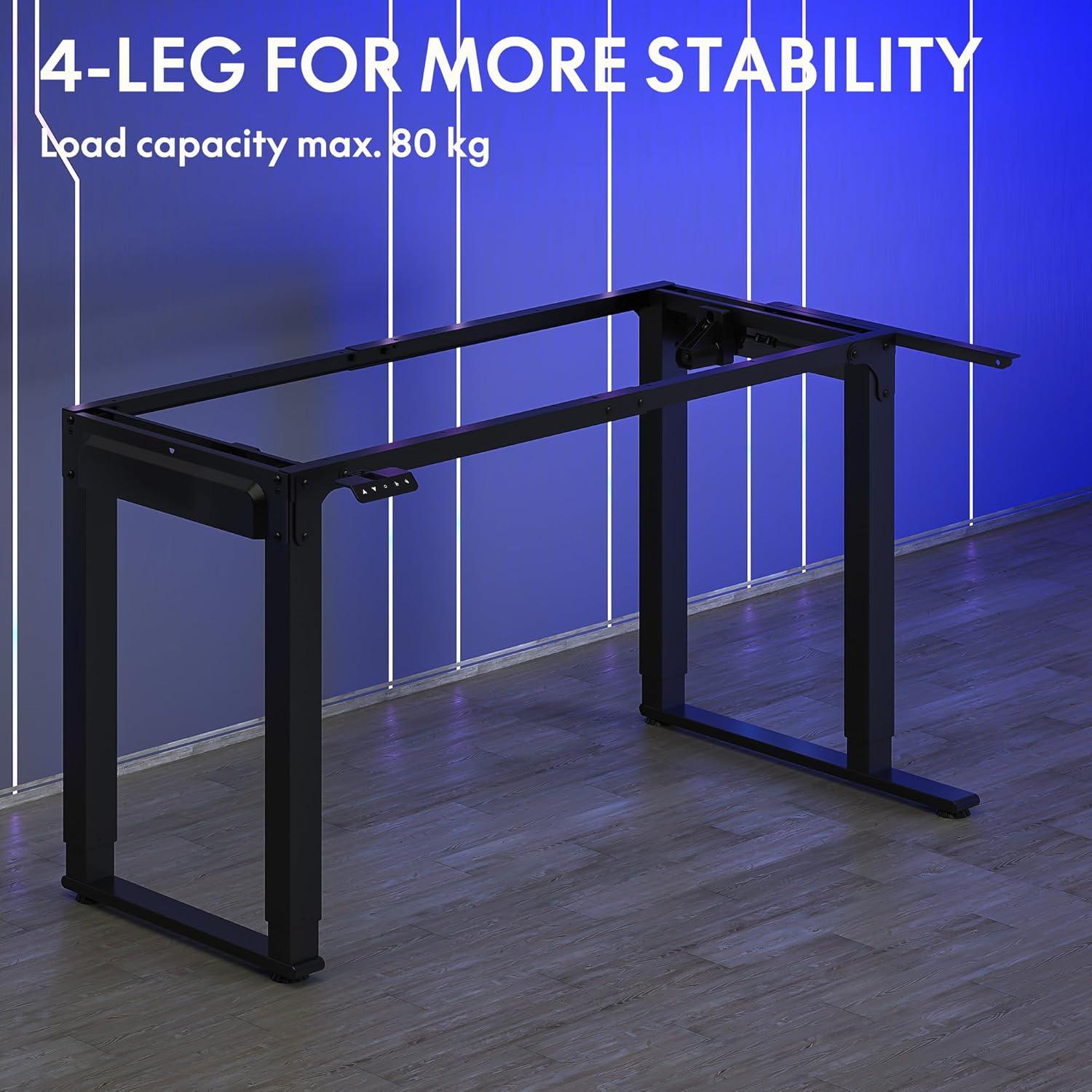
Image: The robust 4-leg frame provides superior stability for the L-shaped standing desk.

Image: Detail of the dual-motor mechanism, ensuring accurate and smooth height positioning.
5. آپريٽنگ هدايتون
Your FLEXISPOT L-Shaped Electric Standing Desk features an intelligent control panel for easy height adjustment and memory presets.
5.1 ڪنٽرول پينل جا ڪم

Image: The intelligent control panel with clearly labeled buttons for desk operation.
- مٿي/هيٺ بٽڻ (▲ / ▼): Press and hold to continuously adjust the desk height up or down. Release to stop at the desired height.
- Reset Button (↺): Used for initial calibration or to reset the desk if an error occurs. Press and hold until the desk moves to its lowest point and slightly rises.
- Sitting Preset Button (👭): Press to automatically move the desk to your programmed sitting height.
- Standing Preset Button (👭 with upward arrow): Press to automatically move the desk to your programmed standing height.
5.2 ميموري پري سيٽ سيٽ ڪرڻ
To save your preferred sitting or standing height:
- مٿي/هيٺ بٽڻن کي استعمال ڪندي ڊيسڪ کي پنهنجي گهربل اوچائي تي ترتيب ڏيو.
- Press and hold the desired preset button (Sitting or Standing) for approximately 3-5 seconds until you hear a beep or see the display flash. This indicates the height has been saved.

Image: The desk can be adjusted from a minimum height of 72cm to a maximum of 117cm.

Image: The spacious L-shaped desktop (180cm x 110cm) provides ample room for multiple computers and accessories.
6. سار سنڀال
Regular maintenance ensures the longevity and optimal performance of your desk.
- صفائي: ڊيسڪ ٽاپ ۽ فريم کي نرم، ڊي سان صاف ڪريوamp ڪپڙو. سخت ڪيميڪلز يا رگڙيندڙ صاف ڪندڙن کان پاسو ڪريو.
- چڪاس: وقت بوقت سڀني پيچرن ۽ ڪنيڪشنن کي چيڪ ڪريو ته جيئن پڪ ٿئي ته اهي تنگ آهن. جيڪڏهن ضروري هجي ته ٻيهر مضبوط ڪريو.
- ڪيبل جو انتظام: Ensure power cables and other device cables are properly managed to prevent entanglement or damage during height adjustments.
- موٽر سنڀال: The dual motors are designed for durability. Avoid obstructing the desk's movement or exceeding the weight limit to prevent strain on the motors.

Image: The desk features safe and stylish rounded corners.
7. مسئلا حل ڪرڻ
جيڪڏهن توهان کي پنهنجي ڊيسڪ سان مسئلا درپيش اچن ٿا، ته هيٺ ڏنل عام مسئلن ۽ حلن جو حوالو ڏيو:
| مسئلو | ممڪن سبب | حل |
|---|---|---|
| ڊيسڪ حرڪت نٿي ڪري. | Power cable disconnected; Control panel cable loose; Overload protection activated. | Check power connections; Ensure control panel cable is secure; Reduce weight on desk and perform a reset. |
| ڊيسڪ غير مساوي طور تي هلي ٿي يا غير معمولي شور ڪري ٿي. | Unbalanced load; Loose connections; Obstruction. | Distribute weight evenly; Check and tighten all frame connections; Remove any obstructions. Perform a reset. |
| Height presets are not working. | پري سيٽ صحيح طرح محفوظ نه ٿيا آهن. | Re-save the desired height by holding the preset button until confirmation. |
| ڊيسڪ حرڪت جي وچ ۾ روڪي ٿي. | Overload protection; Overheating protection. | Reduce weight on the desk. Allow the desk to cool down for 20-30 minutes if it has been used continuously. |
جيڪڏهن انهن حلن جي ڪوشش ڪرڻ کان پوءِ به مسئلو برقرار رهي ٿو، ته مهرباني ڪري FLEXISPOT ڪسٽمر سپورٽ سان رابطو ڪريو.
8. وضاحتون
| خاصيت | تفصيل |
|---|---|
| ماڊل نمبر | QS2LB-1811 |
| برانڊ | FLEXISPOT |
| ڊيسڪ جو قسم | L-shaped اليڪٽرڪ اسٽينڊنگ ڊيسڪ |
| موٽر جو قسم | ٻٽي موٽر |
| فريم جو قسم | 4-Leg Frame |
| اونچائي جي ترتيب جي حد | 72 سينٽي کان 117 سينٽي ميٽر |
| Desktop Dimensions (L x W) | 180 سينٽي x 110 سينٽي ميٽر |
| وڌ ۾ وڌ لوڊ گنجائش | 80 ڪلو |
| شور جي سطح | <50 ڊي بي |
| مواد | مصر جو اسٽيل (فريم) |
| رنگ | ڪارو |
| شيءِ جو وزن | 30 ڪلوگرام |
9. وارنٽي ۽ سپورٽ
FLEXISPOT products are designed for quality and durability. For specific warranty information, please refer to the warranty card included with your purchase or visit the official FLEXISPOT website. If you require technical assistance, have questions about assembly, or need to report a missing/damaged part, please contact FLEXISPOT customer support directly. Ensure you have your model number (QS2LB-1811) and purchase details available when contacting support.
رابطي جي ڄاڻ: Please refer to the contact details provided on the FLEXISPOT official webسائيٽ يا توهان جي خريداري دستاويزن کي جديد ترين سپورٽ چينلز لاءِ.