
OLEVS XBC-G1106GH-HH
OLEVS XBC-G1106GH-HH Men's Chronograph Analog-Digital Watch Instruction Manual
Model: XBC-G1106GH-HH
تعارف
Thank you for choosing the OLEVS XBC-G1106GH-HH Men's Chronograph Analog-Digital Watch. This timepiece combines a classic analog display with modern digital functions, including chronograph, alarm, day, and date. This manual provides detailed instructions for setting up and operating your watch to ensure optimal performance and longevity.

Image: The OLEVS XBC-G1106GH-HH watch featuring a black band and black dial, showcasing ان جي مضبوط ڊيزائن.
پيداوار ختمview
Familiarize yourself with the main components and controls of your OLEVS watch.
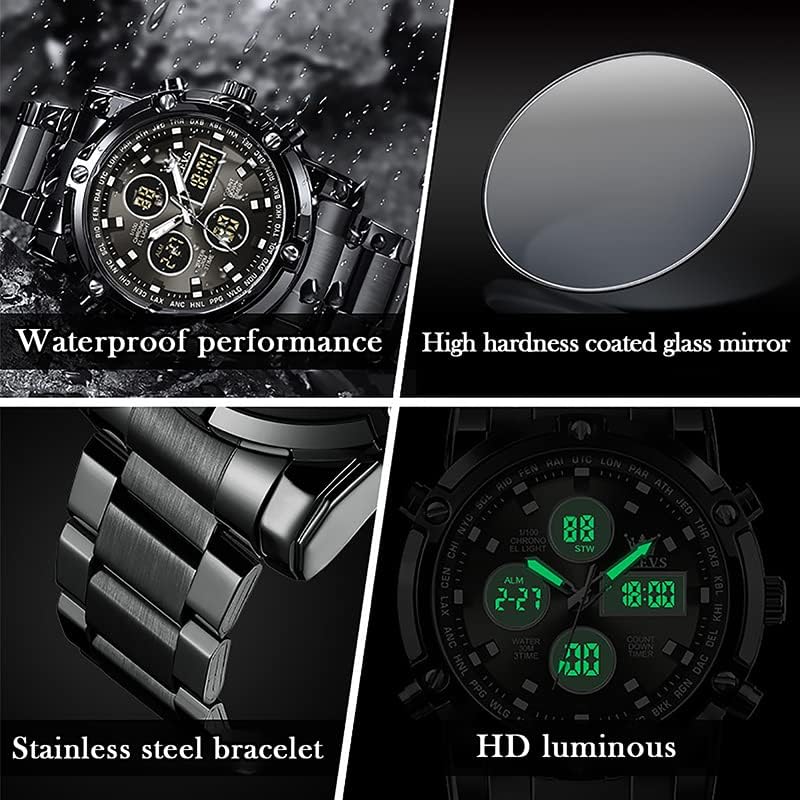
Image: Detailed diagram illustrating the various buttons and digital display functions of the OLEVS watch, including time, date, alarm, and chronograph indicators.
Watch Components and Functions:
- تاج: Used for setting analog time (pull out to adjust).
- Buttons (Pushers): Control digital functions such as mode selection, setting adjustments, and chronograph operations.
- اينالاگ ڊسپلي: روايتي ڪلاڪ، منٽ، ۽ ٻئي هٿ.
- ڊجيٽل ڊسپلي: Multiple digital screens showing time, date, day, alarm, stopwatch, and countdown timer.
- پوئتي روشني: Illuminates the digital display for visibility in low light conditions.
- هفتي ڊسپلي: هفتي جي موجوده ڏينهن کي ظاهر ڪري ٿو (سومر، منگل، اربع، خميس، جمعو، ڇنڇر، آچر).
- موڊ اشارا: AL (Alarm mode), ST (Stopwatch mode), TR (Countdown mode).
سيٽ اپ ڪريو
1. اينالاگ وقت مقرر ڪرڻ
- Pull out the crown located on the right side of the watch.
- ڪلاڪ ۽ منٽ جي هٿن کي گهربل وقت تي منتقل ڪرڻ لاءِ ڪرائون کي گھمايو.
- وقت جي سيٽنگ کي محفوظ ڪرڻ لاءِ تاج کي پوئتي ڌڪيو.
2. ڊجيٽل وقت ۽ تاريخ مقرر ڪرڻ
The digital display allows for precise time, date, and day settings. Refer to the product overview image for button locations.
- سيٽنگ موڊ داخل ڪريو: Press and hold the button labeled "Long press to enter settings" (typically bottom-right) until the digital display starts flashing.
- Select Item to Adjust: Press the button labeled "Convert hours, minutes when setting week, month, day, etc." (typically top-left) to cycle through the settings: seconds, hours, minutes, year, month, day, and week.
- قدر کي ترتيب ڏيو: Use the button labeled "Increment value when setting" (typically top-right) to increase the selected value.
- Confirm and Exit: Once all settings are correct, press the button labeled "Long press to enter settings" again to exit the setting mode.
3. الارم جوڙڻ
- الارم موڊ داخل ڪريو: Press the mode button (typically bottom-left, labeled "Convert seconds, timing Functions such as normal time" or similar) until "AL" (Alarm mode) is displayed on the digital screen.
- Enter Alarm Setting: Press and hold the button labeled "Long press to enter settings" until the alarm time starts flashing.
- الارم جو وقت ترتيب ڏيو: Use the button labeled "Convert hours, minutes when setting week, month, day, etc." to select hours or minutes, and the button labeled "Increment value when setting" to adjust the values.
- الارم کي فعال/غير فعال ڪريو: While in Alarm mode (AL), press the button labeled "Alarm on" (typically bottom-right) to toggle the alarm on or off. An alarm icon will appear when activated.
- Exit Alarm Setting: Press the button labeled "Long press to enter settings" to save and exit.
آپريٽنگ افعال
1. ڪرونوگراف (اسٽاپ واچ) استعمال ڪرڻ
ڪرونوگراف فنڪشن توهان کي گذري ويل وقت کي ماپڻ جي اجازت ڏئي ٿو.
- Enter Stopwatch Mode: Press the mode button (typically bottom-left) until "ST" (Stopwatch mode) is displayed.
- شروع/روڪ: Press the button labeled "Convert seconds, timing functions such as normal time" (typically bottom-left) to start the stopwatch. Press it again to stop.
- تبديل ڪريو While the stopwatch is stopped, press the button labeled "Increment value when setting" (typically top-right) to reset the stopwatch to zero.
2. ڳڻپ ٽائمر استعمال ڪندي
The countdown timer allows you to set a specific duration and will alert you when it reaches zero.
- Enter Countdown Mode: Press the mode button (typically bottom-left) until "TR" (Countdown mode) is displayed.
- Set Countdown Time: Press and hold the button labeled "Long press to enter settings" until the countdown time flashes. Use the button labeled "Convert hours, minutes when setting week, month, day, etc." to select hours or minutes, and the button labeled "Increment value when setting" to adjust the values. Press the button labeled "Long press to enter settings" again to save.
- شروع/روڪ: Press the button labeled "Convert seconds, timing functions such as normal time" to start the countdown. Press it again to pause/resume.
- تبديل ڪريو While the countdown is paused, press the button labeled "Increment value when setting" to reset to the preset time.
3. بيڪ لائيٽ فنڪشن
To illuminate the digital display in dark conditions, press the button labeled "Backlit keys" (typically top-left). The backlight will typically stay on for a few seconds.
پاڻي جي مزاحمت جي رهنمائي
Your OLEVS XBC-G1106GH-HH watch is rated for 30 meters (3ATM) water resistance. This means it is suitable for daily use and can withstand splashes, rain, and brief immersion in water. However, it is نه suitable for swimming, diving, or showering with hot water, as steam and temperature changes can compromise the seals.
- نه operate any buttons or pull out the crown while the watch is wet or submerged.
- گھڙي کي انتهائي گرمي پد جي تبديلين جي سامهون آڻڻ کان پاسو ڪريو.
- If the watch comes into contact with saltwater, rinse it with fresh water and dry thoroughly.

Image: The OLEVS watch demonstrating its water-resistant capabilities, suitable for splashes and rain.
سار سنڀال
Proper care will extend the life and maintain the appearance of your watch.
- صفائي: Wipe the watch case and strap regularly with a soft, dry cloth. For stainless steel, a slightly damp ڪپڙو استعمال ڪري سگهجي ٿو، جنهن کان پوءِ فوري طور تي سڪايو وڃي.
- ڪيميائي شين کان بچاء: گھڙي کي سالوينٽس، ڊٽرجنٽ، پرفيوم، يا ڪاسمیٹڪ اسپري جي سامهون نه رکو، ڇاڪاڻ ته اهي ڪيس، پٽي، يا سيل کي نقصان پهچائي سگهن ٿا.
- گرمي پد: گھڙي کي انتهائي گرمي پد (60°C / 140°F کان مٿي يا 0°C / 32°F کان گهٽ) يا اوچتو گرمي پد ۾ تبديلين کان پاسو ڪريو.
- مقناطيسي ميدان: Keep the watch away from strong magnetic fields, which can affect the accuracy of the quartz movement.
- بيٽري مٽائڻ: When the watch battery runs low, the digital display may dim or the watch may stop. Have the battery replaced by a qualified watch technician to ensure water resistance is maintained.
مشڪلاتون
| مسئلو | ممڪن سبب | حل |
|---|---|---|
| اينالاگ هٿ حرڪت نه ڪري رهيا آهن | Battery depleted; Crown pulled out; Mechanical issue. | Check if crown is pushed in. Replace battery. Contact service if issue persists. |
| ڊجيٽل ڊسپلي خالي يا مدھم آهي | بيٽري ختم ٿي وئي. | بيٽري تبديل ڪريو. |
| Incorrect time/date displayed | Time/date not set correctly; Watch exposed to strong magnetic fields. | Reset time and date according to instructions. Keep watch away from magnets. |
| بٽڻ جواب نه ڏئي رهيا آهن | Watch is wet; Internal malfunction. | Ensure watch is dry before operating buttons. If issue persists, contact service. |
وضاحتون
- برانڊ: OLEVS
- ماڊل نمبر: XBC-G1106GH-HH
- ڊسپلي جو قسم: اينالاگ-ڊجيٽل
- تحريڪ: کوارٽز
- طاقت جو ذريعو: بيٽري سان هلندڙ
- ڪيس جو مواد: بي داغ لوه
- بينڊ مواد: بي داغ لوه
- ڪرسٽل: هارڊليڪس
- ڪيس قطر: 48 ملي ميٽر
- ڪيس جي ٿولهه: 16 ملي ميٽر
- بينڊ ويڪر: 23 ملي ميٽر
- پاڻي جي مزاحمت جي کوٽائي: 30 Metres (3ATM)
- ڪلپ جو قسم: پش بٽڻ فولڊ اوور ڪليپ حفاظت سان
- افعال: Chronograph, LED Backlight, Day, Date, Alarm, Stopwatch, Countdown Timer
وارنٽي ۽ سپورٽ
For warranty information and customer support, please refer to the documentation provided with your purchase or contact the retailer where you purchased the OLEVS XBC-G1106GH-HH watch. Keep your proof of purchase for any warranty claims.
For further assistance, you may also visit the official OLEVS webسائيٽ تي وڃو يا سڌو سنئون انهن جي ڪسٽمر سروس ڊپارٽمينٽ سان رابطو ڪريو.
Ask a question about this manual
Ask about setup, troubleshooting, compatibility, parts, safety, or missing instructions. Manuals+ will review the question and use this page’s manual context to help answer it.