تعارف
خريد ڪرڻ لاءِ مهربانيasing the HEANTTV Mini Stereo USB Computer Speakers, Model C1. This manual provides essential information for the safe and efficient use of your new speakers. Please read it thoroughly before use and retain it for future reference.
حفاظت جي ڄاڻ
- اسپيڪرن کي پاڻي يا گهڻي نمي جي سامهون نه آڻيو.
- اسپيڪرن کي گرمي جي ذريعن جي ويجهو يا سڌي سج جي روشني ۾ رکڻ کان پاسو ڪريو.
- Do not attempt to disassemble or repair the speakers yourself. Contact qualified service personnel.
- ٻارن جي پهچ کان پري رکو.
- Use only with compatible devices and power sources as specified.
پيڪيج مواد
مھرباني ڪري ھيٺ ڏنل شين لاءِ پيڪيج چيڪ ڪريو:
- HEANTTV Mini Stereo USB Computer Speakers (2 units)
- Integrated USB power cable and 3.5mm audio cable with in-line control
- تڪڙو شروع ھدايت
پيداوار ختمview
The HEANTTV C1 speakers feature a compact design with integrated LED lighting and convenient in-line controls for volume and LED light management.
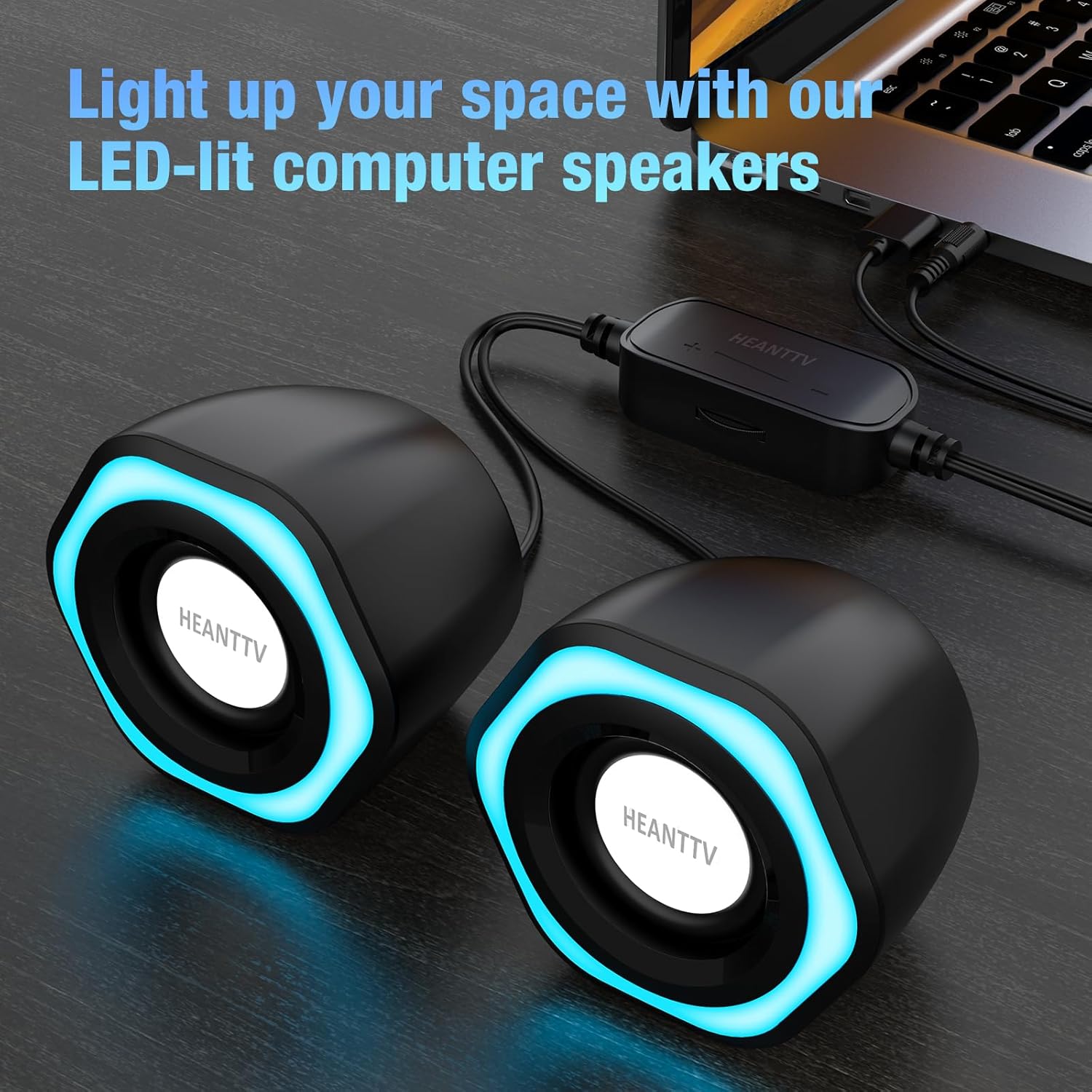
شڪل 1: HEANTTV C1 speakers with their distinctive blue LED lighting, connected to a laptop. The speakers are designed to illuminate your workspace.

شڪل 2: تفصيلي view of the HEANTTV C1 speaker dimensions, highlighting its compact and portable size. The measurements are approximately 79mm (3.11in) height, 65mm (2.55in) width, and 84mm (3.30in) depth.

شڪل 3: A HEANTTV C1 speaker held in a hand, illustrating its mini size and portability.
سيٽ اپ جون هدايتون
Follow these steps to set up your HEANTTV C1 speakers:
- لڳائڻ: Position the two speakers on your desk or desired surface, ensuring they are equidistant from your listening position for optimal stereo sound.
- آڊيو ڳنڍيو: Plug the 3.5mm audio jack into the audio output port of your computer, laptop, or other compatible device.
- پاور Connectنيو: Insert the USB-A connector into an available USB port on your computer, laptop, or a USB power adapter (5V/1A recommended). The speakers are USB powered.
- پاور آن: Once both cables are connected, the speakers will power on, and the LED lights will illuminate.

شڪل 4: Illustration of the easy connection process. The USB cable provides power, and the 3.5mm audio cable transmits sound. The in-line control unit is visible for convenient adjustments.

شڪل 5: هڪ بند اپ view of the USB plug for power and the 3.5mm audio plug for sound input, demonstrating the simple plug-and-play connectivity.
آپريٽنگ هدايتون
The HEANTTV C1 speakers are designed for straightforward operation.
- حجم ڪنٽرول: Use the in-line control wheel located on the cable to adjust the volume. Rotate the wheel upwards to increase volume and downwards to decrease it.
- ايل اي ڊي لائيٽ ڪنٽرول: The in-line control unit also features a button to turn the LED lights on or off. Press the button to toggle the lighting feature.
- آڊيو پلے بیک: Once connected and powered, play audio from your connected device. The speakers will output stereo sound.

شڪل 6: Detail of the in-line control unit, showing the volume adjustment wheel and the button for controlling the LED lights. This allows for easy access to common functions.
سار سنڀال
پنهنجي اسپيڪرن جي ڊگهي عمر ۽ بهترين ڪارڪردگي کي يقيني بڻائڻ لاءِ، انهن سار سنڀال جي هدايتن تي عمل ڪريو:
- صفائي: اسپيڪرن جي ٻاهرين حصي کي صاف ڪرڻ لاءِ نرم، سڪل ڪپڙو استعمال ڪريو. مائع صاف ڪندڙ يا رگڙيندڙ مواد استعمال نه ڪريو.
- اسٽوريج: When not in use for extended periods, store the speakers in a cool, dry place away from direct sunlight and dust.
- ڪيبل جي سنڀال: نقصان کان بچڻ لاءِ ڪيبلن کي گهڻو موڙڻ يا مروڙڻ کان پاسو ڪريو.
مشڪلاتون
If you encounter issues with your HEANTTV C1 speakers, refer to the following common problems and solutions:
| مسئلو | ممڪن سبب | حل |
|---|---|---|
| آواز ڪونهي |
|
|
| LED بتيون ڪم نه ڪري رهيو آهي |
|
|
| بگڙيل آواز |
|
|
وضاحتون
| خاصيت | تفصيل |
|---|---|
| ماڊل نالو | C1 |
| برانڊ | HEANTTV |
| مطابقت رکندڙ ڊوائيسز | Personal computer, laptop, desktop |
| رابطي ٽيڪنالاجي | USB (پاور لاءِ)، 3.5mm AUX (آڊيو لاءِ) |
| آڊيو آئوٽ پٽ موڊ | اسٽيريو (2.0 چينل ترتيب) |
| اسپيڪر آئوٽ پاور پاور | 6 واٽ (ڪل) |
| خاص خاصيتون | LED Light (with on/off control) |
| ڪنٽرول جو طريقو | In-line volume control wheel, LED light button |
| طاقت جو ذريعو | USB Powered (Electric cable) |
| مواد | پلاسٽڪ |
| پيداوار جي ماپ (L x W x H) | 3.11 x 6.5 x 7.9 cm (per speaker) |
| وزن | 400 گرام (ڪل) |
| پنروڪ | نه |
وارنٽي ۽ سپورٽ
Information regarding warranty coverage and customer support is typically provided with your purchase documentation or on the manufacturer's official website. Please refer to the included "Quick Start Guide" or visit the HEANTTV website for detailed warranty terms and contact information for support.
For any issues not covered in this manual, please contact HEANTTV customer service.