
1. تعارف
This manual provides detailed instructions for the installation, configuration, and maintenance of the FRONTECH FT-0470 H61 Motherboard. Please read this manual thoroughly before proceeding with installation to ensure proper setup and operation.
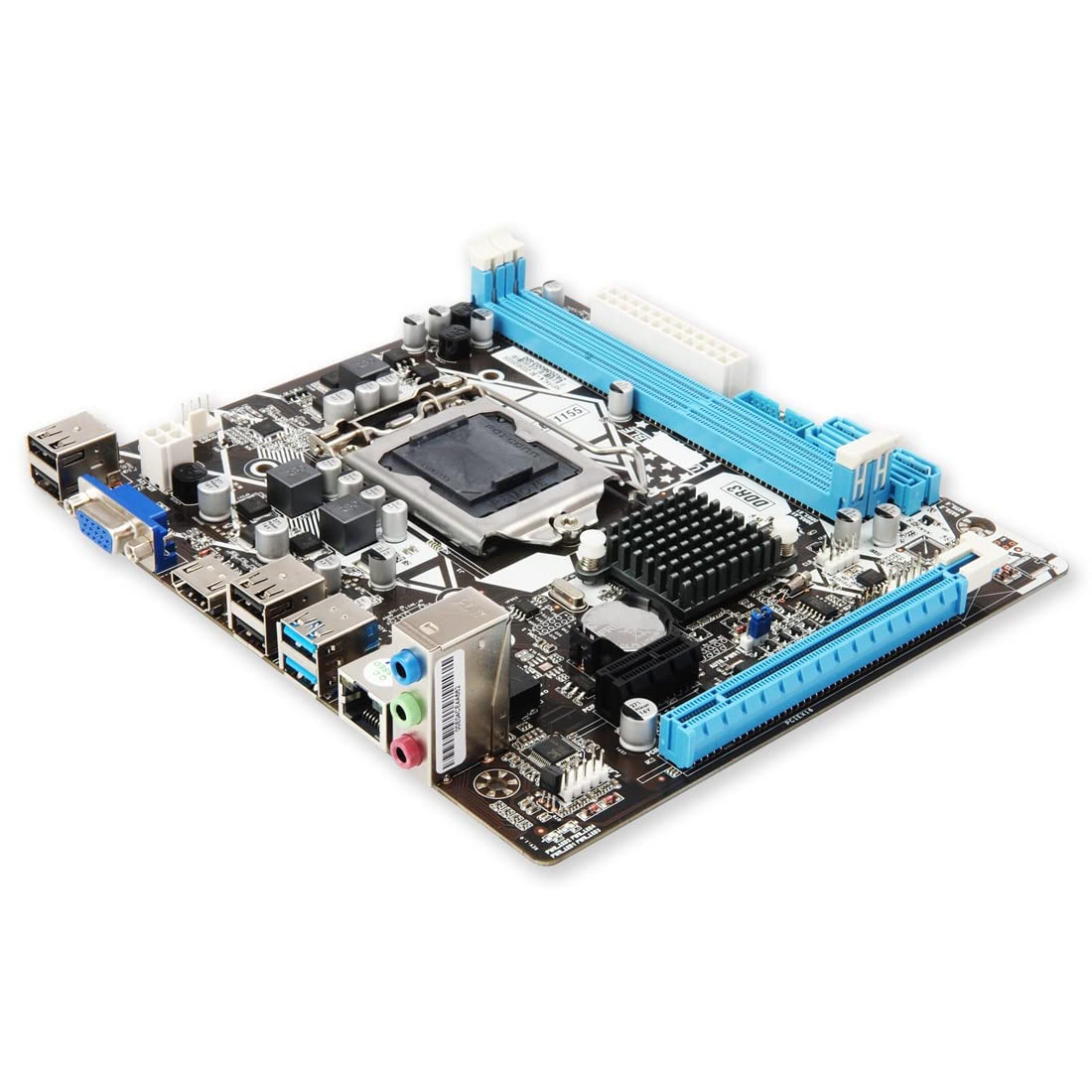
Image 1.1: The FRONTECH FT-0470 H61 Motherboard with its retail packaging, driver CD, and SATA cables.
2. پراڊڪٽ ختمview
The FRONTECH FT-0470 H61 Motherboard is designed to support Intel LGA1155 socket processors, including i3, i5, i7, and Pentium series. It features the Intel H61 Express Chipset, providing a stable and efficient platform for personal computing.
اهم خاصيتون:
- پروسيسر سپورٽ: LGA1155 socket for Intel i3/i5/i7/Pentium processors.
- چپ سيٽ: Intel H61 Express Chipset.
- ياداشت: 2 x DDR3 RAM slots, supporting 1066/1333/1600 MHz, up to 16GB total.
- اسٽوريج: 4 x SATA ports, 1 x NVMe slot.
- توسيع جا سلاٽ: 1 x PCI Express x16 slot, 1 x PCI Express x1 slot.
- رابطي: 6 x USB ports (USB 2.0), HDMI, VGA, Ethernet (LAN 10/100Mbps), 6-channel HD Audio.

Image 2.1: The FRONTECH H61 Motherboard mounted inside a computer case, highlighting its key specifications such as CPU support, chipset, memory, sound, expansion, and LAN.

Image 2.2: A visual representation of the FRONTECH H61 Motherboard, emphasizing its H61 Express Chipset and compatibility with Intel i3/i5/i7 series CPUs.
3. سيٽ اپ ۽ تنصيب
Follow these steps carefully to install your FRONTECH FT-0470 H61 Motherboard into your computer system.
3.1. توهان جو سسٽم تيار ڪرڻ
- Ensure your power supply is disconnected from the wall outlet.
- Open your computer case and prepare the mounting area for the motherboard.
- ضروري اوزار گڏ ڪريو: اسڪرو ڊرايور، ٿرمل پيسٽ، اينٽي اسٽيٽڪ کلائي پٽي.
3.2. سي پي يو جي انسٽاليشن
- مدر بورڊ تي LGA1155 CPU ساکٽ ڳوليو.
- لوڊ ليور کي نرميءَ سان مٿي ڪريو ۽ سي پي يو ساڪٽ ڪَوَر کوليو.
- Align the notches on your Intel LGA1155 processor with the socket. Carefully place the CPU into the socket without forcing it.
- ساڪٽ ڪَوَر کي بند ڪريو ۽ لوڊ ليور کي هيٺ دٻايو جيستائين اهو جاءِ تي لاڪ نه ٿئي.
- سي پي يو جي مرڪز تي ٿوري مقدار ۾ ٿرمل پيسٽ لڳايو.
- سي پي يو ڪولر کي ان جي ٺاهيندڙ جي هدايتن مطابق انسٽال ڪريو.
3.3. رام جي انسٽاليشن
- Locate the two DDR3 RAM slots.
- رام سلاٽ جي ٻنهي پاسن تي ڪلپس کوليو.
- Align the notch on the DDR3 memory module with the notch in the slot.
- Insert the memory module firmly into the slot until the clips snap into place. Repeat for the second module if installing dual channel memory.
3.4. اسٽوريج ڊيوائس جي انسٽاليشن
- SATA ڊرائيوز: Connect your SATA hard drives or SSDs to the 4 available SATA ports using SATA data cables. Connect power from your power supply.
- NVMe SSD: If using an NVMe SSD, locate the NVMe slot and install the drive, securing it with the provided screw.
3.5. ايڪسپينشن ڪارڊ جي انسٽاليشن
- گرافڪس ڪارڊ: Insert your PCI Express x16 graphics card into the designated slot until it clicks. Secure it with a screw to the case.
- Other Cards: Install any other PCI Express x1 cards into the available slot.
3.6. پردي ۽ طاقت کي ڳنڍڻ
Refer to the diagram below for identifying the rear I/O ports and front panel connectors.

Image 3.1: Diagram illustrating the rear input/output ports of the FRONTECH H61 Motherboard, including USB, VGA, HDMI, Ethernet, and audio jacks.

Image 3.2: Close-up of the FRONTECH H61 Motherboard highlighting the 6x USB 2.0, 1x VGA, 1x HDMI, 1x RJ45 (Ethernet), and 1x 3-in-1 Audio Port.
- Connect the 24-pin ATX power connector and the 4-pin 12V CPU power connector from your power supply to the motherboard.
- Connect front panel headers (power button, reset button, HDD LED, power LED, front USB, front audio) to their respective pins on the motherboard. Refer to your case manual for specific pin assignments.
- Connect USB devices, monitor (via HDMI or VGA), Ethernet cable, and audio devices to the rear I/O panel.
4. آپريٽنگ هدايتون
After successful installation, power on your system. The motherboard will initiate the Power-On Self-Test (POST) process.
4.1. BIOS/UEFI سيٽ اپ
- During POST, press the designated key (usually ڊي ايل or F2) to enter the BIOS/UEFI setup utility.
- ضرورت مطابق بوٽ آرڊر، تاريخ/وقت، ۽ ٻيون سسٽم سيٽنگون ترتيب ڏيو.
- Save changes and exit BIOS/UEFI.
4.2. آپريٽنگ سسٽم جي انسٽاليشن
- پنهنجو آپريٽنگ سسٽم انسٽاليشن ميڊيا (USB ڊرائيو يا DVD) داخل ڪريو.
- Boot from the installation media and follow the on-screen prompts to install your preferred operating system.
- Install necessary drivers for the chipset, audio, LAN, and other components, typically found on the included driver CD or the manufacturer's webسائيٽ.
5. سار سنڀال
Proper maintenance ensures the longevity and stable performance of your motherboard.
- مٽي هٽائڻ: مدر بورڊ ۽ سي پي يو ڪولر مان مٽي کي باقاعدي طور تي ڪمپريسڊ ايئر استعمال ڪندي صاف ڪريو. صفائي کان اڳ پڪ ڪريو ته سسٽم پاور آف ۽ ان پلگ ٿيل آهي.
- درجه حرارت جي نگراني: Monitor system temperatures to prevent overheating. Ensure proper airflow within the PC case.
- BIOS اپڊيٽس: وقتي طور تي ٺاهيندڙ جي چيڪ ڪريو website for BIOS updates. Update only if necessary and follow instructions carefully.
- ڊرائيور اپڊيٽ: Keep your drivers updated for optimal performance and compatibility.
6. مسئلا حل ڪرڻ
هي حصو عام مسئلن کي حل ڪري ٿو جيڪي توهان کي منهن ڏئي سگهن ٿا.
6.1. ڪوبه ڊسپلي آئوٽ پٽ ناهي
- Check if the monitor is properly connected to the graphics card or motherboard's integrated graphics port (VGA/HDMI).
- پڪ ڪريو ته گرافڪس ڪارڊ مڪمل طور تي ان جي PCIe سلاٽ ۾ رکيل آهي ۽ مناسب پاور ڳنڍيل آهي.
- Verify that RAM modules are correctly installed in their slots. Try reseating them or testing with one module at a time.
- Confirm the CPU is correctly installed and the CPU cooler is functioning.
6.2. System Fails to Boot
- Check all power connections to the motherboard (24-pin ATX and 4-pin CPU power).
- پڪ ڪريو ته بجلي جي فراهمي ڪم ڪري رهي آهي.
- Disconnect all non-essential peripherals and expansion cards to isolate the issue.
- Clear CMOS by removing the CMOS battery for a few minutes or using the clear CMOS jumper (refer to motherboard layout).
6.3. پيري فيرلز نه مليا
- USB ڊوائيسز: Try different USB ports. Ensure front panel USB headers are correctly connected.
- SATA ڊرائيوز: Check SATA data and power cables. Verify drives are enabled in BIOS.
- نيٽ ورڪ: Ensure Ethernet cable is connected and LAN drivers are installed. Check network settings in the operating system.
- آڊيو: Ensure audio cables are correctly plugged into the appropriate jacks. Install audio drivers.
7. وضاحتون
Detailed technical specifications for the FRONTECH FT-0470 H61 Motherboard.
| خاصيت | تفصيل |
|---|---|
| برانڊ | FRONTECH (GENERIC) |
| ماڊل | ايف ٽي-0470 |
| ٺاهيندڙ | JAY INFOSYS |
| سي پي يو ساکٽ | LGA 1155 |
| مطابقت رکندڙ پروسيسر | Intel i3/i5/i7/Pentium (2nd & 3rd Generation) |
| چپ سيٽ | Intel H61 Express Chipset |
| رام ميموري ٽيڪنالاجي | ڊي ڊي آر 3 1066/1333/1600 ميگا هرٽز |
| ميموري سلاٽ | 2 ڊي ايم ايم |
| وڌ ۾ وڌ رام جي گنجائش | 16 جي بي |
| گرافڪس ڪارڊ انٽرفيس | PCI ايڪسپريس x16، PCI ايڪسپريس x1 |
| اسٽوريج انٽرفيس | 4 x SATA, 1 x NVMe Slot |
| USB بندرگاهن | 6 x USB 2.0 (Rear I/O) + Front Panel Headers |
| وڊيو آئوٽ | 1 x HDMI، 1 x VGA |
| آڊيو | 6-channel HD Audio Codec |
| LAN | 10/100 Mbps Ethernet |
| پيداوار جي ماپ | 12 x 12 x 10 سينٽي |
| اصل جو ملڪ | انڊيا |
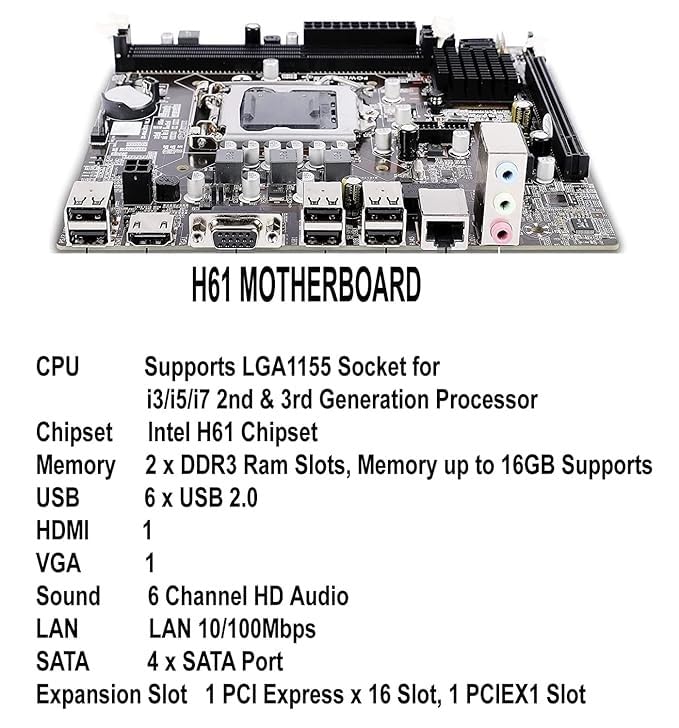
تصوير 7.1: هڪ تفصيلي view of the H61 Motherboard, listing key specifications such as CPU support, memory, USB, HDMI, VGA, sound, LAN, SATA, and expansion slots.
8. وارنٽي ۽ سپورٽ
The FRONTECH FT-0470 H61 Motherboard comes with a 1 سالن جي محدود وارنٽي خريداري جي تاريخ کان. هي وارنٽي عام استعمال جي حالتن هيٺ پيداوار جي خرابين کي ڍڪيندي آهي.
For technical support, warranty claims, or further assistance, please contact the manufacturer, JAY INFOSYS, or your local retailer.
وارنٽي جي تصديق لاءِ خريداري جو ثبوت رکو.