
1. تعارف
Thank you for choosing the Devoko 120x60cm Electric Standing Desk. This desk is designed to enhance your workspace by allowing seamless transitions between sitting and standing positions, promoting better posture, reducing fatigue, and increasing productivity. This manual provides essential information for the safe assembly, operation, and maintenance of your new desk.

Image 1: The Devoko 120x60cm Electric Standing Desk in a typical setup, showcasing its spacious design and monitor support.
2. حفاظتي ڊيڄاريندڙ
- وڌ ۾ وڌ وزن جي گنجائش: وڌ ۾ وڌ لوڊ گنجائش کان وڌيڪ نه ڪريو 70 ڪلوگرام (154 پائونڊ). Overloading the desk can cause damage or injury.
- محفوظ اسيمبلي: Ensure all components are securely mounted and tightened according to the assembly instructions before use.
- Movement and Adjustment: Exercise caution when moving or adjusting the desk due to its metal structure and electrical components. Keep hands and objects clear of moving parts.
- ٻار ۽ پالتو جانور: حادثن کان بچڻ لاءِ آپريشن دوران ٻارن ۽ پالتو جانورن کي ڊيسڪ کان پري رکو.
- بجلي جي فراهمي: Use only the provided power adapter and ensure it is connected to a grounded outlet. Do not operate the desk with a damaged power cord or plug.
- مائع اسپيل: Avoid spilling liquids on the control panel or motor components. In case of a spill, immediately unplug the desk and allow it to dry completely before reconnecting power.
3. سيٽ اپ ۽ اسيمبلي
Detailed installation instructions are included in the product packaging. Please follow these instructions carefully for proper assembly. The desk features a robust metal frame and a multi-part wooden tabletop designed for stability.
اهم اسيمبلي جا طريقا:
- ڪم اسپيس: پڪ ڪريو ته توهان وٽ آهي ampاسيمبليء لاء جاء.
- Tabletop Alignment: The tabletop consists of multiple wooden parts. Take time to align them properly during assembly to ensure a smooth and even surface.
- ڪيبل جو انتظام: Utilize the integrated cable pass-throughs to keep your workspace tidy.

Image 2: Integrated design features such as cable management, rounded corners, and a convenient hook for headphones or bags.
4. آپريٽنگ هدايتون
Your Devoko electric standing desk is equipped with an intuitive control panel for easy height adjustment and memory functions.
4.1. اونچائي جي ترتيب
- Adjusting Up: کي دٻايو ۽ رکو يوپي (▲) ڊيسڪ کي پنهنجي گهربل بيهڻ واري اوچائي تائين وڌائڻ لاءِ بٽڻ دٻايو.
- Adjusting Down: کي دٻايو ۽ رکو ھي ((▼) ڊيسڪ کي پنهنجي گهربل ويٺي جي اوچائي تائين هيٺ ڪرڻ لاءِ بٽڻ.
- The desk height can be adjusted smoothly and quietly between 73 سينٽي ۽ 118 سينٽي ميٽر. Release the button once the desired height is reached.
4.2. ياداشت جا اڳواٽ سيٽ
The control panel allows you to save two preferred height settings for quick recall.
- اڳواٽ محفوظ ڪرڻ:
- Adjust the desk to your desired height (e.g., sitting height).
- کي دٻايو M button (or similar memory button, if present). The LED display may flash.
- Immediately press either 1 or 2 to save the current height to that memory slot.
- پري سيٽ ياد ڪرڻ: بس کي دٻايو 1 or 2 button corresponding to your saved height. The desk will automatically move to that position.
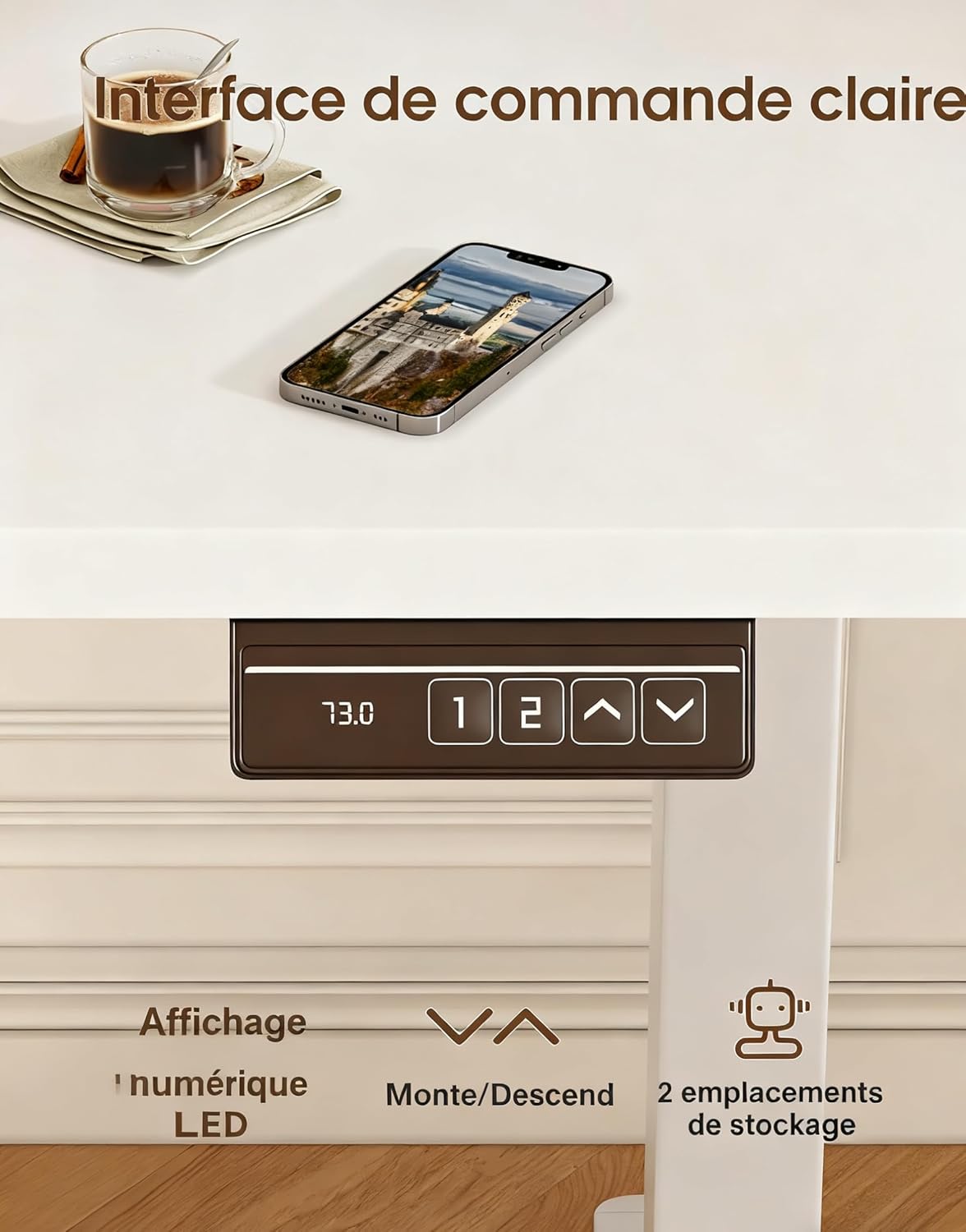
Image 3: The desk's control panel, featuring an LED display for current height, up/down adjustment buttons, and two memory preset buttons.

Image 4: Visual guide demonstrating proper ergonomic posture when using the desk in both sitting and standing positions, highlighting the benefit of the monitor support.
5. سار سنڀال
- صفائي: ڊيسڪ جي مٿاڇري کي نرم، ڊي سان صاف ڪريوamp ڪپڙو. گھڙڻ وارا صاف ڪندڙ يا سخت ڪيميڪلز کان پاسو ڪريو جيڪي ختم کي نقصان پهچائي سگھن ٿا.
- ڪنيڪشن چيڪ ڪريو: وقت بوقت سڀني اسڪرو ۽ بولٽن کي چيڪ ڪريو ته جيئن پڪ ڪري سگهجي ته اهي تنگ رهن. جيڪڏهن ضروري هجي ته ٻيهر سخت ڪريو.
- ڪيبل جي چڪاس: Inspect the power cord and motor cables for any signs of wear or damage. Replace immediately if damage is found.
- موٽر سنڀال: The desk's motors are designed for durability (tested over 20,000 cycles). Avoid continuous operation for extended periods without rest to prevent overheating.
6. مسئلا حل ڪرڻ
| مسئلو | ممڪن سبب | حل |
|---|---|---|
| ڊيسڪ حرڪت نٿي ڪري. | بجلي ڪيبل ڪٽيل؛ اوورلوڊ؛ موٽر ۾ غلطي. | Check power connections. Reduce weight on desk. Unplug for 10 minutes, then reconnect. |
| ڊيسڪ غير مساوي طور تي هلي ٿي يا غير معمولي شور ڪري ٿي. | Uneven load; Loose connections; Obstruction. | Distribute weight evenly. Check all assembly screws. Ensure no objects are obstructing the legs. |
| ميموري پري سيٽ ڪم نه ڪري رهيا آهن. | پري سيٽ صحيح طرح محفوظ نه ٿيا آهن. | سيڪشن 4.2 ۾ ڏنل هدايتن تي عمل ڪندي ميموري پري سيٽس کي ٻيهر محفوظ ڪريو. |
| Desk wobbles. | Loose connections; Uneven floor. | Ensure all screws are tightened. Adjust leveling feet if your floor is uneven. |
جيڪڏهن توهان کي هتي درج نه ڪيل مسئلن جو منهن ڏسڻو پوي ٿو يا حل ڪرڻ جي ڪوشش ڪرڻ کان پوءِ به مسئلو برقرار رهي ٿو، مهرباني ڪري ڪسٽمر سپورٽ سان رابطو ڪريو.
7. وضاحتون

Image 5: Key specifications and dimensions of the Devoko Electric Standing Desk.
| خاصيت | تفصيل |
|---|---|
| ماڊل نمبر | 0463 |
| برانڊ | ديووڪو |
| رنگ | اڇو |
| ٽيبل ٽاپ طول و عرض (L x W) | 120 سينٽي x 60 سينٽي (47.2 انچ x 23.6 انچ) |
| اونچائي جي ترتيب جي حد | 73 سينٽي ميٽر - 118 سينٽي ميٽر (28.7 انچ - 46.5 انچ) |
| Product Dimensions (L x W x H at lowest) | 60 x 120 x 72 سينٽي |
| وزن جي گنجائش | 70 ڪلوگرام (154 پائونڊ) |
| پيداوار جو وزن | 22 ڪلوگرام (48.5 پائونڊ) |
| مواد | Wood (Tabletop), Metal (Base) |
| خاصيتون | Adjustable, Electric, 2 Memory Presets, Monitor Support |
| شور جي سطح | <60 ڊي بي |
8. وارنٽي ۽ سپورٽ
For warranty information, please refer to the documentation included with your purchase or contact the seller directly. Devoko is committed to providing quality products and customer satisfaction.
If you have any questions, require assistance with assembly, or need troubleshooting support, please contact the Devoko customer service team or the retailer from whom you purchased the product. Please have your model number (0463) and purchase details ready when contacting support.