
1. تعارف
This manual provides essential instructions for the assembly, operation, and maintenance of your Devoko 140x60cm Electric Height Adjustable Standing Desk, Model 0463. Designed to promote a healthier work environment, this desk allows you to seamlessly switch between sitting and standing positions, enhancing productivity and reducing physical strain.
2. حفاظت جي ڄاڻ
- احتياط: Operate the electric height adjustment mechanism with care.
- وڌ ۾ وڌ لوڊ گنجائش کان وڌيڪ نه ڪريو 70 ڪلو on the desktop to prevent damage or injury.
- آپريشن دوران ٻارن ۽ پالتو جانورن کي ڊيسڪ کان پري رکو.
- پڪ ڪريو ته سڀئي ڪيبل صحيح طرح سان منظم ڪيا ويا آهن ته جيئن اوچائي جي ترتيب دوران ڦاسي کان بچي سگهجي.
- Do not place hands or objects near moving parts of the desk frame.
- Always ensure the desk is on a level surface before operation.
3. پراڊڪٽ ختمview
The Devoko Electric Height Adjustable Standing Desk features a robust design for stability and durability. Key components include:
- Electric height-adjustable frame with T-shaped legs.
- 140x60cm desktop made of engineered wood.
- Integrated control panel with LED display and memory presets.
- Monitor support for ergonomic screen placement.
- Cable management grommets and rounded corners for safety.
- Accessory hook for headphones or bags.

Image 3.1: Fully assembled Devoko Electric Standing Desk with monitor support, laptop, and accessories.
4. سيٽ اپ ۽ اسيمبلي
Detailed installation instructions are included in the product packaging. Please refer to these instructions for step-by-step guidance. General assembly involves:
- سڀني حصن کي کولڻ ۽ حصن جي فهرست جي خلاف تصديق ڪرڻ.
- Assembling the desk frame, ensuring all screws are securely tightened.
- Attaching the desktop sections and monitor support.
- Connecting the control panel and power supply.

Image 4.1: Diagram illustrating the dimensions of the desk components, including the 140cm x 60cm desktop and the height-adjustable frame.
5. آپريٽنگ هدايتون
5.1. اونچائي جي ترتيب
The desk's height can be adjusted electrically between 73 cm and 118 cm. Use the control panel located on the front edge of the desk.
- کي دٻايو يوپي (▲) ڊيسڪ کي مٿي ڪرڻ لاءِ بٽڻ.
- کي دٻايو ھي ((▼) ڊيسڪ کي هيٺ ڪرڻ لاءِ بٽڻ.
- Release the button when the desired height is reached. The LED display will show the current height.
5.2. ياداشت جا اڳواٽ سيٽ
The control panel allows you to save two frequently used heights for quick adjustment.
- مٿي/هيٺ بٽڻن کي استعمال ڪندي ڊيسڪ کي پنهنجي گهربل اوچائي تي ترتيب ڏيو.
- کي دٻايو "م" button (Memory) once, then press either "1" or "2" to save the current height to that preset.
- To recall a saved height, simply press the corresponding "1" or "2" button. The desk will automatically move to the saved position.
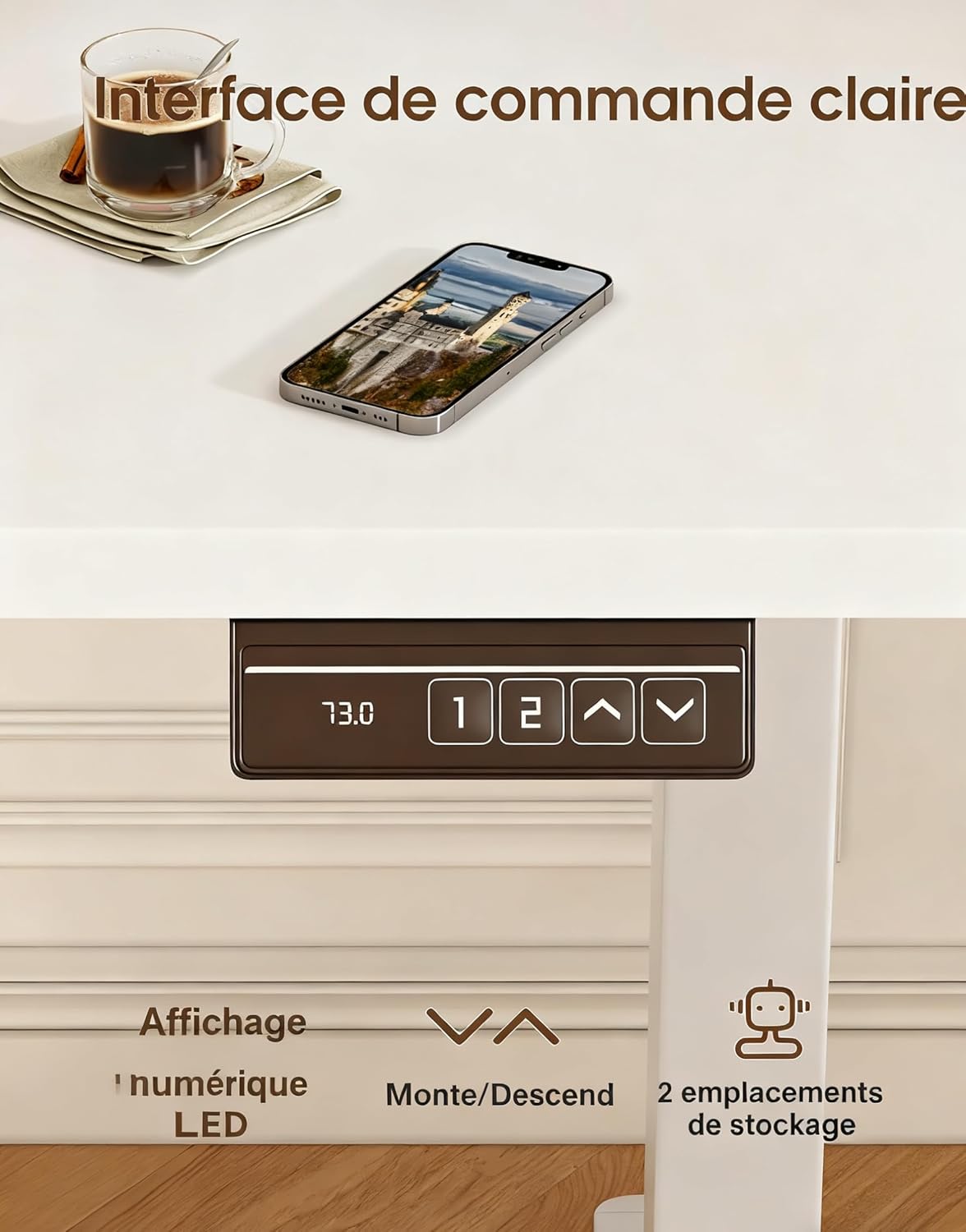
Image 5.1: Close-up of the desk's control panel, showing the LED height display, up/down arrows, and two memory preset buttons.
5.3. Ergonomics and Usage Tips
Alternating between sitting and standing throughout your workday can improve posture, circulation, and overall well-being. Utilize the monitor support to ensure your screen is at eye level, whether sitting or standing, to reduce neck and eye strain.

Image 5.2: Illustrations demonstrating correct ergonomic postures for sitting and standing at the desk, highlighting the importance of monitor height.

Image 5.3: Visual representation of the desk's special features, including cable management grommets, rounded corners for safety, and an integrated hook for accessories.
6. سار سنڀال
- صفائي: ڊيسڪ ٽاپ ۽ فريم کي نرم، ڊي سان صاف ڪريوamp ڪپڙو. گھڙڻ وارا صاف ڪندڙ يا سخت ڪيميڪلز کان پاسو ڪريو.
- معائنو: وقتي طور تي سڀني پيچرن ۽ ڪنيڪشنن کي چيڪ ڪريو ته جيئن اهي تنگ رهن.
- ڪيبل جو انتظام: Ensure power cords and other cables are not pinched or tangled, especially during height adjustments.
7. مسئلا حل ڪرڻ
If your desk is not functioning as expected, please check the following:
- ڪابه حرڪت: پڪ ڪريو ته پاور ڪنڊ ڊيسڪ ۽ ڪم ڪندڙ وال آئوٽليٽ ٻنهي ۾ محفوظ طور تي لڳل آهي.
- غير معمولي تحريڪ: Check that the desk is not overloaded and that all components are assembled correctly and securely.
- غلطي جا ڪوڊ: If the LED display shows an error code, refer to the detailed troubleshooting section in your included assembly manual.
8. وضاحتون
| خاصيت | تفصيل |
|---|---|
| برانڊ | ديووڪو |
| ماڊل نمبر | 0463 |
| Desktop Dimensions (L x W) | 140 سينٽي x 60 سينٽي ميٽر |
| اونچائي جي ترتيب جي حد | 73 سينٽي - 118 سينٽي ميٽر |
| وڌ ۾ وڌ لوڊ گنجائش | 70 ڪلو |
| مواد | انجنيئر ٿيل ڪاٺ (ڊيسڪ ٽاپ)، ڌاتو (فريم) |
| شيءِ جو وزن | 21.8 ڪلو |
| شور جي سطح | 60 ڊي بي کان گھٽ |
| ياداشت جي اڳڪٿي | 2 |
9. وارنٽي ۽ سپورٽ
For specific warranty information and after-sales support, please refer to the documentation included with your product or contact Devoko customer service. Detailed installation instructions and further assistance are available through official support channels.