
1. تعارف
This manual provides detailed instructions for the setup, operation, maintenance, and troubleshooting of your new VEILZOR Wireless Keyboard and Mouse Combo. Please read this manual thoroughly before using the product to ensure proper functionality and to prevent damage.
The VEILZOR Wireless Keyboard and Mouse Combo offers advanced 2.4 GHz wireless connectivity, providing a reliable connection up to 10 meters with minimal delays or dropouts. Both the keyboard and mouse feature RGB backlighting, an ergonomic design for comfort, and are rechargeable for extended use.
2. پيڪيج مواد
- 1 x VEILZOR Wireless Keyboard
- 1 x VEILZOR Wireless Mouse
- 1 x 2-IN-1 USB-A/C Receiver (located in the back of the keyboard)
- 1 x USB چارجنگ ڪيبل
- 1 x استعمال ڪندڙ دستياب (هي دستاويز)
3. مصنوعات جون خاصيتون
- 2.4 GHz Wireless Technology: Provides a stable and reliable connection up to 10 meters.
- آر جي بي بيڪ لائيٽنگ: Keyboard and mouse feature customizable RGB lighting with 3 brightness levels and 22 light modes for enhanced visibility and aesthetics. (Note: Keyboard cannot be set to a single color.)
- Ergonomic ڊيزائن: Keyboard includes a wrist rest and adjustable tilt legs. Mouse is contoured for comfortable use by both left and right-handed users.
- خاموش آپريشن: Keys and mouse clicks are designed for quiet operation, reducing noise by 95% compared to traditional peripherals.
- انٽيگريٽيڊ فون/ٽيبليٽ هولڊر: A U-shaped stand (8.27*0.66in) on the keyboard allows for convenient docking of mobile devices.
- ملٽي ميڊيا ڪيز: 6 independent multimedia keys for quick access to internet, email, media control, and volume.
- Rechargeable بيٽريون: Built-in 1000mAh (keyboard) and 650mAh (mouse) lithium batteries with auto-sleep and on/off switches for extended battery life.
- Adjustable Mouse DPI: Three DPI settings (800/1200/1600) for customizable cursor speed and precision.
- پلگ ۽ راند: Simple setup with a 2-IN-1 USB-A/C receiver.
- سسٽم مطابقت: Easily switch between Mac and Windows systems.
4. سيٽ اپ
- USB رسيور ڳوليو: The 2-IN-1 USB-A/C receiver is stored in a compartment on the back of the keyboard. Carefully remove it.
- وصول ڪندڙ کي ڳنڍيو: Plug the USB receiver into an available USB-A or USB-C port on your computer, PC, or laptop.
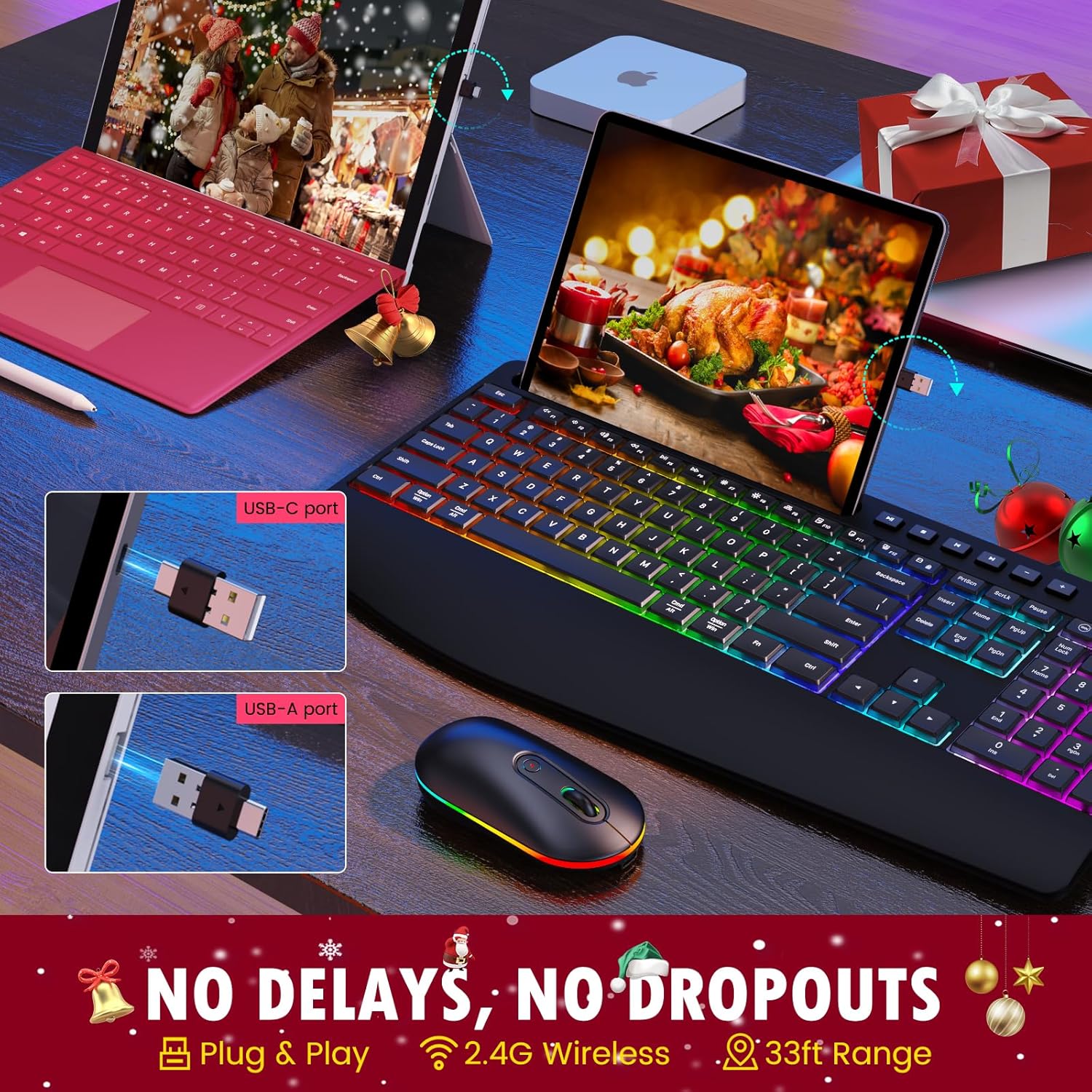
Image: The USB-A and USB-C receiver, demonstrating how it connects to a computer port. This receiver enables wireless communication between the keyboard, mouse, and your device.
- Power On the Keyboard and Mouse: Locate the ON/OFF switches on both the keyboard and the mouse. Slide them to the "ON" position.
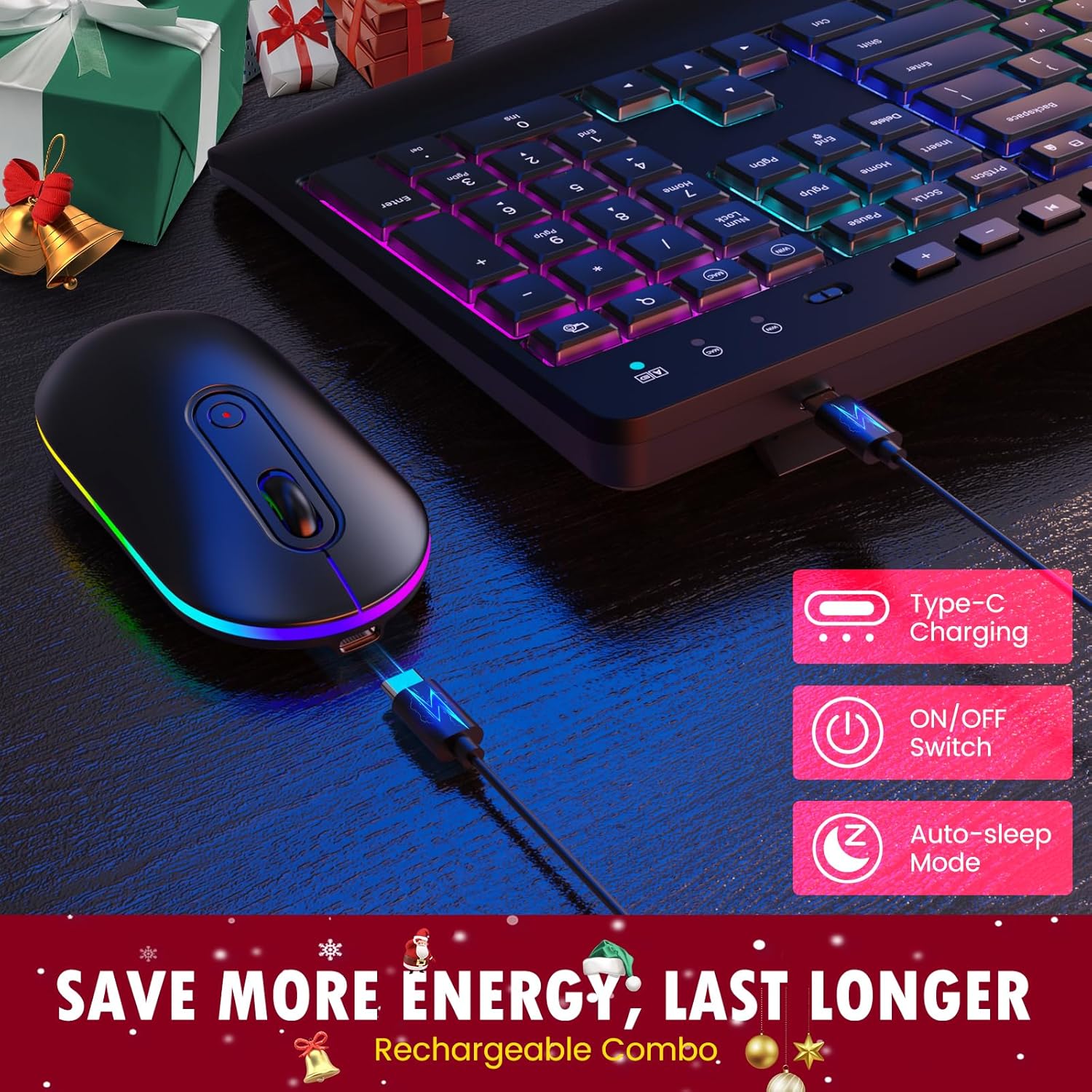
تصوير: ويجهو تصوير view of the keyboard and mouse, highlighting their Type-C charging ports, ON/OFF switches, and auto-sleep mode indicator. These features contribute to energy efficiency and extended battery life.
- خودڪار ڪنيڪشن: The keyboard and mouse should automatically connect to your device. No additional drivers are typically required for basic functionality.
5. آپريٽنگ هدايتون
5.1 ڪي بورڊ آپريشن
- ٽائپنگ: Begin typing as you would with any standard keyboard.
- Adjusting Keyboard Tilt: Flip out the sturdy tilt legs located on the underside of the keyboard to adjust the typing angle for improved ergonomics.

Image: A user's hands positioned on the keyboard, demonstrating the ergonomic design with a built-in wrist rest and adjustable tilt legs. This design aims to reduce wrist strain during prolonged use.
- Using the Phone/Tablet Holder: Place your smartphone or tablet into the integrated U-shaped groove on the top of the keyboard for convenient viewing.
- ملٽي ميڊيا ڪيز: Use the dedicated multimedia keys (F1-F12 shortcuts, 6 independent multimedia keys) located above the function row for quick access to common functions like volume control, play/pause, and web برائوزر.

Image: A close-up of the keyboard, emphasizing the F1-F12 shortcut keys, 6 dedicated multimedia keys, and the full-size number pad. These features are designed to improve work efficiency.
- سسٽم مٽائڻ: The keyboard supports both Mac and Windows systems. Use the appropriate key combination (refer to keyboard markings) to switch between operating system layouts if needed.
5.2 ماؤس آپريشن
- بنيادي استعمال: Move the mouse to control the cursor on your screen. Click the left and right buttons for standard functions.
- اسڪرول ويل: Use the scroll wheel for vertical scrolling in documents and web صفحا.
6. آر جي بي بيڪ لائيٽ ڪنٽرول
The keyboard and mouse feature dynamic RGB backlighting. Please note that the keyboard's RGB cannot be set to a single static color.
- روشني جا طريقا تبديل ڪرڻ: Press the dedicated backlight key on the keyboard (usually indicated by a light bulb icon or similar) to cycle through the 22 available light modes.
- روشني کي ترتيب ڏيڻ: Use the brightness control keys (often Fn + arrow keys or dedicated keys) to select one of the 3 brightness levels.
- Mouse RGB: The mouse RGB lighting typically cycles automatically or can be turned off via its ON/OFF switch.

Image: The keyboard illuminated with vibrant RGB backlighting in a low-light environment, demonstrating its "easy to type in the dark" feature with adjustable brightness levels.

Image: The wireless mouse featuring RGB backlighting along its base, with indicators for its 3 DPI levels (800, 1200, 1600). This illustrates the mouse's customizable sensitivity and aesthetic appeal.
7. ماؤس ڊي پي آءِ ايڊجسٽمينٽ
ماؤس ڪرسر جي حساسيت ۽ رفتار کي ڪنٽرول ڪرڻ لاءِ ٽي ترتيب ڏيڻ وارا ڊي پي آءِ (ڊاٽس في انچ) سيٽنگون پيش ڪري ٿو:
- 800 DPI: Lower sensitivity, ideal for precise tasks like graphic design.
- 1200 DPI: معياري حساسيت، عام استعمال لاءِ موزون.
- 1600 DPI: Higher sensitivity, for quicker cursor movement, often preferred in gaming or large screen setups.
To change the DPI setting, press the DPI button located on the top of the mouse, usually behind the scroll wheel. Each press will cycle through the available DPI levels.
8. چارجنگ ۽ بيٽري جي زندگي
Both the keyboard and mouse are equipped with built-in rechargeable lithium batteries (Keyboard: 1000mAh, Mouse: 650mAh). To charge your devices:
- Connect the provided USB charging cable to the charging port on the keyboard or mouse.
- Plug the other end of the USB charging cable into a USB power source (e.g., computer USB port, USB wall adapter).
- An indicator light will typically show the charging status. Once fully charged, the light may change color or turn off.
To conserve battery life, both devices feature an auto-sleep mode that activates after a period of inactivity. You can also manually turn off the devices using their ON/OFF switches when not in use for extended periods.

Image: The complete VEILZOR Wireless Keyboard and Mouse Combo, showcasing the keyboard's full-size layout, RGB backlighting, and the integrated phone/tablet holder with a smartphone docked. The mouse is positioned next to the keyboard, also featuring RGB lighting.
9. سار سنڀال ۽ سنڀال
- صفائي: ڪيبورڊ ۽ مائوس جي مٿاڇري کي صاف ڪرڻ لاءِ نرم، سڪل ڪپڙو استعمال ڪريو. ضدي مٽيءَ لاءِ، ٿورو ڊيamp ڪپڙو استعمال ڪري سگهجي ٿو، پر پڪ ڪريو ته نمي ڊوائيس ۾ داخل نه ٿئي.
- مائع کان بچاء: ڊوائيسز کي پاڻي يا ٻين مائعات جي سامهون نه رکو.
- اسٽوريج: ڪيبورڊ ۽ مائوس کي سڌي سج جي روشني ۽ انتهائي گرمي پد کان پري ٿڌي، سڪل جاءِ تي رکو.
- سنڀال سان سنڀال: ڊوائيسز کي ڇڏڻ يا مضبوط اثرن جي تابع ڪرڻ کان پاسو ڪريو.
10. مسئلا حل ڪرڻ
| مسئلو | ممڪن سبب | حل |
|---|---|---|
| ڪي بورڊ/ماؤس جواب نه ڏئي رهيو آهي. |
|
|
| دير سان يا دير سان جواب ڏيڻ. |
|
|
| بيڪ لائيٽ ڪم نه ڪري رهي آهي يا مدھم آهي. |
|
|
| Mouse cursor moves too fast/slow. | DPI setting is not preferred. | Press the DPI button on the mouse to cycle through 800/1200/1600 DPI settings. |
11. وضاحتون
| خاصيت | تفصيل |
|---|---|
| ماڊل نالو | PC407 Wireless Keyboard Mouse Combo |
| وائرليس ٽيڪنالاجي | 2.4 GHz آر ايف |
| ڪنيڪشن جو قسم | 2-IN-1 USB-A/C Receiver |
| وائرلیس رينج | 10 ميٽر (33 فوٽ) تائين |
| ڪي بورڊ جو طول و عرض | 43.4 X 21 x 2.1 سينٽ (16.93 X 8.19 x 0.82 انچ) |
| مائوس جي ماپ | 5.8 X 11.2 x 2.8 سينٽ (2.3 X 4.4 x 1.1 انچ) |
| ڪل وزن | 771 گرام (27.2 اونس) |
| ڪي بورڊ جي بيٽري | بلٽ-ان 1000mAh ليتيم بيٽري |
| ماؤس جي بيٽري | بلٽ-ان 650mAh ليتيم بيٽري |
| پٺاڻ | RGB (22 modes, 3 brightness levels) |
| ماؤس DPI | 800/1200/1600 |
| مطابقت | Windows, macOS, PC, Laptop, Tablet |
12. وارنٽي ۽ سپورٽ
VEILZOR offers a 1 سالن جي محدود وارنٽي for this Wireless Keyboard and Mouse Combo. This warranty covers manufacturing defects and issues arising from normal use.
If you encounter any problems or have questions regarding your product, please contact VEILZOR customer service. Our team is available to provide friendly and prompt assistance.
For support, please refer to the contact information provided on the product packaging or the official VEILZOR webسائيٽ.
13. حفاظت جي ڄاڻ
- Do not attempt to disassemble or modify the product. This may void the warranty and could result in damage or injury.
- Keep the product away from extreme temperatures, humidity, and direct sunlight.
- پراڊڪٽ کي ڇڏڻ يا مضبوط اثرن جي تابع ڪرڻ کان پاسو ڪريو.
- مقامي ضابطن جي مطابق بيٽرين ۽ اليڪٽرانڪ حصن کي ذميواري سان ختم ڪريو.
- هي پيداوار هڪ رانديڪو نه آهي. ٻارن جي پهچ کان پري رکو.