
1. تعارف
Thank you for choosing the CASCHO 33 Bluetooth 5.3 Wireless Headset. This manual provides detailed instructions for setting up, operating, and maintaining your headset to ensure optimal performance and longevity. Please read this manual thoroughly before using the product.
2. پراڊڪٽ ختمview
2.1 اهم خاصيتون
- بلوٽوت 5.3 ٽيڪنالاجي: مستحڪم ۽ ڪارآمد وائرليس ڪنيڪشن کي يقيني بڻائي ٿو.
- ماحولياتي شور منسوخي (ENC): Enhances call clarity by reducing background noise.
- وڌايل راند جو وقت: هڪ ئي چارج تي 20 ڪلاڪن تائين، ۽ چارجنگ ڪيس سان 100 ڪلاڪن تائين.
- ايل اي ڊي ڊسپلي چارجنگ ڪيس: Provides clear battery status indication.
- Comfortable Hook Design: Secure and adjustable fit for both left and right ears.
- ٻٽي ڊوائيس ڪنيڪشن: Connects to two Bluetooth-enabled devices simultaneously.
- مربوط ڪنٽرول: Combination of physical buttons and touch controls for easy operation.
2.2 هيڊ سيٽ جا جزا
The CASCHO 33 headset features an ergonomic design with an ear hook for secure placement and an in-ear earpiece for audio delivery. It includes integrated control buttons and a touch-sensitive area for various functions.
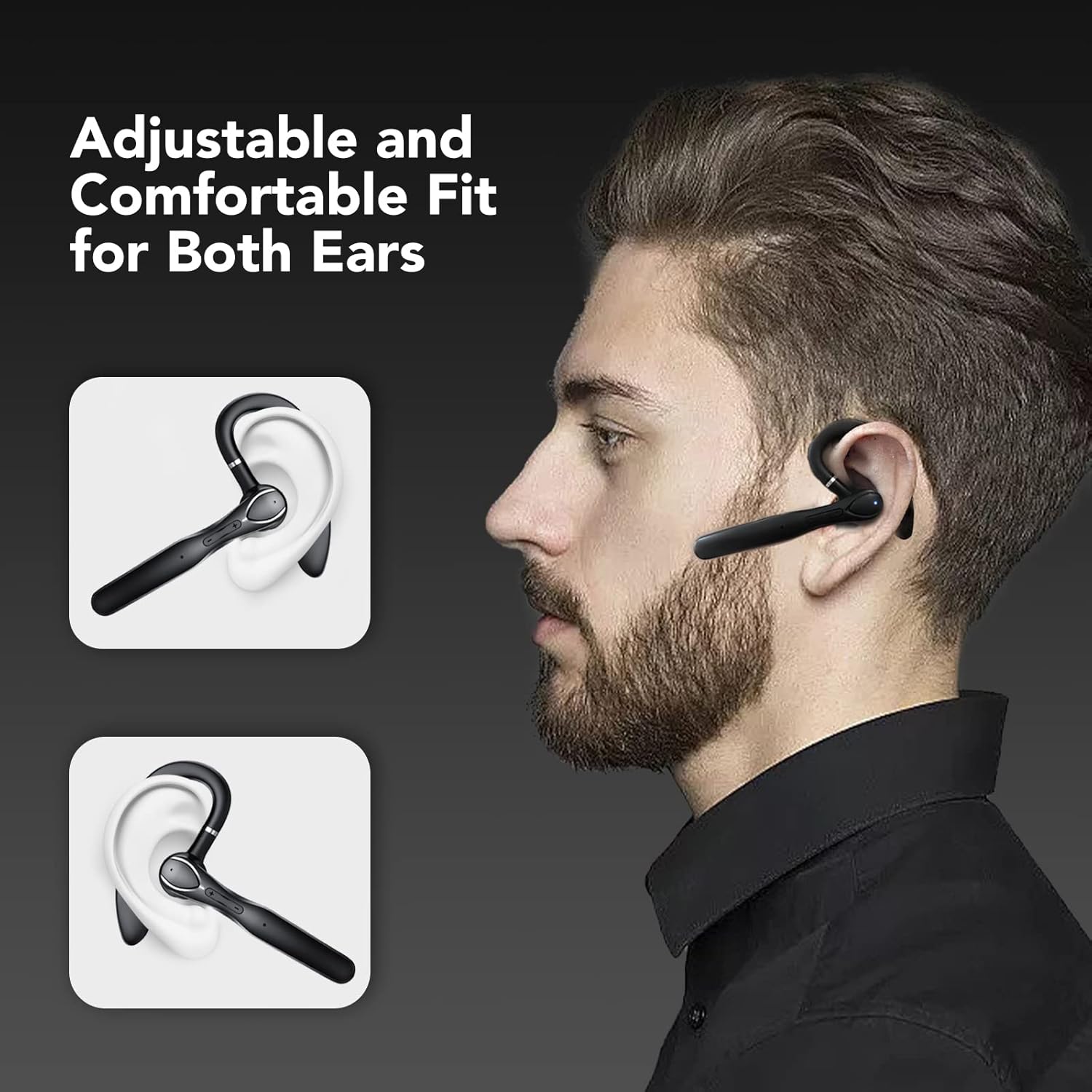
Figure 1: The CASCHO 33 headset is designed for an adjustable and comfortable fit, suitable for both the left and right ear. The ear hook ensures stability during use.
3. سيٽ اپ
3.1 هيڊ سيٽ ۽ ڪيس کي چارج ڪرڻ
Before first use, fully charge the headset and its charging case. The charging case features an LED display to show the current battery level.
- Place the headset into the charging case.
- مهيا ڪيل USB ڪيبل استعمال ڪندي چارجنگ ڪيس کي پاور ماخذ سان ڳنڍيو.
- The LED display on the case will indicate charging status and battery percentage.
- A full charge for the headset takes approximately 1.5 hours. The charging case provides multiple charges, extending total playtime up to 100 hours.

Figure 2: The charging case provides up to 80 hours of additional playtime, with the headset offering 20 hours on its own. Total playtime can reach 100 hours.
3.2 ڊوائيس سان جوڙڻ
The CASCHO 33 headset supports Bluetooth 5.3 for quick and stable pairing. It also features dual device connectivity, allowing it to be connected to two devices simultaneously.
- پڪ ڪريو ته هيڊ سيٽ چارج ٿيل آهي ۽ پاور آن آهي.
- Open the Bluetooth settings on your smartphone, tablet, or computer.
- ڳولھيو available devices. The headset will appear as "CASCHO 33" or similar.
- Select "CASCHO 33" to initiate pairing. A voice prompt will confirm successful connection.
- To connect a second device, disable Bluetooth on the first device temporarily, pair with the second device, then re-enable Bluetooth on the first device. The headset should automatically connect to both.

Figure 3: The CASCHO 33 headset can connect to two devices simultaneously, such as a laptop and a smartphone, allowing seamless switching between calls and media.
4. آپريٽنگ هدايتون
4.1 پاور آن/آف
- پاور آن: Remove the headset from the charging case. It will automatically power on.
- بجلي بند: Place the headset back into the charging case. It will automatically power off and begin charging.
4.2 ڪال مئنيجمينٽ
The headset is optimized for clear communication, featuring Environmental Noise Cancellation (ENC) to minimize background distractions during calls.
- جواب/آخر ڪال: هڪ multiيرو ملٽي فنڪشن بٽڻ کي دايو.
- ڪال رد ڪريو: 2 سيڪنڊن لاءِ ملٽي فنڪشن بٽڻ کي دايو ۽ رکو.
- حجم ڪنٽرول: Use the volume up (+) and volume down (-) buttons.

Figure 4: The headset provides clear call quality with Environmental Noise Cancellation (ENC) to reduce ambient noise, making it ideal for business, office, or commuting use.
4.3 ميوزڪ پلے بیک
- راند/روڪ: هڪ multiيرو ملٽي فنڪشن بٽڻ کي دايو.
- اڳيون ٽريڪ: Press and hold the volume up (+) button.
- پويون ٽريڪ: Press and hold the volume down (-) button.
4.4 وائس اسسٽنٽ
Activate your device's voice assistant (Siri, Google Assistant, etc.) directly from the headset.
- وائس اسسٽنٽ کي فعال ڪريو. Double-tap the touch-sensitive area on the headset.
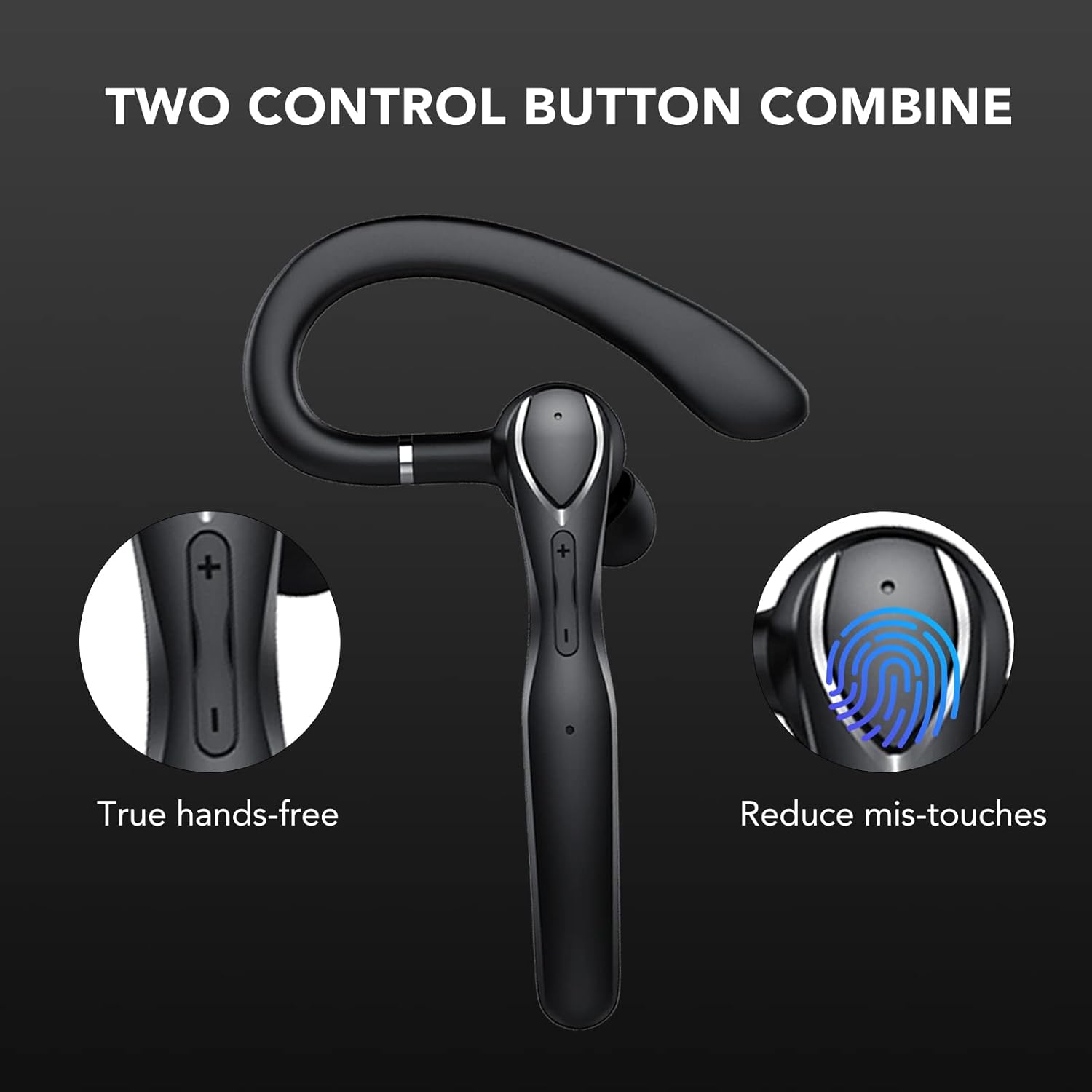
Figure 5: The headset features a combination of physical buttons for precise control and a touch-sensitive area to reduce accidental touches, enabling true hands-free operation.
5. سار سنڀال
- صفائي: هيڊ سيٽ ۽ چارجنگ ڪيس کي صاف ڪرڻ لاءِ نرم، سڪل ڪپڙو استعمال ڪريو. سخت ڪيميڪلز يا رگڙيندڙ مواد استعمال ڪرڻ کان پاسو ڪريو.
- اسٽوريج: When not in use, store the headset in its charging case to protect it from dust and damage. Store in a cool, dry place.
- بيٽري جي سنڀال: بيٽري جي زندگي کي وڌائڻ لاءِ، هيڊ سيٽ کي بار بار مڪمل طور تي چارج ڪرڻ کان پاسو ڪريو. ان کي باقاعدي طور تي چارج ڪريو، جيتوڻيڪ مسلسل استعمال ۾ نه هجي.
6. مسئلا حل ڪرڻ
- هيڊ سيٽ آن نه ٿي رهيو آهي: Ensure the headset is charged. Place it in the charging case and connect the case to a power source.
- ڊوائيس سان جوڙو نه ٿو ٺاهي سگهجي:
- Ensure Bluetooth is enabled on your device and the headset is in pairing mode (usually indicated by a flashing LED).
- پڪ ڪريو ته هيڊ سيٽ اڳ ۾ ئي ڪنهن ٻئي ڊوائيس سان ڳنڍيل نه آهي.
- هيڊ سيٽ کي پنهنجي ڊوائيس جي ويجهو منتقل ڪريو (10 ميٽر جي اندر).
- Restart both the headset (by placing it in the case and taking it out) and your device.
- ڪابه آواز ناهي يا خراب آواز جي معيار:
- هيڊ سيٽ ۽ توهان جي ڳنڍيل ڊوائيس ٻنهي تي حجم جي سطح چيڪ ڪريو.
- Ensure the headset is properly seated in your ear.
- If connected to a computer, ensure the CASCHO 33 is selected as the audio output and input device in your system settings.
- مضبوط برقي مقناطيسي مداخلت جي ذريعن کان پري وڃو.
- Headset does not turn off without charging case: The CASCHO 33 is designed to power off automatically when placed back into its charging case. To disconnect without powering off, simply disable Bluetooth on your connected device.
7. وضاحتون
| ماڊل نالو | 33 |
| برانڊ | CASCHO |
| رابطي ٽيڪنالاجي | بلوٽوٿ 5.3 |
| وائرليس ڪميونيڪيشن | بلوٽوٿ |
| ڪن جي شڪل | ڇڪ |
| ڪن جي جڳهه | ڪن ۾ (ڪن کان مٿي واري ٿلهو سان) |
| شور ڪنٽرول | ماحولياتي شور منسوخي (ENC) |
| ڪنٽرول جو طريقو | Touch and Physical Buttons |
| بلوٽوٿ رينج | 10 ميٽر (33 فوٽ) تائين |
| بيٽري جي زندگي (هيڊ سيٽ) | 20 ڪلاڪ تائين |
| بيٽري جي زندگي (چارجنگ ڪيس سان) | 100 ڪلاڪ تائين |
| چارج ڪرڻ جو وقت (هيڊ سيٽ) | لڳ ڀڳ. 1.5 ڪلاڪ |
| مواد | پلاسٽڪ |
| رنگ | ڪارو |
| شيءِ جو وزن | 4.6 اونس |
| مطابقت رکندڙ ڊوائيسز | Bluetooth-فعال ڊوائيسز |
8. وارنٽي ۽ سپورٽ
For warranty information and customer support, please refer to the product packaging or contact CASCHO customer service directly. Keep your purchase receipt for any warranty claims.
For further assistance, please visit the official CASCHO website or contact their support team through the contact information provided with your purchase.