
1. پراڊڪٽ ختمview
This document provides essential instructions for the installation, operation, and maintenance of your new wangpeng cooling fan. This fan is designed to replace the original cooling fan in compatible MECHREVO F1 and GPU series laptops, ensuring optimal thermal performance.
- High-quality replacement cooling fan.
- Designed for specific laptop models to ensure proper fit and function.
- Aids in maintaining optimal laptop operating temperatures.
2. مطابقت
This cooling fan is specifically compatible with the following laptop models and fan part numbers:
- MECHREVO F1 Series Laptops
- GPU Cooling Fan THER7PH4TX-1411
- GPU Cooling Fan PH4TUX1
- GPU Cooling Fan EG50050S1-1C180-S9A Series Laptops
Important: Please verify your laptop's model and the existing fan's part number against the compatibility list before proceeding with installation.
3. حفاظت جي ڄاڻ
Always observe the following safety precautions when handling and installing electronic components:
- بجلي بند ڪريو: Before beginning any installation, ensure your laptop is completely powered off and disconnected from the AC adapter. Remove the battery if possible.
- جامد بجلي: Wear an anti-static wrist strap or frequently touch a grounded metal object to discharge static electricity, which can damage sensitive electronic components.
- اوزار: Use appropriate tools for laptop disassembly (e.g., small Phillips head screwdrivers).
- سنڀال سان سنڀال: Avoid touching the fan blades or electrical connectors directly.
- پيشه ورانه تنصيب: جيڪڏهن توهان کي ڪنهن به قدم بابت پڪ ناهي، ته ڪنهن قابل ٽيڪنيشن کان مدد وٺو.
4. پيڪيج مواد
پيڪيج ۾ ھيٺ ڏنل شيون ھجڻ گھرجي:
- 1 x wangpeng Cooling Fan (Model: FAOT23101914572860)
5. انسٽاليشن گائيڊ
Follow these general steps to replace your laptop's cooling fan. Specific steps may vary slightly depending on your laptop model. Refer to your laptop's service manual for detailed instructions if available.
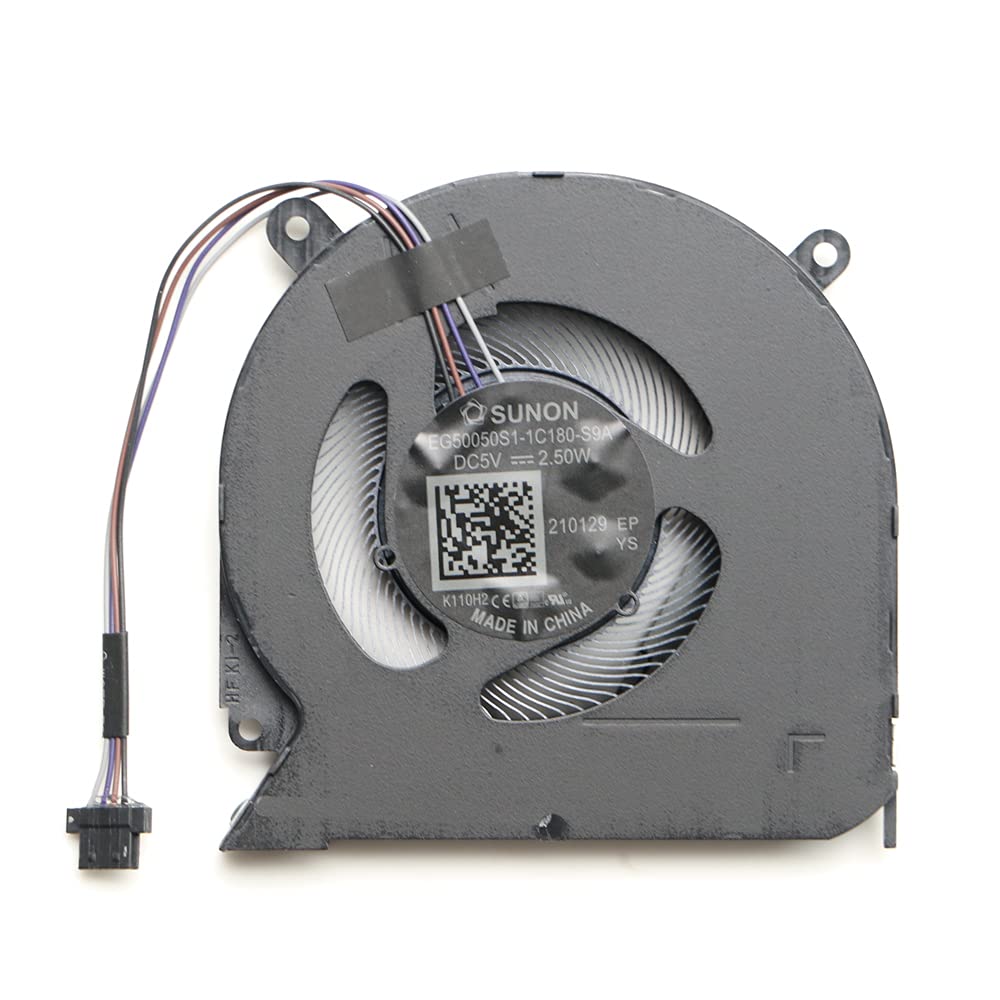
Image 5.1: The wangpeng cooling fan, showing its compact design and connector. This fan is a direct replacement for compatible MECHREVO F1 and GPU laptop models, designed to restore efficient cooling.
- ليپ ٽاپ تيار ڪريو: Power off your laptop completely, disconnect the AC adapter, and remove the battery.
- Access the Fan: Carefully open the laptop's bottom cover. This usually involves unscrewing several small screws. Some models may require removing the keyboard or other components to access the fan.
- Disconnect Old Fan: Locate the existing cooling fan. Gently disconnect its power cable from the motherboard.
- پراڻو فين هٽايو: Unscrew the screws holding the old fan in place. Carefully lift and remove the old fan. Note the routing of any cables.
- صاف علائقو: Use compressed air or a soft brush to clean any dust from the heatsink and surrounding areas. If thermal paste is present on the CPU/GPU heatsink, clean it and apply new thermal paste if necessary (not included).
- نئون فين انسٽال ڪريو: Place the new wangpeng cooling fan into position, aligning it with the screw holes. Secure it with the screws removed earlier.
- نئون فين ڳنڍيو: Carefully connect the new fan's power cable to the corresponding connector on the motherboard. Ensure it is seated firmly.
- ليپ ٽاپ کي ٻيهر گڏ ڪريو: Carefully reassemble the laptop, ensuring all cables are properly routed and all screws are tightened.
- ٽيسٽ ڪارڪردگي: Reconnect the battery and AC adapter. Power on the laptop and verify that the new fan spins correctly and quietly. Monitor temperatures to ensure proper cooling.
6. آپريٽنگ هدايتون
Once installed, the cooling fan operates automatically, controlled by your laptop's system to regulate internal temperatures. No manual operation is required.
- The fan will activate and adjust its speed based on the thermal load of the CPU and GPU.
- Ensure that the laptop's vents are not obstructed to allow for proper airflow.
7. سار سنڀال
Regular maintenance helps prolong the life of your cooling fan and maintain optimal laptop performance:
- مٽي هٽائڻ: Periodically use compressed air to clear dust from the laptop's air vents and, if comfortable, from the fan blades themselves (after opening the laptop).
- رڪاوٽن کان بچڻ: Do not place your laptop on soft surfaces (like beds or couches) that can block airflow to the vents.
- پيشه ورانه صفائي: Consider professional cleaning every 1-2 years, especially if you notice increased fan noise or higher operating temperatures.
8. مسئلا حل ڪرڻ
| مسئلو | ممڪن سبب | حل |
|---|---|---|
| Fan not spinning after installation. | Fan cable not properly connected. Incorrect fan model. Fan is faulty. | Ensure the fan cable is securely connected to the motherboard. Verify compatibility with your laptop model. Contact support if the fan is confirmed faulty. |
| Laptop overheating. | Poor thermal paste application. Obstructed vents. Fan not spinning at adequate speed. | Reapply thermal paste to CPU/GPU if necessary. Ensure vents are clear of dust and obstructions. Check fan operation; if it's not spinning, refer to the above solution. |
| پنکڙي مان غير معمولي شور. | مٽيءَ جو جمع ٿيڻ. پنکڙي جا بليڊ ڪنهن رڪاوٽ سان ٽڪرائجي رهيا آهن. Faulty fan bearing. | Clean the fan and surrounding area. Recheck installation to ensure no cables or components are interfering with the fan blades. If noise persists, the fan may be faulty; contact support. |
9. وضاحتون
| برانڊ | wangpeng |
| ماڊل نمبر | FAOT23101914572860 |
| مطابقت رکندڙ ڊوائيسز | Laptop (MECHREVO F1 & GPU Cooling Fan THER7PH4TX-1411 PH4TUX1 EG50050S1-1C180-S9A Series) |
| شين جو تعداد | 1 |
| ٺاهيندڙ | wangpeng |
| ASIN | B0CLRW9V7Q |
| GTIN/UPC | 615431825841 |
10. وارنٽي ڄاڻ
This wangpeng cooling fan comes with a 3-مهيني وارنٽي from the date of purchase. This warranty covers manufacturing defects. It does not cover damage caused by improper installation, misuse, accidents, or unauthorized modifications.
مھرباني ڪري وارنٽي دعوائن لاءِ خريد ڪرڻ جو پنھنجو ثبوت رکو.
11. سپورٽ
For technical assistance, warranty claims, or further inquiries, please contact your retailer or the manufacturer, wangpeng. Provide your product model number (FAOT23101914572860) and proof of purchase when seeking support.
For more information, you may visit the official wangpeng webسائيٽ تي وڃو يا انهن جي ڪسٽمر سروس چينلز سان رابطو ڪريو.