
1. تعارف
This manual provides detailed instructions for the installation, operation, and maintenance of your AINAVI 9-inch Android 12 Car Stereo. This unit is specifically designed for Dodge Ram 1500, 2500, and 3500 models manufactured between 2013 and 2018. Please read this manual thoroughly before use to ensure proper functionality and to maximize your experience.
2. پراڊڪٽ ختمview
2.1. اهم خاصيتون
- آپريٽنگ سسٽم: Android 12 OS with ARM Cortex A55 8-Core processor.
- ياداشت: 4GB RAM + 64GB ROM for fast and smooth operation.
- ڏيکاريو: 9-inch QLED screen with 1280x720 resolution, G+G full lamination technology, and 178° full-viewزاويه.
- آڊيو: Built-in DSP with Time Correction and 48-band EQ, 4*45W max output.
- رابطي: Wireless and wired Apple CarPlay, USB Android Auto, Built-in GPS Navigation, Dual-band 2.4Ghz & 5Ghz WiFi, Bluetooth 5.0.
- انضمام: Plug-and-play harness with CANbus decoder, supporting original vehicle functions like steering wheel control and reverse signal.
2.2. Visual Comparison
Observe the transformation of your vehicle's dashboard with the AINAVI car stereo installation.

Image: Comparison of the Dodge Ram dashboard before and after installing the AINAVI 9-inch Android 12 Car Stereo.
3. دٻي ۾ ڇا آهي
The following components are included with your AINAVI 9-inch Android 12 Car Stereo:
- 1x اينڊرائيڊ ڪار اسٽيريو هيڊ يونٽ
- Wiring Harness Power Cable
- CANbus Decoder
- 1x Radio Antenna Adaptor
- 1x اسپيڪر
- 1x آر سي اي ڪيبل
- 2x USB ڪيبل
- 1x GPS اينٽيننا
- 1x Rear View ڪئميرا
- 1x مائڪرو فون
- استعمال ڪندڙ جو دستياب (ھي دستاويز)
A visual representation of the included accessories:
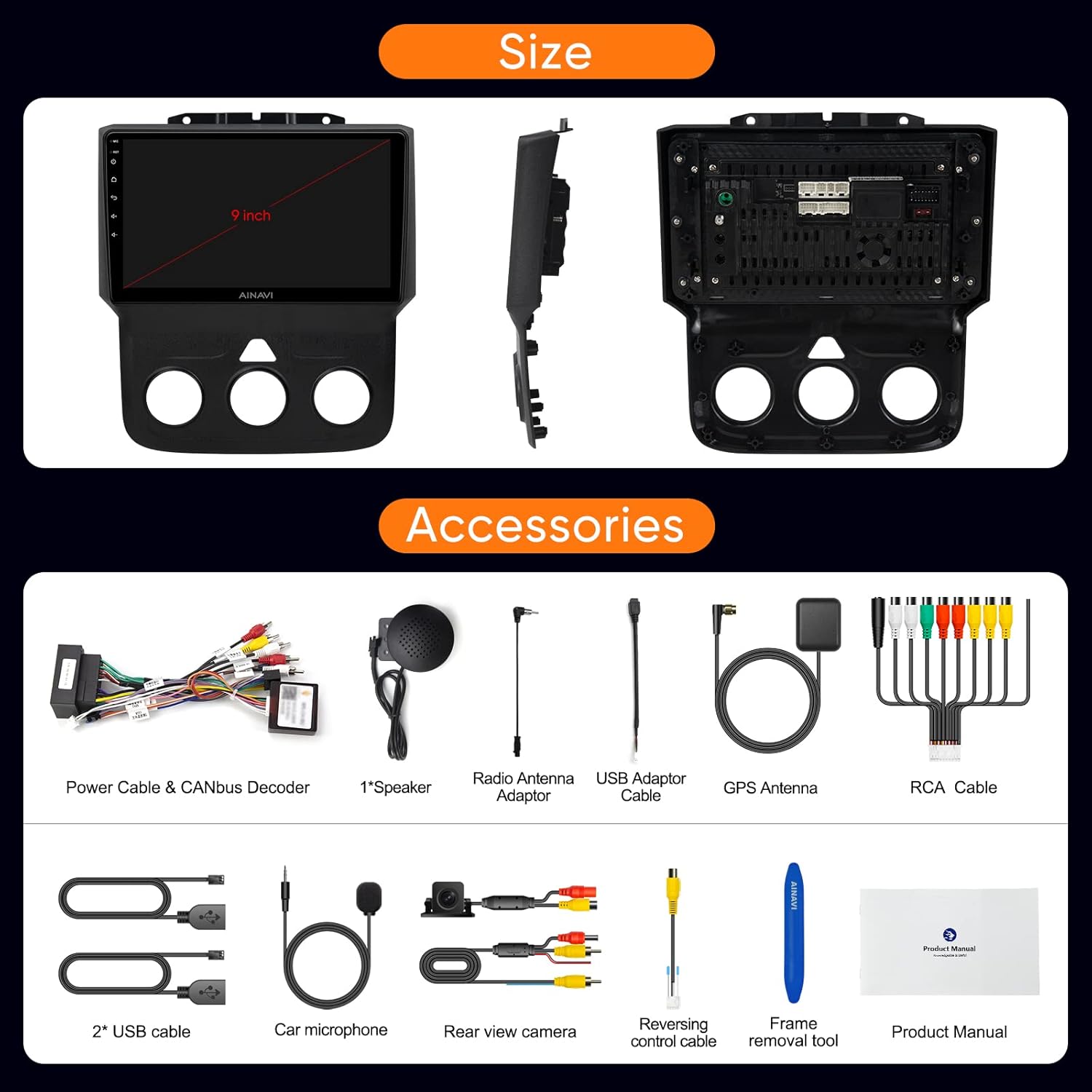
Image: All components and accessories included in the product package.

تصوير: تفصيلي view of the wiring harness and other installation components.
4. سيٽ اپ ۽ تنصيب
The AINAVI car stereo is designed for a customized fit and plug-and-play installation in Dodge Ram 1500, 2500, and 3500 models from 2013-2018. It comes with a dedicated wiring harness and CANbus decoder to integrate with your vehicle's existing systems without requiring cable modifications.
4.1. قبل از انسٽاليشن چيڪ
- Ensure your vehicle is compatible with the specified model years (2013-2018 Dodge Ram 1500/2500/3500).
- Verify all components listed in 'What's in the Box' are present.
- انسٽاليشن شروع ڪرڻ کان اڳ گاڏي جي بيٽري کي ڊسڪنيڪٽ ڪريو.
4.2. انسٽاليشن جا مرحلا (عام)
- اصل ڪار اسٽيريو ۽ ڊيش بورڊ ٽرم کي احتياط سان هٽايو.
- Connect the provided wiring harness to the vehicle's existing connectors. The CANbus decoder will ensure compatibility with original vehicle functions.
- Connect the GPS antenna, radio antenna adaptor, USB cables, rear view camera, and microphone to the corresponding ports on the new head unit.
- Mount the new AINAVI head unit into the dashboard opening.
- ڊيش بورڊ ٽرم کي ٻيهر انسٽال ڪريو.
- Reconnect the vehicle's battery and power on the unit for initial testing.
For detailed visual guidance on wiring, refer to the wiring harness diagram provided in the 'What's in the Box' section.
5. آپريٽنگ هدايتون
5.1. بنيادي انٽرفيس نيويگيشن
The unit features a responsive 9-inch QLED touchscreen. Navigate through applications and settings by tapping and swiping. The main screen provides quick access to essential functions like Radio, Video, Music, and EQ.
5.2. ايپل ڪار پلي ۽ اينڊرائيڊ آٽو
The stereo supports both wireless and wired Apple CarPlay, and USB-connected Android Auto. This allows seamless integration of your smartphone for navigation, calls, messages, and music.
- ڪنيڪشن: Pair your phone via Bluetooth for wireless CarPlay/Android Auto, or connect via USB for wired Android Auto.
- وائس ڪنٽرول: Access voice commands directly by saying “Hey Siri” or “Hey Google”.
Watch these videos for connection guides:
Video: Demonstrates how to connect Wireless Android Auto to the car stereo.
Video: Shows the process of connecting Apple CarPlay to the Dodge Ram 1500/2500/3500 stereo.
Video: Guide on connecting both Apple CarPlay and Android Auto to the Ram 2013-18 stereo.

Image: Interface displaying Wireless CarPlay and Android Auto features.

Image: Smart Voice Control functionality with Apple CarPlay and Android Auto.
5.3. DSP Settings and Audio Control
The built-in Digital Sound Processor (DSP) allows for precise audio customization, including Time Correction and a 48-band Equalizer.
- ٻارڙي آواز کي پنهنجي پسند مطابق ترتيب ڏيڻ لاءِ فريڪوئنسي بينڊ ترتيب ڏيو.
- وقت جي اصلاح: Digitally control the sound timing for each speaker to optimize the sound field position.
Explore DSP settings and music playback:
Video: Demonstrates how to use the Split Screen feature and adjust DSP settings.
وڊيو: ختمview of DSP functions for music playback and multimedia.

Image: DSP settings interface showing 48 EQ band and time correction.

Image: Explanation of the sound control system with DSP.
5.4. اسپلٽ اسڪرين جي ڪارڪردگي
The split-screen mode allows you to run two applications simultaneously, such as navigation and a media player.
See how to use split screen mode:
Video: Demonstrates how to use the Split Screen feature and adjust DSP settings.
5.5. جي پي ايس نيويگيشن
The unit includes built-in GPS navigation. You can access real-time traffic information when connected to a network or download offline maps for use without internet access.

Image: GPS map display and multimedia entertainment options.
5.6. Connectivity (WiFi & Bluetooth)
- وائي فائي: Supports dual-band 2.4Ghz and 5Ghz WiFi for high-speed internet access and app downloads.
- بلوٽوٽ 5.0: Enables hands-free calls, music streaming, and phonebook synchronization.
5.7. ريڊيو جي ڪارڪردگي
The unit features an FM tuner with RDS support. You can scan for stations and save your favorites.
Learn how to use the RDS Radio Player:
Video: Demonstrates how to use the RDS Radio Player and save channel stations.
5.8. سسٽم سيٽنگون
Access various system settings to customize your stereo experience.
- Panel Light: Adjust panel light settings.
- رفتار يونٽ: Change speed unit from km/h to mph.
- فيڪٽري سيٽنگون: Access advanced settings. The factory password is 123456.
Watch these videos for system settings guidance:
Video: Guide on accessing factory settings using password 123456 for Ram 1500 2013-2018.
Video: Instructions on how to change the speed unit from kilometers to miles.
6. سار سنڀال
- صفائي: اسڪرين ۽ يونٽ کي صاف ڪرڻ لاءِ نرم، سڪل ڪپڙو استعمال ڪريو. رگڙيندڙ صاف ڪندڙن يا محلولن کان پاسو ڪريو.
- سافٽ ويئر اپڊيٽ: Periodically check for software updates to ensure optimal performance and access to new features. Updates can typically be found in the system settings.
- ماحولياتي حالتون: يونٽ کي انتهائي گرمي پد، ڊگهي عرصي تائين سڌي سج جي روشني، يا گهڻي نمي جي سامهون رکڻ کان پاسو ڪريو.
7. مسئلا حل ڪرڻ
If you encounter issues with your AINAVI car stereo, refer to the following common solutions:
| مسئلو | ممڪن حل |
|---|---|
| يونٽ پاور نه آهي | Check power connections and vehicle's fuse box. Ensure the battery is properly reconnected. |
| ڪوبه آواز ٻاھر نه | Verify speaker connections, check volume levels, and ensure DSP settings are not muting audio. |
| ڪار پلي/اينڊرائيڊ آٽو ڳنڍي نه رهيو آهي | Ensure Bluetooth is on and paired (for wireless), or USB cable is securely connected. Restart phone and stereo. |
| جي پي ايس سگنل جا مسئلا | پڪ ڪريو ته GPS اينٽينا صحيح طرح سان نصب ٿيل آهي ۽ ان ۾ صاف آهي view of the sky. Check network connection for online maps. |
| اسٽيئرنگ ويل ڪنٽرول ڪم نه ڪري رهيا آهن | Verify CANbus decoder connection and check steering wheel control settings in the stereo's menu. |
| اسڪرين غير جوابده | Perform a soft reset of the unit (refer to the device's reset button location, if available). |
جيڪڏهن انهن حلن جي ڪوشش ڪرڻ کان پوءِ به مسئلو برقرار رهي، مهرباني ڪري ڪسٽمر سپورٽ سان رابطو ڪريو.
8. وضاحتون
| خاصيت | تفصيل |
|---|---|
| برانڊ | AINAVI |
| ماڊل | B0CLTQ1Q2P |
| آپريٽنگ سسٽم | Android 12 |
| پروسيسر | آر ايم ڪارٽيڪس اي 55 8-ڪور |
| رام | 4 جي بي |
| ميموري رکڻ جي صلاحيت | 64 جي بي |
| اسڪرين جي ماپ | 9 انچ |
| قرارداد | 1280 x 720 |
| ڊسپلي جو قسم | QLED, Capacitive Touchscreen |
| آڊيو آئوٽ پٽ موڊ | اسٽيريو (4*45W) |
| رابطي ٽيڪنالاجي | Bluetooth 5.0, USB, Wi-Fi (2.4Ghz & 5Ghz) |
| Supported Navigation Systems | BeiDou, GPS, Galileo |
| مطابقت واري گاڏي جو قسم | Dodge Ram 1500, 2500, 3500 (2013-2018) |
| انساني-انٽرفيس ان پٽ | مائڪروفون، ٽچ اسڪرين |
| ڪنٽرول جو طريقو | ٽچ ، آواز |
| يو پي سي | 760762573289 |
9. وارنٽي ۽ سپورٽ
AINAVI مهيا ڪري ٿو هڪ هڪ سال جي پراڊڪٽ وارنٽي from the date of purchase. For any technical assistance, troubleshooting, or warranty claims, please do not hesitate to contact us via Amazon email. Our professional technical support team will respond as soon as possible to assist you.
مھرباني ڪري وارنٽي جي تصديق لاءِ خريداري جو ثبوت رکو.