
1. تعارف
Thank you for choosing the MageGee Cloud98 Mechanical Keyboard. This manual provides detailed instructions for setting up, operating, and maintaining your keyboard. The Cloud98 features a 98-key layout, triple-mode connectivity (Bluetooth, 2.4GHz wireless, and USB-C wired), RGB backlighting, hot-swappable switches, and PBT keycaps for a premium typing experience.

Image 1.1: MageGee Cloud98 Mechanical Keyboard Overview
2. پيڪيج مواد
مھرباني ڪري ھيٺ ڏنل شين لاءِ پيڪيج چيڪ ڪريو:
- MageGee Cloud98 Mechanical Keyboard
- USB-سي ڪيبل
- 2.4GHz USB Receiver (typically stored in the keyboard's bottom compartment)
- ڪي ڪيپ ڇڪڻ وارو (جيڪڏهن شامل هجي)
- سوئچ پلر (جيڪڏهن شامل هجي)
3. مصنوعات جون خاصيتون
- 98-ڪي لي آئوٽ: Compact yet functional, retaining essential keys.
- ٽرپل موڊ ڪنيڪٽوٽي: Seamlessly switch between Bluetooth, 2.4GHz wireless, and USB-C wired connections.
- آر جي بي بيڪ لائيٽ: Customizable full-key RGB backlighting with multiple effects and adjustable brightness.
- Gasket Mounted Design: Enhances typing feel and sound by reducing vibrations and cavity noise.
- PBT Material Keycaps: Durable dual-injection molded keycaps with ASA height for clear legends and ergonomic comfort.
- گرم مٽائي سگھڻ وارا سوئچ: Compatible with most 3-pin and 5-pin mechanical switches, allowing for easy customization without soldering.
- 4000mAh بيٽري: Provides extended wireless usage, up to 200 hours with backlight off.
- N-ڪي رول اوور: Ensures every keystroke is registered accurately, even during rapid typing or gaming.
- وسيع مطابقت: Supports Win2000, Win XP, Win ME, Vista, Win7, Win8, Win10, Android, Linux, and Mac operating systems.
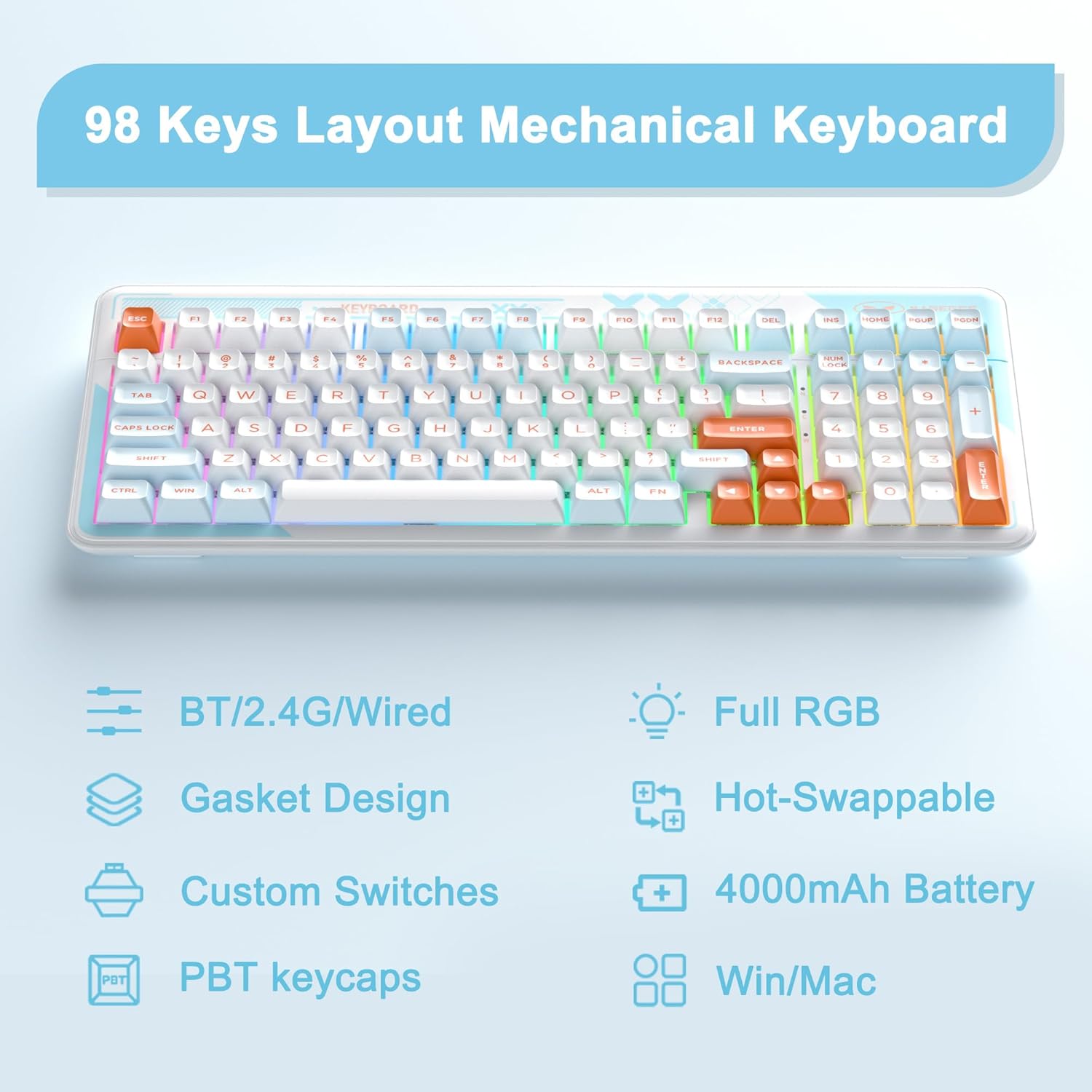
Image 3.1: Key features of the Cloud98 keyboard.

تصوير 3.2: ڦاٽي پيو view illustrating the gasket-mounted design and internal components.

تصوير 3.3: ويجهو تصوير view of a Blue Whale mechanical switch.

Image 3.4: Detail of the dual-color injection PBT keycaps.
4. سيٽ اپ ۽ ڪنيڪشن
4.1. Wired Mode (USB-C)
- Locate the USB-C port on the keyboard (typically on the top edge).
- مهيا ڪيل USB-C ڪيبل جي هڪ پڇاڙي کي ڪيبورڊ سان ڳنڍيو.
- USB-C ڪيبل جي ٻئي ڇيڙي کي پنهنجي ڪمپيوٽر تي موجود USB پورٽ سان ڳنڍيو.
- The keyboard will automatically be recognized and ready for use.
- دٻايو fn+5 for 3 seconds to ensure the keyboard is in wired mode.

Image 4.1: Connecting the USB-C cable to the keyboard.
4.2. 2.4GHz وائرليس موڊ
- Locate the 2.4GHz USB receiver, usually stored in a compartment on the bottom of the keyboard.
- 2.4GHz USB رسيور کي پلگ ان ڪريو توهان جي ڪمپيوٽر تي موجود USB پورٽ ۾.
- Turn on the keyboard using the power switch (if present, typically on the back or side).
- دٻايو ۽ رکو fn+4 for 3 seconds to enter 2.4GHz pairing mode. The indicator light will flash.
- هڪ دفعو ڳنڍيو ويو، اشارو روشني چمڪائڻ بند ڪري ڇڏيندو ۽ مضبوط رهندو.

Image 4.2: The 2.4GHz USB receiver.
4.3. بلوٽوٽ موڊ
- پڪ ڪريو ته ڪيبورڊ فعال آهي.
- دٻايو ۽ رکو fn+1, fn+2، يا fn+3 for 3 seconds to enter Bluetooth pairing mode for the respective profile. The indicator light will flash quickly.
- پنهنجي ڊوائيس (ڪمپيوٽر، ٽيبليٽ، اسمارٽ فون) تي، بلوٽوٿ کي فعال ڪريو ۽ نوان ڊوائيسز ڳوليو.
- Select "MageGee Cloud98" (or similar name) from the list of available devices to pair.
- Once paired, the indicator light will flash slowly when reconnecting, and then remain solid.
- جوڙيل بلوٽوٿ ڊوائيسز جي وچ ۾ سوئچ ڪرڻ لاءِ، مختصر دٻايو fn+1, fn+2، يا fn+3.

Image 4.3: Visual guide for triple mode connection.
5. آپريٽنگ هدايتون
5.1. آر جي بي بيڪ لائيٽ ڪنٽرول
The Cloud98 keyboard features full RGB backlighting with 19 RGB modes, 9 monochrome modes, and a custom mode. Use the following key combinations to control the lighting:
- Fn + ← (کاٻو تير): Switch backlight flowing direction.
- Fn + → (ساڄو تير): Switch backlight color (single color mode).
- Fn + - (Minus): Decrease backlight flowing speed.
- Fn + = (Equals): Increase backlight flowing speed.
- Fn + Del: بيڪ لائيٽ آن/آف ڪريو.
- Fn + خلا: Switch backlight color (RGB mode).
- Fn + Ins: Switch backlight modes.
- Fn + ↑ (مٿي تير): بيڪ لائيٽ جي چمڪ وڌايو.
- Fn + ↓ (هيٺ تير): بيڪ لائيٽ جي چمڪ گھٽايو.

Image 5.1: Keyboard layout showing RGB backlight control key combinations.
5.2. گرم مٽائڻ وارا سوئچ
The Cloud98 keyboard supports hot-swappable switches, allowing you to change switches without soldering. This feature enables customization of typing feel and sound.
- ڪي ڪيپ هٽايو: گهربل ڪي ڪيپ کي آسانيءَ سان هٽائڻ لاءِ مهيا ڪيل ڪي ڪيپ پلر استعمال ڪريو.
- سوئچ هٽايو: سوئچ جي مٿين ۽ هيٺئين ڪلپس کي احتياط سان پڪڙڻ لاءِ مهيا ڪيل سوئچ پلر استعمال ڪريو ۽ ان کي سڌو مٿي ڇڪيو.
- نئون سوئچ داخل ڪريو: Align the pins of the new switch with the holes on the PCB. Ensure the pins are straight. Gently push the switch down until it clicks into place. Do not force it to avoid bending pins.
- ڪي ڪيپ تبديل ڪريو: نئين سوئچ اسٽيم تي ڪي ڪيپ کي دٻايو.
نوٽ: Ensure the keyboard is disconnected or powered off before changing switches to prevent accidental input or damage.
5.3. WIN Key Lock Function
To prevent accidental presses of the Windows key during gaming, you can lock it. Press Fn+Win to toggle the WIN key lock function. An indicator light may illuminate when the WIN key is locked.
5.4. N-Key Rollover
The Cloud98 supports N-Key Rollover, meaning all keys pressed simultaneously will be registered. This is particularly beneficial for fast typists and gamers.

Image 5.2: Illustration of N-Key Rollover capability.
6. بيٽري ۽ چارجنگ
The Cloud98 keyboard is equipped with a 4000mAh battery, providing extended usage in wireless modes.
- چارج ڪرڻ: Connect the keyboard to a USB power source using the provided USB-C cable. The charging indicator light will show the charging status.
- بيٽري جي زندگي: The keyboard can last up to 200 hours with the backlight off. Battery life will vary depending on backlight usage and connection mode.
- گھٽ بيٽري جو اشارو: The keyboard may indicate low battery status through a flashing light or reduced functionality. Charge the keyboard promptly when this occurs.

Image 6.1: Information regarding the 4000mAh battery capacity.
7. سار سنڀال
مناسب سار سنڀال توهان جي ڪيبورڊ جي ڊگهي عمر ۽ ڪارڪردگي کي يقيني بڻائي ٿي.
- ڪي ڪيپس جي صفائي: ڪي ڪيپس ڪڍڻ لاءِ ڪي ڪيپ ڪڍڻ وارو استعمال ڪريو. انهن کي هلڪي صابڻ واري محلول ۽ نرم ڪپڙي سان صاف ڪريو، پوءِ ٻيهر ڳنڍڻ کان اڳ چڱي طرح سڪيو.
- ڪي بورڊ جي جسم کي صاف ڪرڻ: Use a soft, dry cloth to wipe the keyboard surface. For stubborn dirt, a slightly damp ڪپڙو استعمال ڪري سگهجي ٿو، انهي ڳالهه کي يقيني بڻائڻ لاءِ ته ڪيبورڊ ۾ نمي داخل نه ٿئي.
- مٽي هٽائڻ: ڪي ڪيپس ۽ سوئچز جي وچ مان مٽي ۽ ملبہ هٽائڻ لاءِ دٻيل هوا استعمال ڪريو.
- اسٽوريج: ڪيبورڊ کي سڌي سج جي روشني ۽ انتهائي گرمي پد کان پري ٿڌي، سڪل جاءِ تي رکو.
8. مسئلا حل ڪرڻ
If you encounter issues with your MageGee Cloud98 keyboard, please refer to the following common solutions:
| مسئلو | حل |
|---|---|
| ڪي بورڊ وائرڊ موڊ ۾ جواب نه ڏئي رهيو آهي. | Ensure the USB-C cable is securely connected to both the keyboard and the computer. Try a different USB port or cable. Confirm the keyboard is in wired mode (Fn + 5 for 3s). |
| 2.4GHz وائرليس ڪنيڪشن غير مستحڪم يا نه ڳنڍجي رهيو آهي. | Ensure the 2.4GHz USB receiver is plugged in. Press and hold Fn + 4 for 3 seconds to re-pair. Move the receiver closer to the keyboard. Check for interference from other wireless devices. |
| بلوٽوٿ ڪنيڪشن جا مسئلا. | Ensure Bluetooth is enabled on your device. Press and hold Fn + 1/2/3 for 3 seconds to enter pairing mode. Remove previous pairings from your device and try again. Ensure the keyboard battery is charged. |
| بيڪ لائيٽ ڪم نه ڪري رهي آهي يا ڦاسي پئي آهي. | Press Fn + Del to toggle the backlight. Adjust brightness with Fn + ↑/↓. Try switching backlight modes with Fn + Ins. Ensure the keyboard battery is charged. |
| Specific keys not working. | If hot-swappable, carefully remove the keycap and switch. Re-seat the switch firmly, ensuring pins are not bent. If the issue persists, try replacing the switch. |
| Keyboard randomly disconnects. | Ensure the battery is sufficiently charged. For wireless modes, ensure the receiver/device is within range and free from interference. Update drivers if available. |
9. وضاحتون
| خاصيت | تفصيل |
|---|---|
| ماڊل نمبر | Cloud98 |
| رابطي | بلوٽوٿ، 2.4GHz وائرليس، USB-C وائرڊ |
| ڪي بورڊ جو قسم | مشيني |
| پٺڀرائي | مڪمل آر بي جي |
| ڪي ڪيپ مواد | PBT (Polybutylene Terephthalate) |
| خاص خصوصيت | Ergonomic, Gasket Mounted, Hot-Swappable |
| بيٽري جي گنجائش | 4000mAh |
| پيداوار جي ماپ | 16.5 x 7.87 x 1.57 انچ (41.9 x 19.99 x 3.99 سينٽي) |
| شيءِ جو وزن | 2.66 پائونڊ (1.21 ڪلوگرام) |
| مطابقت رکندڙ ڊوائيسز | Laptop, PC, Android, Mac |
| آپريٽنگ سسٽم | Win2000, Win XP, Win ME, Vista, Win7, Win8, Win10, Android, Linux, Mac |
10. وارنٽي ۽ سپورٽ
MageGee products come with a standard warranty. For specific warranty details, please refer to the warranty card included with your product or visit the official MageGee website. If you encounter any issues not covered in this manual or require further assistance, please contact MageGee customer support through their official channels.
توهان عام طور تي ٺاهيندڙ جي مدد سان رابطي جي معلومات ڳولي سگهو ٿا webسائيٽ تي يا پراڊڪٽ پيڪنگنگ تي.