تعارف
This manual provides detailed instructions for the installation, operation, and maintenance of your Amaseaudio Android 14 Car Stereo. Please read this manual thoroughly before using the product to ensure proper function and safety.
پيداوار ختمview ۽ مطابقت
The Amaseaudio Android 14 Car Stereo is designed to enhance your in-car entertainment and navigation experience. It features a 9-inch display, Quad-Core processor, DSP+, Wireless Apple Carplay, and Android Auto support.
مطابقت رکندڙ ماڊل:
- BMW E53 X5 (1999-2006)
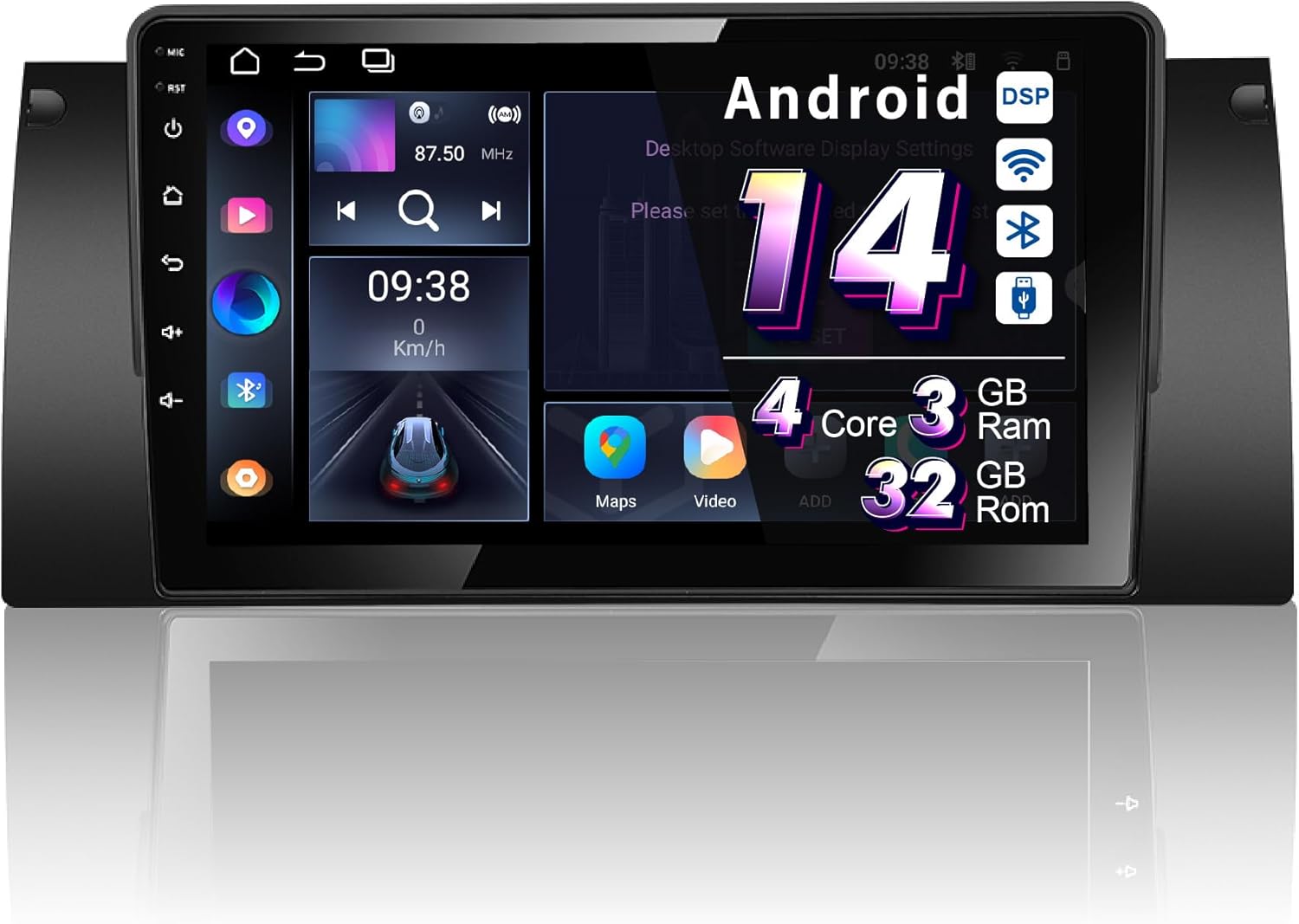
Figure 1: Amaseaudio Android 14 Car Stereo main unit, showcasing ان جي سهڻي ڊيزائن ۽ وڏي ڊسپلي سان.
اهم خاصيتون
- آپريٽنگ سسٽم: Android 14.0 with Quad-Core processor, 3GB RAM, and 32GB ROM.
- وائرلیس رابطي Built-in Wireless Apple Carplay and Android Auto, Bluetooth 5.0, 2.4GHz WiFi, and 4G support.
- Audio Enhancements: Integrated DSP (Digital Sound Processor) for superior audio quality.
- نيويگيشن: Built-in Google Maps for GPS navigation.
- ملٽي ميڊيا: Supports 1080p video playback, split-screen functionality.
- وسعت: Supports OBDII and rear camera (devices not included).

شڪل 2: ختمview of key features including Android 14, Wireless Carplay, DSP+, WiFi, 4G, and Bluetooth 5, highlighting the system's core capabilities.
سيٽ اپ ۽ تنصيب
Proper installation is crucial for the optimal performance of your car stereo. It is recommended to have the installation performed by a qualified professional.
قبل از انسٽاليشن چيڪ:
- Ensure your vehicle is a BMW E53 X5 (1999-2006).
- Verify all included accessories are present (refer to the "Accessories" section).
- انسٽاليشن شروع ڪرڻ کان اڳ گاڏي جي بيٽري کي ڊسڪنيڪٽ ڪريو.
تنصيب جا مرحلا:
- Remove the original car stereo unit from your BMW E53 X5 dashboard.
- Connect the provided wiring harness to the car stereo and the vehicle's existing wiring. Ensure all connections are secure.
- Connect the GPS antenna, WiFi antenna, and any other external accessories (e.g., rear camera, external microphone).
- Carefully slide the new Amaseaudio car stereo into the dashboard opening until it clicks into place.
- گاڏي جي بيٽري کي ٻيهر ڳنڍيو ۽ يونٽ جي ڪارڪردگي کي جانچيو.
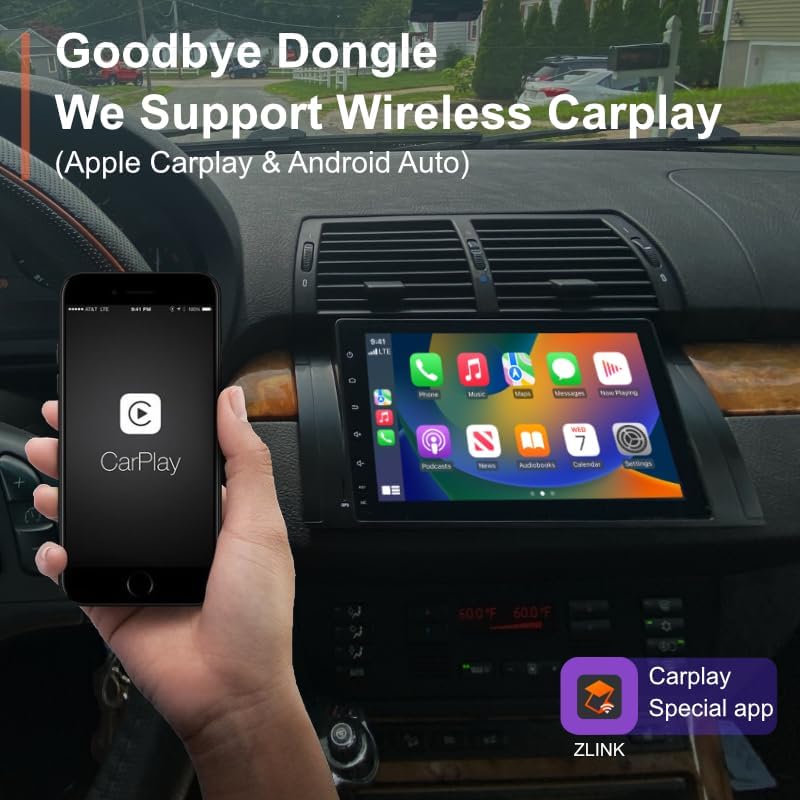
Figure 3: Visual comparison of the BMW E53 X5 dashboard before and after the Amaseaudio car stereo installation, showing the integrated fit.
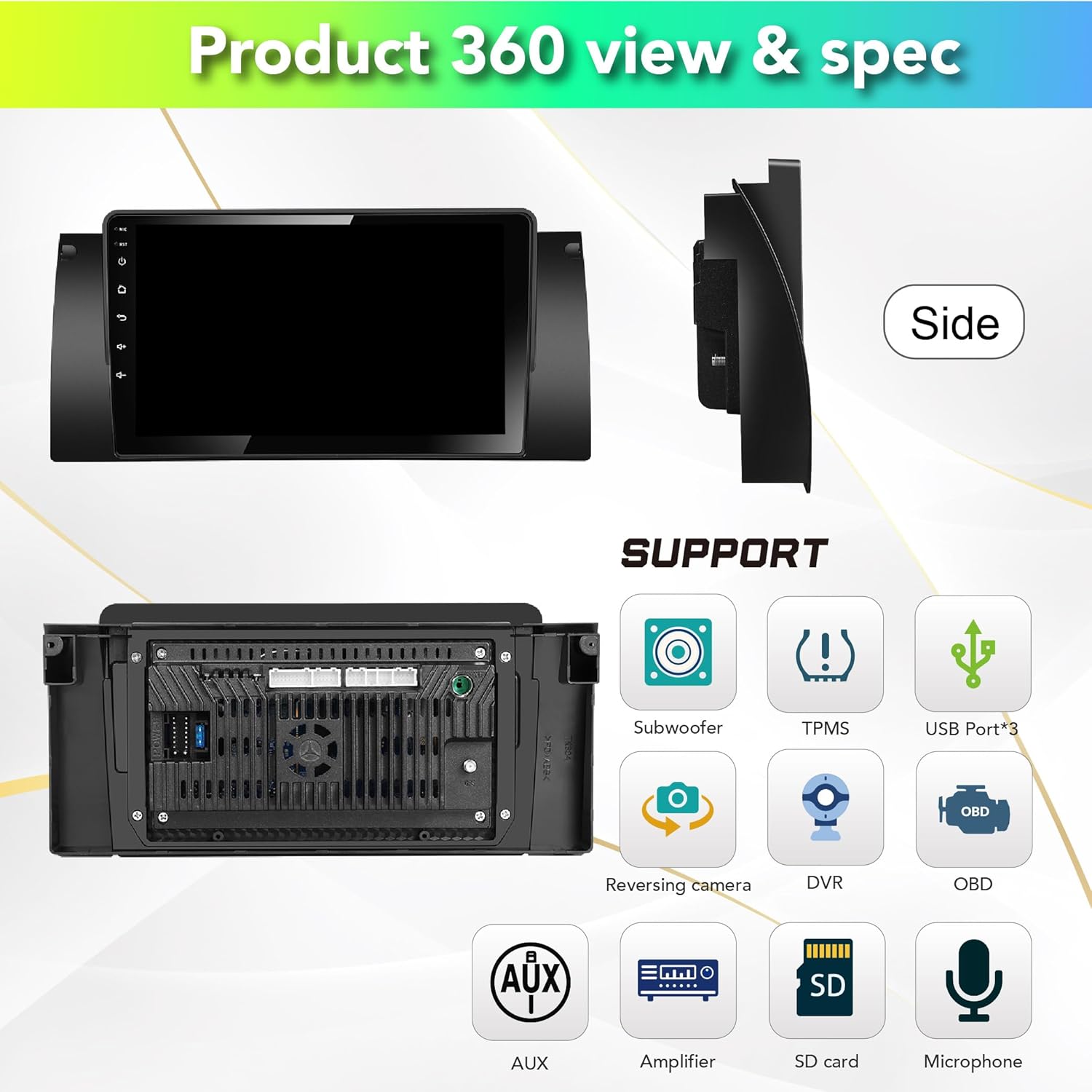
شڪل 4: پوئتي view of the car stereo showing various connection ports for subwoofer, TPMS, USB, reversing camera, DVR, OBD, AUX, amplifier, SD card, and microphone.
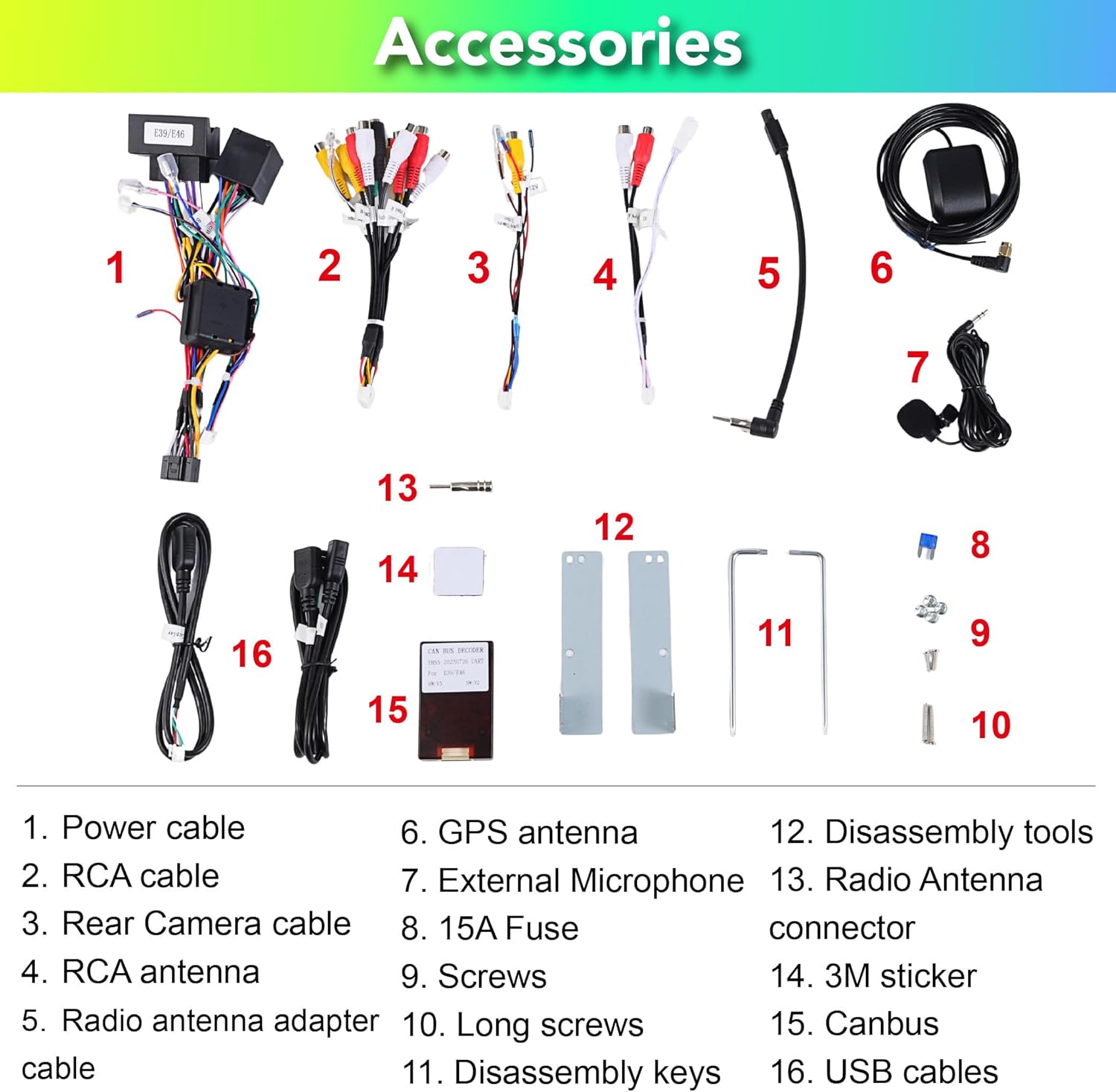
Figure 5: List of included accessories: Power cable, RCA cable, Rear Camera cable, RCA antenna, Radio antenna adapter cable, GPS antenna, External Microphone, 15A Fuse, Screws, Long screws, Disassembly keys, Disassembly tools, Radio Antenna connector, 3M sticker, Canbus, USB cables.

Figure 6: Detailed pin definitions for the 18PIN power supply socket and the 60PIN multi-functional socket, including definitions for AUX video input, audio outputs, USB, and other connections.
آپريٽنگ هدايتون
System Interface and Navigation:
Upon startup, the unit will display the main Android interface. You can customize themes and button colors. Navigate through applications using the touchscreen.

شڪل 7: مثالamples of different user interface themes and a selection of pre-installed and downloadable applications like Google Maps, Netflix, and Play Store.
Wireless Apple Carplay & Android Auto:
The unit comes with a built-in Carplay app. Connect your iPhone or Android phone wirelessly via Bluetooth to access navigation, music, messages, and more directly on the stereo screen.

Figure 8: Demonstration of wireless Apple Carplay and Android Auto, showing a smartphone connected to the car stereo display for seamless integration.
Digital Sound Processor (DSP+):
Utilize the built-in DSP for advanced audio adjustments. This includes a 15-band graphic equalizer, preset EQ modes, special sound effects (Equiloudness, Surround system enhancement), and time correction.

Figure 9: Screenshots of the DSP interface, illustrating the 15-band equalizer, special effect adjustments, and time correction settings for optimizing audio output.
Connectivity (4G, WiFi, Bluetooth):
- وائي فائي: Connect to available Wi-Fi networks (2.4GHz supported) to access online content and download apps.
- بلوٽوٽ 5.0: Pair your smartphone for hands-free calling, music streaming, and contact synchronization.
- 4 جي: Insert a 4G SIM card (not included) for mobile data connectivity.
جي پي ايس نيويگيشن:
The unit comes with built-in Google Maps. Ensure a stable internet connection for real-time traffic updates and accurate navigation.
ٻيا افعال:
- ورهايل اسڪرين: اسڪرين تي هڪ ئي وقت ٻه ايپليڪيشن هلايو.
- پوئين ڪئميرا سپورٽ: Connect an aftermarket rear camera for parking assistance (camera not included).
- OBDII Support: Connect an OBDII scanner (not included) to monitor vehicle diagnostics.
- ايف ايم/اي ايم ريڊيو: پنهنجي پسنديده ريڊيو اسٽيشنن تي ٽيون ڪريو.
سار سنڀال
To ensure the longevity and optimal performance of your Amaseaudio car stereo, follow these maintenance guidelines:
- صفائي: اسڪرين ۽ يونٽ کي صاف ڪرڻ لاءِ نرم، سڪل ڪپڙو استعمال ڪريو. رگڙيندڙ صاف ڪندڙن يا محلولن کان پاسو ڪريو.
- سافٽ ويئر اپڊيٽ: Regularly check for and install system updates to improve performance and security. The unit supports OTA (Over-The-Air) updates.
- ماحولياتي حالتون: يونٽ کي انتهائي گرمي پد، ڊگهي عرصي تائين سڌي سج جي روشني، يا گهڻي نمي جي سامهون رکڻ کان پاسو ڪريو.

Figure 10: Screenshot of the system update interface, indicating the current software version and the option to check for new updates to keep the system optimized.
مشڪلاتون
جيڪڏهن توهان کي پنهنجي ڪار اسٽيريو سان مسئلا درپيش اچن ٿا، ته هيٺ ڏنل عام مسئلن ۽ حلن جو حوالو ڏيو:
| مسئلو | ممڪن سبب | حل |
|---|---|---|
| يونٽ پاور نه آهي. | بجلي جو ڪنيڪشن ڍلو، فيوز ڦاٽل، گاڏي جي بيٽري جو مسئلو. | Check power cables and connections. Inspect the 15A fuse. Ensure vehicle battery is charged. |
| ڪوبه آواز ٻاھر نه. | Incorrect wiring, volume too low, mute enabled, speaker issues. | Verify speaker wiring. Increase volume. Check if mute is active. Test with different audio sources. |
| GPS سگنل ڪمزور يا غلط آهي. | GPS اينٽينا صحيح طرح سان نصب ٿيل نه آهي يا رڪاوٽ آهي. | Ensure GPS antenna is placed in an unobstructed location (e.g., dashboard). Check antenna connection. |
| Wireless Carplay/Android Auto not connecting. | Bluetooth not enabled, phone not paired, app issues. | Ensure Bluetooth is on for both devices. Re-pair the phone. Restart the Carplay/Android Auto app on the unit and phone. |
جيڪڏهن انهن حلن جي ڪوشش ڪرڻ کان پوءِ به مسئلو برقرار رهي، مهرباني ڪري ڪسٽمر سپورٽ سان رابطو ڪريو.
وضاحتون
| خاصيت | تفصيل |
|---|---|
| ماڊل نمبر | Android 14, 4Cores, (3+32GB) |
| آپريٽنگ سسٽم | Android 14.0 |
| پروسيسر | چار پروسيسر |
| رام | 3 جي بي |
| روم | 32 جي بي |
| ڊسپلي سائيز | 9 انچ |
| رابطي | Bluetooth 5.0, Wi-Fi (2.4GHz), 4G |
| خاص خاصيتون | DSP+, Wireless Carplay, Android Auto |
| نقشي جو قسم | Online map (Google Maps built-in) |
| شيءِ جو وزن | 1.87 پائونڊ |
| پيڪيج جي ماپ | 13.39 x 11.81 x 4.21 انچ |
| اصل جو ملڪ | هانگ ڪانگ |
وارنٽي ۽ سپورٽ
وارنٽي ڄاڻ:
The Amaseaudio Android 14 Car Stereo comes with a هڪ سال وارنٽي. This warranty covers defected parts, excluding the screen. Human-caused damage is not included under this warranty.
ڪسٽمر سپورٽ:
For technical assistance, troubleshooting, or warranty claims, please contact Amaseaudio customer support through the retailer's platform or the official brand website. Please have your product model number and purchase details ready when contacting support.