
1. تعارف
Thank you for choosing the Cyrank Z73 Smart Watch. This manual provides essential information for setting up, operating, and maintaining your device. Please read it carefully to ensure proper use and to maximize your experience with the smart watch.

تصوير 1.1: سامهون view of the Cyrank Z73 Smart Watch, showcasing its elegant design with a floral pink watch face.
2. پيڪيج مواد
مھرباني ڪري تصديق ڪريو ته سڀ شيون توھان جي پيڪيج ۾ موجود آھن:
- Cyrank Z73 Smart Watch
- Data Cable (Charging Cable)
- پٽي Adjuster
- استعمال ڪندڙ جو دستياب (ھي دستاويز)

Image 2.1: The Cyrank Z73 Smart Watch displayed alongside its included data cable and strap adjuster tool.
3. وضاحتون
Detailed technical specifications for the Cyrank Z73 Smart Watch:
| خاصيت | تفصيل |
|---|---|
| Main Control Platform | XC2806 |
| ياداشت | 16+128M |
| ٽچ موڊ | G+F Single Touch |
| اسڪرين جي ماپ | 1.09 انچ (2.77 سينٽي) |
| اسڪرين جي قرارداد | 240x240 پڪسل |
| ڊائل قطر | تقريبن 36 ملي ميٽر (1.4 انچ) |
| ڊائل جي ٿولهه | تقريبن 11.5 ملي ميٽر (0.5 انچ) |
| پٽي ڊگھائي | Approx. 220x16mm (8.7x0.6in) |
| بلٽ ان بيٽري | 200mAh ليتيم بيٽري |
| عام استعمال جو وقت | اٽڪل 7 ڏينهن |
| اسٽينڊ بائي ٽائيم | اٽڪل 15 ڏينهن |
| رابطي | Bluetooth, USB, GPS (via smartphone) |
| شيءِ جو وزن | لڳ ڀڳ. 180 ز (6.3 اوز) |
| پيداوار جي ماپ | 0.39 x 0.39 x 0.39 انچ |

Image 3.1: Diagram illustrating the dimensions of the Cyrank Z73 Smart Watch, including dial diameter and thickness.

Image 3.2: Visual representation of the Cyrank Z73 Smart Watch strap length, measuring approximately 220mm (8.7 inches).
4. سيٽ اپ
4.1. سمارٽ واچ کي چارج ڪرڻ
Before first use, fully charge your smart watch. Connect the provided data cable to the charging port on the watch and plug the USB end into a compatible power adapter (not included) or a computer's USB port. The watch display will indicate charging status.
4.2. ائپ تنصيب
To unlock the full functionality of your Cyrank Z73 Smart Watch, you need to install the companion application on your smartphone. Scan the QR code provided in the quick start guide (if available) or search for the recommended app name in your smartphone's app store (e.g., Google Play Store for Android, Apple App Store for iOS).
4.3. توهان جي اسمارٽ فون سان جوڙڻ
The Cyrank Z73 Smart Watch utilizes Dual Bluetooth (BT) connectivity. One BT connection (Z73) is for data transmission, and the other (Z73 Audio) is for audio transmission (calls, music playback).
- پڪ ڪريو ته توهان جي سمارٽ واچ چارج ٿيل ۽ پاور آن آهي.
- پنهنجي اسمارٽ فون تي بلوٽوت کي فعال ڪريو.
- Open the companion app on your smartphone and follow the on-screen instructions to add a new device.
- The app will search for available devices. Select 'Z73' from the list to establish the data connection.
- Once the data connection is established, go to your smartphone's Bluetooth settings and manually pair with 'Z73 Audio' for call and music functions.
- Confirm any pairing requests on both your watch and smartphone.
5. آپريٽنگ هدايتون
5.1. بنيادي نيويگيشن
- ٽچ اسڪرين: Swipe left, right, up, or down to navigate through menus and functions. Tap to select an item.
- پاسي واري بٽڻ: Typically used to wake the screen, return to the home screen, or access the main menu.
5.2. Health Monitoring Functions
The smart watch offers various health tracking features:
- Multiple Exercise Modes: Track different sports activities.
- مرحلا: Counts daily steps taken.
- سمهڻ جي نگراني: Analyzes sleep patterns.
- دل جي شرح: Monitors heart rate throughout the day.
- GPS Running: Utilizes smartphone GPS for tracking outdoor runs.
5.3. Reminder Functions
Stay informed with timely reminders:
- الارم ڪلاڪ: Set alarms directly on the watch or via the app.
- بيڪار ياد ڏياريندڙ: Notifies you to move after periods of inactivity.
- پيئڻ جي ياد ڏياريندڙ: Prompts you to drink water.
- پيغام پھچايو: Receives notifications for calls, SMS, WeChat, QQ, Messenger, and other apps.
5.4. Daily Functions
Convenient features for everyday use:
- ڪال: Make and receive calls directly from the watch.
- رابطا: Access your phone's contacts.
- ڪال رڪارڊس: View توهان جي ڪال جي تاريخ.
- ميوزڪ پلے بیک: پنهنجي اسمارٽ فون تي موسيقي کي ڪنٽرول ڪريو.
- ڪسٽم ڊائل: Personalize your watch face.
- گھڻن ٻولين جي حمايت: پنھنجي پسند جي ٻولي چونڊيو.
- رڪارڊنگ: Use the watch as a voice recorder.
- وائس ڪنٽرول: Interact with the watch using voice commands.
- موسم: موجوده موسم جي تازه ڪاريون حاصل ڪريو.
- ڪليڪٽر بنيادي حساب سان انجام ڏيو.
- اسٽاپ واچ ۽ ڳڻپ: وقت جا ڪم.
- ريموٽ ڪئميرا: Control your smartphone's camera remotely.
- موبائل فون ڳولھيو: پنھنجو جوڙيل اسمارٽ فون ڳولھيو.
- سيٽنگون: Adjust watch settings like brightness, screen time, and themes.
- اسڪرين کي روشن ڪرڻ لاءِ کلائي وڌو: Automatically illuminates the screen when you raise your wrist.
- پريشان نه ڪريو موڊ: Silence notifications.

Image 5.1: The Cyrank Z73 Smart Watch screen showing an incoming call notification, demonstrating its call answering capability.
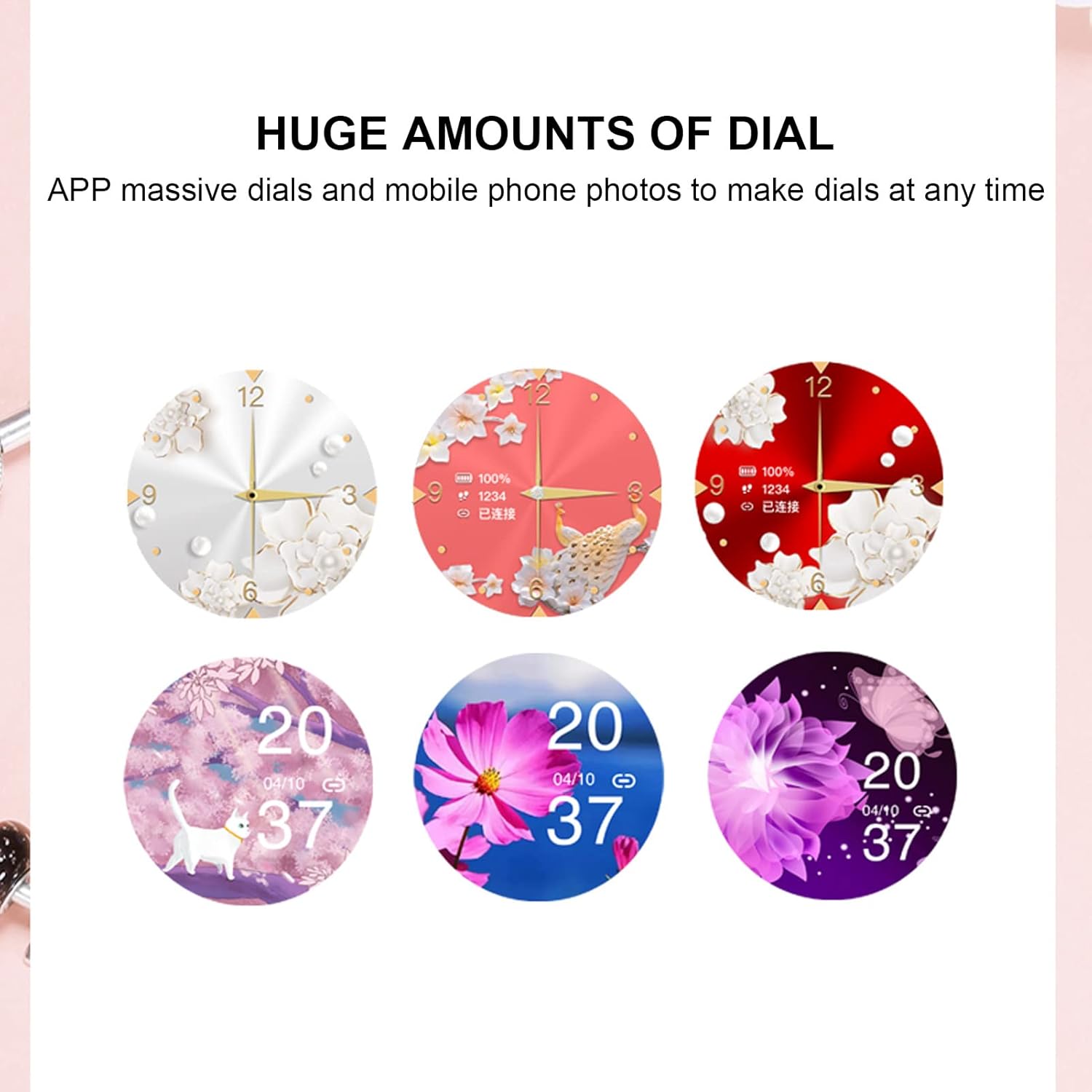
Image 5.2: A selection of diverse custom watch faces available for the Cyrank Z73 Smart Watch, allowing for personalization.
5.5. Special Purpose Functions
The Cyrank Z73 Smart Watch includes specific features for women's health:
- Feminine Functions: Prediction of menstrual period, ovulation period, ovulation day, and safe period.
6. سار سنڀال
To ensure the longevity and optimal performance of your smart watch, follow these maintenance guidelines:
- صفائي: باقاعدي طور تي واچ اسڪرين ۽ پٽي کي نرم، سڪل ڪپڙي سان صاف ڪريو. ضدي مٽيءَ لاءِ، ٿورو ڊيamp ڪپڙو استعمال ڪري سگهجي ٿو، پر گهڻي نمي کان پاسو ڪريو.
- انتهائي گرمي پد کان بچاء: Do not expose the watch to extreme heat or cold, as this can damage the battery and internal components.
- پاڻي جي مزاحمت: Refer to the product specifications for water resistance ratings. Avoid submerging the watch beyond its rated depth or exposing it to hot water, steam, or chemicals.
- چارج ڪرڻ: Use only the provided data cable for charging. Avoid using damaged cables or chargers.
- اسٽوريج: جڏهن گهڻي وقت تائين استعمال ۾ نه هجي، ته واچ کي ٿڌي، سڪل جاءِ تي رکو.
7. مسئلا حل ڪرڻ
If you encounter issues with your Cyrank Z73 Smart Watch, try the following steps:
- واچ آن نه ٿي رهي آهي: پڪ ڪريو ته گھڙي مڪمل طور تي چارج ٿيل آهي. ان کي گهٽ ۾ گهٽ 30 منٽن لاءِ چارجر سان ڳنڍيو.
- فون سان جوڙو نه ٿو ٺاهي سگهجي:
- پڪ ڪريو ته توهان جي فون ۽ واچ تي بلوٽوٿ فعال آهي.
- پڪ ڪريو ته گھڙي توهان جي فون جي حد اندر آهي.
- پنهنجو فون ۽ واچ ٻئي ري اسٽارٽ ڪريو.
- پنهنجي فون تي بلوٽوٿ ڪيش صاف ڪريو (جيڪڏهن لاڳو هجي) ۽ ٻيهر جوڙڻ جي ڪوشش ڪريو.
- پڪ ڪريو ته ساٿي ايپ انسٽال ٿيل ۽ هلندڙ آهي.
- نوٽيفڪيشن نه مليا:
- Check if the watch is properly paired and connected to the app.
- Verify notification permissions are granted to the app on your phone.
- Ensure 'Do Not Disturb' mode is not active on the watch or phone.
- غلط صحت ڊيٽا: Ensure the watch is worn snugly on your wrist, but not too tight. Clean the sensor on the back of the watch.
- مختصر بيٽري زندگي: Reduce screen brightness, disable unnecessary features, and ensure background app usage is optimized on your phone.
- فيڪٽري سيٽنگون بحال ڪريو: If issues persist, you may try restoring the watch to factory settings via the watch's menu or the companion app. Note that this will erase all data on the watch.
8. وارنٽي ۽ سپورٽ
The Cyrank Z73 Smart Watch comes with a standard manufacturer's warranty. Please refer to the warranty card included in your package or contact your retailer for specific warranty terms and conditions. For technical support or further assistance, please reach out to Cyrank customer service through the contact information provided with your purchase or on the official Cyrank webسائيٽ.